
iPhone · guide
Liquid detected iPhone: the alert, the wait, and the rice
By Alberto Gulotta · Updated · 12 min read
The liquid detected iphone alert means the phone has sensed moisture in the connector, on the cable or on the accessory, and has stopped charging on purpose. Unplug both ends, tap the phone gently with the connector facing down, leave it somewhere dry with a little air moving, and try again after thirty minutes. Everything below is from Apple’s own page, including the part about rice, apart from one note on lint that comes from iFixit.
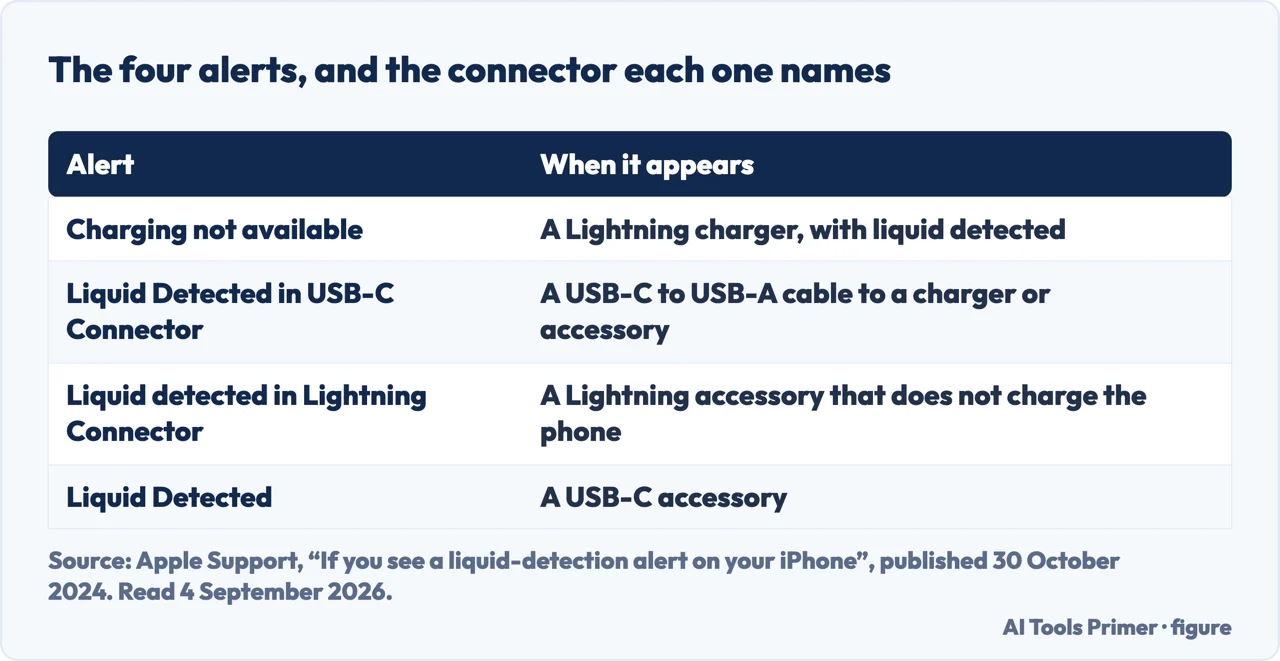
| Alert | When it appears | Source |
|---|---|---|
| Charging not available | “If you connect your iPhone with a Lightning connector to a charger and liquid is detected” | Apple |
| Liquid Detected in USB-C Connector | “If you connect an accessory or charger to your iPhone with a USB-C to USB-A cable and liquid is detected” | Apple |
| Liquid detected in Lightning Connector | “If you connect a Lightning accessory to your iPhone that doesn’t charge your iPhone and liquid is detected” | Apple |
| Liquid Detected | “If you connect a USB-C accessory to your iPhone and liquid is detected” | Apple |
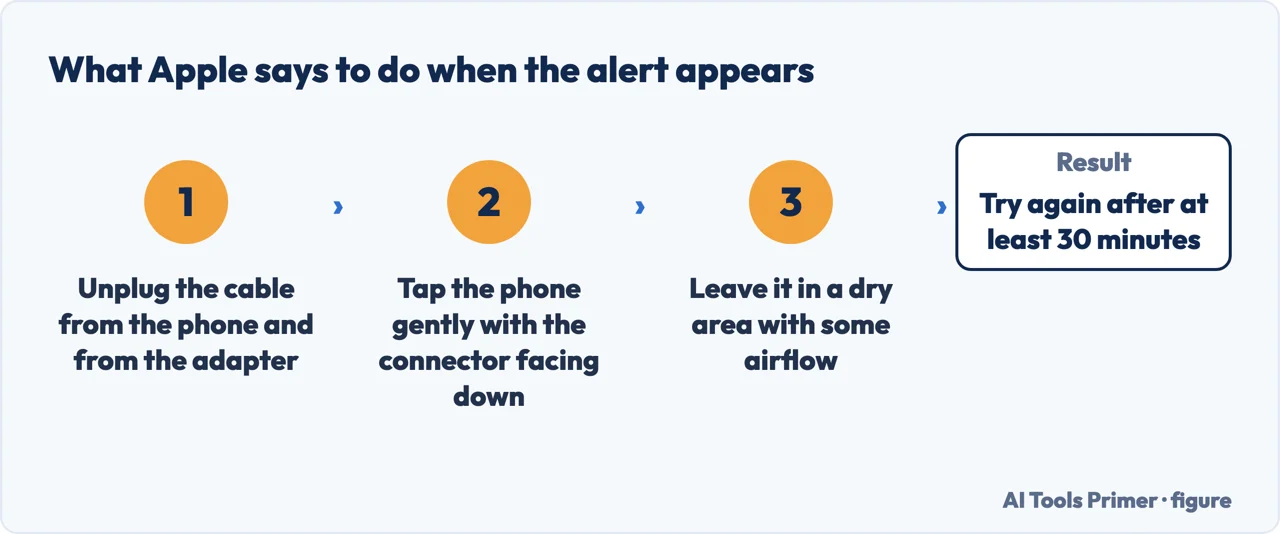
- Unplug both ends. Apple’s first instruction: “unplug the cable from your iPhone and unplug the other end of the cable from the power adapter or accessory.” Both ends, because the liquid may be on the cable rather than in the phone.
- Tap the water out, gently. “Tap your iPhone gently against your hand with the connector facing down to remove excess liquid.” Connector down, so gravity is working with you.
- Leave it somewhere dry, with some air moving. Apple’s phrasing is “a dry area with some airflow”. Not a windowsill in the sun and not a warm cupboard: see the list of things not to do below.
- Wait at least thirty minutes, then try again. “After at least 30 minutes, try charging with a Lightning or USB-C cable or connecting an accessory.”
- If the alert comes back, give it the rest of the day. “There is still liquid in the connector or under the pins of your cable. Leave your iPhone in a dry area with some airflow for up to a day… It might take up to 24 hours to fully dry.” You can keep trying during that time.
- Charge wirelessly in the meantime, if you can. “If you have a wireless charger, you can still use that to charge your iPhone” — with the back of the phone dry, on a Qi-certified charger. The connector stays out of it entirely.
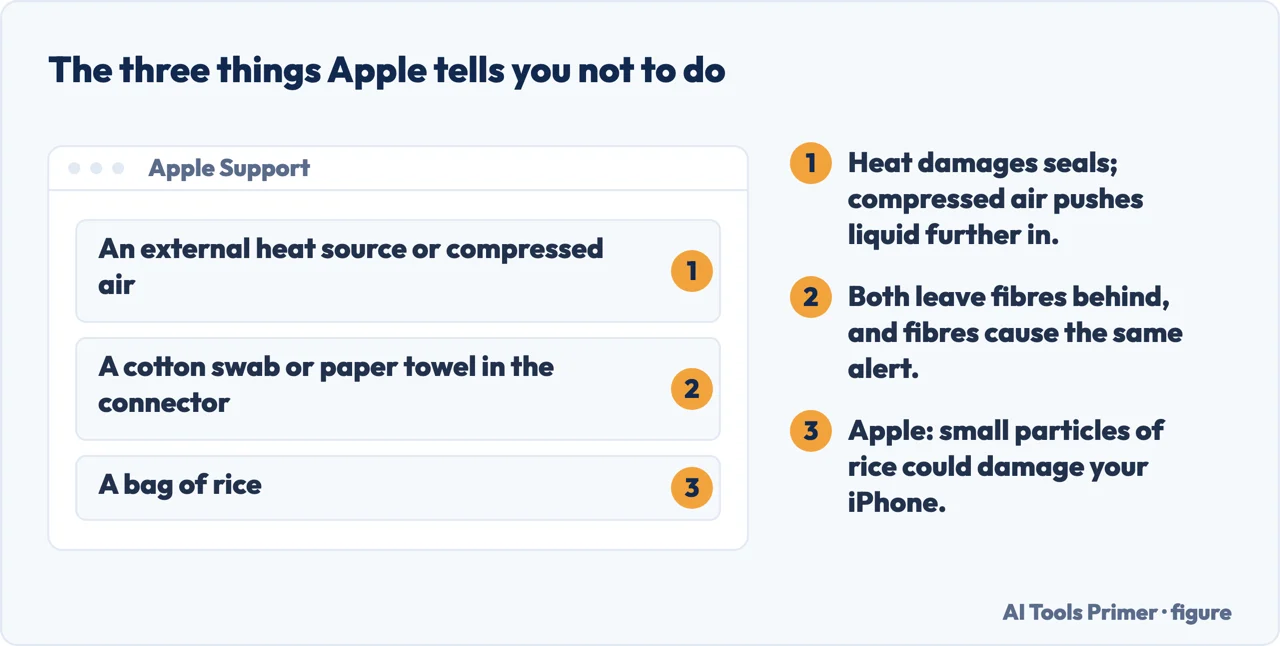
The three things Apple says not to do, including the one about rice
These are quoted rather than summarised, because each one is advice that circulates in the opposite form.
What the timings mean in practice
Three numbers appear on Apple’s page, and they answer three different questions.
“Liquid detected” when nothing is wet
Apple treats this as a separate case, with a separate answer. If the phone has not been near water, the sensor is reporting something real about the connection rather than inventing it — and the thing it is reporting is usually not inside the phone.
Apple splits it by which cable. “If you see this alert every time you connect a certain cable or accessory, that cable or accessory might be damaged. Contact the manufacturer.” And: “if you see this alert every time you connect an Apple Lightning or USB-C cable or accessory, you might need service.” The test is therefore free and takes a minute: try a second cable, and see whether the alert follows the cable or stays with the phone.
Lint is another possible cause, and it is not on Apple’s page. iFixit’s guide to cleaning a Lightning port says that “a buildup of dust, grime, and lint inside the port can prevent the connector from fitting properly in the port”. Its cleaning steps use a dust blower and a brush. That guide is about a dirty port, not a wet one: for the alert, Apple’s instruction above stands and nothing goes into the port.
Why the phone refuses rather than warns. Apple gives the reason in one sentence: “if you charge your iPhone while the Lightning or USB-C connector is wet, the pins on the connector or cable can corrode and cause permanent damage or stop functioning.” The alert is not the phone being cautious about water in general — it is specifically about putting current through wet metal, which is what turns a wet connector into a dead one.
The override exists, and Apple is careful about how it describes it. “Although you shouldn’t charge your iPhone when it’s wet, you might need to in an emergency. If you reconnect your iPhone to the cable or accessory, you have the option in an emergency to override the liquid detection and charge your iPhone.” The word doing the work there is emergency: it is the option for a phone at four per cent with a journey to arrange, not for an ordinary evening when waiting half an hour would do.
Which iPhones show it at all. Apple names the range: the alert appears on “iPhone XS, iPhone XS Max, iPhone XR, or later”. An older phone with a wet port gives no warning, which is worth knowing in the other direction — silence there is not a clean bill of health, it is an absence of the sensor.
The alert is a warning, so the useful response is to let it finish. The phone has stopped charging on purpose, and the first step on this page is to unplug both ends, leave the phone somewhere dry and try again after thirty minutes.
Every quoted line above except the lint line — the four alerts, the drying steps, the timings, the override and the three things not to do — is from Apple’s support page “If you see a liquid-detection alert on your iPhone”, published 30 October 2024 and read on 4 September 2026. The one line on lint is from iFixit’s guide to cleaning a Lightning port, read on 16 October 2026.
Where to start
Four ways in.
- “It just happened.”
- Six steps, above — then how long to wait
- “I need it charged now.”
- The override, and its price — see how long to wait
- “Nothing is wet.”
- Try another cable — when nothing is wet
- “Someone said rice.”
- Apple says no — what not to do
What not to do
Three methods Apple names, all of them things people are told to try. Quoted rather than summarised, because each circulates in the opposite form.
How long to wait
Thirty minutes, up to a day, up to twenty-four hours. Three numbers from Apple, answering three different questions.
When nothing is wet
The sensor is reporting something real about the connection. A second cable tells you in a minute whether the fault follows the cable or stays with the phone.
The sensor and the promise
Water resistance describes a new device in a laboratory. Seals age, and a working warning system is worth letting finish.
Questions people also ask
What does liquid detected mean on an iPhone?
That the phone has sensed liquid in the connector, on the cable, or on the accessory. Apple: charging and accessory connection “are unavailable until the connector, cable ends, and the accessory are dry”.
How long does the liquid detection alert last?
Try again after at least 30 minutes. If it returns, Apple says to leave the phone in a dry area with airflow “for up to a day”, and that “it might take up to 24 hours to fully dry”.
Is it okay to override liquid detection?
Apple allows it and frames it narrowly: “although you shouldn’t charge your iPhone when it’s wet, you might need to in an emergency”. Reconnect the cable and the option appears. The stated risk is corroded pins and permanent damage.
Should I put my iPhone in rice?
No. Apple’s instruction is direct: “don’t put your iPhone in a bag of rice. Doing so could allow small particles of rice to damage your iPhone.”
It says liquid detected but the phone is dry. What now?
Try a different cable. Apple: if the alert appears “every time you connect a certain cable or accessory, that cable or accessory might be damaged” — and if it happens with an Apple cable, “you might need service”.
Not covered here. It will not tell you the phone is fine. A liquid alert is a warning that worked, and the only sensible response is to let it finish.
It will not recommend a drying method Apple does not name, or claim a home remedy is safe because it worked for somebody once.
And it will not cover water damage that has already happened, which is a repair question rather than a settings one. What holds instead is simple: every quoted line is from Apple’s support page on the liquid-detection alert or iFixit’s Lightning-port guide, with the date it was read.
Sources
- Apple Support — If you see a liquid-detection alert on your iPhone: the four alerts, the drying steps and timings, the emergency override, and the instructions not to use heat, cotton swabs or rice. Published 30 October 2024 — support.apple.com, read 4 September 2026.
- iFixit — How to Clean your iPhone’s Lightning Port: what lint and grime in the port do to the connector, and the dust-blower and brush steps — www.ifixit.com, read 16 October 2026.
Written by Alberto Gulotta
Founder and editor of AI Tools Primer, writing from Palermo, Italy. Thirty-five years of taking computers apart, starting with a Commodore 64 — the long version is on the about page.
Something wrong on this page? Write to aitoolsprimer@gmail.com and it gets fixed.
Written on 4 September 2026 · last checked 20 October 2026.
Independence and limits
No affiliate links and no paid placements anywhere on this site. Nobody pays to appear here, and no company has seen this page before you did.
This is general information, not professional advice. Where a page touches money, health, safety or the law, it names its source and the date it was read — and your situation may still differ. See the privacy page and the cookie policy.