
Screens · guide
White spots on mobile screen, and what is actually behind them
By Alberto Gulotta · Updated · 15 min read
White spots on mobile screen are not always in the screen. A protector with dust or damp under it makes the same pale patch, and so does something on the glass. Both cost nothing to rule out, and no page written by somebody who sells replacement screens is going to suggest them first.
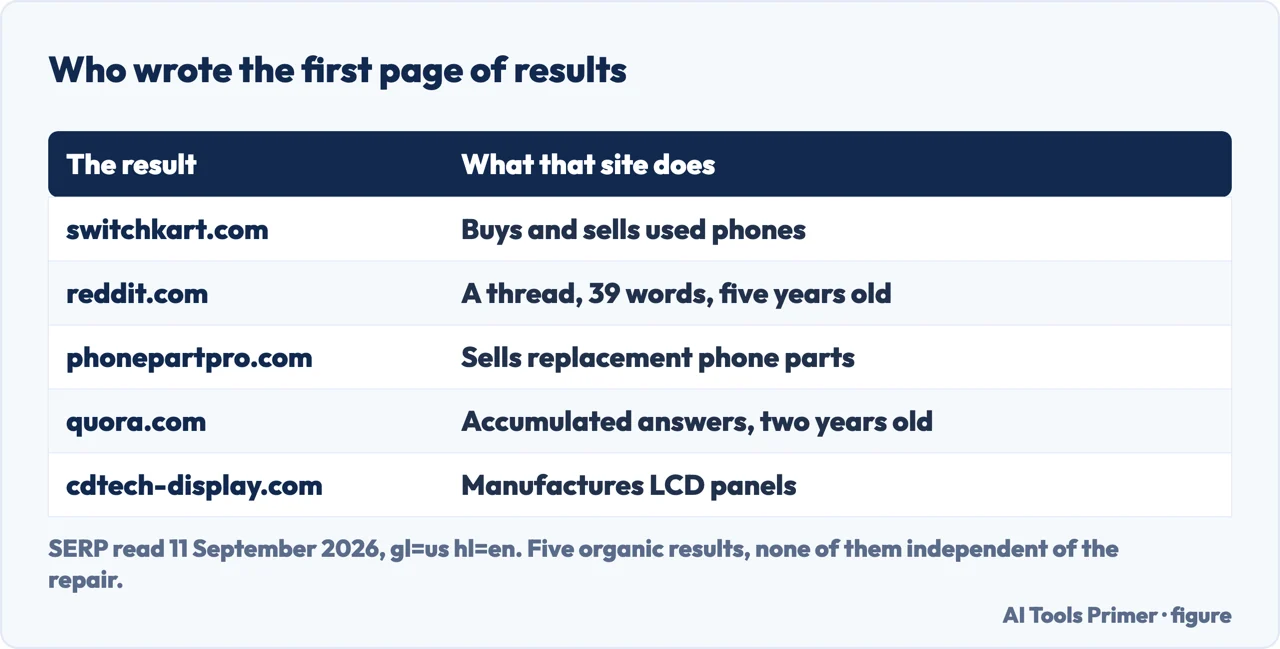
Of the five results on the first page for this question, three sell either the replacement part or the phone.
That is not an accusation, it is the shape of the market: a screen is the most expensive part of a phone, so the people with a reason to write about a mark on one are mostly the people who replace it. It has a consequence for what you read. Two sentences are missing from all five pages, and both of them save money: the mark may not be in the screen at all, and the repair may not be worth doing on this phone.
Four places a white spot can be
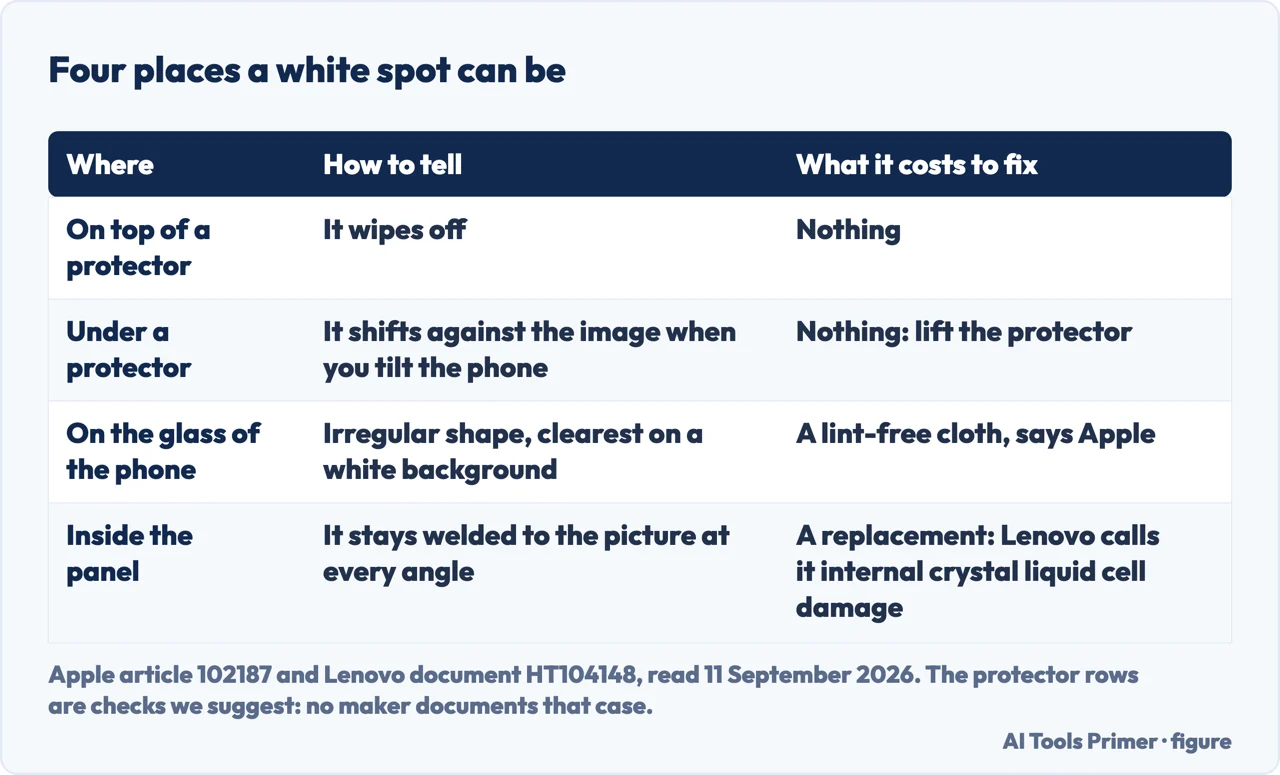
Going outwards from your eye: the first two cost nothing to rule out, and between them they account for a fair share of these questions.
- On top of a screen protector. A smear, a fleck, a dried drop. Wipe it. Ten seconds, and the only reason it is worth naming is that people skip it once they have decided the phone is broken.
- Under a screen protector. Trapped air, dust or moisture beneath a tempered-glass cover makes a pale patch that looks exactly like a fault in the panel. Tilt the phone and watch the spot from an angle: something between two sheets of glass moves in the reflection while a fault in the panel does not. Lifting a corner of the cover settles it outright. None of the manufacturer pages behind this guide documents this case — it is a check we are suggesting, not a claim any of them makes.
- On the glass of the phone itself. Apple’s rule applies here and it is a test of shape: “Foreign material is typically irregular in shape and is usually most noticeable when viewed against a white background.” Material on the front surface “can be easily removed using a lint free cloth”.
- Inside the panel. Then it has a name in the makers’ own paperwork. Lenovo lists White spot as an entry of its own, and defines it: “Internal crystal liquid cell damage, shape or location might vary and the color is white.” That entry sits in a guide about damage a standard warranty does not cover, and Apple says the equivalent about anything trapped inside a display: it “must be removed by an Apple Authorized Service Provider or Apple Retail Store”.
The order of that list is the order to work in, because it goes from free to expensive and each step rules out the one above. It also puts the question the right way round: what causes a white spot matters less than where the spot is, and that one can be answered in about a minute on a kitchen table.
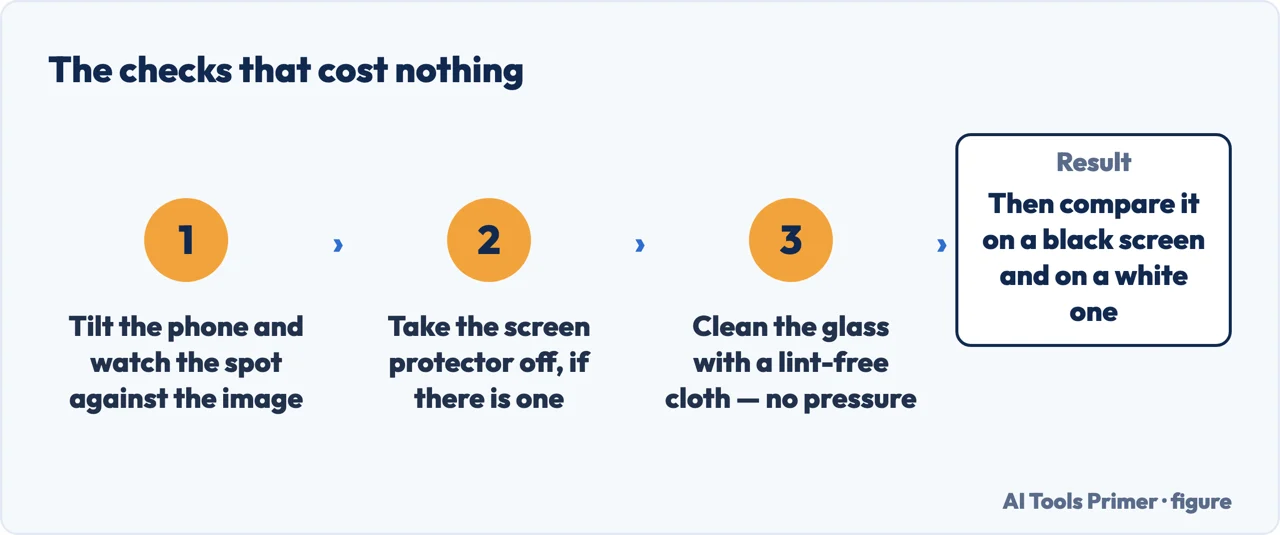
- Look at the spot from an angle, then straight on. Anything sitting above the panel shifts against the image underneath as the phone tilts. Anything in the panel stays welded to the picture.
- Take the protector off, if there is one. This is the single check that most often ends the question, and it is the one nobody selling a screen has a reason to suggest.
- Clean the glass properly. A lint-free cloth; nothing abrasive, no solvent, and no pressure. Pressing is how marks are made rather than removed: a panel maker writes that “Applying pressure can crack the screen or damage internal components”.
- Compare the spot on a black background and on a white one. Two blank screens, one of each. A pale patch that is obvious on black and invisible on white behaves differently from a dark speck that only shows on white, and the difference tells you whether you are looking at something bright in the panel or something opaque on it.
- Photograph it against a plain background, with the date. The question that decides everything afterwards is whether it is spreading, and that is a comparison rather than a feeling. Two photographs a month apart answer it.
- Only then ask what a repair costs on your model. On a phone the screen is replaced as an assembly, so the decision is a price against the value of the handset. Apple publishes an estimated cost per iPhone model on its screen repair page, and says “We’ll inspect your device to determine the final service fee.” — so treat the published figure as the starting point and the quote on your handset as the number that decides.
One case is not a display fault at all, and it is the reason this page has a safety paragraph. If the pale area is growing, if the screen is standing slightly proud of the frame, or if a gap has opened along one edge, stop using the phone and have it looked at. Apple’s safety guidance for iPhone covers this in two sentences: “If you suspect damage to iPhone or the battery, discontinue use of iPhone, as it may cause overheating or injury”, and “An iPhone battery should only be repaired by a trained technician to avoid battery damage, which could cause overheating, fire, or injury.” A battery that is pushing a screen outwards is not something to carry around in a pocket while you compare repair quotes, and none of the five pages on the first page of results mentions it.
If the spot survives all of that, it is in the panel, and it is worth knowing what that means in the paperwork rather than in a repair shop’s prose. The only manufacturer that publishes a vocabulary for these marks is Lenovo, whose guide to damage it attributes to the customer lists white spots, black spots and patches, yellow spots from compression and cracked internal glass as separate entries with separate definitions — and the guide exists because claims arrive for “products which have failed due to reasons not covered by the Lenovo Standard Limited Warranty”. That document is written for laptops, tablets and desktops rather than phones, which is exactly why it is worth reading here: it is the clearest published statement of how a manufacturer thinks about a mark on a display, and phone makers reach the same conclusion in fewer words by sending you to a repair.
Two things not to do, both of them documented by the people who build screens rather than by people selling them. The first is pressure, in any of the forms it circulates in: rubbing the spot, pressing around it, working it with a cloth. The second is software that promises to cure a display fault — Google’s advice about the related problem of burn-in is blunt: “Don’t install apps that promise to reduce burn-in.” The same reasoning covers the apps that promise to repair pixels and patches, and the page on dead pixels has the panel maker’s full position on that class of remedy.
Worth knowing, too, that some changes in an OLED screen are normal rather than damage. Google writes that “All OLED screens show some color shift when seen at certain angles” and that “OLED screens can also experience some color changes over time. This is normal behavior”. A faint overall difference that you notice only when you look for it is not the same thing as a distinct pale patch in one place, and the difference is worth holding on to before anybody is paid. If the mark is a line rather than a patch, white horizontal lines on a phone screen is the page for it; if the screen has stopped answering your finger, a screen that ignores you is.
Where to start
Three ways in. If the phone is also warm, swollen or lifting at an edge, take the third one now.
- “Where is the spot, exactly?”
- Four places, outwards — four places outwards
- “What can I do without paying?”
- The free checks, in order — the free checks
- “The screen is lifting at one edge.”
- Stop and read this — when it is the battery
Four places, outwards
On the protector, under it, on the glass, in the panel. Each one has a test, and the first two are free.
The free checks
Tilt, lift the protector, clean, compare on black and on white, photograph with the date. About a minute, and no money.
When it is the battery
A pale area that grows, a screen standing proud of the frame, a gap along one edge. Not a display fault, and not something to carry in a pocket.
Questions people also ask
How to remove white dots on phone screen?
Only the ones that are not in the panel can be removed: something on the glass comes off with a lint-free cloth, and something under a screen protector goes when the protector does. Damage inside the panel is a replacement, and none of the six maker pages read for this guide documents a home remedy for it.
What causes white spots on the screen?
Where the spot is inside the panel, Lenovo’s definition is “Internal crystal liquid cell damage” — usually pressure or an impact. But check the three cheaper explanations first: a mark on the glass, something trapped under a protector, or foreign material, which Apple says is “typically irregular in shape”.
Why are there little dots on my phone screen?
Small distinct dots that stay in exactly the same place on any image are usually pixel faults; irregular ones that are most visible on a white background are more often foreign material. A pale patch with soft edges is neither: it is damage under the glass.
Do the white spot repair apps work?
Two of the six maker pages read for this guide mention such apps, and both warn against them: Google’s advice on the neighbouring problem of burn-in is “Don’t install apps that promise to reduce burn-in”, and Dell says of pixel-fixing software that it is “not officially supported” and may not work.
The spot is getting bigger. What does that mean?
Take it seriously. A growing pale area with the screen lifting at an edge is the pattern of a swelling battery, and Apple’s instruction for suspected damage to the phone or battery is to “discontinue use” and have it repaired by a trained technician.
Not covered here. It will not tell you which repair shop to use, or what the part should cost. Three of the five pages that rank for this question sell one of those two things, and this page has no business joining them.
It will not print a home remedy for damage inside the panel. None of the six maker pages read for this guide publishes one, and the techniques that circulate are the ones panel makers warn against.
And it will not diagnose your phone from a distance. What it can do is tell you where to look, in the order that costs the least, and say plainly which of those checks comes from a manufacturer and which is simply worth doing. What holds instead is simple: what is actually behind them is the display makers’ own language, and the pages written for laptops are flagged where they are used for phones.
Sources
- Apple, About LCD display pixel anomalies for Apple products released in 2010 and later — article 102187 (the test of shape and background, that foreign material is typically irregular in shape and usually most noticeable when viewed against a white background; and the two destinations, a lint free cloth for material on the front surface of the glass and an Apple Authorized Service Provider or Apple Retail Store for material trapped within the screen) — support.apple.com, read 11 September 2026.
- Apple, Important safety information for iPhone — iPhone User Guide (the handling section, which states that if you suspect damage to iPhone or the battery you should discontinue use as it may cause overheating or injury, and that you should not use an iPhone with cracked glass; and the battery section, which states that an iPhone battery should only be repaired by a trained technician to avoid battery damage that could cause overheating, fire or injury) — support.apple.com, read 11 September 2026.
- Lenovo, Customer Induced Damage (CID) Guide — Laptops, Tablets, Desktops, document HT104148 (the display section entries and their definitions, including a white spot and a black line, spot or patch described as internal crystal liquid cell damage whose shape or location might vary, a yellow spot described as pixel damage from compression, and an internal glass crack described as having liquid crystal along the crack; and the stated purpose of the guide, which is that claims arrive under warranty for products that failed for reasons the Lenovo Standard Limited Warranty does not cover. The guide covers laptops, tablets and desktops, not phones, and is cited here for the vocabulary a manufacturer uses) — support.lenovo.com, read 11 September 2026.
- Google, Understand & help protect your Pixel screen — article 9128915 (the advice for avoiding burn-in, including the default sleep timer, keeping the default brightness or lower, not leaving the phone in the sun and the instruction not to install apps that promise to reduce burn-in; and the notes on normal OLED behaviour, that all OLED screens show some colour shift when seen at certain angles and that colour changes over time are normal behaviour) — support.google.com, read 11 September 2026.
- Dell, Dell Display Pixel Guidelines — article 000126004 (the warning that applying pressure can crack the screen or damage internal components, and the note that pixel-fixing software tools are not officially supported by Dell and may not work) — www.dell.com, read 11 September 2026.
- Apple, Apple Service and Repair for iPhone Screens (the estimated service cost table, published per iPhone model for screen damage and for the other common repairs, and the statement that Apple will inspect the device to determine the final service fee) — support.apple.com, read 11 September 2026.
Written by Alberto Gulotta
Founder and editor of AI Tools Primer, writing from Palermo, Italy. Thirty-five years of taking computers apart, starting with a Commodore 64 — the long version is on the about page.
Something wrong on this page? Write to aitoolsprimer@gmail.com and it gets fixed.
Written on 11 September 2026 · last checked 23 September 2026.
Independence and limits
No affiliate links and no paid placements anywhere on this site. Nobody pays to appear here, and no company has seen this page before you did.
This is general information, not professional advice. Where a page touches money, health, safety or the law, it names its source and the date it was read — and your situation may still differ. See the privacy page and the cookie policy.