
Screens · guide
White spot on Lenovo laptop screen: what Lenovo counts as a defect
By Alberto Gulotta · Updated · 10 min read
A white spot on a Lenovo laptop screen is either a dot or a patch. Lenovo's pixel policy counts dots: a Full HD screen may have 2 bright and 10 dark sub-pixels, none of the bright ones green. BOE says a patch usually comes from pressure, a drop, dust, ageing or the backlight.
| Question | Answer | Where it comes from |
|---|---|---|
| What does Lenovo call a bright dot? | A regular sub-pixel bright dot seen on a black screen | Lenovo Support |
| How many are allowed? | For a Full HD screen, 2 bright and 10 dark sub-pixels, and none of the bright ones green | Lenovo Support |
| Whose rules are these? | The page says Idea, Lenovo and ThinkBook laptops and tablets; it does not name ThinkPad | Lenovo Support |
| What else makes a white patch? | Compression, drops, dust, ageing parts or a backlight problem | BOE |
| What does the spot do if it is hardware? | It stays in the same place when you move the screen or change the brightness | BOE |
Two things get called a white spot
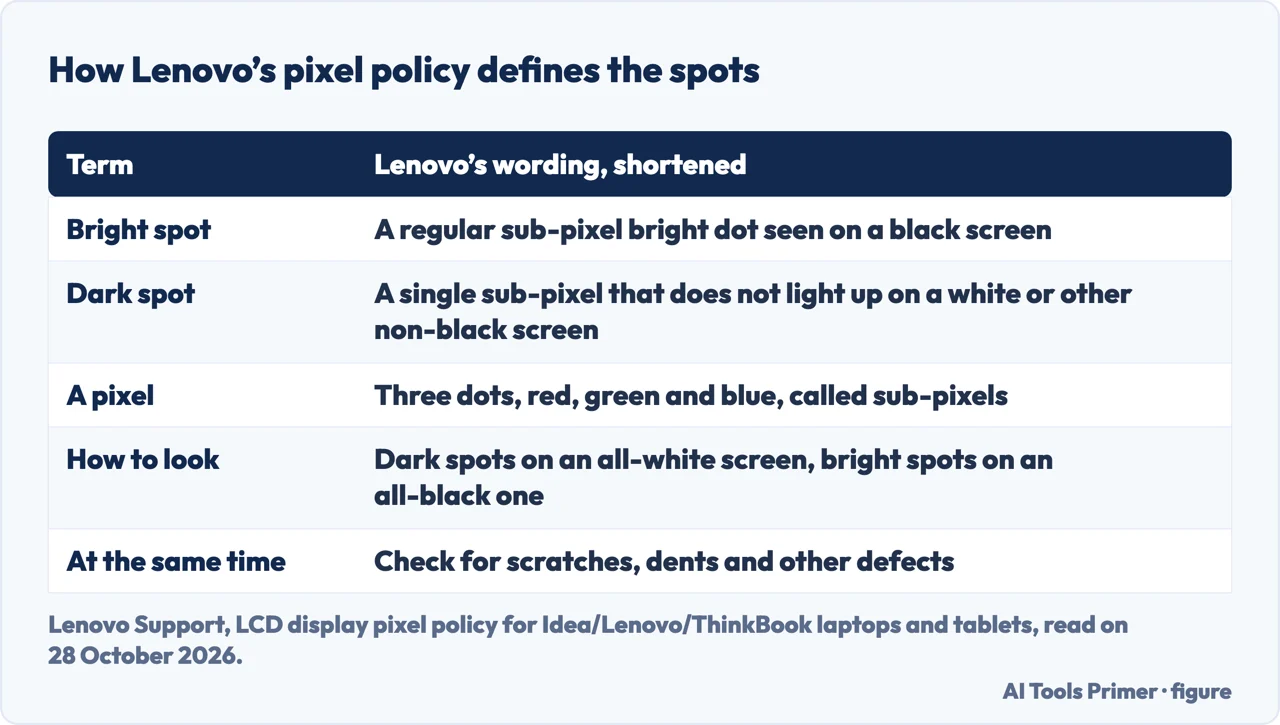
A white spot on a Lenovo laptop screen can be a single dot or a patch, and the sources we read treat them as different faults. Lenovo’s pixel policy is about dots: it says every pixel contains three dots, red, green and blue, which it calls sub-pixels, and it defines a bright spot as any regular sub-pixel bright dot seen on a black screen and a dark spot as a single sub-pixel that does not light up on a white or other non-black screen. BOE’s blog on white spots is about patches. It says white spots on LCD screens are usually caused by screen compression, accidental drops, dust left for a long time, component ageing or backlight problems, and it describes pressure damage as a bright patch where the LCD layers shift or break. The first is judged by counting; the second is a damaged screen. Our page on black pressure marks covers what Lenovo says about the black version of that damage.
What Lenovo’s pixel policy counts
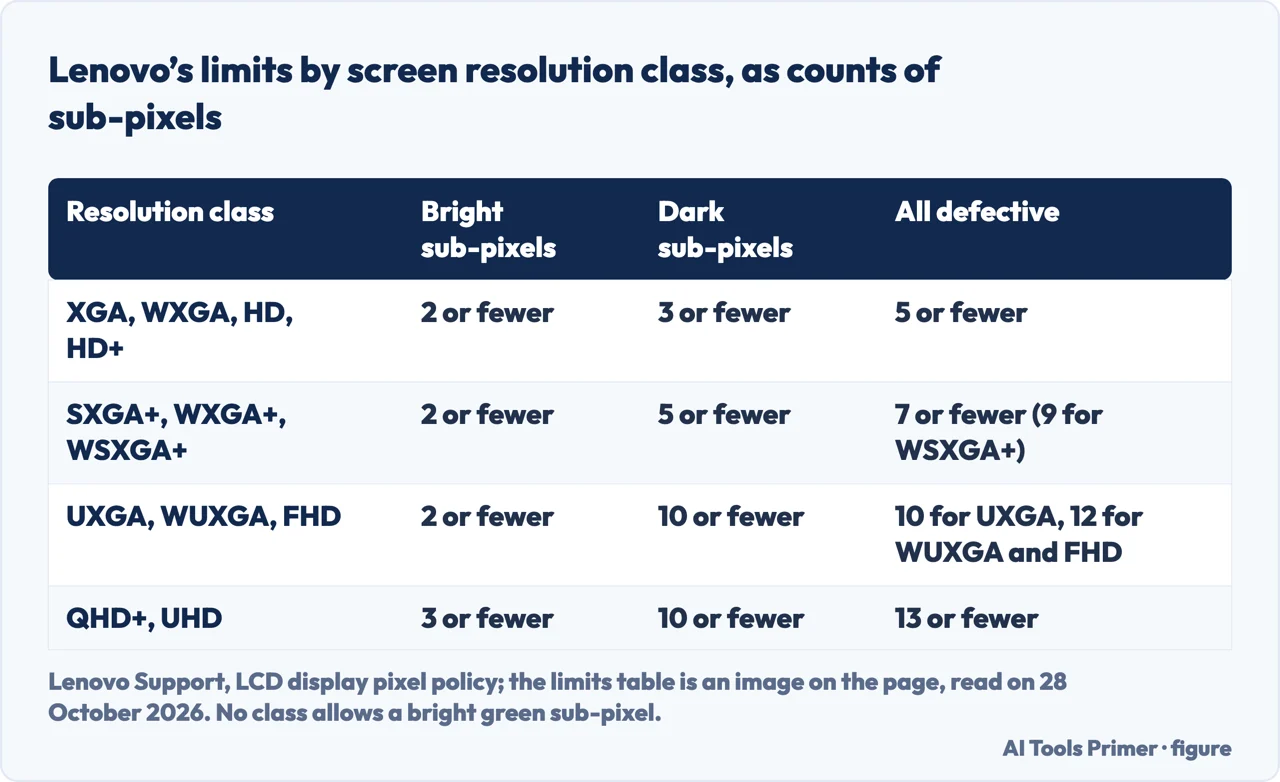
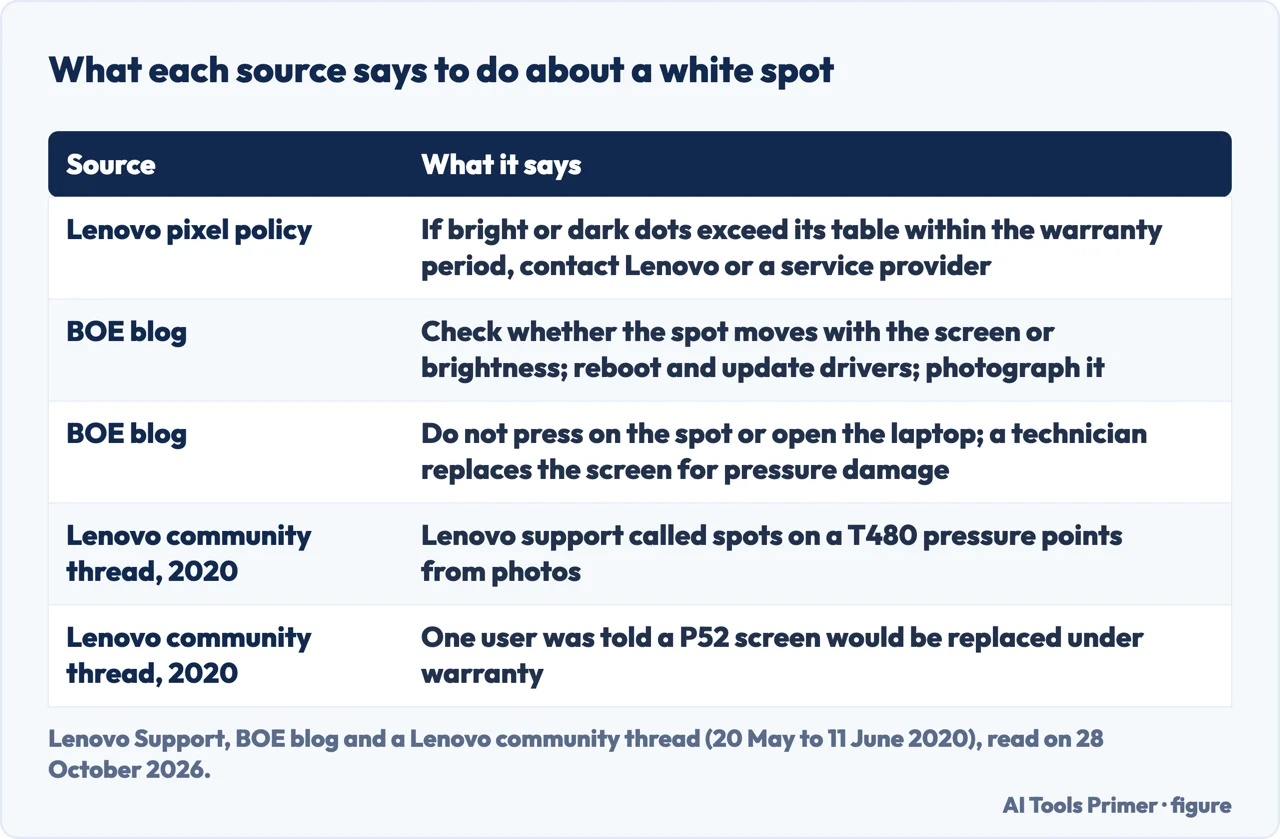
The policy page says it applies to Idea, Lenovo and ThinkBook laptops and tablets. It tells you to look for dark spots on an all-white screen and bright spots on an all-black one, and to check for scratches, dents and other defects at the same time. If the number of bright or dark dots exceeds the figure in its table during the warranty period, it tells you to contact Lenovo or your service provider. The limits are not in the text of the page but in an image, which we read on 28 October 2026. They are counts of sub-pixels by screen resolution class.
For the common Full HD class, which Lenovo lists as UXGA, WUXGA and FHD, the table allows up to 2 bright sub-pixels and up to 10 dark ones, with at most 2 dark ones side by side and no bright ones side by side. It allows no bright sub-pixel that is green in any class. The total of bright and dark defective sub-pixels may not pass 10 for UXGA and 12 for WUXGA and FHD. The table also sets minimum distances: 15 mm between lit spots and 5 mm between unlit ones. For lower resolutions the dark-sub-pixel limits are tighter, and for QHD+ and UHD they allow 3 bright and 10 dark sub-pixels, 13 in all. The page does not name ThinkPad models. Its list of related articles includes one titled for ThinkPad display replacement for defective pixels, which we did not open, and one for Lenovo monitors and all-in-one desktops, which has its own pixel policy.
The causes BOE gives, and its tests
BOE lists five causes of a white spot: compression, from pressing on the screen, dropping the laptop or stacking weight on a closed lid; a backlight problem, where the backlight or its diffuser shifts after a fall or impact and the light turns uneven; dust or debris that settles between the layers; a manufacturing defect that shows soon after purchase; and ageing, when the glue holding the layers weakens or the backlight fades. For finding out which you have, BOE says to check whether the spot changes when you move the screen or adjust the brightness: a spot that stays in the same place points to hardware. Software is ruled out by rebooting and updating the display drivers, and if the spot is still there, BOE says the screen itself is the problem and needs a professional.
BOE adds practical advice: photograph the spot, because the picture helps with a repair or a warranty claim; do not press on the spot, poke it or open the laptop without training; and check the warranty first, because under warranty the manufacturer may cover the repair, and a technician may have to replace the screen to fix a white spot. It lists pressure damage, backlight failure and ageing as problems for a professional. BOE says a gentle clean with a microfibre cloth may help if dust is the cause. We have not tried any of this on a Lenovo screen.
What a Lenovo community thread shows
A thread on the Lenovo community forum, with replies dated from 20 May to 11 June 2020, was started by the owner of a ThinkPad T480 about a year old and shows how the same symptom is handled in practice. The owner says white spots developed on the screen, that a local dealer and service provider judged from photos that they were pressure points, and that the laptop is stationary at home with only a sheet of A4 paper inside when closed. A second owner of a T480 says Lenovo support, by photo diagnosis, called their darker spots pressure points and that the spot had grown. One reply says bright spots like these are usually caused by a finger or thumb pressing the screen, for instance when opening or closing the lid, and that there is no good way to repair pressure spots. Another says Lenovo replaces the screen only if there are more than four spots, but that their retailer replaced it. A fourth says a six-month-old P52 developed the same problem and Lenovo said the screen should be replaced under warranty and asked no questions.
These are individual accounts from 2020, and the community is now read only; they do not agree with each other and are not Lenovo’s policy. They are useful for one thing: a photo was enough for Lenovo support to put a name on the spots, which fits BOE’s advice to take one.
What we did not use
We ran nothing on a Lenovo laptop and did not test any spot. We did not read the Lapsolve, SmartTechFixer or WPReset guides, the Reddit thread on a ThinkPad or the second Lenovo community thread on a bright spot. We did not open the Lenovo document on ThinkPad display replacement or the one on Lenovo monitors and all-in-one desktops. The Google AI box mentions a screenshot test and a BIOS check; neither source we read says either, so we do not repeat them. The pixel limits come from an image that we read by eye, and Lenovo may change them. Dead and stuck pixels on other brands, and phones, are not covered.
Where to start
Four ways in.
- “Is it a dot or a patch?”
- Two things get called a white spot — kinds
- “How many dots are allowed?”
- What Lenovo’s pixel policy counts — policy
- “What causes a patch?”
- The causes BOE gives — causes
- “What do owners hear?”
- What a Lenovo community thread shows — thread
Marks that stay
Black, white and bruised: what each mark is.
When the fault is larger
A half, a line and a blank screen.
Questions people also ask
Why is there a white spot on my laptop screen?
BOE lists compression from pressure or a drop, dust between the layers, a backlight problem, a manufacturing defect and ageing. Lenovo’s pixel policy covers single bright sub-pixels seen on a black screen.
How to fix white dot on screen?
Neither source we read gives a fix for a bright sub-pixel. Lenovo says to contact it or a service provider if the count passes its table within the warranty. BOE says to reboot and update the display drivers, and that a spot which remains needs a professional.
How can I fix white spots on my LCD screen?
BOE says a gentle clean may help if dust is the cause, and that pressure damage, backlight failure and ageing need a professional, who may have to replace the screen. It warns against pressing on the spot or opening the laptop.
Why is there a white patch on my screen?
BOE links a white patch to pressure on the LCD layers, to a shifted backlight or diffuser, or to dust. In a Lenovo community thread, support named photographed spots on a T480 as pressure points.
Not covered here. We ran nothing on a Lenovo laptop. The statements come from the Lenovo Support pixel policy, a BOE blog post and a Lenovo community thread from 2020, all read on 28 October 2026.
The search volume and difficulty behind this page come from a Semrush reading of 29 August 2026, older than the 60 days the site normally allows.
Sources
- Lenovo Support — LCD display pixel policy, Idea/Lenovo/ThinkBook laptops and tablets — support.lenovo.com, read 28 October 2026.
- BOE — What Causes White Spots on LCD Screens and How to Deal with and Prevent Them — blog.boe.com, read 28 October 2026.
- Lenovo Community — White spots appeared on the screen, T480 (thread of 2020) — forums.lenovo.com, read 28 October 2026.
Written by Alberto Gulotta
Founder and editor of AI Tools Primer, writing from Palermo, Italy. Thirty-five years of taking computers apart, starting with a Commodore 64 — the long version is on the about page.
Something wrong on this page? Write to aitoolsprimer@gmail.com and it gets fixed.
Written on 28 October 2026.
Independence and limits
No affiliate links and no paid placements anywhere on this site. Nobody pays to appear here, and no company has seen this page before you did.
This is general information, not professional advice. Where a page touches money, health, safety or the law, it names its source and the date it was read — and your situation may still differ. See the privacy page and the cookie policy.