
Screens · guide
Cracked phone screen: what Apple, Samsung and a repair shop say
By Alberto Gulotta · Updated · 18 min read
A cracked phone screen raises two questions at once: whether it is safe to keep using and what to do about it. Apple tells iPhone owners not to use one with cracked glass. A repair shop and Honor differ on tape and a protector, only Honor suggests super glue, and AT&T advises against household cures. Others cover who pays.
| Question | Answer | Where it comes from |
|---|---|---|
| Is it safe to keep using it? | Apple advises against using an iPhone with cracked glass; a repair shop says working touch does not make it safe | Apple Support, Hailey Device Repair |
| Will tape or a protector stop it spreading? | Honor presents them as a temporary fix; Hailey says no protector can guarantee that | Honor, Hailey Device Repair |
| Are glue or toothpaste a fix? | Honor allows a little super glue and advises against toothpaste; AT&T advises avoiding household cures | Honor, AT&T |
| Who pays for the repair? | It depends on warranty, insurance and the model; Google repairs all damage found, covered or not | Samsung Support, Google, Consumer Reports |
| What does it cost? | The figures differ by page and year: from $100 at one shop, $129 to $379 in 2023 estimates | Hailey Device Repair, Consumer Reports |
Is it safe to keep using it?
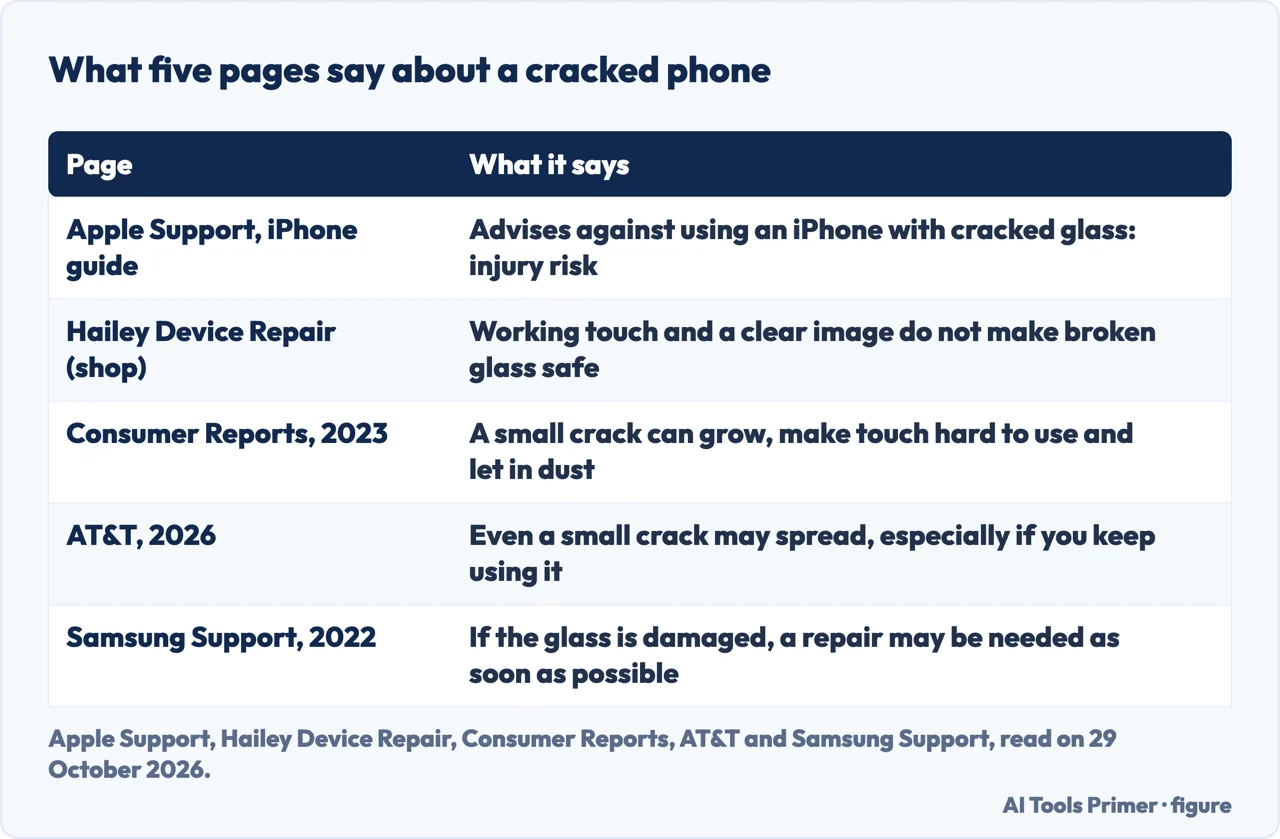
Apple’s iPhone user guide, in its safety information, says not to use an iPhone with cracked glass because it may cause injury. The same passage says that if you suspect damage to the iPhone or its battery you should stop using it, since it may overheat or cause injury, and that anyone worried about scratching the surface can consider a case or cover. That is Apple speaking about its own phone. The Samsung and Google pages we read do not state whether a cracked screen is safe to keep using.
Hailey Device Repair, a repair shop in Hailey, Idaho, repeats the Apple advice on a page updated on 9 October 2026 and points to Apple’s safety guidance. The shop says working touch and a clear image do not make broken glass safe, and that a crack alone cannot tell you whether other parts of the display were damaged. It says cracked glass can leave sharp edges or loose fragments, and it tells readers to inspect the crack by eye and not to swipe a finger across it to test whether it is sharp. Its advice, even for a small crack, is to arrange an assessment and repair rather than wait, because a clear image and working touch do not remove the broken-glass risk.
The same page lists signs that need prompt assessment:
- dark patches, color shifts or new lines on the display;
- dead touch areas, flicker or ghost input;
- new cracks or loose fragments;
- a lifting screen, a bulging enclosure or unusual heat, which the shop reads as possible battery damage.
For that last group Hailey says to stop using and charging the phone, to power it off if that can be done safely, and not to press the screen back down or cover it to hold it in place.
Consumer Reports (21 February 2023) and AT&T (updated 16 September 2026) give a second reason to act: a crack can grow. Consumer Reports says a small crack can expand over time, making the touchscreen hard to use, and can expose parts inside the device to moisture and dust. AT&T, a carrier, says even a small crack may grow and spread, especially if you keep using the phone, and that it may then affect touchscreen performance and let dust and water in. Hailey words it differently: a crack may worsen, but the timing and extent are unpredictable, and a small crack does not prove the display is failing.
Hailey adds a point about water. Screen or frame damage may compromise water resistance, a visible crack does not show which seals remain intact, and the shop advises against relying on the phone’s original IP rating. It says a protector or tape does not restore the seals. The pages we read do not set a size or position of crack that counts as safe enough; Apple’s advice is simply not to use the phone.
Glass, display or something else?
Samsung Support (the Philippines edition, last updated on 4 January 2022) separates three kinds of screen damage. A cracked screen follows direct physical force, which can crack or shatter the glass display. A black spot that resembles an ink stain can appear on a display whose glass is not damaged, when the inner parts of the screen have been damaged by prolonged, continuous pressure. Pixel bleeding, which Samsung says generally follows a direct impact, shows as black or other colored lines in the rows or columns of pixels. The page says a case or screen protector can minimize damage to some degree, but that if damage is present a repair may be necessary as soon as possible. A damaged glass back is a separate case: Samsung says it can be replaced at a service center, and that the cost and method depend on the model and on whether there is internal damage.
Hailey draws the line differently, between layers. It describes phone glass, touch sensing and the LCD or OLED that makes the image as parts of one display assembly, and says glass can break while touch and image keep working. Its three cases are cracked glass with normal touch and image, image or touch problems after an impact (dark patches, lines, discoloration, flicker or unresponsive areas), and glass and display damage together. For the second and third the shop says inspection is needed to find the affected parts. It also says its screen repairs use complete bonded display assemblies, not glass alone.
The practical point is that a crack and a mark are not the same fault. If the glass is intact and a patch has appeared, our page on black pressure marks on a laptop screen covers the pressure bruise Samsung describes, on a laptop. For a colored spot on a phone, see a blue spot on a phone screen, and for lines, white horizontal lines on a phone screen. If the touch itself misbehaves, a screen that ignores you has Apple’s four steps.
Tape, protector, glue: what the pages say
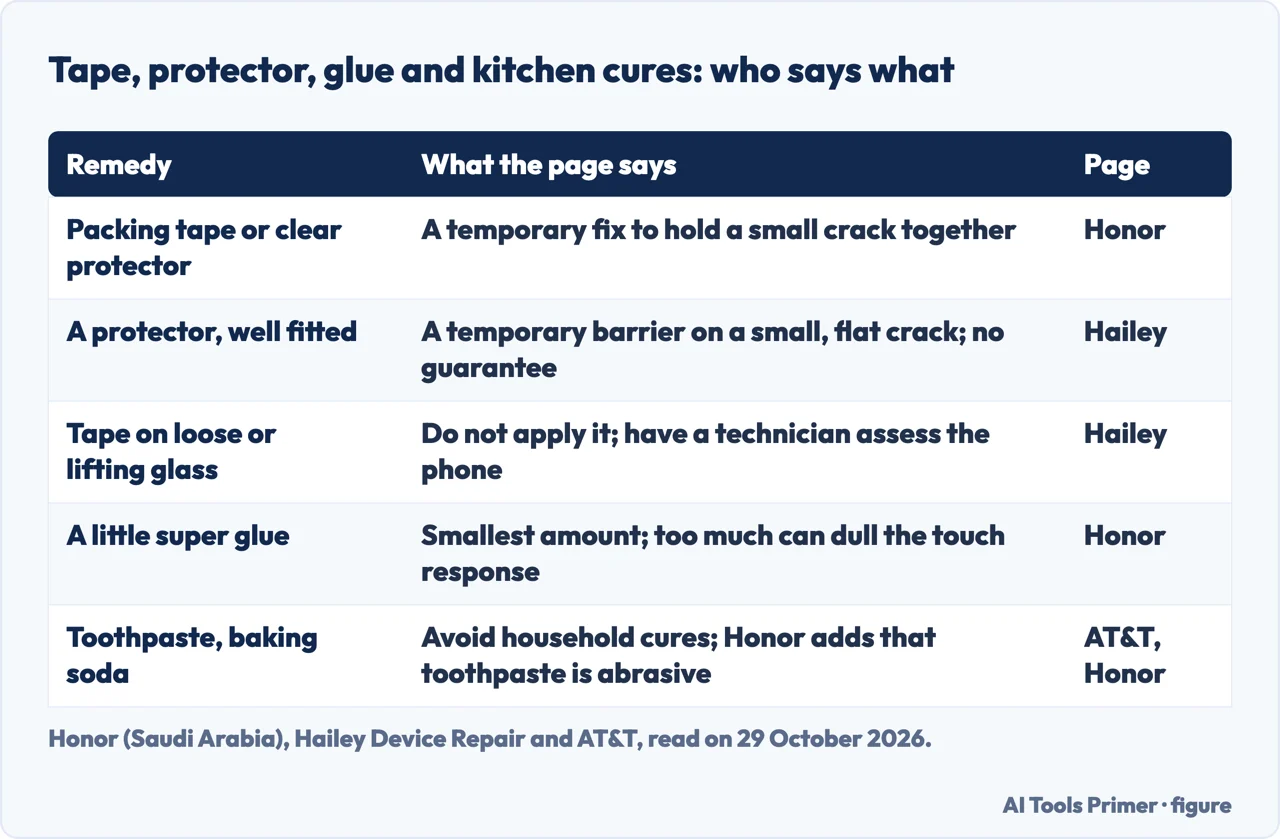
Honor’s blog (the Saudi Arabia edition; Honor sells phones, so it also sells the product it is writing about) names three common causes of a cracked screen: accidental drops, pressure or squeezing, such as sitting on the phone or placing heavy objects on it, and rough handling in transport. For the fix it offers four options. Packing tape or a clear adhesive screen protector on a small crack or chip, it says, can help hold the glass together and prevent the crack from spreading, as a temporary fix. A small amount of super glue can hold the pieces of a minor crack, with the excess wiped off using a cotton swab, because too much glue can reduce touchscreen responsiveness. Screen repair kits come third and need technical skill, precision and patience. Professional repair comes last, and the page says it may come with a warranty on the repair.
Its FAQ rules out two home remedies. Toothpaste is not recommended because it is abrasive and may damage the screen or its protective coating. Clear nail polish is not recommended either; the page says it may temporarily fill minor cracks but is not designed for screen repairs. It says fixing a screen at home is possible depending on the damage, and that when the display or touchscreen is also damaged, professional repair is usually the safer option.
Hailey Device Repair is more cautious about the same tape and protector. It says a properly fitted screen protector may reduce direct finger contact with a small, flat, stable crack while a repair is arranged, but that it is a temporary barrier, not a repair and not a guarantee against cuts or spreading. Applying or removing a covering can put stress on damaged glass and make it worse, so the shop says not to force a protector to fit. It says not to apply a protector or tape to raised, loose or shedding glass, or to a screen that is lifting or swollen. On whether a protector stops a crack from spreading, its FAQ answers that no protector can guarantee it.
AT&T says do-it-yourself repair may be possible for people with experience, and that replacement parts and repair tools can be found online. Otherwise it says to leave the repair to a professional, and to avoid suggestions that recommend toothpaste, baking soda or other household items. Apple goes further for its own phone: an iPhone should only be serviced by a trained technician, and disassembling it may damage it, cause loss of splash and water resistance on supported models, or cause injury. Apple says to contact Apple or an Apple Authorized Service Provider, and that repairs by untrained individuals or with non-genuine Apple parts may affect safety and functionality.
The pages therefore split on the temporary fixes. Honor presents tape as a way to keep a crack from spreading; Hailey says no protector can promise that and that fitting one can hurt the glass; Apple says not to use the phone at all. Super glue appears only on Honor’s page. AT&T does not name glue, though it advises against household items. The Honor page we read does not mention the cut risk that Hailey raises. Our page on a broken screen protector covers what two protector makers say about the layer on top of the glass.
Before you pay: warranty, insurance and the repair itself
AT&T puts the order first: check whether the phone is under warranty or covered by insurance that includes screen repair, then, if neither applies, look for repair services certified by the phone’s manufacturer or with strong customer reviews, and get a cost estimate before the repair begins. It adds that estimates from several shops can be compared. AT&T sells a device protection plan, AT&T Protect Advantage, which it says you can sign up for within 30 days of service activation or a device upgrade, or during an open enrollment period.
Samsung says its service centers repair screens using only genuine, Samsung-authorized parts, and that after a technician checks the damage you are told the repair method and its cost. For a complete screen replacement the total cost may depend on warranty, insurance and the model. Two notes on the page are practical: contact Samsung customer support before the visit to make sure the part is in stock, and if you signed up for insurance or a protection plan, get the receipt and submit it to the insurer.
Google’s Pixel Phone Help says repair options depend on the phone’s warranty and the location. The process starts at Google Store Repair services, signed in with a Google Account, where you select all the issues with the phone. Google says it has to repair all the damage on the phone, whether the warranty covers it or not, and that you are charged for repairs the warranty does not cover. Walk-in service is available only in selected countries, and the page advises calling first to book an appointment and confirm parts availability. Before sending a phone in, it says to back up your data and remove the SIM card, and that on many Pixel phones you can turn on Repair Mode. The Samsung, Honor and Consumer Reports pages we read do not mention backing up the phone.
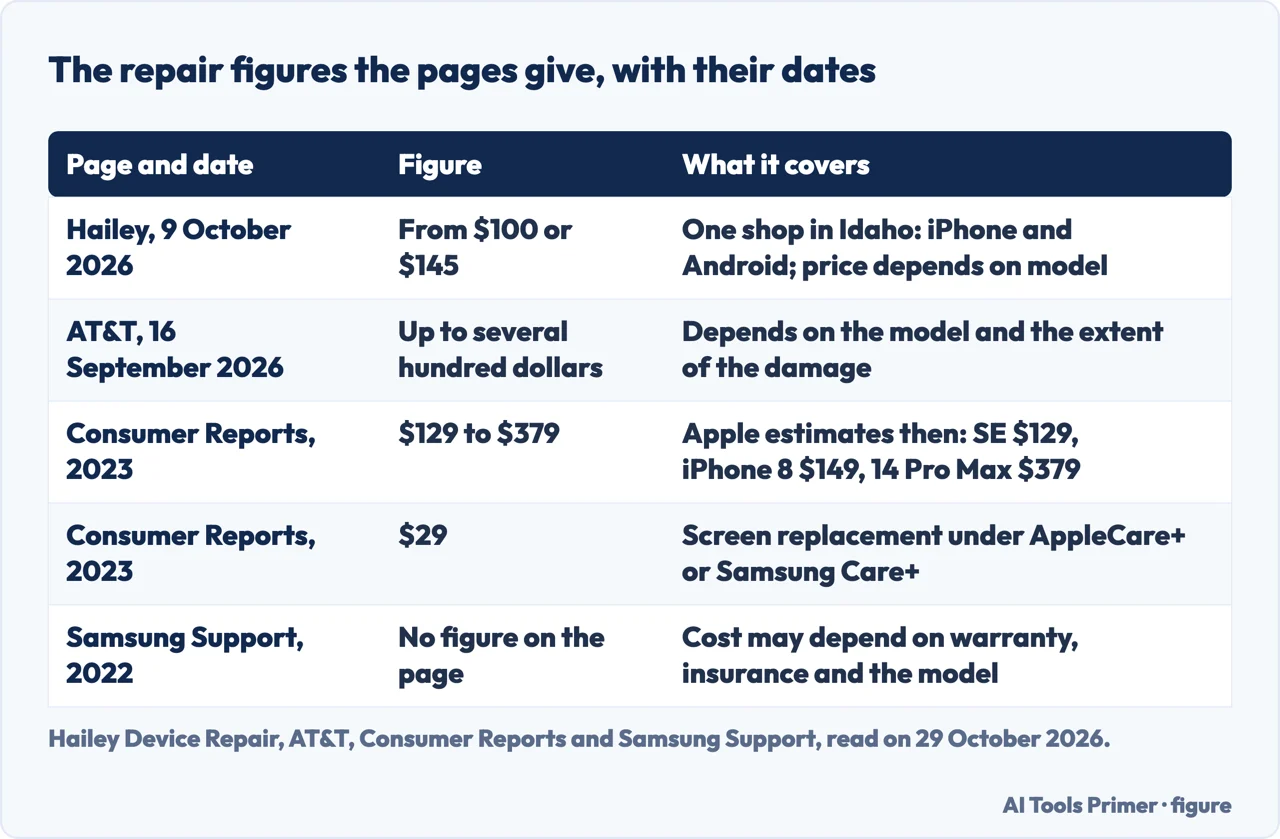
On warranties in general, Hailey says standard manufacturer warranties generally exclude accidental screen damage, which does not automatically void all coverage, and that AppleCare+ may cover accidental screen damage subject to the plan’s terms and a service fee. Consumer Reports, in 2023, gives specifics: AppleCare+ replaced the screen for $29 on any model back to the iPhone 5s, and Samsung Care+ also for $29. It adds three limits. AppleCare+ allowed no more than two claims for accidental damage in a 12-month period. Verizon’s insurance through Asurion sometimes needed an authorized repair center in a select location. And the components under the glass might not be eligible for repair. Those are 2023 terms; the plans may have changed since.
Repair or replace: the numbers, dated
The figures on the pages we read cannot be set side by side, because they come from different phones, shops and years. Hailey Device Repair says its screen repairs start at $145 on Androids and $100 on iPhones, and that the exact model and replacement assembly determine the quote; that is one shop’s price list in October 2026, not a market price. AT&T gives no figure, only that the cost depends on the model and the extent of the damage and can reach up to several hundred dollars. Consumer Reports, in February 2023, quoted Apple’s estimates of $129 for the 4.7-inch iPhone SE screen, $149 for the iPhone 8 and $379 for the 6.7-inch iPhone 14 Pro Max, and said the fee varies significantly by model. Samsung’s page links to a pricing page, which we did not read.
Consumer Reports adds that if components under the glass, such as the fingerprint sensor, are also damaged, the repair cost may increase. For phones from Google and other makers it points to services like Swappa or uBreakiFix for estimates.
Consumer Reports lists four reasons to buy a new phone instead of repairing the screen:
- The old phone is worth less than the repair. Its example is the iPhone 5s: a $129 screen repair, against $20 to $75 for a used or refurbished one and an estimated carrier trade-in value of $0.
- It no longer gets security updates. Apple was still providing security patches for models back to the iPhone 5s; Android makers, it says, offer three to five years of security updates from release.
- You cannot wait. A replacement could take under an hour or over a week, depending on appointments and parts.
- The phone is already failing. If it has been lagging and crashing for some time, the article says it is probably time to move on.
AT&T frames the same choice around three things: the repair cost, the device’s age and the extent of the damage, and it says a severely damaged older phone might be better replaced than repaired. Its advice for finding out is to have a repair shop assess the damage and give an estimate. Hailey adds a reason to avoid delay: the damage may worsen unpredictably, or the phone may lose touch or image function before you can access important data.
What the pages do not say
We tested nothing on a phone, and the seven pages we read leave some gaps. They do not say how long a crack takes to get worse; Hailey calls the timing unpredictable. They do not give one repair price for every model today. Samsung points to a pricing page we did not read, and the Apple and Google pages we read give no figures. They do not explain how to take a protector off a cracked phone safely; Hailey says only that applying or removing a covering can worsen the damage. And only Apple’s page says what repairs by untrained people or with non-genuine parts may do; Samsung says its centers use only genuine, Samsung-authorized parts.
We did not read the repair-shop pages from Cellular City and UrPhoneStore, the Reddit and Quora threads, or the Google Pixel Care+ pages. Apple’s statement comes from its guide for the iPhone, so it does not necessarily apply to other phones.
Where to start
Four ways in.
- “Can I keep using it?”
- Is it safe to keep using it? — use
- “Will tape or glue fix it?”
- Tape, protector, glue: what the pages say — tape
- “Who pays for it?”
- Before you pay: warranty, insurance and the repair — pay
- “Is it worth fixing?”
- Repair or replace: the numbers, dated — numbers
Around the glass
The layer on top, the touch underneath and the bruise the pressure leaves.
Marks that are not cracks
Spots and lines on a phone screen, one shape at a time.
Questions people also ask
Can you fix a cracked screen on a phone?
Honor says yes, depending on the damage, and lists tape or a clear protector as a temporary fix, a small amount of super glue for minor cracks, repair kits that need skill, and professional repair as the last resort. Apple says an iPhone should only be serviced by a trained technician, and AT&T leaves do-it-yourself repair to people with experience.
How much does it cost to fix a cracked phone screen?
The pages differ. Hailey Device Repair, one shop in Idaho, starts at $100 for iPhones and $145 for Androids in October 2026. Consumer Reports quoted Apple estimates from $129 to $379 in 2023. AT&T says up to several hundred dollars, and Samsung says the cost may depend on warranty, insurance and the model.
Is it worth it to fix a cracked phone screen?
Consumer Reports gives four reasons to buy a new phone instead: the old one is worth less than the repair, it gets no security updates, you cannot wait, or it is already failing. AT&T says it depends on the repair cost, the phone’s age and the extent of the damage.
Is it okay to use a cracked phone screen?
Apple says not to use an iPhone with cracked glass because it may cause injury, and Hailey Device Repair says working touch and a clear image do not make broken glass safe. Consumer Reports and AT&T add that a small crack can grow. The pages we read set no size of crack as safe.
Not covered here. We tested nothing on a phone. The statements come from the Samsung Support page for the Philippines (updated 4 January 2022), Hailey Device Repair (updated 9 October 2026), a blog from Honor for Saudi Arabia, a Consumer Reports article of 21 February 2023, an AT&T article (updated 16 September 2026), Apple’s iPhone user guide and Google’s Pixel Phone Help, all read on 29 October 2026.
The search volume and difficulty behind this page come from a Semrush reading of 29 August 2026, older than the 60 days the site normally allows.
Sources
- Samsung Support — My device is shattered and there is a crack on my screen (Philippines) — www.samsung.com, read 29 October 2026.
- Hailey Device Repair — Cracked phone screen: is it safe to keep using? — www.haileyrepair.com, read 29 October 2026.
- Honor — How to Fix a Cracked Phone Screen: A Complete Guide (Saudi Arabia) — www.honor.com, read 29 October 2026.
- Consumer Reports — Is It Worth It to Replace a Cracked Phone Screen? — www.consumerreports.org, read 29 October 2026.
- AT&T — Cracked phone screen: repair options and protection tips — www.att.com, read 29 October 2026.
- Apple Support — Important safety information for iPhone — support.apple.com, read 29 October 2026.
- Google Pixel Phone Help — Get your Pixel phone repaired — support.google.com, read 29 October 2026.
Written by Alberto Gulotta
Founder and editor of AI Tools Primer, writing from Palermo, Italy. Thirty-five years of taking computers apart, starting with a Commodore 64 — the long version is on the about page.
Something wrong on this page? Write to aitoolsprimer@gmail.com and it gets fixed.
Written on 29 October 2026.
Independence and limits
No affiliate links and no paid placements anywhere on this site. Nobody pays to appear here, and no company has seen this page before you did.
This is general information, not professional advice. Where a page touches money, health, safety or the law, it names its source and the date it was read — and your situation may still differ. See the privacy page and the cookie policy.