
Screens · guide
White horizontal lines on phone screen: what they mean
By Alberto Gulotta · Updated · 16 min read
White horizontal lines on phone screen are treated as a hardware fault by the companies that make the phones, not as a glitch to reboot away. Google says so on its own support page, and offers a single software step before repair. Your phone also has a diagnostic built in that almost nobody opens.
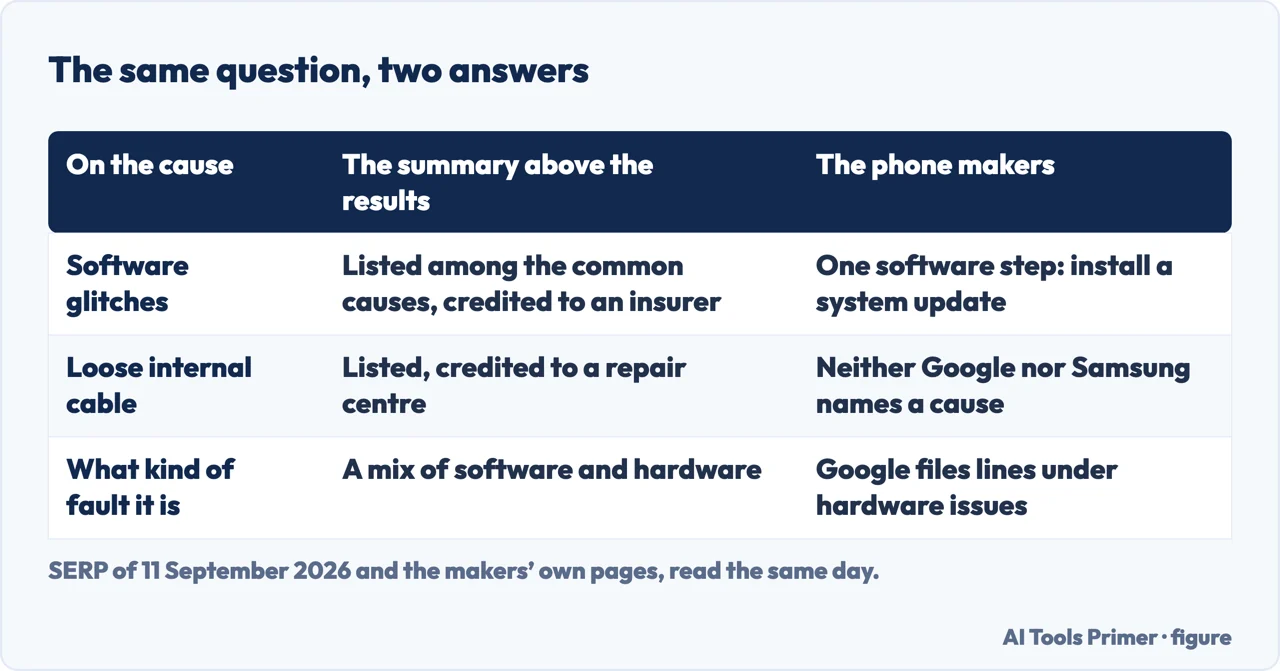
That gap matters because of who is answering this question elsewhere. On the first page of results there is a page from a phone insurer that serves no readable text at all, a manufacturer of replacement panels whose article ends in a wholesale enquiry, a question behind a security check, and five years of forum answers. The summary at the top of the results lists “Software glitches” among the common causes and credits it to the insurer. Meanwhile the two documents read for this guide that name lines on a screen at all — Google’s Pixel support page and Lenovo’s damage guide — both file them under hardware.
“If your screen flickers, shows a green tint, or horizontal or vertical lines, won’t turn on, or is cracked, you may have a hardware issue.”
That is Google, on its own support page, naming this exact symptom. And look at what it offers for it: one software step — check for a system update and install it — and then “If the issue isn’t resolved, contact us or get your phone repaired”. Compare that with the search results, where a reboot, a cache clear and a safe-mode test are offered as though the odds were even. One page is written by the company that has to pay for the repair, and it is not the one promising a software fix.
The diagnostic your phone already has
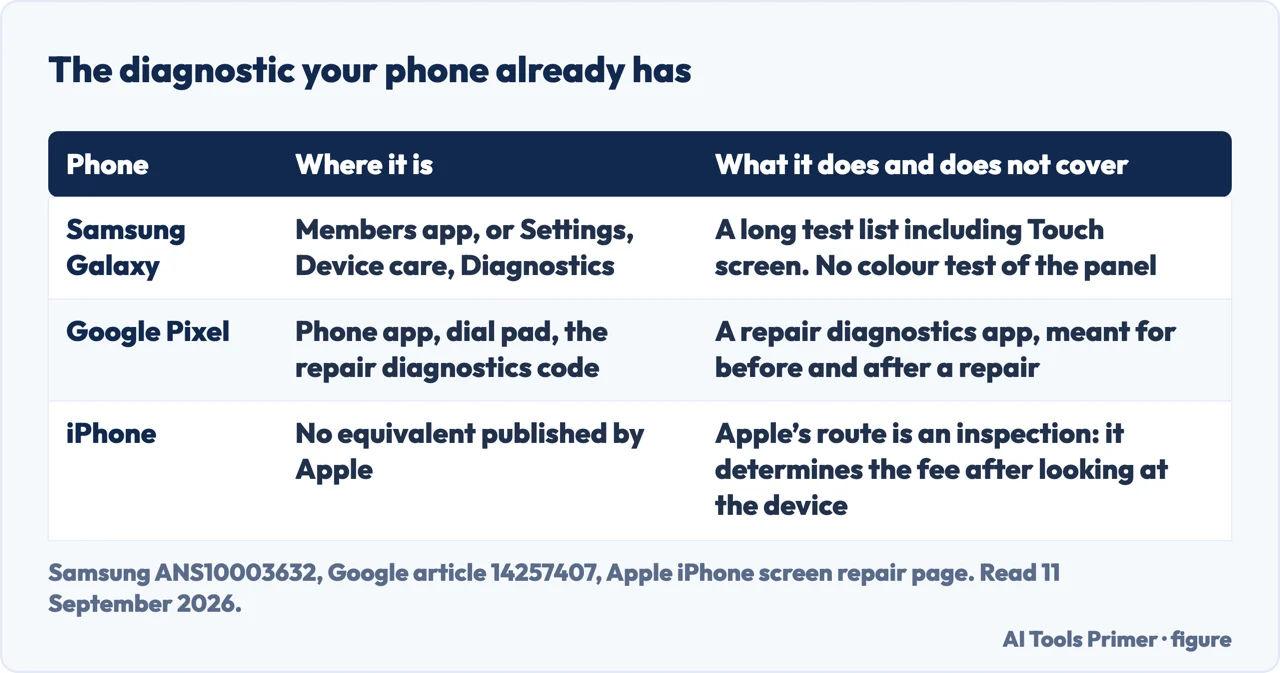
Laptops have a panel test built into the machine. Phones have something similar, and almost nobody uses it because it is filed under repair rather than under troubleshooting.
- Samsung Galaxy. In the Samsung Members app: “tapping Diagnostics on the Discover tab”, then “tap Phone diagnostics”, then “tap Test all at the bottom of the screen if you would like to run a full diagnostic”. There is a second way in with no app at all — Settings, Device care, Diagnostics — and Samsung notes that “Device care diagnostics are available on Galaxy devices running Android 12 or later”. Read the test list before you trust the result: it includes “Touch screen”, and touch is not the same thing as the picture.
- Google Pixel. Google publishes a repair diagnostics app and how to open it:
“While connected to the internet, open your Phone app”, tap the dial pad, and
dial
*#*#7287#*#*. Google says it is on “Pixel 3 and later and Pixel Tablet”, and that it is meant to be used “Before and after a repair”, which is exactly the position you are in. - iPhone. Neither of the two Apple pages read for this guide describes an equivalent you can start from the home screen, and this page is not going to invent one. What Apple does publish is the route: its repair page says the device is inspected and that “We’ll inspect your device to determine the final service fee”. Where a maker is silent, the honest answer is that it is silent.
Read the list of tests in your phone’s diagnostic before you read its verdict. Samsung’s published list covers NFC, the mobile network, proximity, buttons, speaker, camera, Bluetooth, face recognition, USB, wireless charging, SIM, sensors, touch screen, flashlight, vibration, mic, Wi-Fi, fingerprint, charging and battery status. It is a long list and it does not contain a colour test of the panel: “Touch screen” checks whether the glass answers your finger, which a phone with perfect touch and a white line across it will pass. A green tick on the wrong test is worse than no test, and this is the kind of detail the pages that recommend “run a diagnostic” never mention.
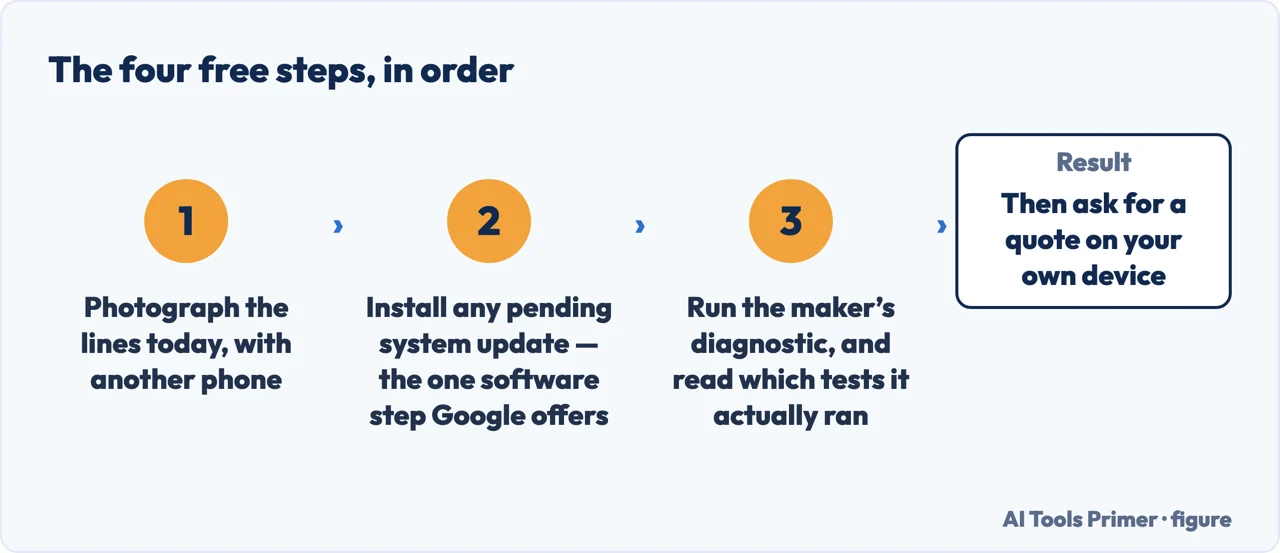
- Take a photograph of the screen with another phone, today. Not of the picture on it — of the lines. Everything that happens next, from a warranty conversation to a repair quote to selling the phone, turns on whether the lines are spreading, and that is a comparison rather than an impression.
- Install any pending system update. It is the one software step Google offers for this symptom — Settings, System, System update — and it is worth doing first precisely because it is the only one anybody official recommends.
- Run the maker’s own diagnostic. Samsung Members, or Settings → Device care → Diagnostics on a Galaxy; the dial-pad code on a Pixel. Read what the tests are called: a touch test that passes says nothing about lines, and knowing that keeps you from taking a green tick as an answer.
- Press nothing and rub nothing. The advice that circulates for marks on screens is to press or massage them; the maker of a laptop panel writes that “Applying pressure can crack the screen or damage internal components”, and a phone panel is thinner than a laptop one, not thicker.
- Then ask for a price rather than a diagnosis. On a phone the screen is an assembly, and the question is not which part failed but what a replacement costs against what the phone is worth. Apple publishes an estimated cost per iPhone model for screen damage, and adds “We’ll inspect your device to determine the final service fee.” — so the published figure tells you the order of magnitude and the quote on your device decides.
One thing comes before all of it, and it is the only genuinely urgent line on this page. If the glass is cracked, or if the screen has begun to lift away from the body of the phone, stop. Apple’s safety guidance for iPhone is written for exactly that moment: “If you suspect damage to iPhone or the battery, discontinue use of iPhone, as it may cause overheating or injury”, and “Don’t use iPhone with cracked glass, as it may cause injury.” A screen that is being pushed outwards is not a display fault at all, and a battery is not a part to treat as an inconvenience: Apple adds that one “should only be repaired by a trained technician to avoid battery damage, which could cause overheating, fire, or injury.”
About the phrase that follows this fault around: a flex cable. Repair sites will tell you the ribbon between the panel and the board has worked loose, and on a phone that has been dropped it is a perfectly reasonable guess. It stays a guess: none of the manufacturer pages read for this page name a cause at all, and the one maker vocabulary that puts names to display faults — Lenovo’s guide to damage it considers caused by the customer — is written for laptops, tablets and desktops rather than phones. It is worth reading anyway, because it shows how a manufacturer thinks about these marks: a vertical line has its own entry, “Vertical line appears when LCD is on”, and it sits in a list of things a standard warranty does not cover.
What that means in practice is that the useful question on a phone is rarely which component failed. The screen comes as an assembly; a repair is a swap; the decision is a price against the value of the phone and how long you meant to keep it. If the machine is old enough that the answer is no, the same money is often better spent elsewhere — and before you hand the phone to anybody, get a backup off it, because a screen repair means somebody else holding your device.
And if the fault is not lines but the touch that has stopped answering, or a screen that is dark rather than marked, this is the wrong page: a screen that ignores you has the four steps Apple publishes, and the entrance to the rest of these faults is computer screen problems.
Where to start
Three ways in. If the glass is cracked or the screen is lifting, take the third one first.
- “Is this software or hardware?”
- What the makers say — what the makers say
- “What can I check myself?”
- The diagnostic already on the phone — the diagnostic you have
- “The glass is cracked too.”
- Then read this first — before anything else
What the makers say
Google and Lenovo are the two makers read for this guide that write about lines at all, and both treat them as hardware. That is the answer to the first question, and it is not the answer the search results give.
The diagnostic you have
Samsung keeps it in an app and in Settings, Google behind a dial-pad code. Both are free, both take a minute, and both need reading carefully.
Before anything else
Cracked glass and a screen that is being pushed outwards are not display faults. They are safety questions, and the makers write about them in those terms.
Questions people also ask
Is there a way to fix white lines on phone screen?
Google offers one software step for this symptom — install any pending system update — and then says: “If the issue isn’t resolved, contact us or get your phone repaired”. No manufacturer read for this page documents a home fix.
Are horizontal lines on phone screen fixable?
Fixable in the sense of repairable, yes: on a phone the screen is replaced as an assembly. Fixable at home, no — and the pressing and rubbing techniques that circulate are what a panel maker warns against, because “Applying pressure can crack the screen or damage internal components”.
Why are white lines appearing on my screen?
None of the manufacturer pages read for this page commits to a cause, and neither will this one. What they commit to is the category: Google lists horizontal or vertical lines among the signs of a hardware issue, alongside flickering, a green tint and cracks.
How to remove white lines on screen?
If they are in the panel, nothing you install removes them. Before assuming that, install pending updates and run your phone’s own diagnostic — and check that what you are looking at is on the glass rather than in it, which on a screen is a question of shape.
Can I keep using the phone like this?
That depends on the glass, not on the lines. Apple’s safety guidance is explicit: “Don’t use iPhone with cracked glass, as it may cause injury”, and if you suspect damage to the phone or its battery, “discontinue use”.
Not covered here. It will not name the failed component. The manufacturer pages behind this page do not, and a confident guess about a ribbon cable would be somebody else’s guess repeated with more punctuation.
It will not walk you through a screen replacement. Google publishes repair manuals and prefaces them by saying that attempting a repair without the relevant technical skills risks injury or a broken device.
And it will not quote a price for your phone. Apple publishes an estimated cost per iPhone model and says the final fee follows an inspection; for an Android handset the figure depends on the maker and the repairer, and every other number in circulation comes from somebody selling the repair. What holds instead is simple: each maker’s own diagnostic is named with the maker, and the laptop document quoted here is flagged as written for laptops rather than phones.
Sources
- Google, Fix screen appearance issues on your Pixel phone — article 16250690 (the classification of the symptom: a screen that flickers, shows a green tint, or horizontal or vertical lines, will not turn on, or is cracked may have a hardware issue; the single software step offered for flickering, a green tint or lines, which is to check for and install a system update through Settings, System, System update; the instruction to contact support or get the phone repaired if that does not resolve it; the separate button sequence for a screen that will not turn on; and the entry for a cracked screen or dead pixels, which goes straight to repair) — support.google.com, read 11 September 2026.
- Google, Repair your own Pixel device — article 14257407 (the Pixel Repair Diagnostics App, described as something to use before and after a repair to check for problems with the device; its availability on Pixel 3 and later and on Pixel Tablet; the instructions to open the Phone app while connected to the internet, tap the dial pad and dial the diagnostics code; and the warning that precedes the repair manuals, that attempting a repair without the relevant technical skills risks injury or damage to the device) — support.google.com, read 11 September 2026.
- Samsung, Check your Samsung Galaxy device status and run diagnostics — ANS10003632 (the two routes into the diagnostics, through the Samsung Members app by tapping Diagnostics on the Discover tab and then Phone diagnostics, and through Settings, Device care, Diagnostics; the instruction to tap an individual test or Test all for a full diagnostic, and the note that the first run starts a full scan automatically; the note that Device care diagnostics are available on Galaxy devices running Android 12 or later; and the published list of available tests, which includes the touch screen, the buttons, the speaker, the camera, the sensors and battery status) — www.samsung.com, read 11 September 2026.
- Apple, Important safety information for iPhone — iPhone User Guide (the handling section, which states that iPhone or its battery can be damaged if dropped, burned, punctured or crushed or if it comes into contact with liquid, that if you suspect damage to iPhone or the battery you should discontinue use as it may cause overheating or injury, and that you should not use an iPhone with cracked glass as it may cause injury; and the battery section, which states that an iPhone battery should only be repaired by a trained technician to avoid battery damage that could cause overheating, fire or injury) — support.apple.com, read 11 September 2026.
- Apple, Apple Service and Repair for iPhone Screens (the estimated service cost table, published per iPhone model for screen damage and for the other common repairs, and the statement that Apple will inspect the device to determine the final service fee, that estimated fees are for out-of-warranty service and may be subject to tax, and that Apple Authorized Service Providers set their own service fees) — support.apple.com, read 11 September 2026.
- Dell, Dell Display Pixel Guidelines — article 000126004 (read here for one sentence, the warning that applying pressure can crack the screen or damage internal components, which is quoted on this page against the pressing and rubbing techniques that circulate for marks on a screen. The document is written for Dell displays and laptops, not for phones) — www.dell.com, read 11 September 2026.
- Lenovo, Customer Induced Damage (CID) Guide — Laptops, Tablets, Desktops, document HT104148 (the display section entry for a vertical line that appears when the LCD is on, inside a guide whose stated purpose is to identify damage that the Lenovo Standard Limited Warranty does not cover. Cited here for the vocabulary a manufacturer uses about marks on a display, and dated: the guide covers laptops, tablets and desktops, not phones) — support.lenovo.com, read 11 September 2026.
Written by Alberto Gulotta
Founder and editor of AI Tools Primer, writing from Palermo, Italy. Thirty-five years of taking computers apart, starting with a Commodore 64 — the long version is on the about page.
Something wrong on this page? Write to aitoolsprimer@gmail.com and it gets fixed.
Written on 11 September 2026 · last checked 23 September 2026.
Independence and limits
No affiliate links and no paid placements anywhere on this site. Nobody pays to appear here, and no company has seen this page before you did.
This is general information, not professional advice. Where a page touches money, health, safety or the law, it names its source and the date it was read — and your situation may still differ. See the privacy page and the cookie policy.