
iPhone · guide
iPhone XR screen burn in corner: what Apple says about the mark
By Alberto Gulotta · Updated · 15 min read
The iPhone XR screen burn in corner question meets a mismatch: Apple's burn-in page covers OLED iPhones, and the XR has an LCD that the page does not name. Below: what a corner mark can be, how a fading ghost differs from a fixed patch, and what Apple's warranty covers.
| Question | Answer | Where it comes from |
|---|---|---|
| Is the XR screen OLED? | No: Apple lists a Liquid Retina HD display, a 6.1-inch all-screen LCD with IPS technology | Apple Support |
| Does Apple’s burn-in page cover the XR? | It names the iPhone X, XS, XS Max and 11 Pro models and later, all OLED; the XR is not named | Apple Support |
| Ghost or fixed mark? | Newhaven: a ghost fades after a short time, burn-in stays | Newhaven Display |
| What causes a corner mark on an XR? | Replies name pressure from cases or screen protectors, air pressure on flights and an ageing LCD (heat comes from the question itself); they are users’ accounts, not diagnoses | iFixit Answers, Apple Community |
| What does the warranty cover? | Manufacturing issues for one year from purchase, plus rights under consumer law; not accidental damage | Apple Support |
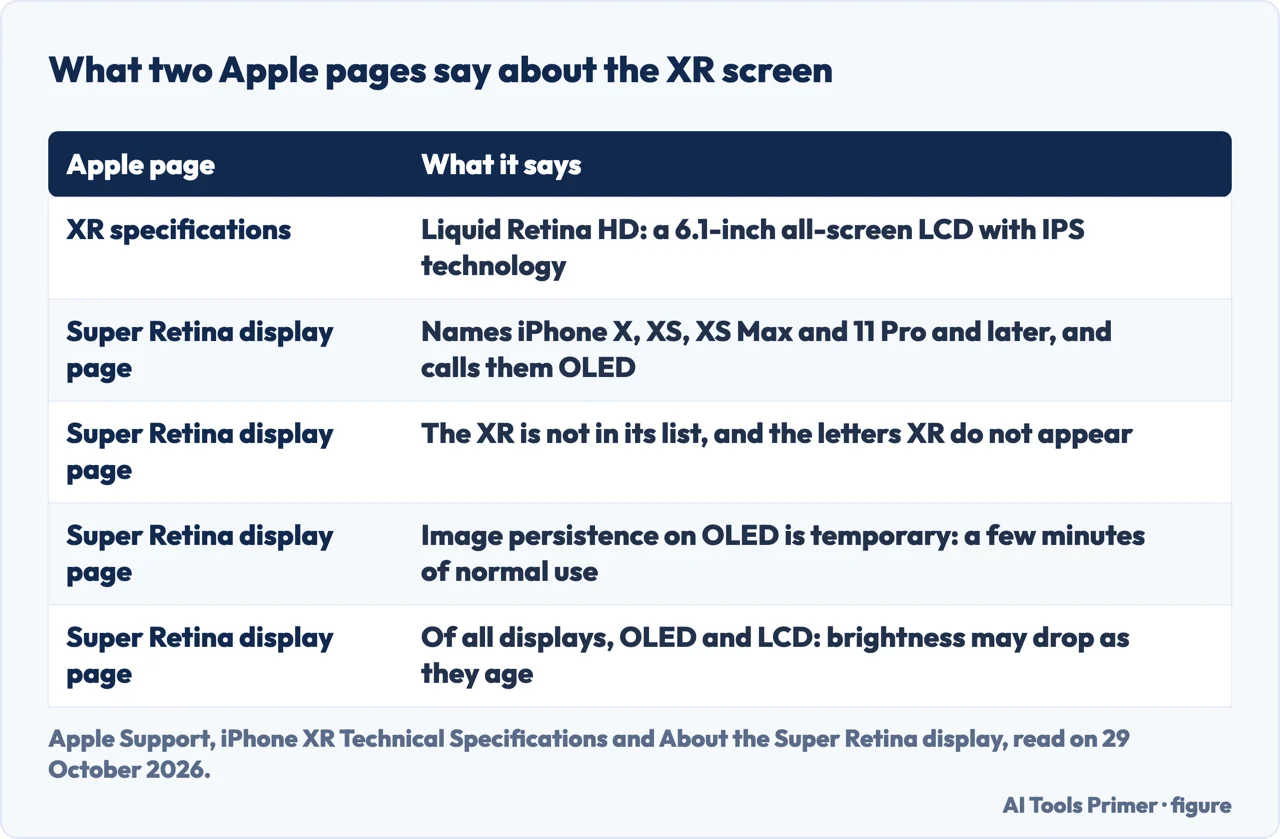
The page Apple wrote is about OLED
Apple’s page on the Super Retina and Super Retina XDR displays, shown as published on 1 June 2026, is the one that talks about burn-in. It names the iPhone X, iPhone XS and iPhone XS Max for the first, and the iPhone 11 Pro models and later, excluding the second- and third-generation iPhone SE, for the second, and it describes them as OLED displays. The iPhone XR is not in that list, and the letters XR do not appear on the page.
The XR has a different screen. Apple’s specifications page for it lists a Liquid Retina HD display, a 6.1-inch all-screen LCD Multi-Touch display with IPS technology, at 1792-by-828 pixels and 326 ppi. The specifications page we read does not mention image persistence or burn-in.
For the OLED displays, Apple says that with extended long-term use they can show “image persistence” or “burn-in,” where a faint remnant of an image stays after a new image appears, and it calls this expected behavior. Image persistence, it says, is temporary and disappears after a few minutes of normal use. Burn-in can occur in more extreme cases, such as the same high-contrast image shown continuously at high brightness for prolonged periods.
The one sentence on that page that mentions LCDs is about brightness: all displays, including OLEDs and LCDs, might be susceptible to reduced brightness levels as the display ages. The Apple pages we read do not describe image persistence or a fixed mark on an LCD such as the XR’s, so what follows leans on other sources and says which.
Ghost or fixed mark: telling them apart on an LCD
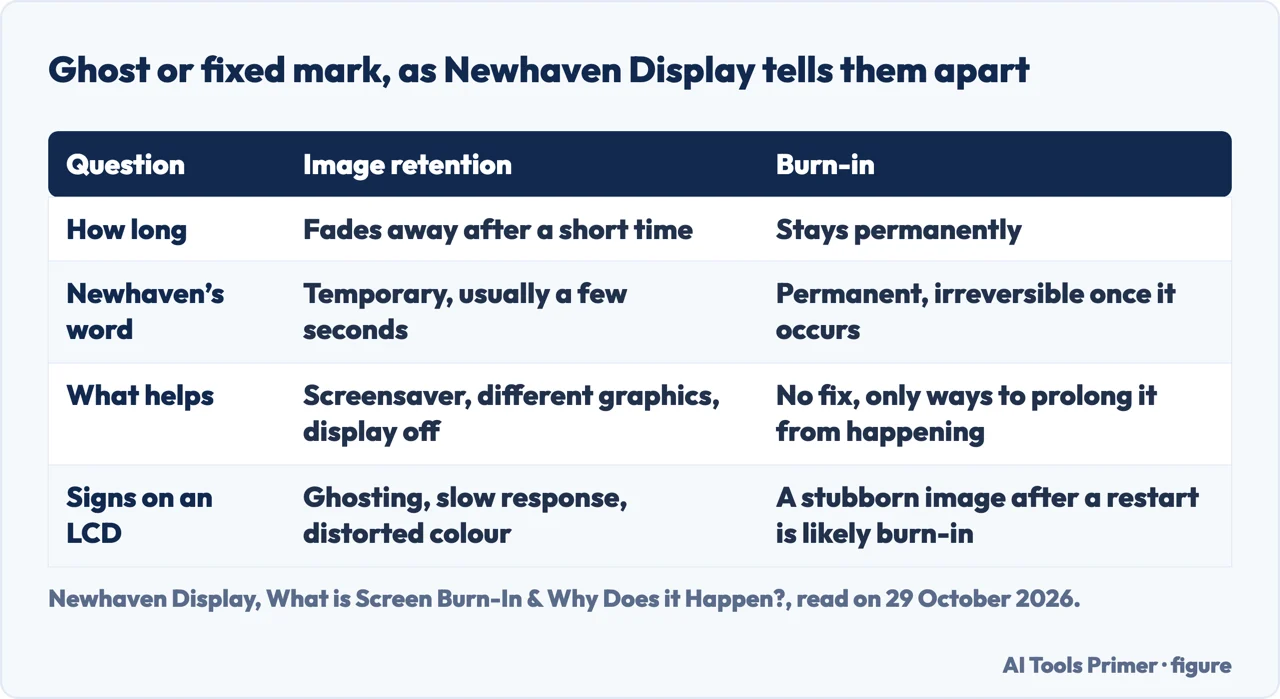
Newhaven Display’s post on screen burn-in separates two things that look alike. Image retention, which it also calls ghosting or image persistence, is the temporary effect of an image remaining visible for a short period, usually a few seconds. Burn-in is permanent and, it says, completely irreversible once it occurs. Its test is simple: if the images fade away after a short time, it is retention; if they stay permanently, it is burn-in. A stubborn image that is still there after restarting the display, it adds, is likely burn-in.
The times differ between sources. Apple writes of a few minutes of normal use for image persistence on its OLED displays; Newhaven writes of usually a few seconds for LCDs and OLEDs in general. The pages we read give no time for an XR.
On LCDs, Newhaven says that after a static image has been shown for a long time the crystals in a liquid crystal display become weaker to move, so pixels do not switch fully on or off and a faded image stays. The post is not consistent about how far this goes. It opens by saying burn-in affects all screens, including LCDs and OLEDs, and later says LCDs do not suffer permanent burn-in like OLEDs but can have a temporary form, image persistence. We use the later passage and flag the conflict.
For that temporary form, Newhaven lists early signs: ghosting or faint remnants of a previous image, slow response and distorted colour in the affected area. If it is caught early, it says, persistence can be reversed by turning off the display or using a display refresh function. It adds that IPS panels are less prone to persistence than TN panels; Apple’s specifications describe the XR panel as IPS. To look for a ghost, it suggests filling the screen with a solid white, red, green or blue, or with a uniform grey or gradient, and watching for remnants or wear. On phones, it gives the permanently placed battery, Wi-Fi and signal icons as an example of what can cause burn-in.
iServices, a repair company, says models with LCD screens are less likely to have the problem than OLED models such as the iPhone X, XS and 11 Pro, and the list of models in its answer does not include the XR. It does not give a price for a replacement screen; it says the cost varies.
What the iGeeksBlog fixes do, and which ones apply
iGeeksBlog’s guide “10 Ways to fix iPhone screen burn-in issue”, last updated on 21 April 2026, says burn-in comes from OLED technology, where each pixel has its own light source. Its list of OLED models runs from the iPhone X, XS and XS Max through the 11 Pro and 11 Pro Max to the 12, 13 and 14. The XR is not on it and the letters XR do not appear in the guide. The guide does not say its fixes fail on an LCD.
The ten steps, in its order: play a colourful video or a moving screensaver; switch the iPhone off, after which it says pixels are more likely than not to recover if the burn-in is light; adjust the brightness; use Dark Mode, which it says may not solve burn-in but lowers the risk; set a shorter Auto-Lock, suggesting 30 seconds; force restart, for small software faults such as screen discolorations; update the software; use Reset All Settings, which it says does not erase data or media; try a burn-in fixer app, with Doctor OLED X at $0.99 on the App Store as its example; and, last, replace the screen. If the earlier steps fail, it says, the burn-in is probably permanent and replacing the screen is the only solution.
Apple gives a shorter list, for its OLED displays: update iOS in Settings, General, Software Update; keep auto-brightness on, found under Settings, Accessibility, Display & Text Size and on by default; choose a shorter time under Settings, Display & Brightness, Auto Lock; avoid leaving static images at high brightness; and lower the brightness from Control Center. The page does not say whether these apply to an XR. Updating, a shorter Auto-Lock and adjusting the brightness also appear in iGeeksBlog’s list.
The sources disagree on whether a formed mark can be reversed. iGeeksBlog says minor burn-in may recover when the iPhone is switched off, and lists a $0.99 app among its fixes; Newhaven says guides that promise to fix burn-in mostly describe how to speed up the recovery of image retention, and that there is no fix for burn-in, only ways to prolong it from happening. Apple’s page does not name an app or a remedy for burn-in that has already formed.
A fixed patch in the corner of an XR
For a mark on an XR itself, the material we read is community replies, which are people’s accounts and not diagnoses.
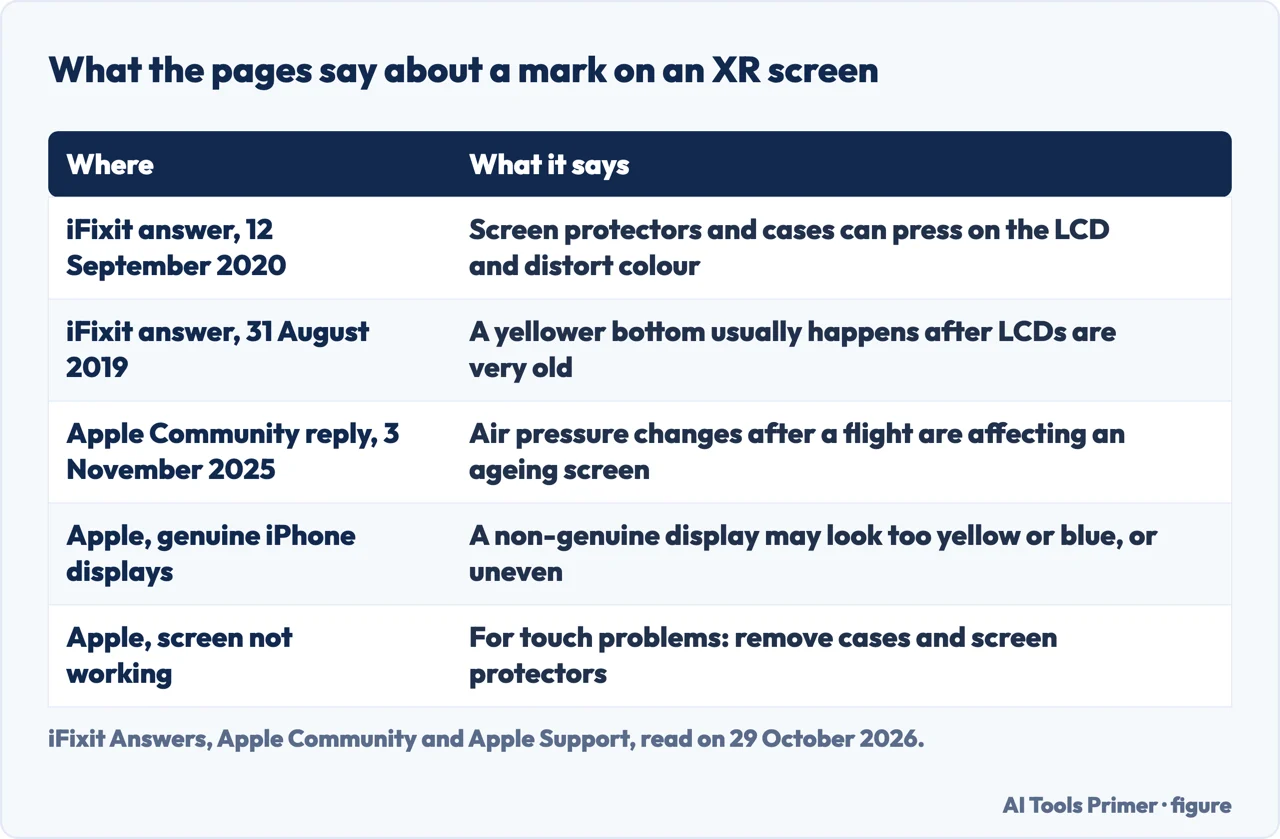
On iFixit Answers, a question from 12 September 2020 describes an XR with a cracked display and colour distortion; after a screen replacement the repairer says the distortion was not as bad as before, but it seemed to happen more with heat. The answer chosen there says some screen protectors and cases can cause this on the XR because it uses an LCD, which does not like pressure, and pressure causes colour distortion. Another iFixit question, from 31 August 2019, describes a new XR whose bottom was more yellow than its top; one reply says that usually happens after LCDs are very old and that replacing the screen would fix it.
An Apple Community thread from 3 November 2025 comes closest to a corner. An XR owner describes a greyish or reddish-yellow area at the top corners after a flight, starting from the right side where the battery, network and Wi-Fi icons are, which becomes blurred or hazy and fades over a few weeks. The top reply, from a user at level 10, says air pressure changes are affecting a screen that is showing its age and that the likely solution is a replacement at an Apple Store or authorized provider. It puts a price on that, which we do not repeat, because Apple’s own price page for an XR did not load for us. That reply is one user’s opinion and not Apple’s.
Two Apple pages are worth setting beside these. The page on a screen that is not working is about touch, not colour: it lists restarting, cleaning, disconnecting accessories and removing cases and screen protectors, and then service. The page on genuine iPhone displays says that with a non-genuine display, colour calibration might be incorrect, for example making the display look too yellow or blue, and the display might not be uniformly bright. That matters if the XR’s screen has been replaced, as the first iFixit question describes. The pages we read do not say whether a mark that appears after a flight is a defect.
What Apple covers, and where the XR stands
Apple’s page on service and repair for iPhone screens says the Apple Limited Warranty covers the device against manufacturing issues for one year from the date you bought it. It does not cover accidental damage or batteries that wear down from normal use, and it comes in addition to rights provided by consumer law in your country or region. Apple guarantees its service and replacement parts for 90 days or the rest of the warranty, whichever is longer. If a repair is not covered and consumer law does not apply, it says there is a cost, and if the device is not eligible for service you may need to pay the full value of a replacement. Service is at a Genius Bar or an Apple Authorized Service Provider, in person, or by mail. The page does not say whether a mark like the ones above counts as a manufacturing issue.
To see what your own phone has, Apple’s coverage page says to open Settings, General, AppleCare & Warranty and choose the device, or to go to mysupport.apple.com, sign in with your Apple Account, choose the device and click View Proof of Coverage. We give no repair price for the XR: the screen-repair page showed its prices for a default model, and the selector for the XR did not load them.
Apple’s page on service after a warranty has expired, published on 14 October 2026 and read by us on 29 October 2026, says owners of an iPhone may obtain service and parts for a minimum of 5 years from when Apple last distributed the product for sale. Products are vintage when Apple stopped distributing them more than 5 and less than 7 years ago, and obsolete after more than 7 years, when Apple discontinues all hardware service. The iPhone lists on that page name the XS, XS Max, 11 Pro and 11 Pro Max among the vintage models, and the XR is in neither the vintage nor the obsolete list. The page does not say when Apple stopped distributing the XR.
On software, Apple’s iOS 26 page, published on 16 September 2026, lists compatible models from the iPhone 11 and the iPhone SE (2nd generation and later). The XR is not listed.
What we did not use
We tested nothing on a phone. We did not open the fastmoneyelectronics.com page, the Reddit thread, the Apple Community thread on an XR burn, the Dr.Fone page, the imfixed.co.uk page or the video that Google listed. The Google AI box, which opens with two questions, whether the mark changes shape or fades after a restart and whether the phone has been dropped or pressed, was read only in part. The pages we read do not cover an iPhone that is lit up around the edges, which one of the questions people ask is about. OLED iPhones, Android phones and the iPad are not covered.
Where to start
Four ways in.
- “Does Apple’s burn-in page cover the XR?”
- The page Apple wrote is about OLED — apple
- “Is it a ghost or a fixed mark?”
- Ghost or fixed mark on an LCD — ghost
- “It is in the corner and it came after a flight.”
- A fixed patch in the corner of an XR — corner
- “Will Apple fix it?”
- What Apple covers, and where the XR stands — cover
When the iPhone shows something odd
White screens and liquid.
Marks on a phone screen
Spots, lines and what they are.
Questions people also ask
Can an iPhone screen burn be fixed?
Apple calls image persistence on its OLED displays temporary, gone after a few minutes of normal use, and burn-in an extreme case. iGeeksBlog says minor burn-in may recover and ends with replacing the screen; Newhaven says there is no fix for burn-in, only for retention.
Is the iPhone XR end of life?
Apple’s page on service after a warranty expires, published on 14 October 2026 and read on 29 October 2026, does not name the XR in its vintage or obsolete iPhone lists. Apple’s iOS 26 compatibility list starts at the iPhone 11 and does not include the XR.
Why is my iPhone lit up around the edges?
The pages we read do not cover this. The nearest is Apple’s note that a non-genuine display might not be uniformly bright.
Can screen burn-in be reversed?
Newhaven says burn-in is completely irreversible once it occurs and that only retention can be sped up, by a screensaver or switching the display off. iGeeksBlog says that if the burn-in is minor the pixels are more likely than not to recover when the iPhone is switched off, but it applies this to OLED models.
Not covered here. We tested nothing on a phone. The statements come from eight Apple Support pages, an iGeeksBlog guide, a Newhaven Display post, an iServices post, two iFixit Answers questions and an Apple Community thread, all read on 29 October 2026.
The search volume and difficulty behind this page come from a Semrush reading of 29 August 2026, older than the 60 days the site normally allows.
Sources
- Apple Support — About the Super Retina display and Super Retina XDR display on your iPhone — support.apple.com, read 29 October 2026.
- Apple Support — iPhone XR Technical Specifications — support.apple.com, read 29 October 2026.
- Apple Support — Apple Service and Repair for iPhone Screens — support.apple.com, read 29 October 2026.
- Apple Support — Find information about your warranty or AppleCare plan — support.apple.com, read 29 October 2026.
- Apple Support — Obtaining service for your Apple product after an expired warranty — support.apple.com, read 29 October 2026.
- Apple Support — About genuine iPhone displays — support.apple.com, read 29 October 2026.
- Apple Support — If the screen isn’t working on your iPhone or iPad — support.apple.com, read 29 October 2026.
- Apple Support — How to download iOS 26 — support.apple.com, read 29 October 2026.
- iGeeksBlog — 10 Ways to fix iPhone screen burn-in issue — www.igeeksblog.com, read 29 October 2026.
- Newhaven Display — What is Screen Burn-In & Why Does it Happen? — newhavendisplay.com, read 29 October 2026.
- iServices — iPhone Screen with Burn-in (Image Retention): How to fix — iservices.nl, read 29 October 2026.
- iFixit Answers — iPhone XR question on colour distortion with heat (posted 12 September 2020) — www.ifixit.com, read 29 October 2026.
- iFixit Answers — Bottom of screen yellowish than top, iPhone XR (posted 31 August 2019) — www.ifixit.com, read 29 October 2026.
- Apple Community — Screen discoloration after flight travel (thread posted 3 November 2025) — discussions.apple.com, read 29 October 2026.
Written by Alberto Gulotta
Founder and editor of AI Tools Primer, writing from Palermo, Italy. Thirty-five years of taking computers apart, starting with a Commodore 64 — the long version is on the about page.
Something wrong on this page? Write to aitoolsprimer@gmail.com and it gets fixed.
Written on 29 October 2026.
Independence and limits
No affiliate links and no paid placements anywhere on this site. Nobody pays to appear here, and no company has seen this page before you did.
This is general information, not professional advice. Where a page touches money, health, safety or the law, it names its source and the date it was read — and your situation may still differ. See the privacy page and the cookie policy.