Why is my iPhone hot has two answers and they are opposite. Sometimes the heat is the phone doing exactly what it was built to do, and Apple lists those cases by name. Sometimes it is a threshold being crossed, and Apple attaches numbers to those.
Start with the reassuring half, because it covers the situations people most often panic about.
Six things Apple lists as normal reasons for a warm iPhone
“Set up your device the first time”
“Restore from a backup”
“Complete a software update, particularly to a major release”
“Wirelessly charge your device”
“Use graphics-intensive or processor-intensive apps, games, or features, including
camera apps”
“Stream high-quality video”
And the sentence that follows them, which is the most useful thing on this page:
“These conditions are normal. Your device will cool when the process is complete or
when you finish your activity. If your device doesn’t display a temperature warning, you
can keep using your device.” That is Apple giving you permission to carry on. A warm
iPhone with no warning on screen is not a fault, and there is nothing to fix.
Two of those six are worth pausing on. A software update, especially a major release, is on Apple’s own list — so a phone that runs hot the evening it updates is behaving as documented. And wireless charging is on the list too, which means a phone that is warm on a charging pad and cool on a cable is not showing you a fault.
Now the other half. Apple publishes three temperature figures for an iPhone, and they are three different kinds of number.
16–22 °C
the comfort zone
“Your device is designed to perform well in a wide range of ambient temperatures, with
62° to 72° F (16° to 22° C) as the ideal comfort zone.”
Far narrower than the operating range, and it is about the battery rather than about the
phone refusing to work.
Above 35 °C
permanent
“It’s especially important to avoid exposing your device to ambient temperatures
higher than 95° F (35° C), which can permanently damage battery
capacity.”
The word Apple uses is permanent. It is the only threshold on this page with that word
attached.
Below 32 °C
for storage
“Place your device in a cool, moisture-free environment that’s less than
90° F (32° C).”
And for a long absence: “If you plan to store your device for longer than six months,
charge it to 50% every six months.”
The gap between the first two is the thing to carry away. The operating range Apple publishes elsewhere is 0–35 °C; the comfort zone is 16–22 °C. A phone working perfectly at 30 degrees is inside its operating range and well outside the range Apple says is ideal for the battery. Nothing will go wrong today. The number that matters is the one about permanent damage, and it sits at 35.
Which brings up charging, and here Apple names a consequence rather than a precaution.
“Charging the device in high ambient temperatures can damage it
further.Software may limit charging above 80% when the recommended battery temperatures
are exceeded.”
Two things follow, and both are practical. First, a hot phone should not be put on the
charger — charging is what Apple names as making the damage worse, not a way of
riding it out. Second, a phone that stops at eighty per cent on a hot day is not broken:
that is a documented behaviour with a stated cause, and the fix is temperature rather than a
new cable. If the screen says so explicitly — “Charging On Hold. Charging will
resume when [device] returns to normal temperature” — Apple’s own reading is
that “the device is temporarily too hot or too cold to charge”.
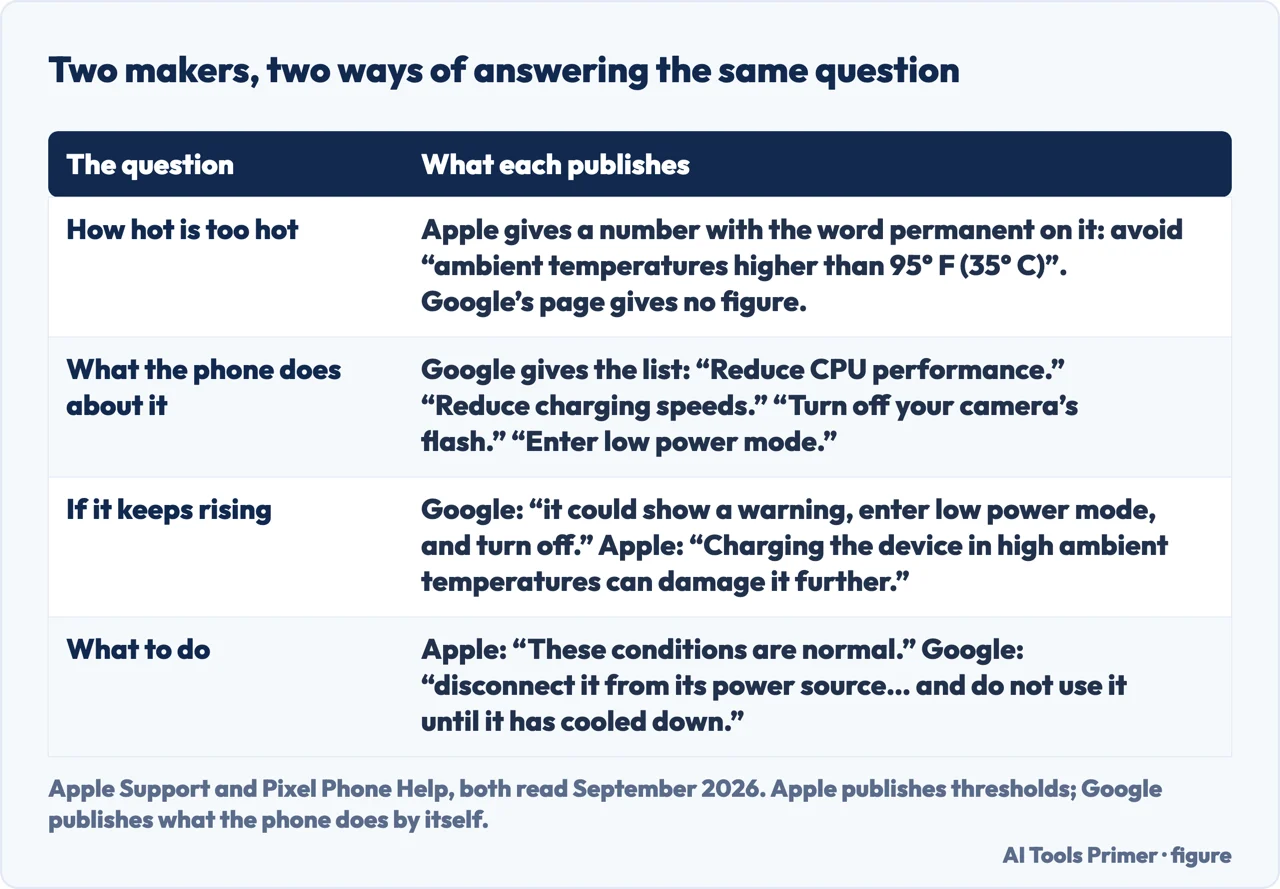
There is a second half to this question that Apple does not answer, and the other phone maker does: what the device is doing about the heat while you are wondering. Google publishes it for a Pixel — “Your phone may start to limit some functions when it senses that it’s too hot” — and then names the functions: “Reduce CPU performance.” “Reduce charging speeds.” “Turn off your camera’s flash.” “Turn off your camera.” “Partially or fully turn off your mobile data or Wi-Fi, including 5G.” “Enter low power mode.” And if that is not enough: “If your phone’s temperature continues to rise, it could show a warning, enter low power mode, and turn off.”
Apple publishes thresholds; Google publishes what the phone does about them by itself. Quotations from both. Figure drawn by AI Tools Primer.
That is a different kind of documentation from Apple’s, and the two are better held together than chosen between. Apple publishes the numbers and no list of defensive actions; Google publishes the list and, on the page read for this guide, no temperature figure at all. The practical use of the second list is that it renames a set of faults: a camera that refuses to open on a hot day, or a phone that suddenly charges slowly, is on it. And Google’s instruction when it gets that far is the one you would give a person: “disconnect it from its power source if it’s plugged in, move it to a cooler place, and do not use it until it has cooled down”.
The conditions Apple asks you to avoid are specific rather than general, and worth knowing by
name: “Leaving your device in a car on a hot day”, “Leaving your
device in direct sunlight for an extended period of time”, and “Using certain
features in hot conditions or direct sunlight for an extended period of time, such as
GPS tracking or navigation in a car, playing a graphics-intensive game, or using the
camera for an extended period of time”. The car appears twice in that list, once parked and
once while navigating.
One more distinction, because it decides whether to act. This page is about a phone that feels hot. A phone that switches itself off is a different question with a different answer — and, counter-intuitively, the words “turn off” appear on the cold side of Apple’s temperature page rather than the hot one. That belongs to the guide on a phone that keeps restarting, which is linked below.
A note on other guides, with its limit stated. Google did not return readable search results while this page was written, so this page makes no claim about what is on Google’s first page for this question.
What this page will not do is tell you the phone is damaged. Apple publishes one threshold with the word permanent attached and it is an ambient temperature, not a sensation in your hand.
It will not recommend a cooling case, a fan or a cooling app. Apple’s published advice is to stop the activity and move the device; nothing else here has been tested.
And it will not tell you to put a warm phone in the fridge. Apple documents a cold limit as well, and the page about cold is where the words about the device turning off actually appear.
Where to start
Three ways in. If there is no warning on the screen, take the first and stop worrying.
Not covered here. It will not tell you a warm iPhone is broken. Apple publishes six ordinary reasons for it and says plainly that you can keep using the device when no warning appears.
It will not recommend a cooling case, fan or app. The published advice is to stop the activity and move the device, and nothing else here has been tested.
It will not tell you to cool the phone artificially. Apple documents a cold limit too, and the cold side of that page is where the device turning off is described.
And it carries no affiliate links, including for cases and chargers, exactly the products a guide on this subject usually exists to sell. What holds instead is simple: the six activities and the three temperatures above are quoted from Apple directly, with the page saying which is a limit and which is merely ideal.
Sources
Apple Support — If your iPhone or iPad gets too hot or too cold (the six conditions listed as normal reasons for a device to feel warm: setting up the device the first time, restoring from a backup, completing a software update particularly to a major release, wirelessly charging the device, using graphics-intensive or processor-intensive apps, games or features including camera apps, and streaming high-quality video, followed by the statement that these conditions are normal; and the conditions to avoid, namely leaving the device in a car on a hot day, leaving it in direct sunlight for an extended period, and using certain features in hot conditions or direct sunlight for an extended period such as GPS tracking or navigation in a car, playing a graphics-intensive game, or using the camera for an extended period) — support.apple.com, read 24 August 2026.
Apple — Maximizing Battery Performance and Lifespan, apple.com (that the device is designed to perform well in a wide range of ambient temperatures, with 62 to 72 degrees Fahrenheit, 16 to 22 degrees Celsius, as the ideal comfort zone; that it is especially important to avoid exposing the device to ambient temperatures higher than 95 degrees Fahrenheit, 35 degrees Celsius, which can permanently damage battery capacity; and that charging the device in high ambient temperatures can damage it further, with software possibly limiting charging above 80 per cent when the recommended battery temperatures are exceeded) — www.apple.com, read 24 August 2026.
Google — Help keep your Pixel phone from feeling too warm or hot, Pixel Phone Help (that the phone may start to limit some functions when it senses that it is too hot, with the published list: reduce CPU performance, reduce charging speeds, turn off the camera flash, turn off the camera, partially or fully turn off mobile data or Wi-Fi including 5G, and enter low power mode; that if the temperature continues to rise it could show a warning, enter low power mode and turn off; and the instruction that a phone which is too hot should be disconnected from its power source, moved somewhere cooler and left unused until it has cooled down. No temperature figure appears on this page) — support.google.com, read 6 September 2026.
AG
Written by Alberto Gulotta
Founder and editor of AI Tools Primer, writing from Palermo, Italy. Thirty-five years of
taking computers apart, starting with a Commodore 64 — the long version is on the
about page.
Written on 23 August 2026 · last checked 23 September 2026.
§
Independence and limits
No affiliate links and no paid placements anywhere on this site. Nobody pays to appear here,
and no company has seen this page before you did.
This is general information, not professional advice. Where a page touches money, health,
safety or the law, it names its source and the date it was read — and your situation may
still differ. See the privacy page and the
cookie policy.