
Software · guide
How to force restart iphone, and hold it longer
By Alberto Gulotta · Updated · 9 min read
You are here because a phone has stopped responding, so the answer comes first. How to force restart iphone depends on which one you are holding, and there are three sequences rather than one.
| Your iPhone | What to press |
|---|---|
| With Face ID (and iPhone 8, SE 2nd gen or later) |
|
| iPhone 7 or 7 Plus | Press and hold the side button and volume down together until the Apple logo. |
| iPhone 6s and earlier | Press and hold the Home button and the side or top button until the Apple logo. |
Now the part that decides whether the sequence works, because on a phone that is already frightening you, the obvious move is exactly wrong.
The whole procedure turns on one sentence, and it is the one every listicle drops. Apple, on the final hold: “this might take longer than 10 seconds.”
Ten seconds is a long time with a dead phone in your hand. Almost everybody lets go at four, decides the sequence must be wrong for their model, and goes back to searching. The sequence was right. Hold the button until the logo appears and not until you lose your nerve — and on the first two steps do the opposite: press and release quickly, without holding.
There is a second common failure and it is the reverse mistake: holding the volume buttons. The first two steps are taps, not holds — Apple’s wording is “press and quickly release” both times. Holding them does something else entirely, and the sequence never starts.
If the logo appears, you are finished. Nothing has been lost, nothing needs restoring, and the phone will come back with everything on it. Which brings us to the reason this guide spends a section on vocabulary rather than buttons.
Four words that are not synonyms
The search results for this problem use them interchangeably. Apple does not, and the difference is what you lose.
- Restart
- Turn it off, turn it on. Needs a working screen. Loses nothing.
- Force restart
- The button sequence above, for when the screen will not cooperate. Loses nothing. It is not a wipe and it does not touch your data.
- Reset
- A menu in Settings. Depending on which one, it clears settings, the network configuration, or the keyboard dictionary. Loses configuration.
- Erase / restore
- Erase All Content and Settings, or a restore from a computer. Loses everything on the phone.
That table is not pedantry. Many guides offer to “hard reset” the phone, or to “force restart or reset”, as though the two were alternatives to each other. They are not. One is a button sequence that costs you nothing; the other is a menu that erases things. Somebody with a frozen phone who searches the wrong word, follows the wrong page, and reaches Erase All Content has turned a five-second problem into a permanent one.
The search terms themselves carry the danger. People type iphone reset when what they need is to force a restart on iphone, land on a page about the first, and follow it. The two phrases feel like the same request and are separated by everything on the phone.
So: a force restart is always safe to try first. There is no configuration in it, nothing is deleted, and if it does not help you have lost thirty seconds. Everything else in this area costs you something, and none of it should be attempted before this.
If the sequence runs and the phone stays dark, Apple’s next instruction is the one people are least willing to follow, because it asks for patience at the exact moment nobody has any: “If your iPhone doesn’t turn on, charge your iPhone for one hour and then try again.” Not a few minutes. An hour, on a cable, then try the sequence again.
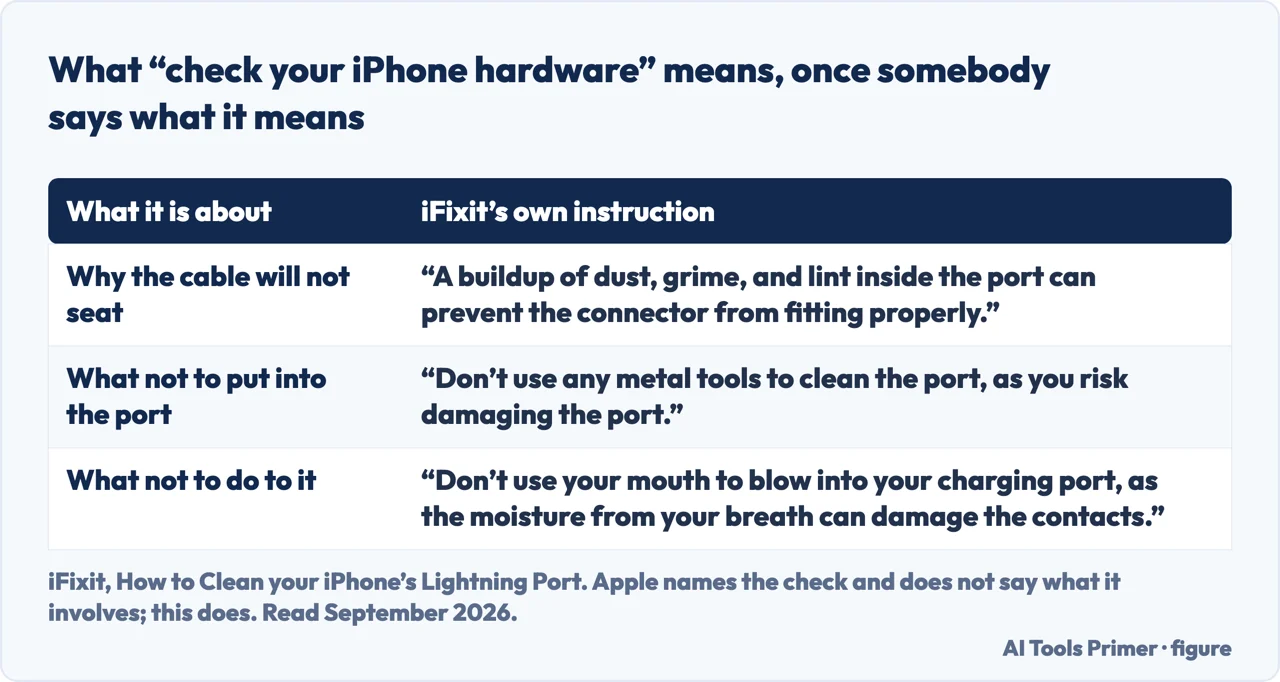
And there is a separate instruction for the case where the screen does light up but only to show the low-battery symbol: “check your iPhone hardware and then charge your iPhone for 30 minutes or until it starts.” The hardware check first is deliberate — a phone that will not take a charge is usually a cable, a plug, or a port full of pocket lint rather than a dead phone, and that is worth establishing before waiting half an hour on a charger that is not charging.
That last item is this page’s own phrase, and it deserves a source, because Apple names the check and never says what it involves. iFixit does: “A buildup of dust, grime, and lint inside the port can prevent the connector from fitting properly.” The useful half is its two prohibitions, both of them things people reach for first — “Don’t use any metal tools to clean the port, as you risk damaging the port”, and “Don’t use your mouth to blow into your charging port, as the moisture from your breath can damage the contacts”. Either one turns a charging problem into a repair.
One last piece of judgement, since a force restart is a symptom-clearer rather than a cure. If you are doing this once, it is a frozen app and nothing more. If you are doing it weekly, something underneath is wrong and the restart is hiding it — and the guides below cover what that usually turns out to be.
They split it four ways: the sequences themselves, what to do when the restart does not help, what the words mean and which operations lose data, and the pattern where the phone needs restarting far too often.
Where to start
Four ways in.
- “The phone is frozen right now.”
- The sequences are above, then the sequences
- “I did it and nothing happened.”
- Go to when it does not help
- “Is this the same as a reset?”
- No — what the words mean
- “It keeps needing this.”
- That is when it happens often
The sequences
Three button combinations across the generations, plus the two details that decide whether any of them work: how long to hold, and which presses are taps.
When it does not help
The phone stays dark, or comes back and freezes again. Apple documents the next steps and they are mostly about waiting, which is why people skip them.
What the words mean
The most useful wing on this guide, because the vocabulary around it is genuinely dangerous. Each of these loses something different, and one of them loses everything.
When it happens often
A restart every few weeks is nothing. A restart every few days is a symptom, and this wing is about finding what it is a symptom of.
Not covered here. It will not call this a hard reset. That phrase belongs to something else, and using it here is how people with a frozen phone end up erasing it.
It will not suggest an app. A force restart is a button sequence on a phone that is not currently running anything, which is precisely why it works.
And it will not skip the waiting. Apple says an hour on the charger, and the pages that leave that out are the reason working phones get taken to shops. What holds instead is simple: the three button sequences and the charging instructions are quoted from Apple’s own support pages.
Sources
- Apple Support — Restart an unresponsive iPhone (the sequences for Face ID models, iPhone 7 and iPhone 6s and earlier, the note that the hold may take longer than 10 seconds, and the charging instructions afterwards). Published 11 May 2026 — support.apple.com, read 22 August 2026.
- Apple — iPhone User Guide, Force restart iPhone (the three-step sequence and the instruction to press and quickly release the volume buttons) — support.apple.com, read 22 August 2026.
- iFixit — How to Clean your iPhone’s Lightning Port (that a buildup of dust, grime and lint inside the port can prevent the connector from fitting properly; the instruction not to use any metal tools to clean the port because of the risk of damaging it; and the instruction not to blow into the charging port with your mouth, because the moisture from your breath can damage the contacts). Quoted for the content of the hardware check Apple names and does not describe — www.ifixit.com, read 6 September 2026.
Written by Alberto Gulotta
Founder and editor of AI Tools Primer, writing from Palermo, Italy. Thirty-five years of taking computers apart, starting with a Commodore 64 — the long version is on the about page.
Something wrong on this page? Write to aitoolsprimer@gmail.com and it gets fixed.
Written on 22 August 2026 · last checked 23 September 2026.
Independence and limits
No affiliate links and no paid placements anywhere on this site. Nobody pays to appear here, and no company has seen this page before you did.
This is general information, not professional advice. Where a page touches money, health, safety or the law, it names its source and the date it was read — and your situation may still differ. See the privacy page and the cookie policy.