
Software · guide
How to reset network settings on iPhone, and what it erases
By Alberto Gulotta · Updated · 9 min read
The steps for how to reset network settings on iphone take one line, and they live in the Transfer or Reset iPhone menu. What the reset takes with it is longer: every saved Wi-Fi password, the phone’s own name, and the certificates it was told to trust. Apple documents all of it, and here it is.
Where the command lives now
Settings › General › Transfer or Reset iPhone › Reset, then Reset Network Settings.
The reason this is worth stating is that it moved. People who learned it years ago go to Settings › General › Reset, find nothing, and conclude the option has been removed. It is one level deeper, behind a menu whose name — Transfer or Reset — reads like it is about getting a new phone.
What it actually removes, in Apple’s own words
More than the name suggests, and two of these surprise almost everybody.
- Every Wi-Fi network the phone knows“Previously used networks and VPN settings that weren’t installed by a configuration profile or mobile device management (MDM) are removed.” Every saved password goes with them — so you will need the password for your own home network again.
- The name of your phone“The device name assigned in Settings › General › About is reset to ‘iPhone,’” If yours was called something else, it is not any more — which matters for AirDrop, for hotspots and for anybody trying to find it in a list of devices.
- Certificates you chose to trust“Manually trusted certificates (such as for websites) are changed to untrusted.” A site or a network you once told the phone to accept will ask again, or stop working.
- Possibly your roaming setting“Cellular data roaming may also be turned off.” Worth checking before you travel, and worth re-checking after.
- Your current connection, immediately“Wi-Fi is turned off and then back on, disconnecting you from any network you’re on.” Do not do this while relying on that connection for something.
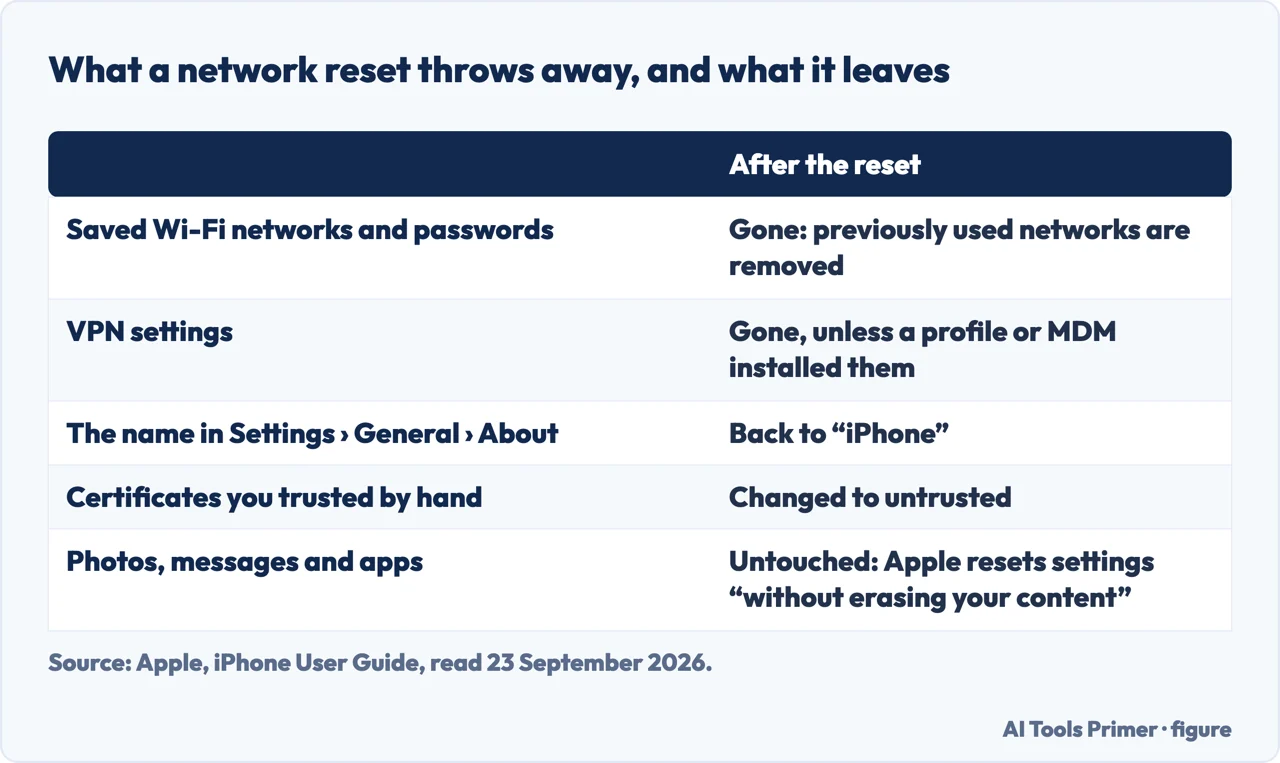
Two of those are worth expecting. The phone renaming itself is the one people notice a week later, when their laptop offers to connect to an “iPhone” it does not recognise. The certificates one is the one that produces a mysterious follow-on problem: a work site or a captive Wi-Fi portal that used to open now refuses, and nothing about it looks related to the reset you did on Tuesday.
The three neighbours in that menu, and what each does
They sit together and only one of them is the mild one. Read before tapping.
- Reset All Settings
- “All settings — including network settings, the keyboard dictionary, location settings, privacy settings, and Apple Pay cards — are removed or reset to their defaults. No data or media are deleted.” Broader than the network option, but still not destructive to your files.
- Reset Network Settings
- The subject of this page. Narrower, and enough for almost every connection problem.
- Delete All eSIMs
- “All eSIMs stored on your iPhone are deleted. You will need to set up a new eSIM or physical SIM card to connect.” On a phone with no physical SIM, this is the option that leaves you without a mobile service until the carrier reissues it.
- Erase All Content and Settings
- Apple gives this one a WARNING of its own: “all your content is removed”. It is in the same menu, one tap away from the others.
Before you do it, write down what you will need afterwards. Chiefly: the Wi-Fi password for wherever you are. Resetting network settings while sitting in a café whose password you do not know leaves you on cellular data until you get home, and resetting it at home when the password is on a label under a router you cannot reach is worse. Two minutes of preparation makes the difference between a fix and an afternoon.
What it does not touch. Apple is explicit that VPN settings installed by a configuration profile or by mobile device management survive — which is why a work VPN is often still there afterwards. Removing those is a different menu: Settings › General › VPN & Device Management, then Remove Profile or Remove Management. Apple warns that doing so “also removes other settings and accounts provided by the profile”, so on a phone your employer manages, that is a conversation rather than a tap.
And it is worth saying what this is for. Resetting network settings is the right move when the phone connects to nothing, or connects and carries no data, or behaves differently from every other device on the same network. It is not a general-purpose fix, it will not make a slow phone faster, and it costs you every saved network in exchange. Used for the right fault it is excellent; used as a first resort it is an afternoon of retyping passwords.
What you are actually rebuilding, seen from the other side. Google’s documentation for joining Wi-Fi networks on Android describes the same stored objects this reset throws away: the network name, the saved password, and whether the phone rejoins automatically. Nothing else on the phone knows any of that, which is why a network reset is both safe for your files and expensive in small ways — every network you use regularly has to be typed in again, starting with the one you are standing in.
The menu path, the full list of what a network reset removes, the note about profiles and management, and the descriptions of the neighbouring options are quoted from Apple’s own iPhone User Guide, read on 22 August 2026 and listed below. The advice about preparing beforehand, and the observation about the follow-on certificate problem, are ours.
Where to start
Four ways in.
- “What will this delete?”
- The full list — what it removes
- “I cannot find the option.”
- It moved — before you tap it
- “The work VPN is still there.”
- Those survive it — what it does not touch
- “Which of these menu items?”
- Only one is mild — the neighbours
What it removes
Every saved network, the phone’s own name, your trusted certificates, and possibly your roaming setting. Apple lists all of it.
The neighbours
Four options in one menu, from mild to irreversible, and Apple gives one of them a warning of its own.
What it does not touch
Profiles and managed settings survive a network reset. Removing those is a different menu and, on a work phone, a different conversation.
Before you tap it
The preparation is two minutes and the difference between a fix and an afternoon of retyping.
Not covered here. It will not give you the tap sequence and stop. The question people are actually asking is what it destroys, and Apple answers it in full.
It will not describe it as harmless. Every saved Wi-Fi password goes, the phone renames itself, and trusted certificates stop being trusted.
And it will not recommend it as a general fix. It is the right move for a specific kind of fault and an expensive one for everything else. What holds instead is simple: the complete list of what a network reset removes is Apple’s own, quoted from the iPhone User Guide with the date it was read.
Sources
- Apple — iPhone User Guide, Reset iPhone settings to their defaults, including the Transfer or Reset iPhone path, the full description of Reset Network Settings and what it removes, the device name reset, the change to manually trusted certificates, cellular data roaming, the survival of configuration profile and MDM settings, and the Reset All Settings, Delete All eSIMs and Erase All Content and Settings options — support.apple.com, read 22 August 2026.
- Android Help — Connect to Wi-Fi networks on your Android device: what a phone stores about a network, read as an inventory of what a network reset discards — support.google.com, read 4 September 2026.
Written by Alberto Gulotta
Founder and editor of AI Tools Primer, writing from Palermo, Italy. Thirty-five years of taking computers apart, starting with a Commodore 64 — the long version is on the about page.
Something wrong on this page? Write to aitoolsprimer@gmail.com and it gets fixed.
Written on 22 August 2026 · last checked 23 September 2026.
Independence and limits
No affiliate links and no paid placements anywhere on this site. Nobody pays to appear here, and no company has seen this page before you did.
This is general information, not professional advice. Where a page touches money, health, safety or the law, it names its source and the date it was read — and your situation may still differ. See the privacy page and the cookie policy.