
Software · guide
How to recover deleted text messages on iPhone, and when
By Alberto Gulotta · Updated · 10 min read
There is a built-in way to do this and it takes four taps, which is worth saying first because the first page of results for how to recover deleted text messages on iphone is a recovery company’s forum, a Reddit thread, a video, a paid-answers site and a Microsoft community post about an Apple product. Apple’s own instructions are there too, and they contain one detail that explains the confusion.
“In Messages, tap the Filters button on the conversations page. If you use iOS 18, tap Edit on the conversations page.”
Apple, on a page published 2 April 2026 and read on 22 August 2026. The button moved. Which means every guide, video and forum answer written before that update points at a control that is no longer where it says — and the reader concludes the feature does not exist on their phone. It does. It is behind Edit now.
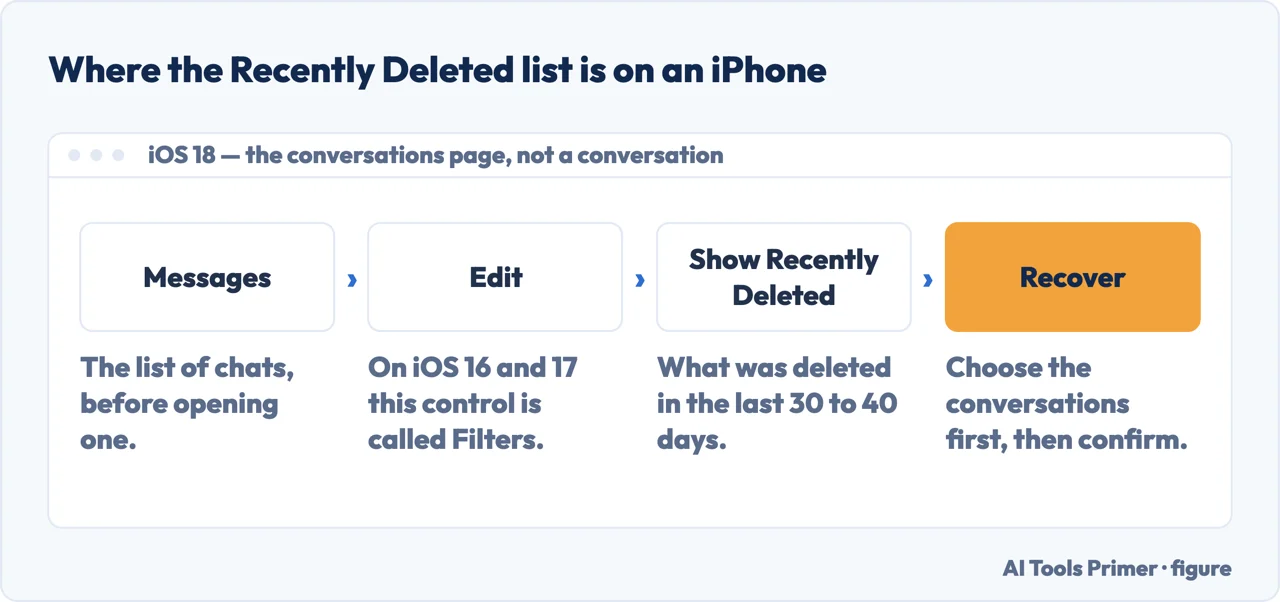
The four steps
- In Messages, on the conversations page, tap Filters — or Edit if you are on iOS 18.
- Tap Show Recently Deleted.
- “Choose the conversations with the messages you want to restore, then tap Recover.”
- Confirm with Recover Message, or Recover [Number] Messages for several.
Three limits, in Apple’s own words
- The window
- “You can only recover messages and conversations that you deleted within the last 30 to 40 days.” Note the range — Apple does not promise an exact figure, so a message from five weeks ago may or may not still be there. Look before assuming either way.
- The version
- “You need iOS 16, iPadOS 16.1, or later to recover deleted messages and conversations.” On anything older the feature is not there to find.
- The cutoff
- “If you delete a message before you update to iOS 16, iPadOS 16, or later, you can’t recover that message.” Updating afterwards does not reach back. What was deleted under the old system stayed deleted.
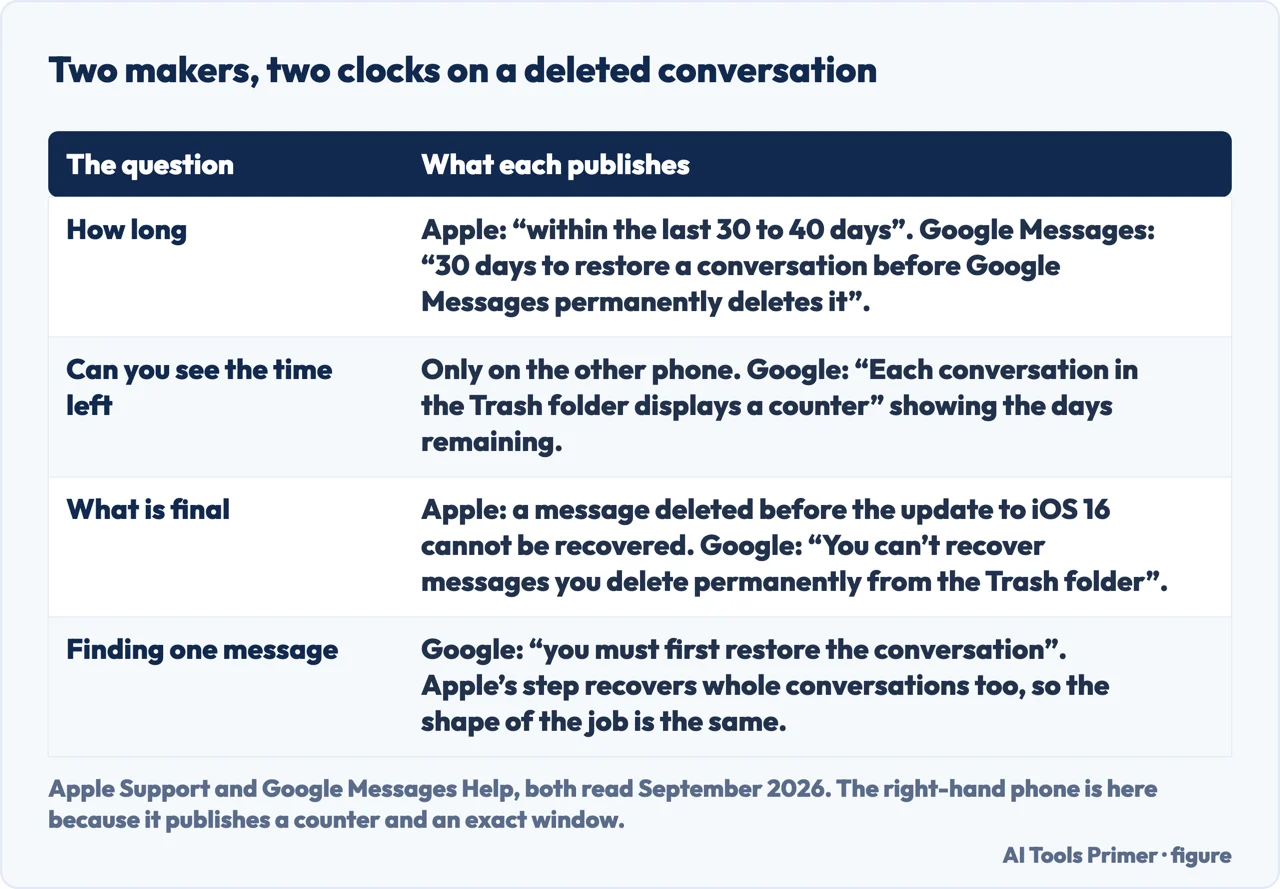
The vagueness of the first of those three deserves a moment, because the same feature on the other kind of phone is not vague. Google publishes a flat figure for Google Messages — you have “30 days to restore a conversation before Google Messages permanently deletes it” — and, more usefully, shows it running: “Each conversation in the Trash folder displays a counter. This indicates the number of days remaining before it’s permanently deleted.” Apple gives a range and no counter, so on an iPhone the only way to know whether a conversation is still there is to go and look. The end of the road is worded almost the same on both: “You can’t recover messages you delete permanently from the Trash folder, whether done on purpose or accidentally.”
The folder holds messages you deleted. It does not hold messages you unsent, and Apple is blunt about the difference: “Any message that you remove from a conversation using Undo Send is permanently deleted.” Unsending feels like the gentler action and is in fact the irreversible one — there is no thirty-day grace period behind it. The second permanent case is quieter: “Audio messages that expire before being saved aren’t recoverable.”
Recovery also reaches further than the phone in your hand. “If you use Messages in iCloud, recovering a message or conversation on your iPhone recovers it on all your devices where Messages in iCloud is on.” Useful when the iPad is the one you actually read on; worth knowing if the reason you deleted the conversation was that someone else uses that iPad.
And the limit that no amount of tapping changes: “deleting and recovering messages only affects your iPhone and other Apple devices where you’re signed in to the same Apple Account. You can’t recover messages, attachments, and conversations on anyone else’s device.” Nothing here reaches the other person’s phone — not to restore what they deleted, and not to remove what they kept.
The middle limit is the one to check first, because it decides whether the rest of the page applies to you at all. If the phone is on iOS 16 or later, Recently Deleted exists and the messages may be in it. If not, there is nothing on the device to recover from, and no application installed afterwards changes that.
And the third limit is the one people find hardest to accept, so it is worth stating plainly: updating the phone does not resurrect anything. The Recently Deleted list holds what was deleted after the feature existed. A conversation removed two years ago on an older version of iOS was not put aside somewhere waiting for a future update — it was deleted.
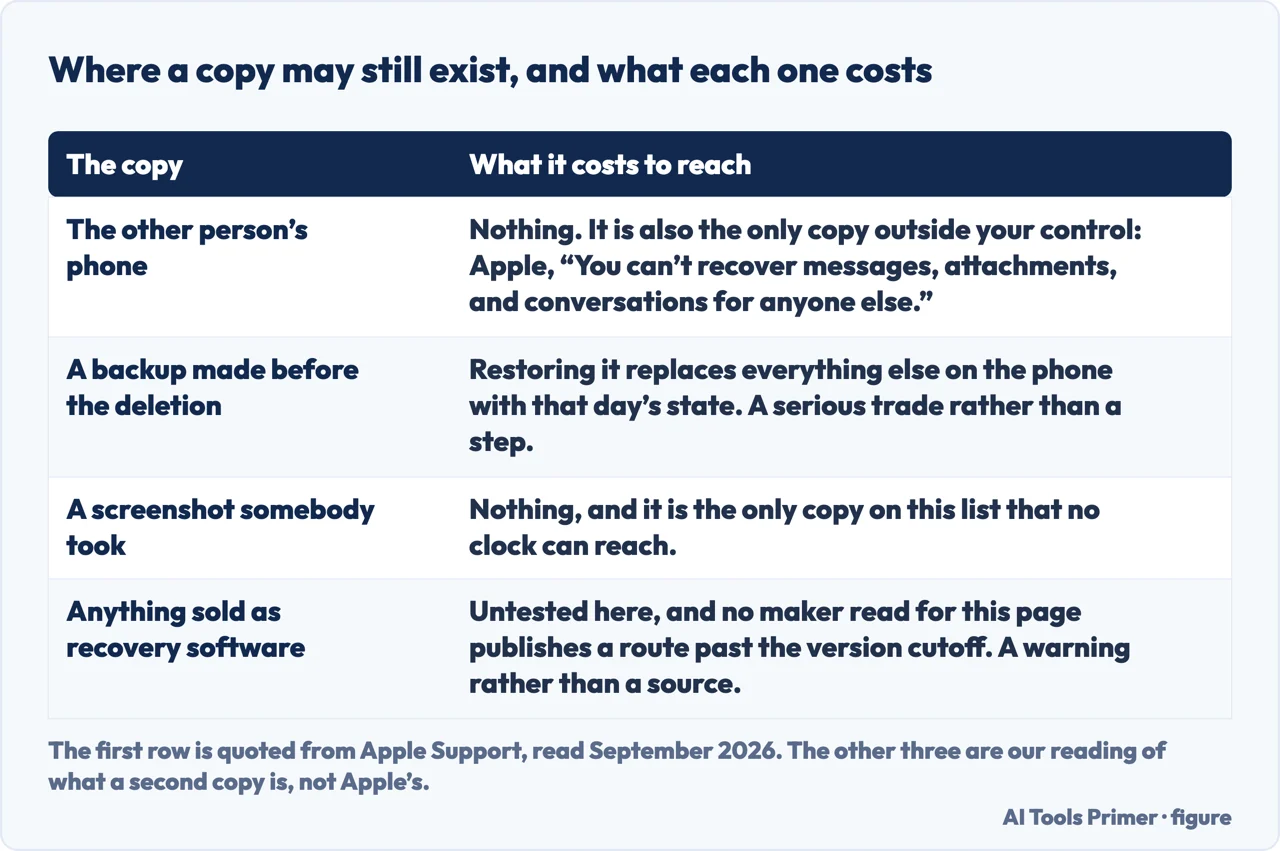
Where messages may genuinely still exist after that is not on the phone but around it. The other person in the conversation has their copy. A device backup made before the deletion contains the conversation as it stood then, though restoring one replaces everything else on the phone with that day’s state, which is a serious trade rather than a step. And a screenshot somebody took is a screenshot somebody took. Those are the real second copies; software promising to reach into the phone itself is promising something Apple has already described as not being there.
One practical note if the messages matter. Recover them, then get them off the phone — a screenshot, or forwarding the conversation to yourself by email. The Recently Deleted list is a grace period, not storage, and the same clock that gave you the chance is still running.
The route, the change in iOS 18, the thirty-to-forty-day window, the version requirement and the cutoff before updating are quoted from Apple’s own support documentation, published 2 April 2026 and read on 22 August 2026. The advice about second copies, and about getting recovered messages off the phone, are ours.
Where to start
Four ways in.
- “I deleted a conversation by mistake.”
- Four taps — the button moved
- “There is no Filters button.”
- It became Edit in iOS 18 — the button moved
- “It was a while ago.”
- Apple gives a range, not a promise — three limits
- “It was years ago.”
- Read the third limit — three limits
The button moved
Filters became Edit in iOS 18, which is why instructions written before iOS 18 describe a control that is not on the screen.
Three limits
A window Apple describes as a range, a version requirement, and a cutoff that updating cannot reach back past.
The copies around it
A conversation has two ends. After the window closes, that is where it still exists.
Keeping what matters
The list is a grace period, not storage. The clock that gave you the chance is still running.
Not covered here. It will not describe a button that is no longer there. Apple changed it in iOS 18 and this guide says so in the first line.
It will not round Apple’s window to thirty days. Apple says thirty to forty, and the difference matters when you are five weeks out.
And it will not suggest software that reaches into the phone for messages Apple has already described as unrecoverable. What holds instead is simple: the route and the three limits are quoted from Apple’s own support documentation, carrying its publication date as well as the reading date.
Sources
- Apple Support — Recover deleted text messages on your iPhone or iPad, including the Filters and iOS 18 Edit routes, Show Recently Deleted, the thirty-to-forty-day window, the iOS 16 requirement and the note that messages deleted before updating cannot be recovered (published 2 April 2026) — support.apple.com, read 22 August 2026.
- Apple — iPhone User Guide, Recover deleted messages in Messages on iPhone — support.apple.com, read 16 September 2026.
- Google Messages Help — Manage Trash folder in Google Messages (that you have 30 days to restore a conversation before Google Messages permanently deletes it; that each conversation in the Trash folder displays a counter indicating the number of days remaining before it is permanently deleted; that messages deleted permanently from the Trash folder cannot be recovered, whether done on purpose or accidentally; and that to find the messages in a trashed conversation you must first restore the conversation) — support.google.com, read 6 September 2026.
Written by Alberto Gulotta
Founder and editor of AI Tools Primer, writing from Palermo, Italy. Thirty-five years of taking computers apart, starting with a Commodore 64 — the long version is on the about page.
Something wrong on this page? Write to aitoolsprimer@gmail.com and it gets fixed.
Written on 22 August 2026 · last checked 23 September 2026.
Independence and limits
No affiliate links and no paid placements anywhere on this site. Nobody pays to appear here, and no company has seen this page before you did.
This is general information, not professional advice. Where a page touches money, health, safety or the law, it names its source and the date it was read — and your situation may still differ. See the privacy page and the cookie policy.