Why does my phone keep restarting is three different questions, and the manufacturer separates them before answering any of them. Getting that separation right saves most of the work, because one of the three is not a software problem at all.
Google separates three things before it troubleshoots any of them
“Try the following steps if your phone has any of these problems”, and it names
three: “randomly reboots or restarts”, “shuts down without restarting”,
“restarts constantly: go to the advanced troubleshooting section.”
That third one is routed somewhere else on the same page, which is the useful signal. A phone
that restarts constantly and never settles is not the same complaint as one that
restarts now and then, and a phone that shuts down and stays down is a third thing again
— it belongs to the battery, not to the software. Knowing which of the three you have
decides which half of this page is yours.
The most common assumption about the third case is that the phone got too hot. Apple publishes what heat actually does, and it is not that.
Too hot
apple, published
What Apple lists is a slowdown, not a shutdown: “Charging, including wireless charging,
slows or stops”, “The display dims or goes black”, “The
camera flash or other camera features might be temporarily disabled”,
performance “reduced with lower frame rates”.
Too cold
apple, published
“Using an iOS or iPadOS device in very cold conditions outside of its operating range
might temporarily shorten battery life and could cause your device to turn off.”
The phrase “turn off” appears here, on the cold side — not on the hot
one.
The range, and the missing number
apple, published
“iPhone and iPad devices are designed for use where the ambient temperature is
between 0º and 35º C (32º to 95º F).”
But for the warning screen Apple declines to give a figure: “If your device exceeds
a certain temperature threshold, it will present a temperature warning
screen”.
Put the first two cards side by side and the direction is the opposite of the folk explanation. Heat, in Apple’s published list, makes the phone dim, slow, stop charging and disable the flash. Cold is the condition Apple attaches the words “turn off” to. A phone that shuts down on a winter platform is behaving as documented; a phone that goes dark and hot is doing something Apple describes as the display dimming, not a shutdown.
The third card is worth its own sentence, because it is an absence rather than a fact. Apple gives an operating range in degrees, then refuses to name the number at which the warning screen appears — “a certain temperature threshold”. So you are given a figure you cannot act on and denied the one you could, and that same page — about 1,400 words, read again on 11 September 2026 — publishes no way to read the interior temperature it is describing.
Which leaves the question of whether it was the battery. On an iPhone that has an answer, and the answer is stored on the phone.
On an iPhone the question “was it the battery?” has an answer written on
the phone itself: “This iPhone has experienced an unexpected shutdown because the
battery was unable to deliver the necessary peak power.”
And the detail that turns that message into evidence rather than advice: Apple states the
feature behind it “is enabled only after an unexpected shutdown first occurs on a
device with a battery that has diminished ability to deliver maximum instantaneous power.”
Its presence is itself the record that a shutdown happened. If you are trying to work out
whether the phone genuinely switched off or you imagined a reboot, that is the place the device
keeps the answer.
On the Android side the equivalent work is a procedure rather than a message, and it starts by holding a button — except that the instruction is not one instruction.
One Google page, four different holds
All from the same article, on a phone that will not turn on or turns off immediately:
“First, try holding down your phone’s power button for 5-7 seconds.
This usually restarts a phone.”
“press and hold both the volume-down button and the power button at the same time
for at least 20 seconds. If you see a red light, your battery is fully
discharged.”
“press and hold the power button for about 30 seconds, until your phone
restarts.”
“To reboot your phone, press and hold the Power button for about 35
seconds.”
They are not contradictions — they belong to four different situations, and one of them
uses two buttons rather than one. But they are on one page, and the practical lesson is that
“hold the power button” is not a single instruction. The one worth knowing is
the second: twenty seconds on both buttons, and a red light means the battery is flat rather
than the phone being broken.
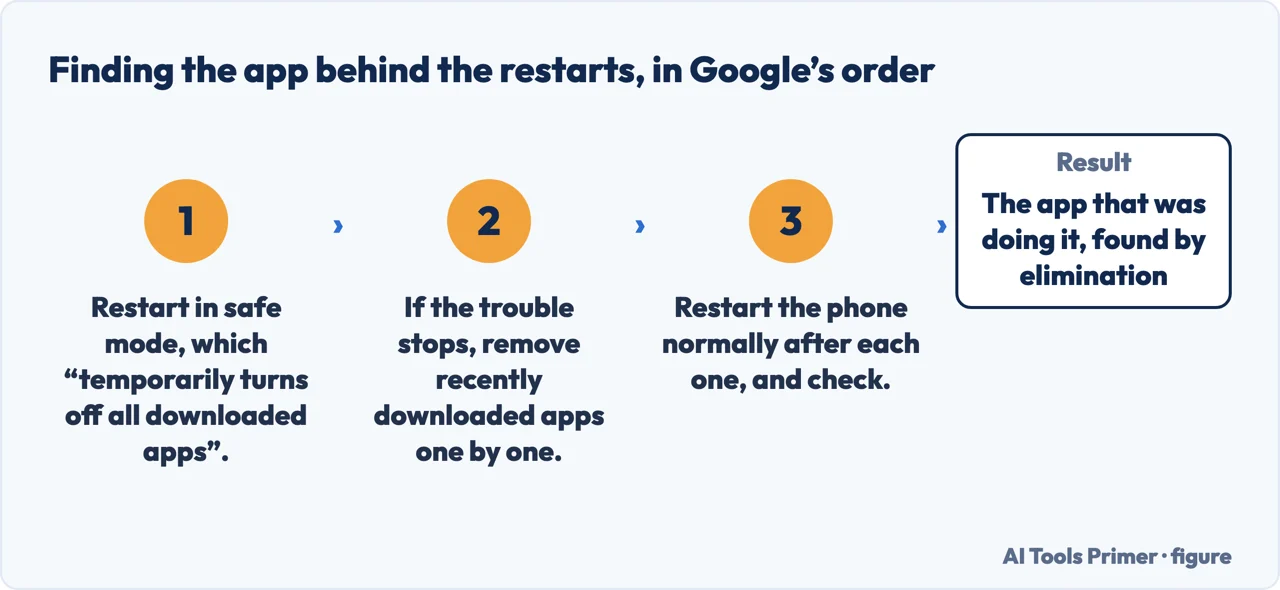
Two published numbers before you suspect anything expensive. Storage: “Your phone can have issues when less than 10% of storage is available.” And the method for finding a
guilty app, which is a procedure rather than a guess: restart in safe mode, which
“temporarily turns off all downloaded apps”; if the problem stops, then
“one by one, remove recently downloaded apps … after each removal, restart
your phone normally. See whether removing that app solved the problem.” One at a time,
checking after each — the part that gets summarised away, and the part that makes it work.
The procedure Google publishes for a phone that restarts by itself, in its order. The instruction that makes it work is the last one: one app at a time, with a normal restart after each. Quotations from Google, read September 2026. Figure drawn by AI Tools Primer.
Two limits the manufacturers set on their own pages, and both are worth carrying. Google’s article states its own guide: “Some of these steps only work on Android 6.0 and up.” And the safe-mode instructions it gives are written for Pixel phones: if yours is made by somebody else, the buttons to hold are that manufacturer’s to publish, not Google’s.
And a warning about the step that sits at the bottom of every troubleshooting article, quoted rather than paraphrased because the wording matters: “A factory data reset will remove all data from your phone. You can restore any data stored in your Google Account, but all apps and their associated data are uninstalled.” Google puts a backup instruction immediately before it. A reset is a real remedy and it is also the one step on this page that cannot be undone.
A note on other guides, with its limit stated. Google returned an anti-bot page rather than search results while this was written, so this page makes no claim about what is on Google’s first page for this question.
What this page will not do is tell you your battery is failing. On an iPhone the phone itself reports that, in Settings, in a message quoted above; anywhere else it is a measurement, not a guess made from a description.
It will not recommend a battery replacement service or a repair shop. Nothing here has been tested, and this is a category where an untested recommendation earns well.
And it will not tell you to factory reset first. Both manufacturers put that last, after a backup, and there is a reason the order is written that way.
Where to start
Three ways in, matching the three problems the manufacturer separates.
A random reboot, a shutdown with no restart, and a phone stuck restarting are routed differently by the manufacturer. The middle one belongs to the battery.
Apple lists dimming, slowed charging and a disabled flash for heat — and attaches the words “turn off” to cold. The range is published; the alarm threshold is not.
Not covered here. It will not tell you the phone overheated. Apple’s published list for heat is dimming and slowing; the word “off” appears on the cold side of that page.
It will not diagnose your battery from a description. On an iPhone the device keeps that record itself; everywhere else it is a measurement.
It will not recommend a repair shop or a replacement battery. Untested here, and well paid elsewhere.
And it carries no affiliate links, including for battery packs and cases, the products a guide on this subject is usually built to sell. What holds instead is simple: the temperatures and the four hold times above are quoted from Apple and Google directly, and where Apple declines to publish a number this page says so.
When an Android phone stops behaving
Four guides: apps crashing on Android, the application tray, a phone that keeps restarting and pop-up ads.
Google, Fix an Android device that won’t charge or turn on — Android Help (the four hold instructions on one page: first holding down the phone’s power button for 5-7 seconds, which usually restarts a phone; with the phone plugged in, pressing and holding both the volume-down button and the power button at the same time for at least 20 seconds; that a red light means the battery is fully discharged and a flashing red light means there is not enough power to turn on; and charging for at least 30 minutes before restarting) — support.google.com, read 24 August 2026.
Google, Fix a Pixel phone that’s restarting or crashing — Pixel Phone Help (the three problems the steps apply to — randomly reboots or restarts, shuts down without restarting, and restarts constantly, the last routed to the Advanced troubleshooting section; that the phone can have issues when less than 10% of storage is available; and the safe-mode procedure, which temporarily turns off all downloaded apps, followed by removing recently downloaded apps one by one and restarting after each) — support.google.com, read 24 August 2026.
Apple Support — If your iPhone or iPad gets too hot or too cold (that when the interior temperature exceeds the normal operating range charging including wireless charging slows or stops, the display dims or goes black, the cellular signal might weaken as radios enter a low-power state, and the camera flash or other camera features might be temporarily disabled; and what happens in very cold conditions outside the operating range) — support.apple.com, read 24 August 2026.
Apple Support — iPhone battery and performance (the message shown after an unexpected shutdown, that this iPhone has experienced an unexpected shutdown because the battery was unable to deliver the necessary peak power and performance management has been applied; and that unexpected shutdowns are likelier with a low state of charge, a higher chemical age, or colder temperatures) — support.apple.com, read 24 August 2026.
AG
Written by Alberto Gulotta
Founder and editor of AI Tools Primer, writing from Palermo, Italy. Thirty-five years of
taking computers apart, starting with a Commodore 64 — the long version is on the
about page.
Written on 23 August 2026 · last checked 23 September 2026.
§
Independence and limits
No affiliate links and no paid placements anywhere on this site. Nobody pays to appear here,
and no company has seen this page before you did.
This is general information, not professional advice. Where a page touches money, health,
safety or the law, it names its source and the date it was read — and your situation may
still differ. See the privacy page and the
cookie policy.