
Screens · guide
iPad Pro line on screen: hardware or software, and what next
By Alberto Gulotta · Updated · 9 min read
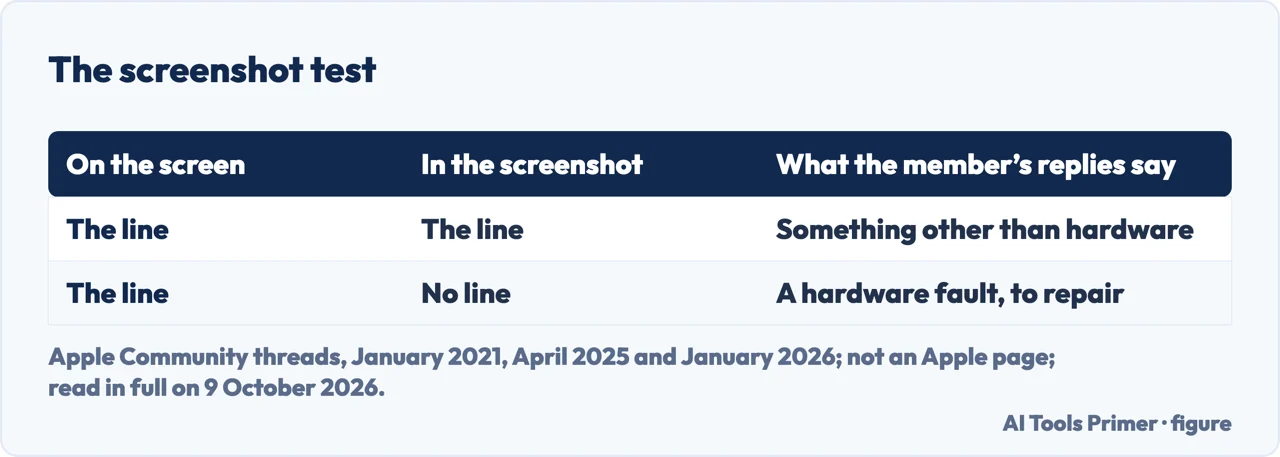
iPad Pro line on screen: one Apple Community member gives the same test in three threads. Take a screenshot while the line shows and look at it with the iPad turned 90 degrees: a line missing from the screenshot means a hardware fault, and a line in it means something other than hardware.
| What | What Apple says |
|---|---|
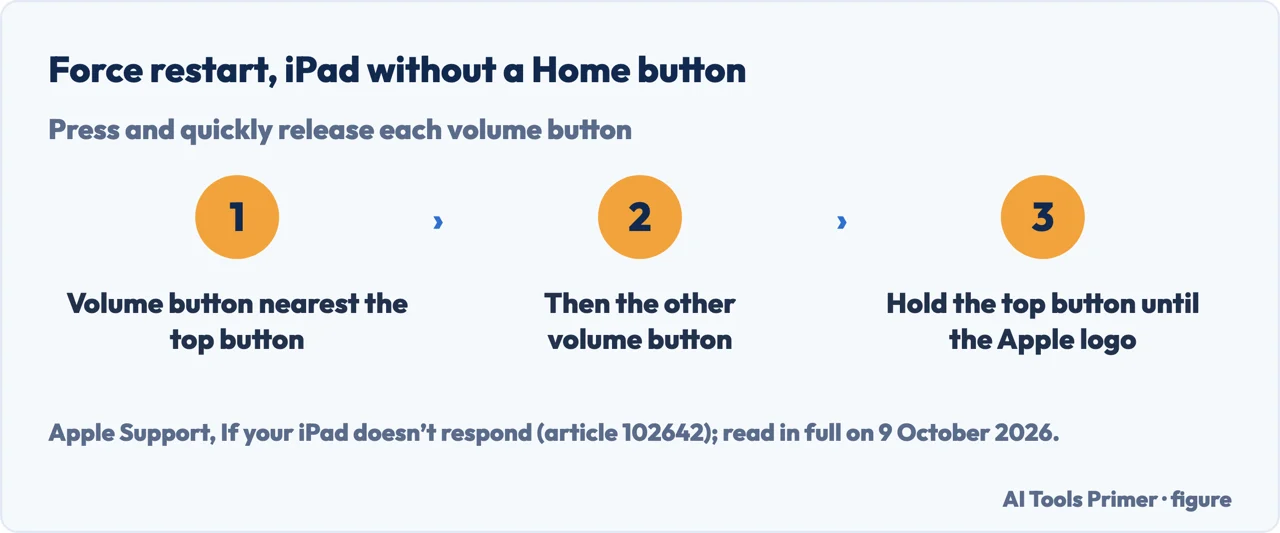
| Force restart, no Home button | Press and release the volume button nearest the top button, then the other one, then hold the top button until the Apple logo |
| Screenshot | Press and release the top button and a volume button together; it goes to Photos, under Screenshots |
| Display replacement | Depending on location: in or out of warranty, at an Apple Store or an Authorized Service Provider, or by shipping it to an Apple Repair Center |
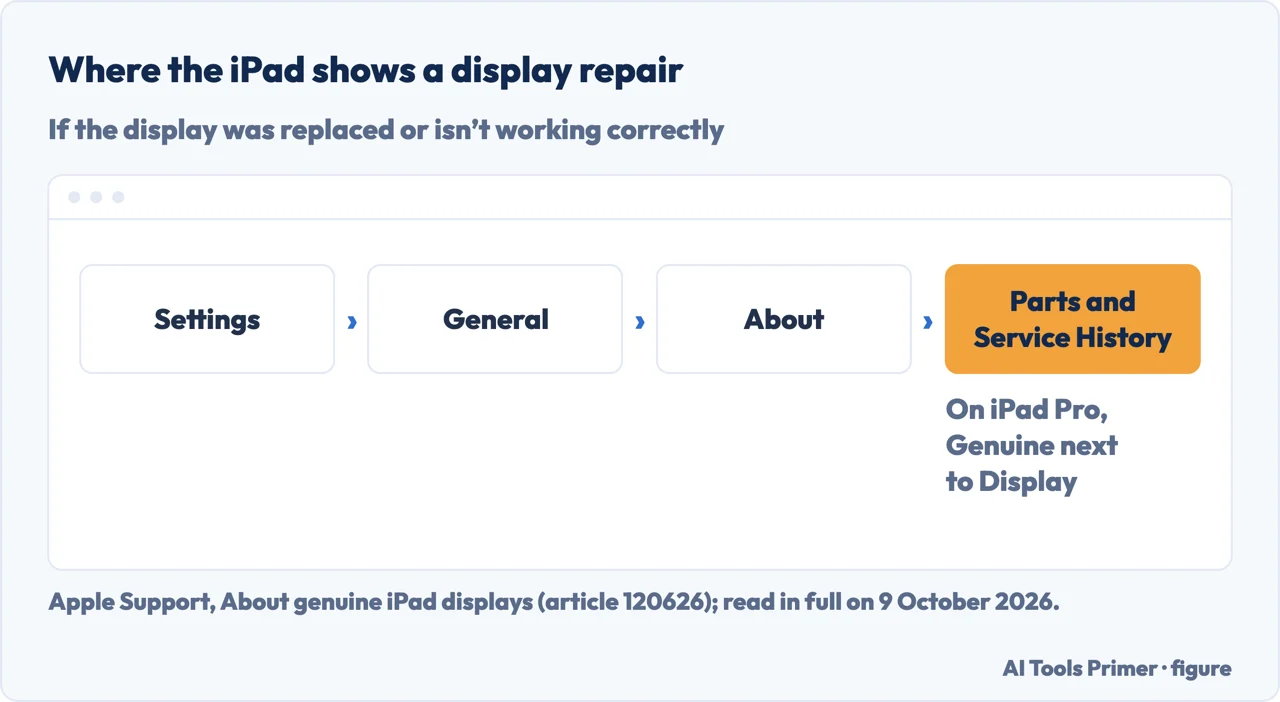
| Repair history | Settings, General, About, Parts and Service History; on iPad Pro, a repair with genuine parts shows Genuine |
| Warranty | One year against manufacturing issues; accidental damage is not covered |
- Force restart the iPad. The 2021 reply starts with this, saying it will often resolve a latent software issue; on an iPad without a Home button, Apple’s steps for a black or frozen screen are to press and quickly release the volume button nearest the top button, then the one farthest from it, then hold the top button until the Apple logo appears.
- Wait for the line to show. The member’s replies say to take the screenshot when the fault is evident.
- Take a screenshot. Apple’s guide for iPadOS 27 says to press and release the top button and a volume button at the same time.
- Turn the iPad 90 degrees and open the screenshot. It is in Photos, under Collections, Media Types, Screenshots. The 2021 reply says turning the iPad 90 degrees keeps the line in the picture from coinciding with the line on the screen.
- Read the result. If the line isn’t in the screenshot, the member’s replies call it a hardware fault; if it is, they say the cause is something other than hardware.
Where the test comes from
Not an Apple page. The screenshot test is given by the same Apple Community member in three of the threads on lines on an iPad, in the same words in 2025 and 2026: in January 2021 for a thin black line on an iPad Pro, in April 2025 for a green band on a 13-inch iPad Pro with M4, and in January 2026 for a flickering red line on a 12.9-inch iPad Pro of the 5th generation.
Why it works, in our words. A screenshot records the image iPadOS draws, not the light from the panel. A line that the panel shows and the picture doesn’t is being added after the image is made. That is our reasoning, not Apple’s.
The same question on a phone. Lines on an iPhone or an Android phone are in white horizontal lines on a phone screen, and a coloured patch rather than a line in a blue spot on a phone screen.
If the line is in the screenshot. The member’s 2021 reply says the issue is then related to software. In the same thread, a poster wrote that turning off Cross-Fade Transitions, in Settings, Accessibility, Motion, stopped a thin black horizontal line that came and went, on what the post calls iPad 14.3. The post doesn’t say whether the line showed in a screenshot; it is one user’s report on an old version, not an Apple fix. If the touch screen also stops responding properly, Apple’s steps are in a screen that ignores you.
What posters report. Posters in the threads write that the lines appeared without a drop: a 3-inch-wide green vertical band on an M4 iPad Pro under two weeks old, a red line that flickered and came back thinner, and, on another iPad, lines that a restart and a few hours off did not clear, which the owner wrote in May 2020 appeared to be an LCD screen failure needing a repair that costs £306. The same member wrote in the 2025 thread that Apple usually exchanges the iPad for a refurbished one of the same model at the repair price; that is a forum reply, not Apple’s statement. On iFixit Answers, for flickering lines on an 11-inch iPad Pro (3rd generation) with a slight bend, a reply says the LCD panel is under tension, which can cause odd behaviour when the frame is bent.
If it is the display
Who replaces it. Apple says that, depending on where you live, an iPad display can be replaced in or out of warranty at an Apple Store or an Apple Authorized Service Provider, or by sending the iPad to an Apple Repair Center, and that Independent Repair Providers can get genuine parts for out-of-warranty work.
What a non-genuine display might do. Apple lists, among others, touch that might not respond on parts of the screen, Apple Pencil accuracy that might degrade, True Tone that might not work correctly, and colour calibration that might be incorrect. If the display has been replaced or isn’t working correctly, Settings, General, About shows it in the Parts and Service History section; on iPad Pro, a repair with genuine parts and processes shows Genuine next to Display.
The fee. Apple’s iPad repair page says Apple inspects the device to set the final fee, and that its estimates are for out-of-warranty service from Apple; Authorized Service Providers set their own. The Apple Limited Warranty covers manufacturing issues for one year and not accidental damage, in addition to consumer law where you live.
Which versions. The screenshot steps come from Apple’s iPad User Guide for iPadOS 27; the force restart article and the display article give no iPadOS version. The threads run from May 2020 to January 2026. Single dots rather than lines are in dead pixel repair, pale patches in white spots on a screen, and dark bruises from pressure in pressure marks on a screen.
Where to start
Five ways in.
- “Where do I start?”
- The test — the test
- “Who says so?”
- Where the test comes from — where the test comes from
- “It’s in the screenshot.”
- Software — if it is in the picture
- “Is it just me?”
- What posters report — what posters report
- “It’s the display.”
- The repair — the repair
Other marks on a screen
Lines, spots and patches each have their own test.
Questions people also ask
How to fix a line on an iPad screen?
One Apple Community member’s test: take a screenshot while the line shows; a line missing from it means a hardware fault. For the display, Apple says that, depending on location, it can be replaced in or out of warranty at an Apple Store or Authorized Service Provider, or by shipping the iPad to an Apple Repair Center.
Why does my iPad keep making lines on the screen?
None of the Apple pages read here gives a cause. The screenshot test tells you where to look: if the line is not in the screenshot, one Community member says it is hardware and may get worse until repair or replacement are the only options; if it is, something other than hardware.
Are lines on screen fixable?
Apple says that, depending on location, an iPad display can be replaced in or out of warranty; its one-year warranty doesn’t cover accidental damage. By one Community member’s test, a line that also shows in a screenshot isn’t hardware; one poster wrote that turning off Cross-Fade Transitions stopped a line that came and went.
Not covered here. It does not cover opening an iPad, replacing the display yourself, or cracked glass.
Sources
- Apple Support — If your iPad doesn’t respond (article 102642): force restart — support.apple.com, read 9 October 2026.
- Apple, iPad User Guide (iPadOS 27) — Take a screenshot on iPad — support.apple.com, read 9 October 2026.
- Apple Support — About genuine iPad displays (article 120626): replacement, non-genuine parts, Parts and Service History — support.apple.com, read 9 October 2026.
- Apple Support — Apple Service and Repair for iPad: estimates and the Apple Limited Warranty — support.apple.com, read 9 October 2026.
- Apple Community — Thin black line across my iPad pro (January and February 2021) — discussions.apple.com, read 9 October 2026.
- Apple Community — Vertical lines on my iPad (May 2020) — discussions.apple.com, read 9 October 2026.
- Apple Community — Green vertical line on my iPad Pro M4 screen (April 2025) — discussions.apple.com, read 9 October 2026.
- Apple Community — Flickering Red line appeared on iPad Pro 12.9-inch (5th gen) (January 2026) — discussions.apple.com, read 9 October 2026.
- iFixit Answers — How to fix lines in screen (iPad Pro 11-inch, 3rd generation) — www.ifixit.com, read 9 October 2026.
Written by Alberto Gulotta
Founder and editor of AI Tools Primer, writing from Palermo, Italy. Thirty-five years of taking computers apart, starting with a Commodore 64 — the long version is on the about page.
Something wrong on this page? Write to aitoolsprimer@gmail.com and it gets fixed.
Written on 9 October 2026.
Independence and limits
No affiliate links and no paid placements anywhere on this site. Nobody pays to appear here, and no company has seen this page before you did.
This is general information, not professional advice. Where a page touches money, health, safety or the law, it names its source and the date it was read — and your situation may still differ. See the privacy page and the cookie policy.