
iPhone · guide
How to reset Face ID on iPhone, and what Apple says to try before
By Alberto Gulotta · Updated · 9 min read
How to reset Face ID on iPhone: go to Settings, Face ID & Passcode, tap Reset Face ID, then Set Up Face ID. Apple puts that last, after an update, a clear camera, a visible face and a restart. Face ID adjusts to makeup or a beard, and asks for the passcode after a restart without being broken.
| Question | Answer | Where it comes from |
|---|---|---|
| Where is the reset? | Settings, Face ID & Passcode, Reset Face ID, then Set Up Face ID | Apple Support |
| Is it the first thing to try? | No: Apple puts it after updating, checking the camera, your face, the distance and a restart | Apple Support |
| Does Face ID adjust by itself? | Yes, to makeup or growing a beard; a bigger change asks for the passcode first | Apple Support |
| Why does it ask for the passcode anyway? | After a restart, 48 hours idle, a remote lock, five failed matches and more | Apple Platform Security |
| What if setup keeps failing? | Apple says the iPhone might need service | Apple Support |
The reset and setting it up again
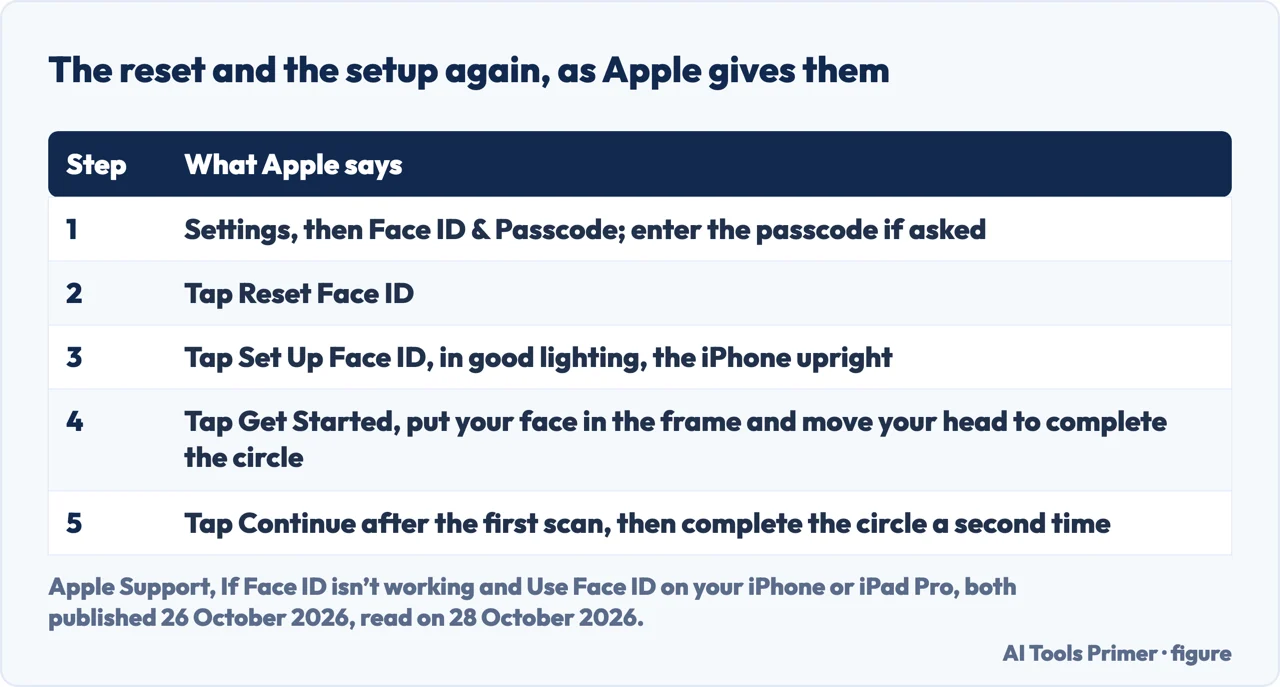
Apple’s page for when Face ID isn’t working, published on 26 October 2026, puts the reset near the end: if you still need help, reset Face ID and set it up again. You go to Settings, tap Face ID & Passcode and tap Reset Face ID, then tap Set Up Face ID. Apple’s page on using Face ID, published the same day, gives the setup: in Settings tap Face ID & Passcode and, if asked, enter your passcode; in good lighting tap Set Up Face ID; hold the device in portrait orientation, put your face in front of it and tap Get Started; move your head gently to complete the circle, using Accessibility Options if you cannot move your head; tap Continue after the first scan and complete the circle a second time. The same screen is where you choose the features that use Face ID.
Apple adds one case where a reset does not help. If Face ID repeatedly asks you to position your face within the frame without continuing the setup, or if your camera isn’t working and you cannot set up Face ID, Apple says you might need service. Asurion, which says on its page that it fixes devices, tells a similar story from the other side: if Face ID still fails during the first setup after a factory reset, it says the TrueDepth camera is likely physically damaged.
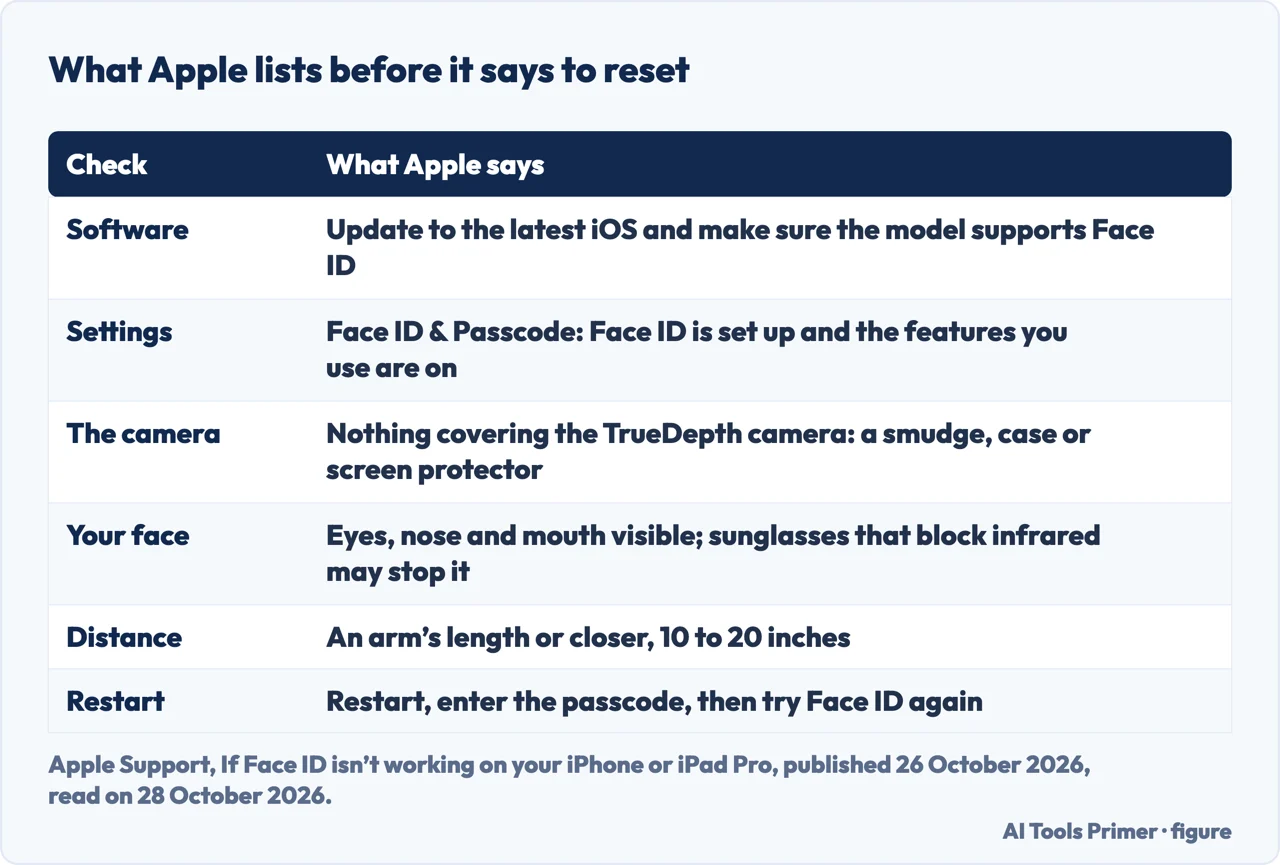
What Apple lists before it says to reset
The order on Apple’s page is to update to the latest iOS and check that the model supports Face ID; to check in Settings that Face ID is set up and that the features you use it for are on; to remove anything covering the TrueDepth camera, such as a smudge, a case or a screen protector; and to make sure your face is not blocked, with eyes, nose and mouth fully visible, because by default Face ID does not work if anything covers your mouth and nose. Face ID with a mask is a separate setup that Apple says works on iPhone 12 and later with iOS 15.4 and later, and only in portrait orientation; sunglasses that block certain types of light may block the infrared light the camera uses, even though Face ID works with many sunglasses.
Next Apple asks you to face the camera at about an arm’s length or closer, 10 to 20 inches, the range of a selfie or a FaceTime call. On iPhone 13 and later with iOS 16 and later Face ID works in portrait and landscape; on earlier models only in portrait. After that it says to restart the iPhone, enter the passcode and try Face ID again, and only then to reset it. Asurion’s list is shorter and in a different order: remove obstructions, hold the phone upright at arm’s length, switch Face ID off and set it up again, and restart.
Face ID adjusts by itself, and the alternate appearance
Apple’s page on the technology says Face ID automatically adapts to changes in your appearance, such as cosmetic makeup or growing facial hair. If the change is more significant, like shaving a full beard, it says Face ID confirms your identity with your passcode before it updates your face data. So a new look does not by itself call for a reset. For an appearance that can look vastly different, from facial hair, heavy makeup or other changes, Apple says you can set up an alternate appearance, which it also suggests for clear or prescription glasses that do not work. Asurion says that after a big change, such as shaving a thick beard or new heavy-framed glasses, you may need to retrain Face ID, and puts a total reset after that. Apple gives the chance that a random person unlocks your iPhone as less than 1 in 1,000,000 with a single enrolled appearance, whether or not you wear a mask.
When the passcode is asked and Face ID is working
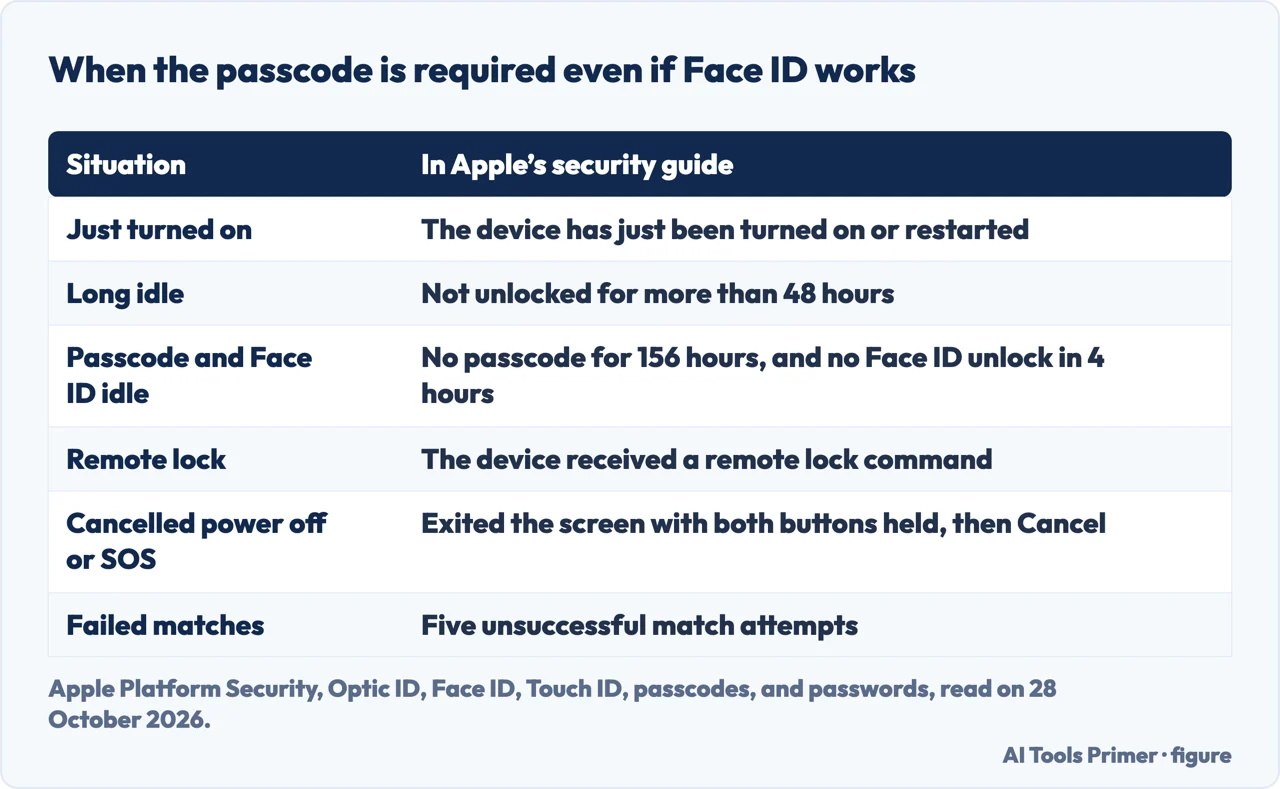
A Face ID that asks for your passcode may be working as designed. Apple’s platform security guide lists the cases in which the passcode is required: the device has just been turned on or restarted; it has not been unlocked for more than 48 hours; the passcode has not been used for 156 hours, six and a half days, and Face ID has not unlocked the device in four hours; the device has received a remote lock command; the user exited the power-off or Emergency SOS screen, reached by holding a volume button and the side button, by pressing Cancel; or there were five unsuccessful match attempts, although the device might offer the passcode after fewer failures. Asurion lists the same conditions in its own words and adds that Face ID is only on the iPhone X and newer. Apple’s page on Face ID not working also links to a separate page for the case where an alert says Face ID has been disabled, which we did not open.
What we did not use
We reset Face ID on no iPhone. We did not read the Reddit thread, the JustAnswer page, the Quora question or the video that Google listed, and the Google AI box, which opens with questions about the error message and damage near the camera, was read only in part. The pages we read do not mention a Reset Face ID button that is greyed out, which one of the questions people ask is about. Apple’s page also covers the new TrueDepth camera on iPhone 18 Pro models, which we left out. Face ID on an iPad, Optic ID and Touch ID are not covered.
Where to start
Four ways in.
- “Where is the reset?”
- The reset and setting it up again — steps
- “What do I try first?”
- What Apple lists before it says to reset — first
- “I changed my look.”
- Face ID adjusts by itself — adapts
- “Why does it ask for the passcode?”
- When the passcode is asked and Face ID is working — passcode
When the iPhone does not answer
Restarts, voice and liquid.
Passcodes and locks
What the passcode guards.
Questions people also ask
How do I rescan my face for Face ID?
Apple says to go to Settings, Face ID & Passcode, tap Reset Face ID and then Set Up Face ID, and move your head to complete the circle twice. For an appearance that changes a lot, it suggests an alternate appearance.
Why has my iPhone Face ID suddenly stopped working?
Apple lists a covered TrueDepth camera, a blocked face, a distance over about 20 inches and an out-of-date iOS. It may also be asking for the passcode on purpose, after a restart, 48 hours idle, a remote lock or five failed matches.
Why is my reset Face ID greyed out?
The pages we read do not mention a greyed-out Reset Face ID. Apple’s path is Settings, Face ID & Passcode, entering the passcode if asked.
How to Reset Face ID on iPhone?
Apple: Settings, tap Face ID & Passcode, tap Reset Face ID, then tap Set Up Face ID, after trying the checks that come before it.
Not covered here. We reset Face ID on no iPhone. The statements come from three Apple Support pages, Apple’s platform security guide and Asurion, all read on 28 October 2026.
The search volume and difficulty behind this page come from a Semrush reading of 29 August 2026, older than the 60 days the site normally allows.
Sources
- Apple Support — If Face ID isn’t working on your iPhone or iPad Pro — support.apple.com, read 28 October 2026.
- Apple Support — Use Face ID on your iPhone or iPad Pro — support.apple.com, read 28 October 2026.
- Apple Support — About Face ID advanced technology — support.apple.com, read 28 October 2026.
- Apple Platform Security — Optic ID, Face ID, Touch ID, passcodes, and passwords — support.apple.com, read 28 October 2026.
- Asurion — What to do if your Face ID isn’t working — www.asurion.com, read 28 October 2026.
Written by Alberto Gulotta
Founder and editor of AI Tools Primer, writing from Palermo, Italy. Thirty-five years of taking computers apart, starting with a Commodore 64 — the long version is on the about page.
Something wrong on this page? Write to aitoolsprimer@gmail.com and it gets fixed.
Written on 28 October 2026.
Independence and limits
No affiliate links and no paid placements anywhere on this site. Nobody pays to appear here, and no company has seen this page before you did.
This is general information, not professional advice. Where a page touches money, health, safety or the law, it names its source and the date it was read — and your situation may still differ. See the privacy page and the cookie policy.