
Software · guide
Optimized battery charging: what Apple says, device by device
By Alberto Gulotta · Updated · 10 min read
Optimized battery charging delays charging past 80 percent when the software expects the device to stay on the charger for a long time. Apple documents it separately for the iPhone, the Mac and the Apple Watch, with different switches and, on the iPhone 15 and later, a separate charge limit. This page puts the three side by side.
| Question | Answer | Where it comes from |
|---|---|---|
| What does it do? | Delays charging past 80 percent in certain situations, to reduce the time the battery spends fully charged | Apple Support, iPhone and Mac |
| Is it on by default? | On an iPhone and an Apple Watch, yes, from setup | Apple Support, iPhone and Apple Watch |
| Why has it not started? | At least 14 days of learning and at least 9 charges of 5 hours or more in a place; some location settings must be on | Apple Support, iPhone |
| How do I charge fully now? | Charge Now on the iPhone notification; Charge to Full Now on a Mac and an Apple Watch | Apple Support |
| What does turning it off cost? | Apple says it can increase wear on the battery and reduce its lifespan | Apple Support, iPhone |
What Apple says it is
Apple’s iPhone page says Optimized Battery Charging is designed to reduce the wear on the battery and improve its lifespan by reducing the time the iPhone spends fully charged. With the feature on, the iPhone delays charging past 80 percent in certain situations, and it uses on-device machine learning to learn your daily charging routine. While it is active, a Lock Screen notification says when the iPhone will be fully charged. The page says the feature is on by default when you set up the iPhone.
The Mac page, which requires macOS Big Sur 11 or later, describes the same idea and says the delay applies, for example, when the Mac is predicted to stay connected to power for an extended period. When charging is on hold, “Charging On Hold” appears in the battery status menu. The Apple Watch page says the feature is on by default from setup, that the watch’s battery level remains between 75% and 80% while charging is delayed, and that it activates only when the watch predicts it will be on a charger for an extended period. The existing pages on a phone that will not charge and a Mac that may be charging cover the same behaviour from the side of the symptom.
Where the setting is, device by device
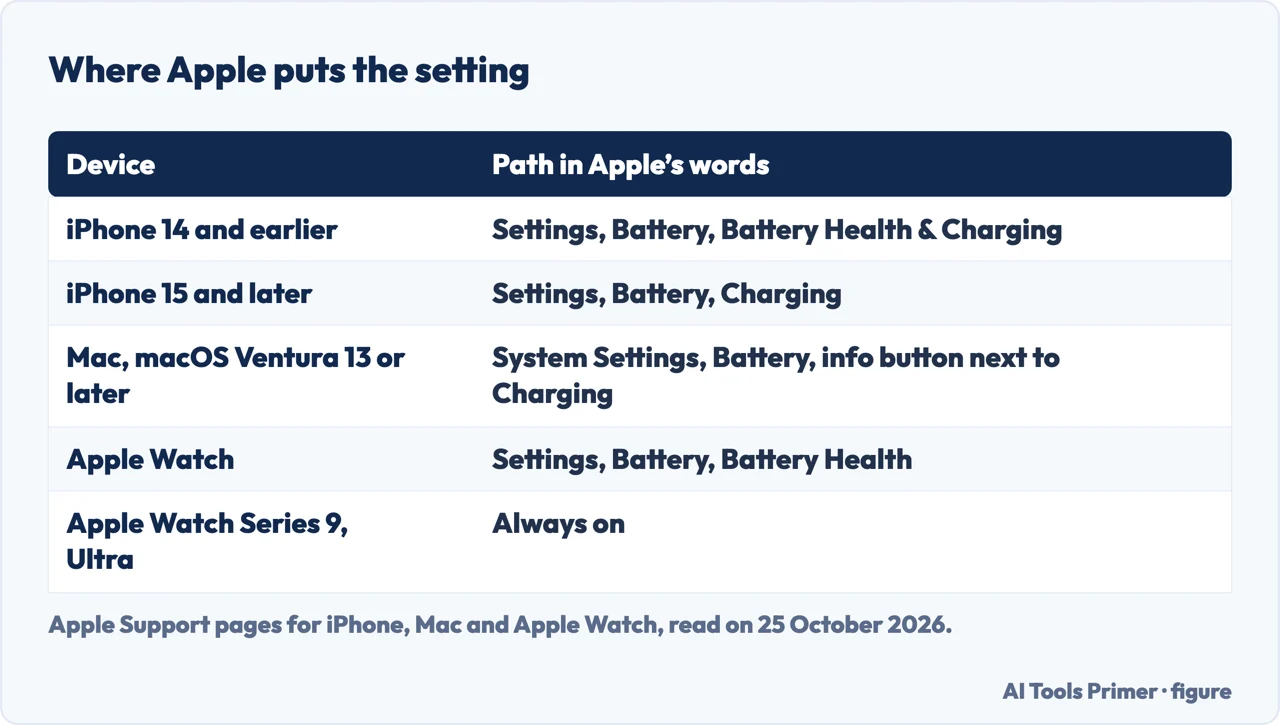
On an iPhone 14 or earlier, Apple’s steps are Settings, Battery, Battery Health & Charging, then turn Optimized Battery Charging on or off. On an iPhone 15 or later they are Settings, Battery, Charging, where you can choose a charge limit between 80 and 100 percent in 5 percent increments, and Optimized Battery Charging is available when the limit is 100 percent. Apple adds a warning: “Turning off charging optimizations can increase wear on your battery and reduce its lifespan.”
On a Mac, in macOS Ventura 13 or later, choose System Settings from the Apple menu, click Battery in the sidebar, click the info button next to Charging (or Battery Health) and turn Optimized Battery Charging off or on; when you turn it off you can choose to turn it off only until tomorrow. On an Apple Watch, open Settings, scroll to Battery, tap Battery Health and turn off Optimized Battery Charging, choosing Turn Off Until Tomorrow or Turn Off. If the watch is a Series 9 or later, or any Apple Watch Ultra, the feature is always on. The watch page also describes a second feature, Optimized Charge Limit, on supported models with watchOS 10 or later.
When it does not start
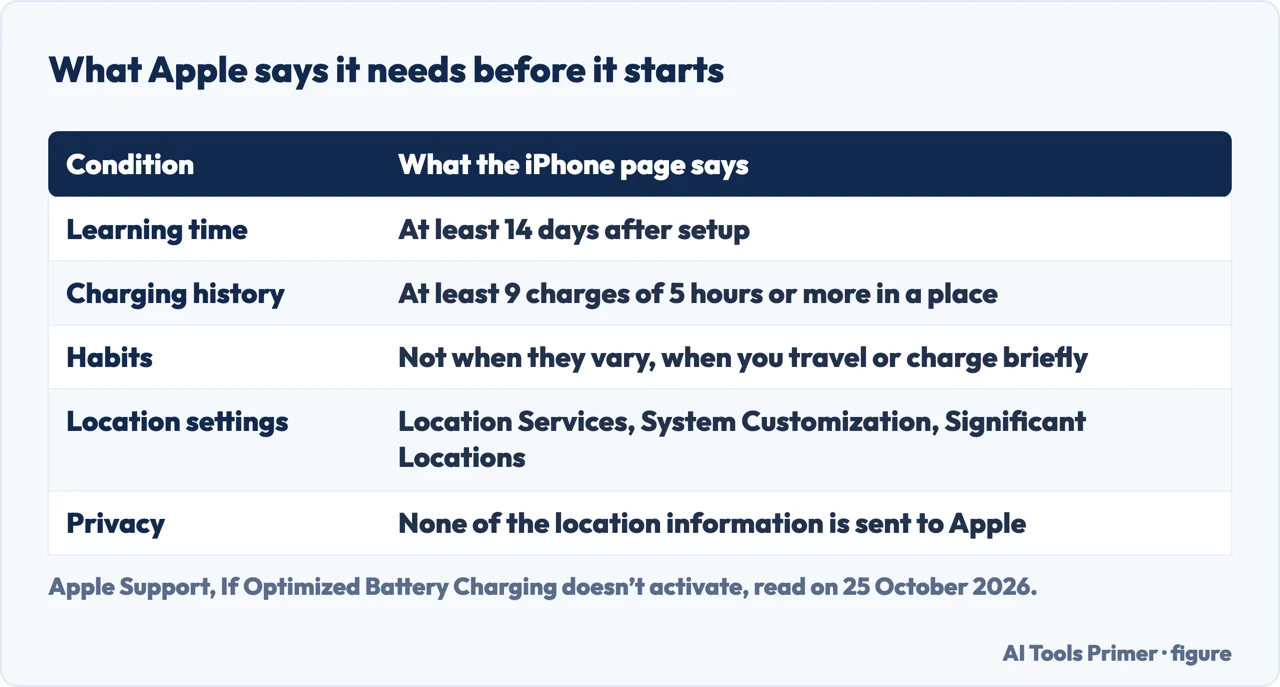
Apple’s page for this case says the feature is designed to engage only in locations where you spend the most time, such as your home and place of work. After you set up the iPhone it needs at least 14 days to learn your charging habits, so it will not engage before then, and the iPhone needs at least 9 charges of 5 hours or more in a given location. It does not engage when your charging habits are more variable, when you travel, or if you charge for short periods of time.
Apple lists three settings that must be on: Location Services, System Customization under System Services, and Significant Locations, all under Privacy & Security, Location Services. It says none of the location information used for this feature is sent to Apple. The Apple Watch page gives a similar list: Location Services on the watch, and System Customization and Significant Locations & Routes on the paired iPhone. For the questions next to this one, see the page on a battery draining fast and the one on battery health.
The charge limit, and 80 or 100
On an iPhone 15 or later, Apple’s page says the iPhone charges to within a few percentage points of the limit you choose and then stops, and resumes if the level drops more than 5 percent while it is plugged in. If iOS decides a limit will help preserve the battery, it shows a recommendation, for example a limit of 95 percent. With a limit below 100 percent, the iPhone occasionally charges to 100 percent to keep its estimate of the charge level accurate. On a Mac, Apple’s page says a charge limit between 80% and 100% can be set when using macOS Tahoe 26.4 or later on a Mac with Apple silicon, and that the menu then shows “Charged to [%] Limit”.
The people-also-ask box asks whether it is better to charge to 80 or 100 percent. The Apple pages we read describe the settings and their cost but do not say which limit to choose, so we do not either.
When you need it full now
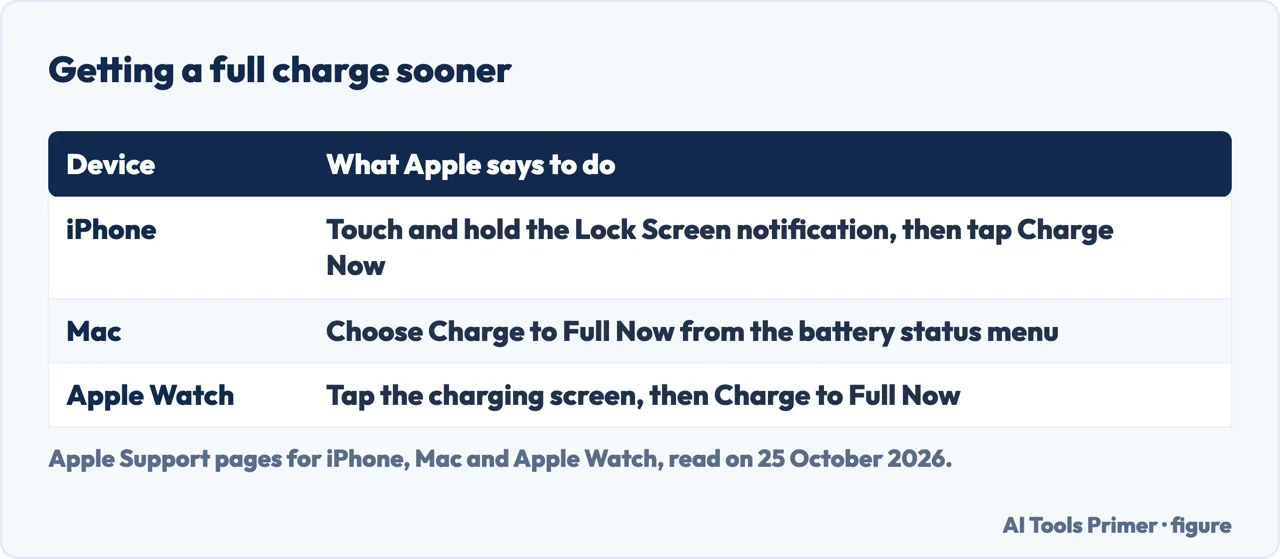
Apple gives one exception for each device. On the iPhone, touch and hold the Lock Screen notification and tap Charge Now. On the Mac, choose Charge to Full Now from the battery status menu, which the page says also applies when the Mac has stopped at a charge limit. On the Apple Watch, keep it on the charger, tap the watch to show the charging screen, tap the circle with the green or yellow charging icon, then Charge to Full Now. For a watch that is new, the charging screen says Charging to full, because it takes time to learn your patterns.
What the accessory pages add
Anker’s page says the feature usually pauses near 80 percent, that the first stage proceeds at normal speed, and that it is not a cure-all, since batteries still age through use, time, heat and charge cycles. INIU’s shop blog says it is not about charging faster but about helping the battery age more slowly. MTS Power Products’ blog says the phone charges to 80 percent, pauses and finishes just before you usually unplug. Chargie’s page comes from the maker of a charge-limiting product and promotes its own manual limit.
In the text we read, none of the four gives the 14 days, the 9 charges, or the three location settings that Apple lists, so they do not explain why the feature can fail to start.
Where to start
Four ways in.
- “What does it actually do?”
- In Apple’s words — what
- “Where do I turn it off?”
- Device by device — where
- “It never seems to start.”
- What it needs — start
- “I need it full now.”
- The exception — now
Charging and battery
When the number stops, and what it measures.
Questions people also ask
Is it good to have optimized battery charging on?
Apple says it is designed to reduce the wear on the battery and improve its lifespan, and that turning charging optimizations off can increase wear and reduce lifespan. It is on by default on an iPhone and an Apple Watch.
Is it better to charge my iPhone to 80% or 100%?
Apple’s page lets an iPhone 15 or later choose a limit between 80 and 100 percent and may recommend one, but the page we read does not say which is better.
What happens if we turn off optimized battery charging?
Apple says that turning off charging optimizations can increase wear on your battery and reduce its lifespan. On a Mac you can turn it off only until tomorrow.
Is it okay to turn off optimized battery charging on iPhone?
Apple gives the steps and a warning about wear, which is the cost it names. If you only need a full charge now, the Charge Now notification is the exception it gives.
Not covered here. We did not test the feature on a device. The statements come from four Apple Support pages: the iPhone page (published 8 December 2025), the Mac page (6 April 2026), the page for when it does not activate (16 March 2026) and the Apple Watch page (7 April 2026), read on 25 October 2026, and from pages by Anker, INIU, MTS and Chargie used only for what they claim. Menu names and requirements change with the software version.
Android phones, which have similar features under other names, are not covered, and neither are iPad and other Apple devices. Reddit was not read.
The search volume and difficulty behind this page were read in Semrush on 29 August 2026.
Sources
- Apple Support — About Charge Limit and Optimized Battery Charging on iPhone (8 December 2025) — support.apple.com, read 25 October 2026.
- Apple Support — About Optimized Battery Charging and Charge Limit on Mac (6 April 2026) — support.apple.com, read 25 October 2026.
- Apple Support — If Optimized Battery Charging doesn’t activate (16 March 2026) — support.apple.com, read 25 October 2026.
- Apple Support — About Optimized Battery Charging on Apple Watch (7 April 2026) — support.apple.com, read 25 October 2026.
- Anker — What Is Optimized Battery Charging on iPhone? — www.ankersolix.com, read 25 October 2026.
- INIU — What Is Optimized Battery Charging? 2026 Complete Guide — iniushop.com, read 25 October 2026.
- MTS — Charge Smarter, Not Harder: Mastering Optimized Battery Charging — mtspowerproducts.com, read 25 October 2026.
- Chargie — What Is Optimized Battery Charging? How It Works — chargie.org, read 25 October 2026.
Written by Alberto Gulotta
Founder and editor of AI Tools Primer, writing from Palermo, Italy. Thirty-five years of taking computers apart, starting with a Commodore 64 — the long version is on the about page.
Something wrong on this page? Write to aitoolsprimer@gmail.com and it gets fixed.
Written on 25 October 2026.
Independence and limits
No affiliate links and no paid placements anywhere on this site. Nobody pays to appear here, and no company has seen this page before you did.
This is general information, not professional advice. Where a page touches money, health, safety or the law, it names its source and the date it was read — and your situation may still differ. See the privacy page and the cookie policy.