
Software · guide
Samsung overheating notification: what the messages mean and do
By Alberto Gulotta · Updated · 10 min read
A Samsung overheating notification means the phone is above its normal operating range and is protecting itself. Samsung lists the messages: “Device overheating” lets you keep using it while it dims and slows, “Device cooling down” asks you to put it down, and “Device powered off automatically” means it already shut down. First, disconnect the charger and close running apps.
This page puts Samsung’s pages in order: the messages, what the phone does by itself, what Samsung lists as causes, and the steps. It also says which questions Samsung’s pages leave open.
| Question | Answer | Where it comes from |
|---|---|---|
| What does the notification mean? | The phone is above its normal operating range and is protecting itself | Normal operating temperature page |
| Can I keep using the phone? | With “Device overheating”, yes, but the screen may dim, it may slow, charging may pause and apps close; with “Device cooling down”, Samsung says to put it down | Two Samsung US pages |
| What is the normal range? | Ambient temperatures between 32 and 95 degrees Fahrenheit | Normal operating temperature page |
| What do I do first? | Disconnect the charger and close running apps until the device cools down | Normal operating temperature page |
| When do I contact Samsung? | If the device is still too warm to touch after cooling | Normal operating temperature page |
The messages Samsung lists
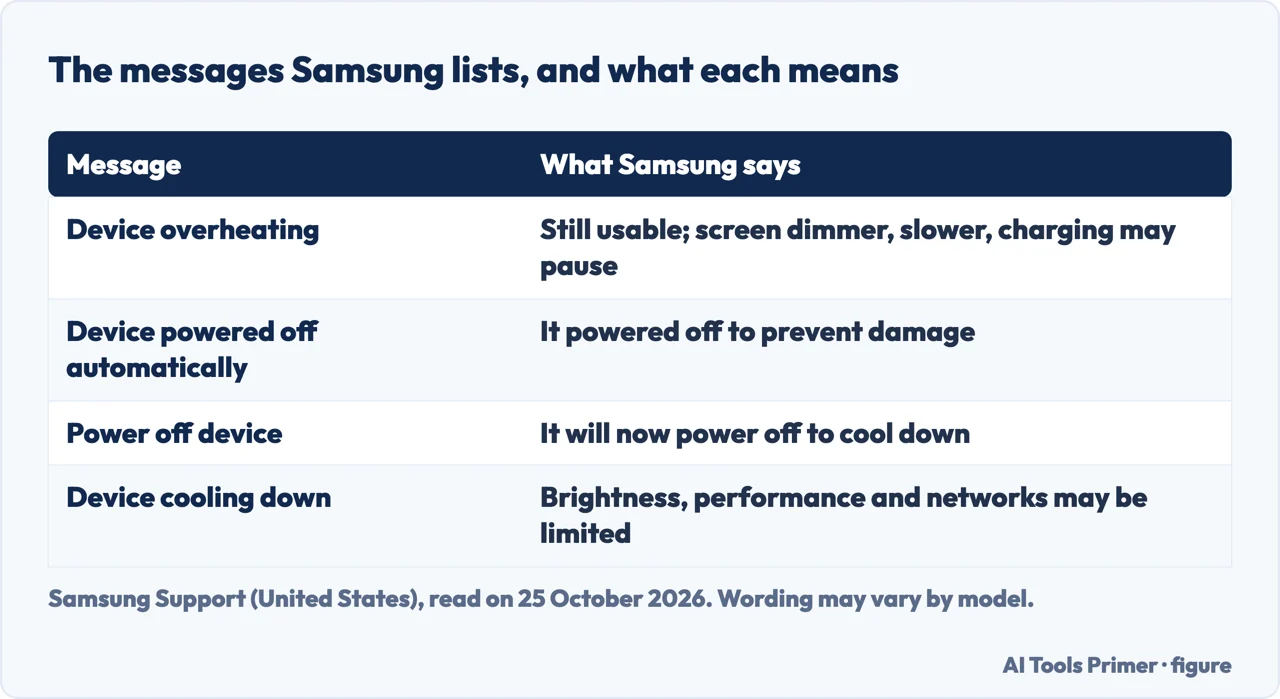
Samsung’s page on the normal operating temperature says a hot phone may power off, close apps, temporarily stop charging and dim the display, and that it shows one of these notifications, with wording that may vary by model. “Device overheating” reads: Your device is overheating. Steps will be taken to cool it down. You can still use your device, but the screen may get dimmer, the device may slow down, charging may pause, and apps will be automatically closed; after the device cools down, performance returns to normal automatically. “Device powered off automatically” says the device powered off to prevent damage, and lists the causes: graphics-intense applications such as games and navigation applications for long periods, transferring large files, or a hot environment. “Power off device” says the device will now power off to cool down.
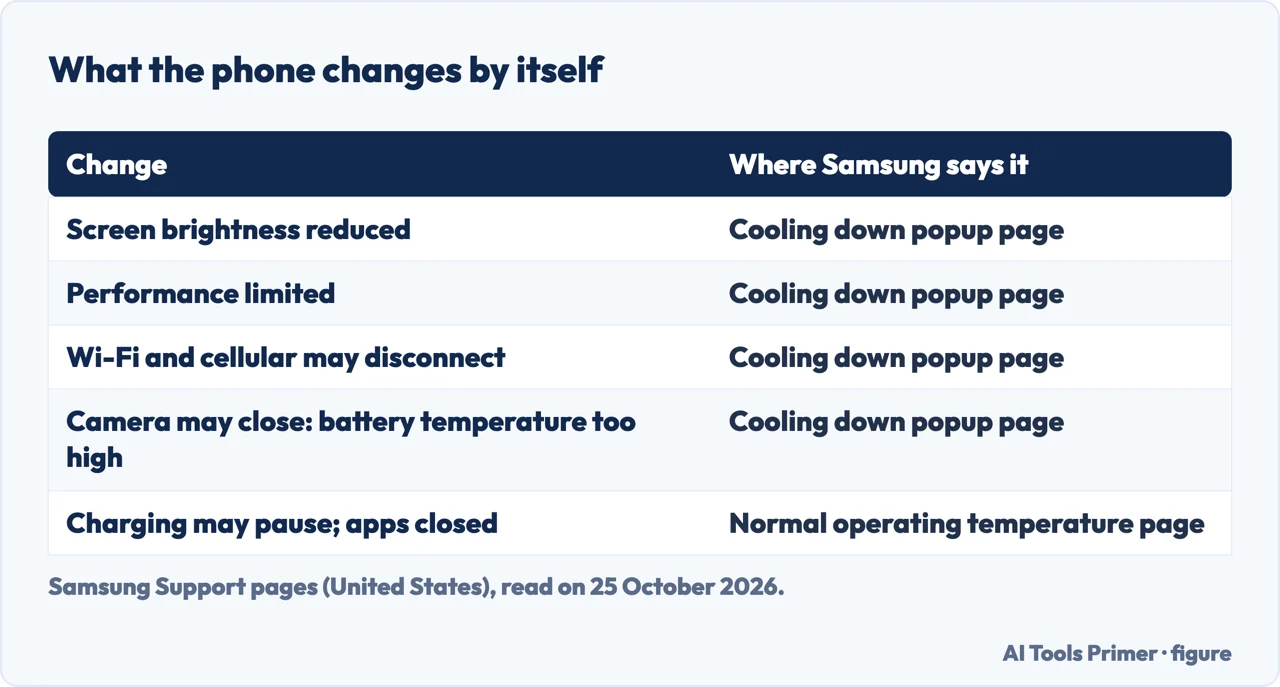
A separate Samsung page covers a fourth message. When certain apps or environmental factors overheat a phone or tablet, it displays “Device cooling down” and changes settings to prevent damage. Samsung’s steps: stop using it, let it cool, remove cases or covers, and take a break. The page says the screen brightness may be reduced, the overall performance may be limited, Wi-Fi and cellular networks may be disconnected, and the Camera app may stop or close with the message “Exit Camera. Battery temperature too high.” Once the device has cooled sufficiently, it returns to normal operation.
What Samsung lists as causes
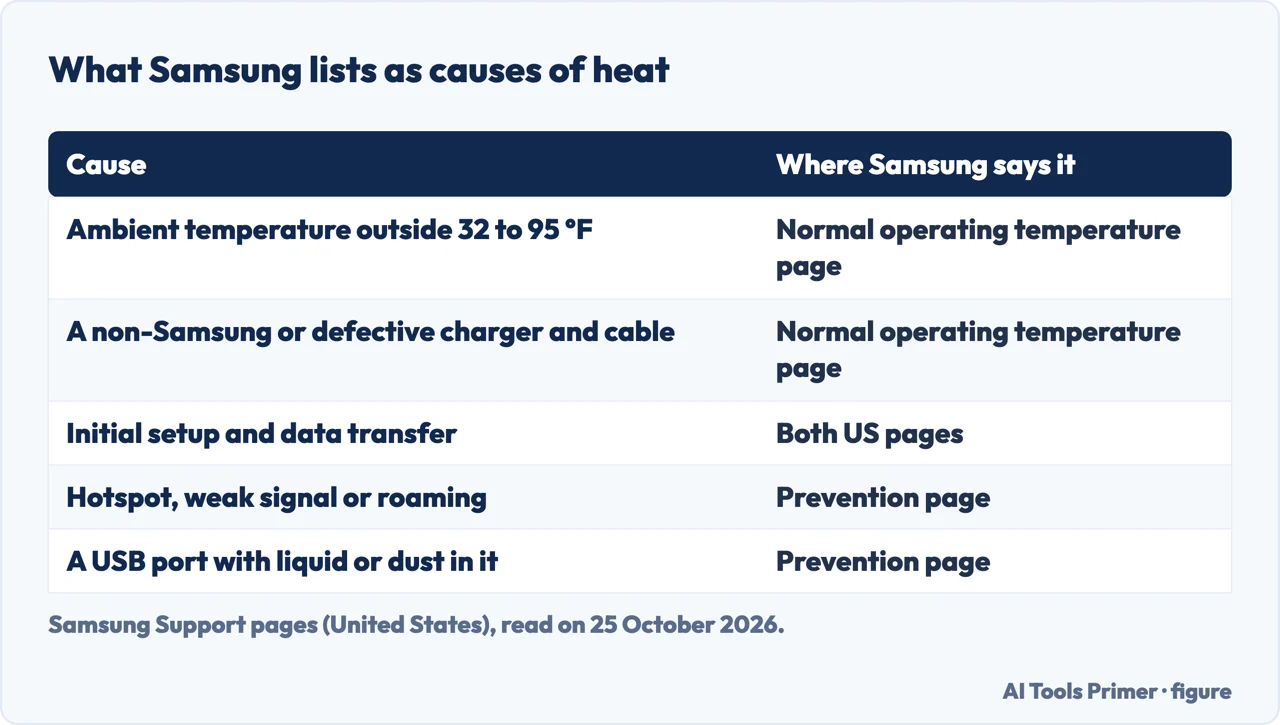
The normal-operating-temperature page names five: using the device outside ambient temperatures of 32 to 95 degrees Fahrenheit; putting it on or near a heat source, leaving it in a parked car on a hot day, or using it continually in direct sunlight; using several apps for an extended time, or processor-intensive apps such as games or GPS tracking; charging with a non-Samsung, incompatible or defective charger and cable; and initial setup and data transfer from a previous device. It adds that a phone may feel warm under some conditions, such as charging, and that this does not affect its lifespan or performance.
The prevention page is longer. Among its scenarios are setting up a device or restoring large backups, downloading system updates or large files, syncing large amounts of data, streaming video at maximum brightness, using Smart View or Samsung DeX, updating or installing apps while recording video, running navigation in direct sunlight in a car, using the mobile hotspot or tethering, poor signal or no service, international roaming, and charging with a damaged USB cable or when the multipurpose jack (USB port) is compromised by liquids, dust or foreign materials.
Samsung’s steps to cool it
The prevention page splits the steps by situation. When heat is detected during charging, disconnect the charger immediately, close all running apps and let the device cool completely before charging again; inspect the cable and the multipurpose jack and, if the cable is frayed or damaged, replace it with a genuine Samsung accessory; make sure no metal, magnets or credit cards sit between the device and a wireless charger. During regular use: keep the software updated, restart the device to clear temporary conflicts between running apps, turn off unused connectivity features such as Wi-Fi, Location and Bluetooth, close background apps (Settings, then Device care, shows high battery consumption), clean up storage, lower the screen brightness and, if it overheats severely, stop using it and let it cool. If the device is still too warm to touch, Samsung says to contact Samsung support.
The Singapore page gives the same advice on restarting, because conflicts between running apps may cause the device to heat up. It says the warning appears to prevent device failure, skin irritation and damage and battery leakage. Samsung’s prevention page also asks you not to keep a warm device in prolonged contact with skin, and not to place the device, the charger or a power accessory on your body or sit on it while it is connected to power.
The same thing on a Pixel, for comparison
Google’s page for its own Android phones shows what a built-in check looks like. On Pixel 6 and later, open Settings, Battery, Battery diagnostics, Phone is very warm. Google says: “If your phone feels warm, you shouldn’t be too concerned.” It lists what warms a phone, such as playing media, restoring backed-up data, tethering or using a hotspot, and downloading or uploading a lot of data, alone or while charging. When it senses it is too hot the phone may turn off the camera’s flash and partially or fully turn off mobile data or Wi-Fi. If the temperature keeps rising it could show a warning, enter low power mode and turn off; Google’s advice is to let it cool down, then restart it, and to contact Pixel support if it keeps turning off. The Samsung pages we read give no equivalent temperature check, and they describe different messages.
When the warning seems wrong, or the phone was wet
Two of the questions in the search results have no answer on the Samsung pages we read. One is a warning with a cool phone: in a Samsung Community thread from 2020, a user whose A50 started showing “device overheating” after a software update on 9 August 2020 says the phone is not hot at all, that apps then close abruptly, and that it once powered off and would not turn on. A reply asks whether the phone has been near water or other liquids and points to the Liquid Indicator in the SIM tray slot. A user with an S10 Lite then reports the same warning after dropping the phone in water more than a week earlier. The thread gives no fix. The other question is a phone that got wet and now warns about heat; the same thread is the only place in these results that connects the two, and it is an account from users.
Samsung’s prevention page does name liquid in one place: charging when the multipurpose jack (USB port) is compromised by liquids, dust or foreign materials. If your phone has been wet, the page on liquid detected on an iPhone is about a different phone and a different alert. For a phone that will not charge at all, see the page on a phone that will not charge.
Where to start
Five ways in.
- “What does the message mean?”
- The messages — messages
- “Why is it hot?”
- What Samsung lists — causes
- “How do I cool it?”
- Samsung’s steps — steps
- “It is not hot at all.”
- A wrong warning — false
- “It got wet first.”
- A wet phone — false
Hot phones and chargers
The same problem on an iPhone and on a laptop, and a phone that will not charge.
Questions people also ask
Why is my phone saying it is overheating when it is not?
Samsung’s pages we read give no procedure for it. A Samsung Community thread from 2020 describes the warning on a cool A50 after an update; a reply asked about liquid and the Liquid Indicator, and gave no fix.
How do I get rid of the Samsung moisture warning?
We did not read a Samsung page on that alert. Samsung’s overheating pages mention only a USB port compromised by liquids, dust or foreign materials as a cause of heat while charging.
My Samsung phone is overheating and turning off. What can I do?
Samsung says to disconnect the charger and close running apps, remove cases, let it cool, use a Samsung-approved charger and cable, keep the software updated, and contact Samsung support if it is still too warm to touch.
My phone got wet and now it says it is overheating. Is this normal?
The Samsung pages we read do not say. The 2020 community thread has a reply asking about liquid, and a user who dropped the phone in water more than a week before the warnings began.
Not covered here. We did not test a phone for this page. The messages, causes and steps come from Samsung Support (Keep your Galaxy device at its normal operating temperature; How to prevent overheating when using your Samsung Galaxy device; Cooling down popup appears on Samsung phone or tablet; the Singapore page on what to do when a phone heats up) and Google Pixel Phone Help (Help keep your Pixel phone from feeling too warm or hot), read on 25 October 2026. The wording of the messages varies by model.
The Samsung Community thread is an account by users from 2020. Reddit, the British version of the Samsung page and the iFixit page in the results were not read, and neither was the video. Smart watches and earbuds, which Samsung also covers on the first page, are not covered here.
The search volume and difficulty behind this page were read in Semrush on 29 August 2026.
Sources
- Samsung Support — Keep your Galaxy device at its normal operating temperature — www.samsung.com, read 25 October 2026.
- Samsung Support — How to prevent overheating when using your Samsung Galaxy device — www.samsung.com, read 25 October 2026.
- Samsung Support — Cooling down popup appears on Samsung phone or tablet — www.samsung.com, read 25 October 2026.
- Samsung Support (Singapore) — What to do when a Samsung phone heats up? — www.samsung.com, read 25 October 2026.
- Google Pixel Phone Help — Help keep your Pixel phone from feeling too warm or hot — support.google.com, read 25 October 2026.
- Samsung Community (EU) — FALSE ‘device overheating’ warning (2020) — eu.community.samsung.com, read 25 October 2026.
Written by Alberto Gulotta
Founder and editor of AI Tools Primer, writing from Palermo, Italy. Thirty-five years of taking computers apart, starting with a Commodore 64 — the long version is on the about page.
Something wrong on this page? Write to aitoolsprimer@gmail.com and it gets fixed.
Written on 25 October 2026.
Independence and limits
No affiliate links and no paid placements anywhere on this site. Nobody pays to appear here, and no company has seen this page before you did.
This is general information, not professional advice. Where a page touches money, health, safety or the law, it names its source and the date it was read — and your situation may still differ. See the privacy page and the cookie policy.