
iPhone · guide
How to unsend a message on iPhone, and what they see
By Alberto Gulotta · Updated · 11 min read
The action takes about three seconds and the deadline is two minutes. But the more useful question is the one underneath it, and Apple answers it in a single sentence.
“A note confirming that you unsent the message appears in both conversation transcripts: yours and your recipient’s.”
This is the sentence that decides whether the feature does what you are hoping. Apple also says plainly that “unsending removes the message from your recipient’s device” — so the words do go. But the two statements are about different things. The content disappears; the event does not. The other person is left looking at a note saying you unsent something, in the place where the message was.
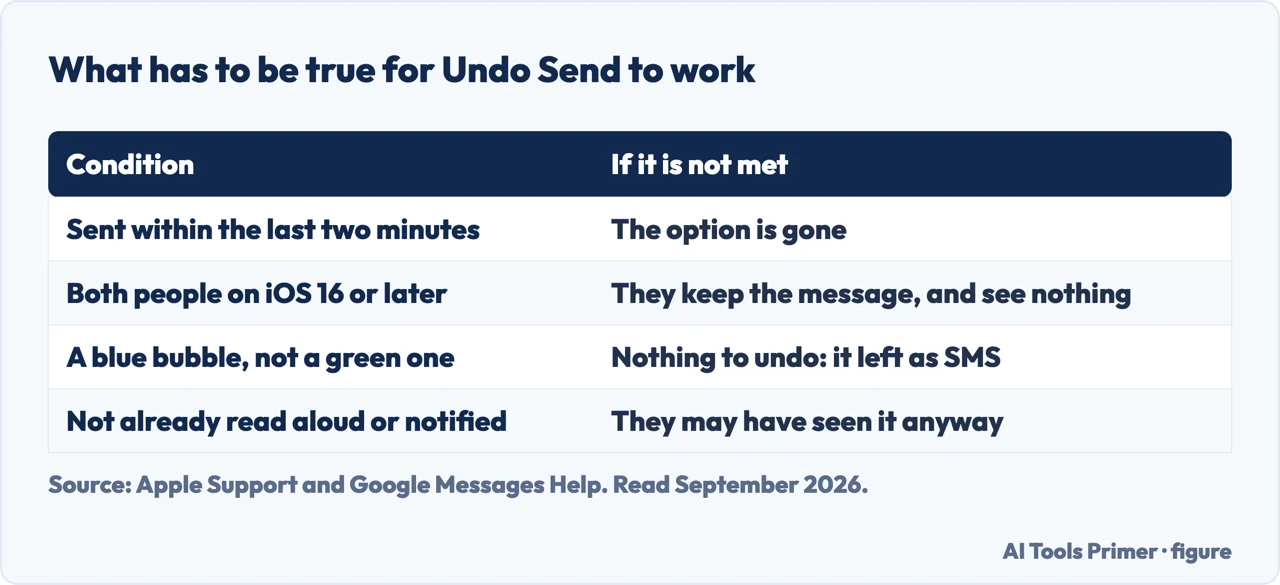
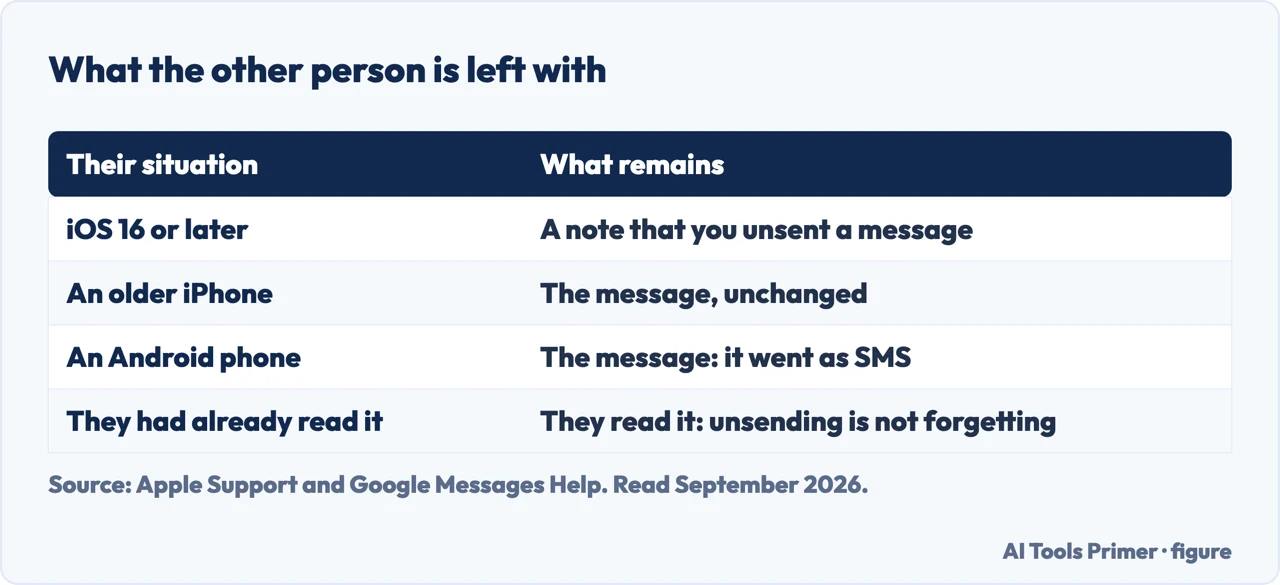
So before the steps, it is worth being clear about what this feature is and is not. It is a way to remove the words from somebody else’s phone. It is not a way to make the message never have happened. If the reason you are here is that you sent something to the wrong person, the first of those is probably enough — they will know a message came and went, but not what it said. If the reason is that you are hoping they never notice, Apple’s own documentation says they will.
The three steps
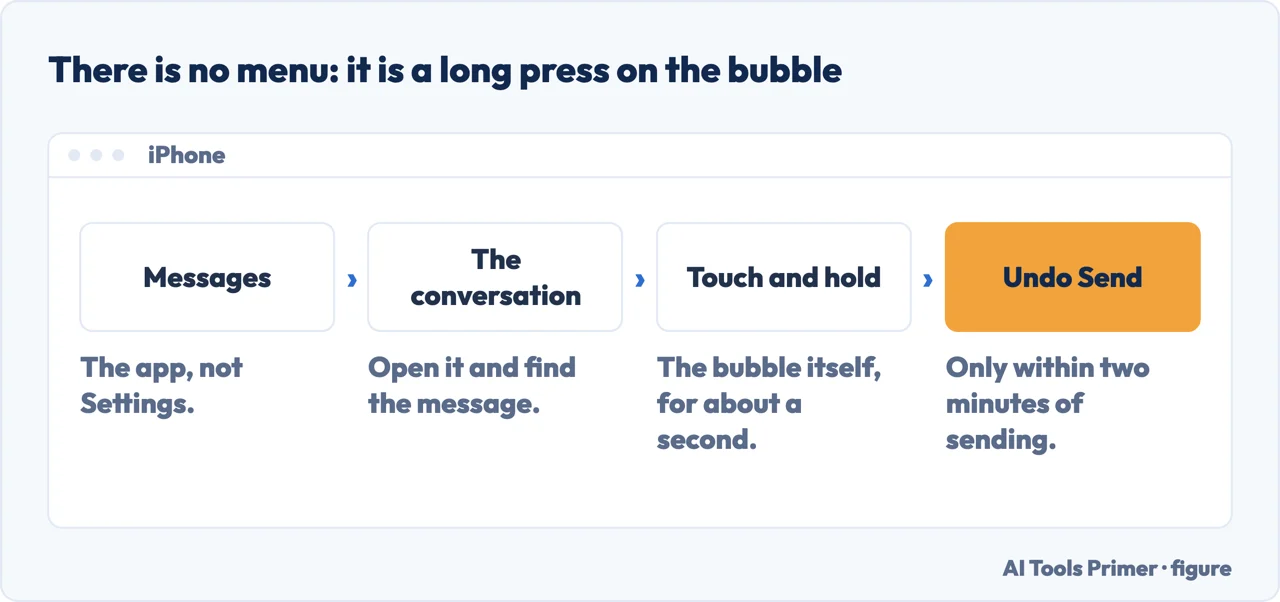
There is no menu and no settings screen. It is a long press on the bubble itself.
- Open the Messages app and tap the conversation.
- Touch and hold the message bubble you want to take back.
- Tap Undo Send. Apple: “The message disappears and a notification that says ‘You unsent a message’ appears.”
That is the whole procedure on Apple’s support page. The reason it is hard to find is that there is nothing to find: no setting, no toggle, no entry in a menu. The control lives on the message itself and only appears when you press and hold it.
Two deadlines, and they are not the same one
Apple publishes a separate window for taking a message back and for fixing it.
- Unsend — 2 minutes, once
- “You can undo a recently sent message for up to 2 minutes after sending it.”
- Edit — 15 minutes, five times
- “You can edit a recently sent message up to five times within 15 minutes of sending it.” Both of you can then tap Edited to see the previous versions.
The gap between those two windows is worth planning around, because they solve different problems and the shorter one runs out first. A typo has fifteen minutes and five attempts. A message sent to the wrong conversation has two minutes and one. If you are not sure which you need, the unsend deadline is the one to act on, because the editing window is still open afterwards and the unsend window is not.
Which brings up the question that shows up in the searches themselves, judging by the shape of the searches around this one: what to do after the two minutes have gone. The honest answer is that Apple documents no route. The window is not a soft limit or a default that can be changed in settings; it is the whole of what the feature offers. After it closes, the message is a message.
There is one thing worth doing instead, and it is not a workaround. If the message went to the wrong person, saying so directly costs less than the alternative, because the alternative is now a permanent message plus a silence. If it went to the right person and you regret the wording, editing may still be open — the fifteen minutes are counted from when it was sent, not from when you noticed.
“You can’t edit or unsend SMS, MMS, or RCS text messages. If you edit a text message in a group conversation, only iMessage users will see your edits.”
Two rules in two Apple sentences, and the second is narrower than it sounds. Editing a green message is not offered; what the group changes is who sees the edit, and the answer is only the iMessage users in it. Unsending is not offered in either case. In practical terms: if the bubble was green, there is no Undo Send to reach for.
This is the point at which the colour of the bubble stops being cosmetic. Everything above depends on the conversation running over iMessage. Apple’s wording is unambiguous about the other kinds, and there is no setting that adds unsending to them.
When the other person is on older software. Apple’s requirement is that “everyone must use iMessage with iOS 16, iPadOS 16.1, macOS Ventura, or later”. If they are not, Apple says the original message “remains in the conversation, and you’re notified that the recipient may still see the original message”. So the failure is reported rather than silent — you are told at the time. Editing behaves differently again: a recipient on older software receives “follow-up messages with the preface ‘Edited to’ and your new message in quotation marks”, which means the correction arrives as an extra message rather than as a change to the old one.
That last detail deserves a moment, because it changes what you should expect to see. Apple does not say the unsend silently fails; it says you are notified that the recipient may still see the original. So the outcome is knowable at the time rather than something to worry about afterwards — and if you see that notice, you know the words are still on their phone and can act accordingly.
One more piece of the picture, from the editing side. Apple says the message “is marked as Edited in the conversation transcript”, and that both of you can tap it to see previous versions. Editing is therefore not quiet either. On current software the earlier wording stays available to the person you sent it to — a correction, in this system, is recorded rather than substituted.
The other messaging standard has no equivalent, and that is the whole answer for green bubbles. Google documents what RCS does offer — typing indicators, read receipts, files and high-resolution photos — and unsending is not among them; RCS chats are also “turned on only when all the participants in a conversation have RCS”. So a message that left your phone as SMS or MMS is gone in the sense that matters: there is no protocol underneath it that can be asked to take it back, whatever your phone shows you.
The guides below take it three ways: the deadline itself, what is left behind afterwards, and the neighbouring settings in Messages that decide what the other person learns about you.
Where to start
Three ways in. The first is time-critical, so take it first if the clock is running.
- “I sent it thirty seconds ago.”
- Stop reading and go to the two minutes
- “Will they know?”
- That is what is left behind
- “The bubble is green.”
- Read when it does not work
The two minutes
Two deadlines run at once and they are different lengths. Which one you need depends on whether the problem is the wording or the recipient.
What is left behind
Apple says a note appears in both transcripts, and that an edited message is marked as edited. Neither action is invisible to the other person.
When it does not work
Green bubbles, older software on the other end, and a group-conversation rule that reverses the usual one. Apple states all three.
Not covered here. It will not tell you the other person is left unaware. Apple says a note appears in both transcripts, and a page that skipped that sentence would be answering a different question from the one being asked.
It will not offer a way round the two minutes. Apple documents none, and the workarounds that circulate for deadlines like this one tend to be guesses dressed as instructions.
And it will not treat editing as the quiet option. The message carries an Edited marker and the earlier versions stay readable, by Apple’s own description. What holds instead is simple: the two-minute unsend window and the fifteen-minute five-edit window are Apple’s own figures, quoted with the note that appears in both transcripts.
How the message actually gets sent
Which system carried it decides what it costs, who can read it and what you can undo.
- The same job, in the other places it comes up
- What is SMS, RCS and iMessage, and which one is private
- How to enable iMessage, and the three things it needs
- How to turn off read receipts, and the setting that overrides it
- How to stop spam texts: three filters and three reports
Sources
- Apple, How to unsend messages on your iPhone (that in Messages on iOS 16, iPadOS 16.1, macOS Ventura or later a message can be unsent for up to two minutes after sending; the three steps of tapping a conversation, touching and holding the message and tapping Undo Send; that the message disappears and a notification saying “You unsent a message” appears; and that to unsend messages everyone must use iMessage with iOS 16, iPadOS 16.1, macOS Ventura or later, with the note that a contact on an older version might still see the message) — support.apple.com, read 22 August 2026.
- Apple, Unsend and edit messages on iPhone — iPhone User Guide (that unsending and editing require iMessage with iOS 16, iPadOS 16.1, macOS 13, visionOS 1 or later; that if a message is unsent to someone on an earlier operating system the original remains in the conversation and the sender is notified that the recipient may still see it; that editing to such a recipient sends follow-up messages prefaced “Edited to” with the new message in quotation marks; that SMS, MMS and RCS text messages cannot be edited or unsent, and that if a text message is edited in a group conversation only the iMessage users see the edit; that a note confirming the unsend appears in both conversation transcripts and that unsending removes the message from the recipient’s device; and that a message can be edited up to five times within fifteen minutes, is marked as Edited in the transcript, and that both parties can tap Edited to see previous versions) — support.apple.com, read 16 September 2026.
- Google Messages Help — RCS chats by Google FAQ: what the protocol does provide, and the condition that every participant must have RCS for any of it to apply — support.google.com, read 4 September 2026.
Written by Alberto Gulotta
Founder and editor of AI Tools Primer, writing from Palermo, Italy. Thirty-five years of taking computers apart, starting with a Commodore 64 — the long version is on the about page.
Something wrong on this page? Write to aitoolsprimer@gmail.com and it gets fixed.
Written on 22 August 2026 · last checked 23 September 2026.
Independence and limits
No affiliate links and no paid placements anywhere on this site. Nobody pays to appear here, and no company has seen this page before you did.
This is general information, not professional advice. Where a page touches money, health, safety or the law, it names its source and the date it was read — and your situation may still differ. See the privacy page and the cookie policy.