How to change default browser is not a complicated setting; it is a well-hidden one. All three documented routes live in the system’s own settings — not in the browser you are trying to switch to — and each system keeps it in a different place under a different name.
Windows
Settings › Apps › Default apps
Then, under Set defaults for applications, choose the browser — and, with Microsoft Edge chosen as the example, “next to Make
Microsoft Edge your default browser, select Set default.” Two clicks after you have found the
right pane, and the pane is the hard part.
Mac
System Settings › Desktop & Dock › Default web browser
In macOS Ventura 13 and later it lives under Desktop & Dock, and you have to scroll
down the pane to reach it. On earlier versions it was System Preferences › General.
iPhone and iPad
Settings › Apps › Default Apps › Browser App
Apple’s condition first: “To use Default Apps settings, update to the latest version of
iOS or iPadOS.” Then a whole list of features, of which the browser is one.
The Mac one is worth a second look, because it moved. Apple’s instructions split at macOS Ventura 13: before it, the setting was in System Preferences under General, which is where you would expect it. From Ventura onwards it is in Desktop & Dock, which is where you would not, and it is far enough down that pane that you have to scroll. Any instruction written before that change sends you to the right idea in the wrong room.
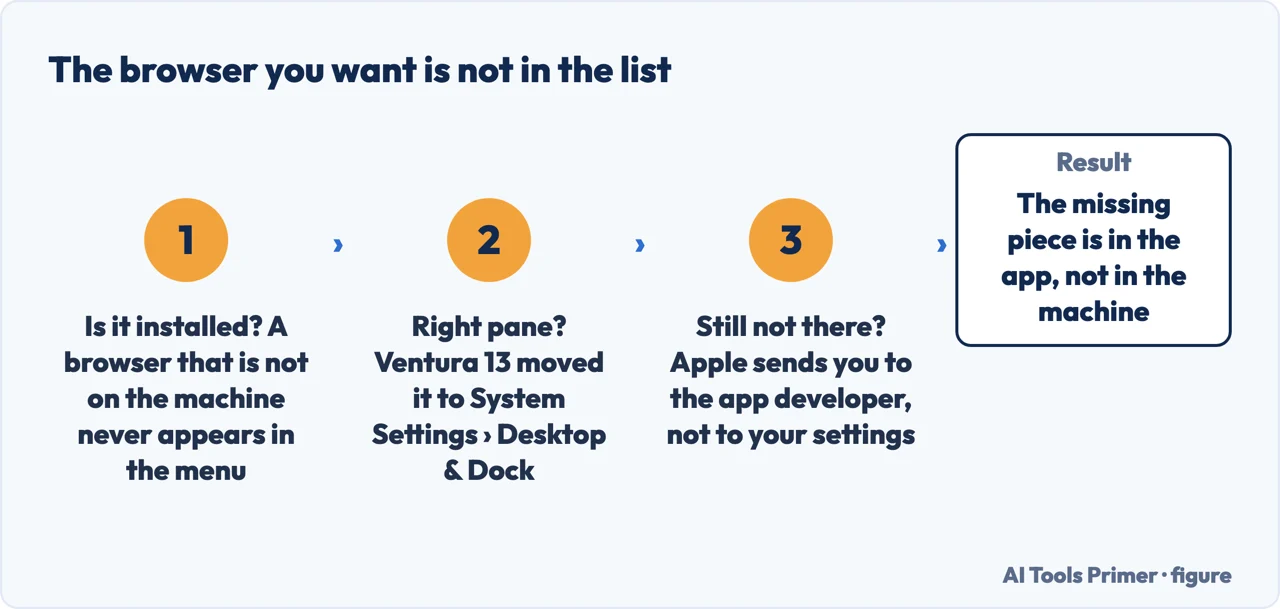
Apple also puts the same first step at the top of both versions, and it is worth not skipping: install the other browser first. A browser that is not on the machine does not appear in the menu, and the menu is the only place the change happens.
“Set a default for a file type or link type… Set defaults for
applications.”
Microsoft’s two ways of thinking about the same question, and the reason Windows feels harder
here than it should. The pane is not really asking which browser you prefer: it is a list of
file types and link types, each pointed at something, plus a shortcut for setting them from
the application’s side. That is why the search bar in that pane accepts things like
.txt and protocol names rather than app names.
That structure is what to hold on to when something still opens in the wrong place after you thought you had settled it. Because Windows matches by type rather than by preference, the question to ask is not “which browser is my default” but “what is this particular type pointed at” — and the same pane answers it. Search it for the file extension or the protocol, and set that one by hand.
What else the iPhone list lets you hand over
Browser App — “choose another app instead of the Safari app to use when opening links to
webpages.” The one you came for.
Email, Messaging, Calling and Call Filtering — the last of which
lets an app take over “presenting caller ID and blocking unwanted callers.”
Keyboards, Navigation, Translation and, in some countries and regions,
App Installation and Contactless Apps.
And the caveat worth having in advance: “If you don’t see an option to set a particular app
as the default for a feature, contact the app developer.” When the option is absent, Apple
points away from your settings entirely.
The last line of that list is the useful one on any of the three systems. If the browser you want is installed and still does not appear as an option, Apple points you at the app’s developer rather than at your settings — which places the missing piece somewhere you cannot fix and saves you from looking for it where it is not.
Three checks in the order the documentation puts them, ending where Apple ends: with the app’s developer. Figure drawn by AI Tools Primer.
A note on the setting sitting next to it, because it is genuinely strange. Changing the
default email app on a Mac is not done in System Settings at all. Apple’s instruction is
to open Mail, make sure it is set up with an account, and change the “Default email reader”
from inside Mail’s own settings.
In other words: to stop using Apple’s mail app, you must first configure Apple’s mail app. Apple
says the account can be removed afterwards, and notes that some third-party apps “might offer a way
to set itself as the default” to avoid the whole dance.
A word on why any of this matters beyond preference. The default browser is what opens when something else on the machine hands you a link — a message, a document, a calendar invitation. Setting it is the difference between one browser that has your bookmarks, your extensions and your signed-in sessions, and two browsers that each have half of them. The second state is the one this setting exists to end.
The guides below take it four ways: the Windows pane and its two logics, the Mac setting that moved, the iPhone list and everything else on it, and what to do when the browser you want is not offered at all.
One screen with two logics behind it — by application, or by file and link type. Knowing which one you are using explains the links that keep going elsewhere.
Not covered here. It will not tell you to change this from inside the browser. All three documented routes are in the system’s settings, and that is the whole reason the setting is hard to find.
It will not treat a link that opens elsewhere as a bug. On Windows the association is per type, and the fix is in the same pane rather than in a reinstall.
And it will not recommend a browser. Which one you want is not a question this guide has any business answering; where the switch lives is. What holds instead is simple: the routes on all three systems and the macOS version split are quoted from Microsoft’s and Apple’s own documentation.
Sources
Microsoft Support — Change Default Apps in Windows (the Settings › Apps › Default apps route, the distinction between setting a default for a file type or link type and setting defaults for applications, and the Set default button beside “Make [browser] your default browser”) — support.microsoft.com, read 6 September 2026.
Apple Support — Change the default web browser or email app on Mac (the instruction to install the other browser first, the Desktop & Dock route in macOS Ventura 13 or later against System Preferences › General in earlier versions, and the Mail-based route for the default email reader) — support.apple.com, read 22 August 2026.
Apple Support — Change your default apps for features on iPhone and iPad (the requirement to update to the latest iOS, the Settings › Apps › Default Apps route, the full list of features including Browser App, and the note to contact the app developer when no option to set a default appears) — support.apple.com, read 22 August 2026.
AG
Written by Alberto Gulotta
Founder and editor of AI Tools Primer, writing from Palermo, Italy. Thirty-five years of
taking computers apart, starting with a Commodore 64 — the long version is on the
about page.
Written on 22 August 2026 · last checked 23 September 2026.
§
Independence and limits
No affiliate links and no paid placements anywhere on this site. Nobody pays to appear here,
and no company has seen this page before you did.
This is general information, not professional advice. Where a page touches money, health,
safety or the law, it names its source and the date it was read — and your situation may
still differ. See the privacy page and the
cookie policy.