
Tor · guide
How to access dark web safely on Tor Browser, in order
By Alberto Gulotta · Updated · 18 min read
To access the dark web safely on Tor Browser, the Tor Project’s own pages cover the steps one by one: download it from the official site, check the signature, connect, and add no extra add-ons. ESET puts a VPN first and DOT Security second, after setting a goal, while the Tor Project does not recommend one in general.
| Question | Answer | Where it comes from |
|---|---|---|
| Where do I download it? | The Tor Project’s own site; if it is blocked, the EFF and La Cebolla mirrors or GetTor | Tor Project Support |
| Do I check the file? | The Tor Project gives the steps and marks them recommended; Deepstrike limits them to high-risk situations | Tor Project Support, Deepstrike |
| Which security level? | Standard is the default; Safer and Safest switch off more, and the Tor Project says some pages might then stop working | Tor Project Support |
| VPN first? | ESET makes a VPN its first step and DOT Security its second, after setting a goal; the Tor Project does not recommend one in general | ESET, DOT Security, Tor Project Support |
| Is it illegal? | ESET says accessing it is not illegal in most countries, with exceptions where Tor is blocked or restricted; DOT Security says there is nothing actually illegal about accessing it | ESET, DOT Security |
Where to get it, and only there
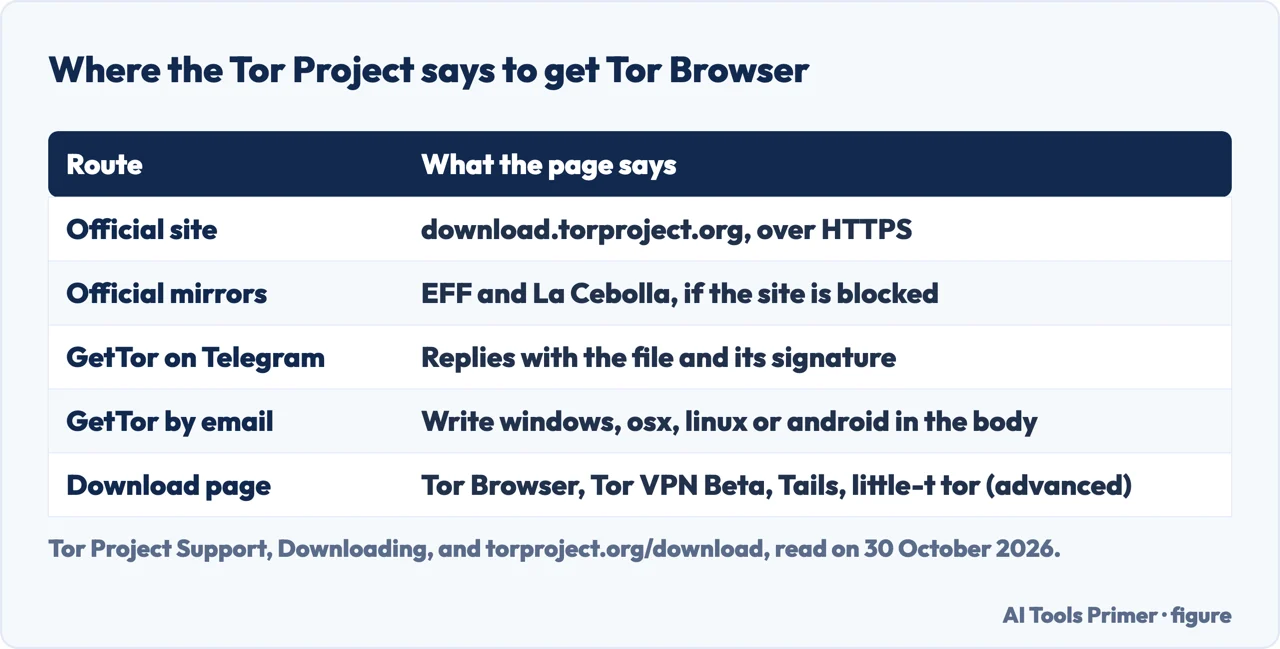
The Tor Project’s page on downloading says the safest and simplest way to get Tor Browser is from its official website, at download.torproject.org, and that your connection to the site is secured with HTTPS, which it says makes tampering much harder. If the site is blocked on your network, the page offers two alternatives. The first is the official mirrors, run through EFF or La Cebolla. The second is GetTor, a service that answers messages with links to the latest version, hosted at places such as Dropbox, Google Drive and GitHub. On Telegram you message the GetTor bot, tap Start, choose a language, then ask it to send Tor Browser and pick your operating system; it replies with the file and the signature that can be used to check it. By email you write to gettor@torproject.org with only the word windows, osx, linux or android in the body, and the reply carries links to the package, the signature, the fingerprint of the key used to make it and the checksum.
Deepstrike, a security-testing company whose page was published on 3 August 2026 and updated on 28 October 2026, gives the same advice on the source and explains the worry: it calls fake Tor builds a real and recurring threat, and says attackers publish copies on lookalike domains, in unofficial app stores and through search ads. Its check is that the address bar reads exactly torproject.org. ESET, a security company, says third-party sites that distribute Tor installers are a known attack vector. Deepstrike also tells readers to avoid any download that arrives through an ad, a forum link or a third-party mirror, and the Tor Project’s page names EFF and La Cebolla as its own official mirrors.
The Tor Project’s download page lists three apps for general use, not one, and under Advanced a fourth, little-t tor, for developers and advanced users who do not need a bundled browser or interface. Tor Browser comes for desktop and for Android. Tor VPN Beta is for Android and routes several apps through Tor, so that you can pair it with any browser. Tails is a portable operating system, found on tails.net. Our page on Tails OS covers that third one.
Checking the download
The Tor Project’s page on verifying the signature says each file on its download page comes with a signature file that has the same name plus the extension .asc. These are OpenPGP signatures, and they let you check that the file you downloaded is exactly the one the project intended you to get. The steps, in the page’s order:
- Install GnuPG. On Windows the page points to Gpg4win and on macOS to GPGTools; on Linux it says you probably have it already, because most distributions come with it.
- Import the signing key with
gpg --auto-key-locate nodefault,wkd --locate-keys torbrowser@torproject.org. The page names the fingerprint of the Tor Browser Developers signing key. If you get an error, it says something has gone wrong and you cannot continue until you work out why. - Save the key to a file named tor.keyring in the current folder, with the export command the page gives.
- Run the check with
gpgv --keyring ./tor.keyring file.asc file, replacing file with the exact name of what you downloaded. The page says the result should contain Good signature from Tor Browser Developers.
The page adds that a signature is dated the moment the package was signed, so the date it reports may vary and is no cause for worry once you have verified it. For people who cannot import the key, it has a section with a workaround using a public key. On how much this matters, the sources differ in emphasis. The Tor Project’s installation page marks the check as recommended for Windows, macOS and Linux. Deepstrike says to verify the signature if you are in a high-risk situation. The ESET and DOT Security pages we read do not describe checking the downloaded file at all.
The Tor Project also covers a related surprise. Some antivirus programs show malware or vulnerability warnings when Tor Browser starts. If you downloaded from the project’s website or from GetTor, and verified the file, the page says these are false positives and you have nothing to worry about, and that some antivirus programs treat files that few users have seen as suspicious. It suggests adding certain processes to the antivirus allowlist: on Windows firefox.exe, tor.exe and lyrebird.exe, and on macOS TorBrowser, tor.real and lyrebird. Then restart Tor Browser. It adds that some antivirus clients, such as Kaspersky, may also block Tor at the firewall level.
Installing it and the first start
According to the Tor Project’s installation page, Tor Browser is available for Android, Windows, macOS and Linux. It supports Windows 10 and 11 and macOS 10.15 and later, and Android 8.0 or newer. On Windows you download the .exe file and double-click it; on macOS you download the .dmg file; on Linux you download the .tar.xz archive, extract it and start the browser with the start-tor-browser.desktop file. For each of the three desktop systems the page lists verifying the signature as a recommended step. ESET lists the same install in its own words: go to the Tor Project site, press Download for your system and double-click the executable.
On phones the sources agree on the shape and differ on the detail. The Tor Project says Tor Browser for Android is on Google Play, on F-Droid through the Guardian Project repository, on its own website and through GetTor. For iPhones it says there is no Tor Browser for iOS; it recommends an open-source app called Onion Browser, and adds that because Apple requires browsers on iOS to use WebKit, Onion Browser cannot have the same privacy protections as Tor Browser. ESET says neither the Android nor the iOS version offers the same level of protection as the desktop one. For Chrome OS, the Tor Project says there is no version yet and that it has not audited the Android app on that system.
The first launch, per the Tor Project, opens a Connect to Tor window. In most cases choosing Connect is enough to join the network. A status bar then shows the progress; if you are on a fast connection and the bar seems stuck, the page says to try Connection Assist. If you know your connection is censored or uses a proxy, you choose Configure Connection instead. Connection Assist can pick a bridge for you from your location, or you can select your region and press Try a Bridge. The window also has an Always connect automatically switch, which makes the browser reuse your saved connection settings every time it starts; ESET’s fifth step is to switch it on and press Connect. Proxy details go in the Advanced section of the connection page, and the page says that in most cases this is not necessary. For what bridges are and when they stop working, see our page on Tor bridges.
The three security levels
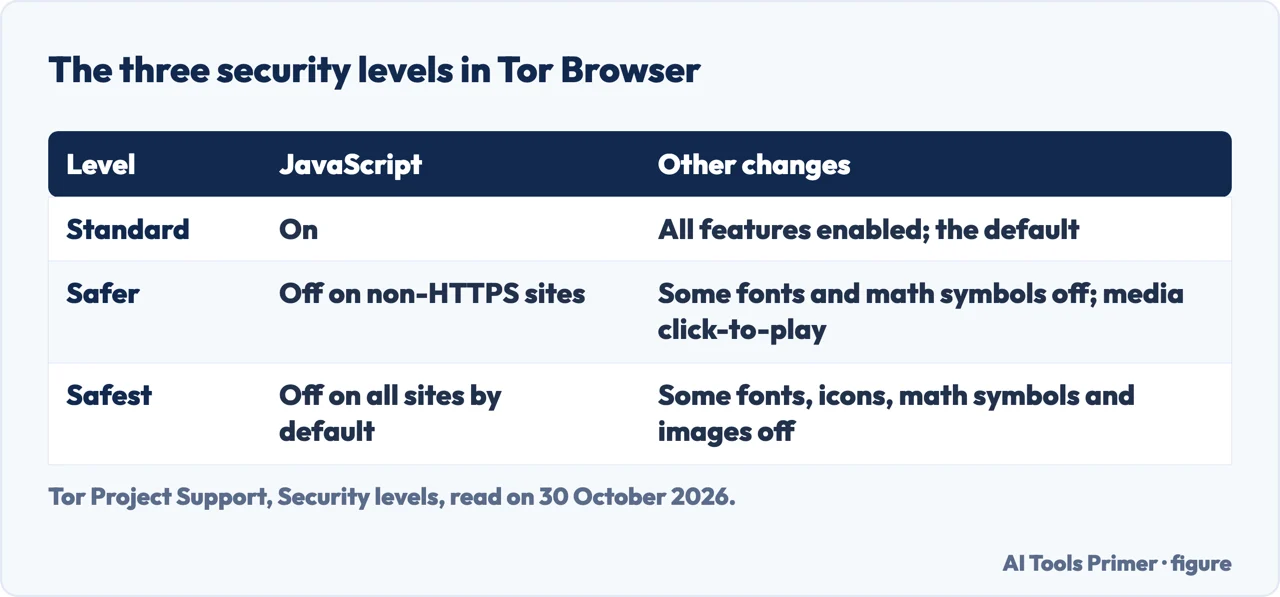
The Tor Project’s page on security levels says Tor Browser starts at the Standard level, where all browser and website features are enabled. To change it, the Tor Project’s plugins page names the shield icon beside the address bar, then Settings. The security levels page says to save the settings and restart the browser, and that you can undo the change at any time by adjusting the level and restarting. Safer disables website features the project calls often dangerous: JavaScript is disabled on all non-HTTPS sites, some fonts and math symbols are disabled, and audio and video become click-to-play. Safest allows only the features needed for static sites and basic services: JavaScript is disabled by default on all sites, some fonts, icons, math symbols and images are disabled, and audio and video are click-to-play. Avast and Deepstrike describe the same three levels. The Tor Project warns that raising the level might stop some web pages from working, so you weigh your security needs against how usable you need the browser to be.
Why not start higher? The Tor Project’s page on plugins answers: JavaScript is enabled by default because many websites will not work without it, and it says most users would give up on Tor entirely if the project had switched it off. It also says JavaScript can enable attacks that lead to deanonymization, and that users who need a high degree of security should choose Safer or Safest. Deepstrike calls the security slider Tor Browser’s most useful safety control, tells readers to choose Standard, Safer or Safest depending on their risk, and in its summary says to set it to Safer or Safest. Deepstrike calls Safer “a reasonable default for cautious use”; the Tor Project pages we read name Safer or Safest for users who need a high degree of security but give no level for a first visit.
What not to add, run or open
Add-ons. Tor Browser includes one add-on, NoScript, reachable from Add-ons and themes in the hamburger menu. The Tor Project says that installing others is strongly discouraged: browser add-ons that work in Firefox can also be installed, but the only ones tested are those included by default, and the project does not support other setups. Its page on the question, which names AdBlock Plus and uBlock Origin as examples people ask about, gives two reasons. A new add-on may make your Tor Browser fingerprint unique, so that your activity could be tracked even though you use Tor, and it may widen the attack surface. Deepstrike agrees: do not install add-ons and do not maximize the window.
Other browsers. The Tor Project says it strongly recommends against using Tor in any browser other than Tor Browser, because they can still reveal your real IP address through DNS leaks or WebRTC, your operating system, fonts and plugins, and tracking cookies and cache. Running Tor Browser beside another browser does not affect Tor’s own performance or privacy, it says, but your Tor activity could be linked to your real IP address simply by moving your mouse from one window to the other. Deepstrike adds that Mullvad Browser, which the Tor Project built with Mullvad, carries Tor Browser’s anti-fingerprinting protections but does not connect to the Tor network.
Torrents. The Tor Project’s best-practices page says torrent applications have been observed to ignore proxy settings and connect directly, and that even a client that connects only through Tor will often send out your real IP address in the tracker request. It adds that this also slows the whole network for everyone. Its torrent page says most clients reveal your real address to peers and puts load and potential legal issues on volunteer exit relay operators. Deepstrike gives the same rule.
Downloaded documents. Tor Browser warns before opening documents with an outside application, and the project writes that the warning must not be ignored. Documents, especially DOC and PDF files outside the built-in PDF viewer, can contain internet resources that are downloaded outside Tor by the application that opens them, which would show your non-Tor address. For files you must work with, it recommends a disconnected computer or dangerzone.
Forms and HTTPS. A website that sees you sign in knows who you are, even if it does not know where you are, and a name, email, address or phone number given in a form makes you no longer anonymous to that site. Tor encrypts traffic to and within its network, the project writes, but the encryption to the final site depends on the site, so look for a padlock or onion icon and https:// in the address bar. Tor Browser includes HTTPS-Only Mode. The page also says Tor protects only applications properly configured to send their traffic through it. Our page on whether Tor Browser is safe already goes through torrents, forms, documents and add-ons with the mechanism behind each, so this section only lists what to leave alone before the first start; the page on OPSEC covers the habits that follow.
The VPN question, and the law
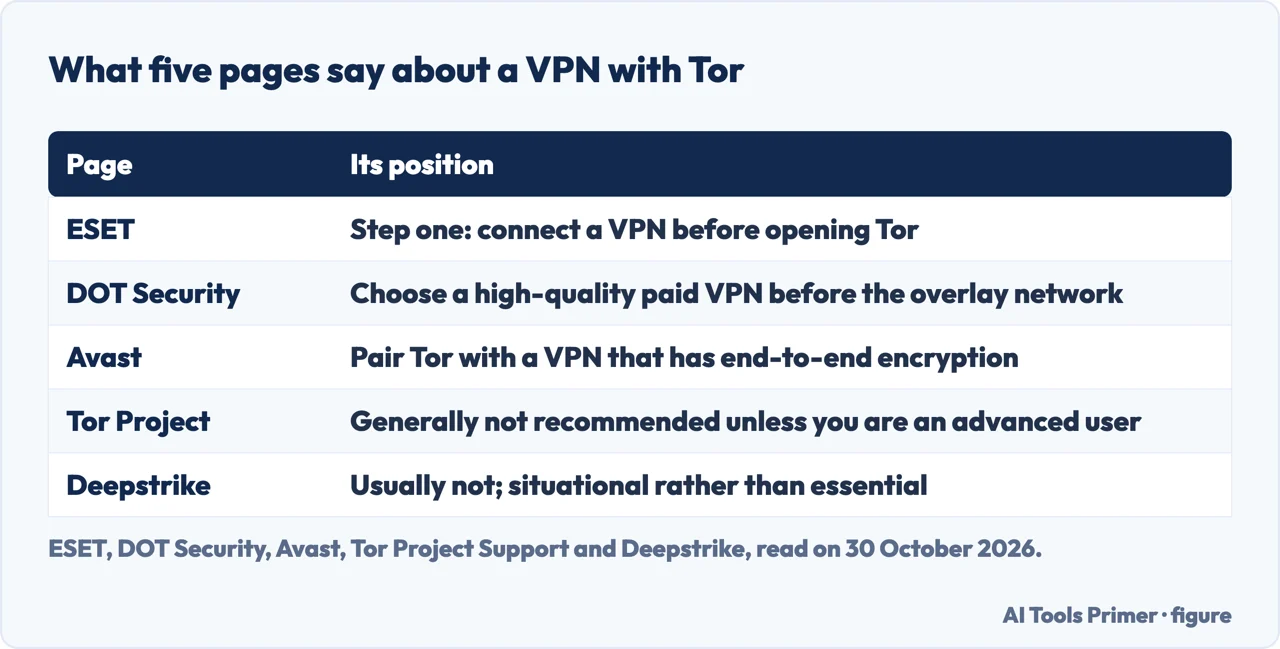
The sources split on whether a VPN comes first. ESET lists connecting to a VPN as the first of its five steps, so that your internet provider cannot see you are about to use Tor. DOT Security begins with a purpose, then makes a VPN its second step and says to choose a high-quality paid one. Avast says pairing Tor with a VPN that has end-to-end encryption can reinforce Tor’s weak spots. The Tor Project’s page says that while combining the two might seem to increase privacy, in practice it can reduce anonymity or break Tor’s protections if not configured correctly, and that generally it does not recommend a VPN with Tor unless you are an advanced user who knows how to configure both. Deepstrike answers Usually not, and calls the combination situational rather than essential. On the narrower aim of hiding Tor use from your provider, the Tor Project’s best-practices page says Tor by default does not stop someone watching your traffic from learning that you use Tor, and suggests a bridge for that. These pages leave the choice to the reader and so do we.
On the law, ESET writes that in most countries simply accessing the dark web is not illegal, and that the law applies to what you do there. It lists China, Russia, Iran and North Korea as countries that block or restrict Tor, and tells readers in restricted places to check local laws. DOT Security writes that there is nothing actually illegal about accessing the dark web, yet also says it does not recommend going unless absolutely necessary. The Tor Project pages we read do not mention the laws of individual countries.
On risk, ESET reports that in May 2025 Operation RapTor, involving agencies from 10 countries, led to 270 arrests and the seizure of over 200 million dollars, and it describes behavioral mistakes as the most common way users are identified: logging into personal accounts, reusing usernames and downloading files. DOT Security’s steps go on after the VPN: close other applications, pick an overlay network, with Tor, Freenet and Riffle as its examples, run an IP leak check on ipleak.net and dnsleaktest.com, then find links in aggregators or wikis. We do not reproduce link lists. ESET says to use dark web links only from reputable sources, and Deepstrike says to treat every onion link as untrusted. Avast adds that using a proxy together with Tor can help hide that you connected to the dark web but gives no extra protection; Avast also says Tor is not the same as a VPN. The pages we read do not say how many people have installed a fake copy of Tor.
Where to start
Four ways in.
- “Where do I download it?”
- Where to get it, and only there — download
- “How do I check the file?”
- Checking the download — verify
- “What should I leave alone?”
- What not to add, run or open — avoid
- “VPN first, or not?”
- The VPN question, and the law — vpn law
Using Tor Browser
Safety, censorship and a portable system.
Habits and the network
What Tor does, what it leaves to you, and what the dark web is.
Questions people also ask
Can police track you on Tor?
ESET says not through conventional surveillance, but police have repeatedly infiltrated illicit sites and marketplaces to obtain details of buyers and sellers, citing Silk Road and AlphaBay, and Operation RapTor in May 2025. It adds that law enforcement has shown it can identify users through traffic analysis and honeypots.
Is Tor 100% untraceable?
The Tor Project says Tor Browser includes many privacy protections but cannot guarantee perfect anonymity, and that generally it is impossible to have perfect anonymity, even with Tor. ESET says Tor makes tracking significantly harder but not impossible.
Can I access the dark web safely?
The pages we read give a route rather than a guarantee: the official download, the signature check, the default connection, a security level, no add-ons, no torrents and no personal accounts. Deepstrike writes that Tor reduces risk and does not eliminate it, and DOT Security does not recommend going unless absolutely necessary.
Is it illegal to browse on Tor?
ESET says that in most countries simply accessing the dark web is not illegal, and that the law applies to what you do there, with exceptions in countries that block or restrict Tor. DOT Security also says there is nothing actually illegal about accessing it.
Not covered here. We installed nothing and tested nothing. The statements come from twelve Tor Project pages (support and download), ESET, DOT Security, Deepstrike and Avast, all read on 30 October 2026. We did not read the Reddit thread or the YouTube video.
The search volume and difficulty behind this page come from a Semrush reading of 29 August 2026, which expired on 28 October 2026, past the 60 days the site normally allows, and is used with the owner’s authorisation until it is read again.
Sources
- Tor Project Support — Downloading — support.torproject.org, read 30 October 2026.
- Tor Project — Download — www.torproject.org, read 30 October 2026.
- Tor Project Support — How to verify Tor Browser’s signature — support.torproject.org, read 30 October 2026.
- Tor Project Support — Installing — support.torproject.org, read 30 October 2026.
- Tor Project Support — First launch — support.torproject.org, read 30 October 2026.
- Tor Project Support — Antivirus blocking Tor Browser — support.torproject.org, read 30 October 2026.
- Tor Project Support — Security levels — support.torproject.org, read 30 October 2026.
- Tor Project Support — Plugins, add-ons and extensions — support.torproject.org, read 30 October 2026.
- Tor Project Support — Using Tor with other browsers — support.torproject.org, read 30 October 2026.
- Tor Project Support — Tor Browser best practices — support.torproject.org, read 30 October 2026.
- Tor Project Support — Tor Browser with a VPN — support.torproject.org, read 30 October 2026.
- Tor Project Support — Can I use Tor with Torrent? — support.torproject.org, read 30 October 2026.
- ESET — What is the dark web? How it works, and how to access it safely — www.eset.com, read 30 October 2026.
- DOT Security — How to Access the Dark Web Safely — dotsecurity.com, read 30 October 2026.
- Deepstrike — Dark Web Browser: Access the Dark Web Safely on Tor — deepstrike.io, read 30 October 2026.
- Avast — The Tor Network: A Guide to the Dark Web Browser — www.avast.com, read 30 October 2026.
Written by Alberto Gulotta
Founder and editor of AI Tools Primer, writing from Palermo, Italy. Thirty-five years of taking computers apart, starting with a Commodore 64 — the long version is on the about page.
Something wrong on this page? Write to aitoolsprimer@gmail.com and it gets fixed.
Written on 30 October 2026.
Independence and limits
No affiliate links and no paid placements anywhere on this site. Nobody pays to appear here, and no company has seen this page before you did.
This is general information, not professional advice. Where a page touches money, health, safety or the law, it names its source and the date it was read — and your situation may still differ. See the privacy page and the cookie policy.