
Tor · guide
What Tails OS is, and where its protection stops
By Alberto Gulotta · Updated · 19 min read
Tails OS is a portable operating system that starts from a USB stick instead of Windows, macOS or Linux, keeps nothing on the computer and sends everything through Tor. The project's own pages also list what it does not cover: your habits, the computer you run it on, and the limits of Tor itself.
| Question | Answer | Where it comes from |
|---|---|---|
| What does it run from? | A USB stick, started instead of Windows, macOS or Linux | Tails, How Tails works |
| What does it remember? | Nothing, unless you turn on the optional encrypted Persistent Storage | Tails, How Tails works |
| Where does the traffic go? | Through Tor, over 3 relays; apps that try to bypass Tor are blocked | Tails, How Tails works |
| What does it need? | A PC with a 64-bit x86-64 processor, 3 GB of RAM to work smoothly, a USB stick of 8 GB or more | Tails, System requirements |
| Does it work with a VPN? | Currently, no | Tails, Frequently asked questions |
| Can it protect everything? | No: the project’s warnings page says it is safe but not magic | Tails, Warnings |
What Tails is, and what “amnesic” means
The Tails home page calls it a portable operating system that protects against surveillance and censorship. To use it you shut down the computer and start from the Tails USB stick instead of starting on Windows, macOS or Linux, and the How Tails works page says you can start again on the other operating system after you shut Tails down. According to Wikipedia the name stands for The Amnesic Incognito Live System, the first release came on 23 June 2009, and it grew out of Incognito, a discontinued Gentoo-based system, merged with a project called Amnesia.
“Amnesic” is the part that matters. The How Tails works page says Tails always starts from the same clean state and everything done in a session disappears when it is shut down. It lists four traces that a computer otherwise keeps: websites visited, even in private mode; files opened, even if they were deleted; passwords, even with a password manager; and all the devices and Wi-Fi networks used. Tails, it says, never writes anything to the hard disk and only runs from the memory of the computer, which is entirely deleted at shutdown.
The same page says Tails is made by the Tor Project, and the project’s FAQ says Tails was founded in 2009 and joined forces with Tor in 2024. The FAQ also says it is based on Debian and ships the GNOME desktop. The home page names who uses it: activists, journalists and their sources, domestic violence survivors, and anyone who wants extra privacy. Wikipedia adds that Laura Poitras, Glenn Greenwald, Bruce Schneier and Barton Gellman have each said Tails was an important tool in their work with Edward Snowden, and it lists 7.15.1, of 23 October 2026, as the latest release. The install page for macOS also names 7.15.1 as the current download.
What you need before you start
The requirements page says Tails works on most PC computers that are less than 10 years old. It does not work on Mac computers with an Apple processor (M1, M2 and so on), on smartphones or tablets, or on a Raspberry Pi. The detailed list asks for a 64-bit x86-64 processor, the ability to start from a USB stick or a DVD reader, and 3 GB of RAM to work smoothly. With less, the page says, Tails can work but may show reduced performance, instability or crashes. It adds that Nvidia or AMD Radeon graphics cards often do not work, and that 32-bit computers have not been supported since Tails 3.0 in June 2017.
For Macs the same page says Tails still works on some older computers with an Intel processor, and that the project does not know of any Mac model that works well in Tails and can run the latest macOS version. The install page for macOS tells you to choose About This Mac from the Apple menu to find out which processor or chip you have.
The USB stick has its own rules. It must be 8 GB or more, and all the data on it is lost during installation. The requirements page calls its quality crucial, because a bad stick will be slower and more likely to corrupt the files in the Persistent Storage. It recommends new sticks from well-known brands such as Kingston, Samsung and SanDisk, bought in a reputable local store. It advises against buying sticks online or using sticks that were given to you, because they could contain malware, and it recalls a 2020 FBI warning about sticks received by mail. A USB 3.0 stick can be up to 10 times faster than USB 2.0, with a maximum read speed of around 500 MB/s against around 50 MB/s.
How many sticks? If you want an encrypted Persistent Storage, the page recommends 2, ideally 3: a primary Tails, a backup of the same size made by cloning the primary together with its storage, and a third for manual upgrades, which can be smaller and of worse quality. The FAQ says Tails needs a stick dedicated to it. That stick is not recognized in Windows, so to exchange files with another system you use a separate stick. It also says Tails cannot be installed onto the hard disk with the recommended methods, that UNetbootin, YUMI and Ventoy are unsupported, and that the project does not sell preinstalled sticks, because their contents could not be verified.
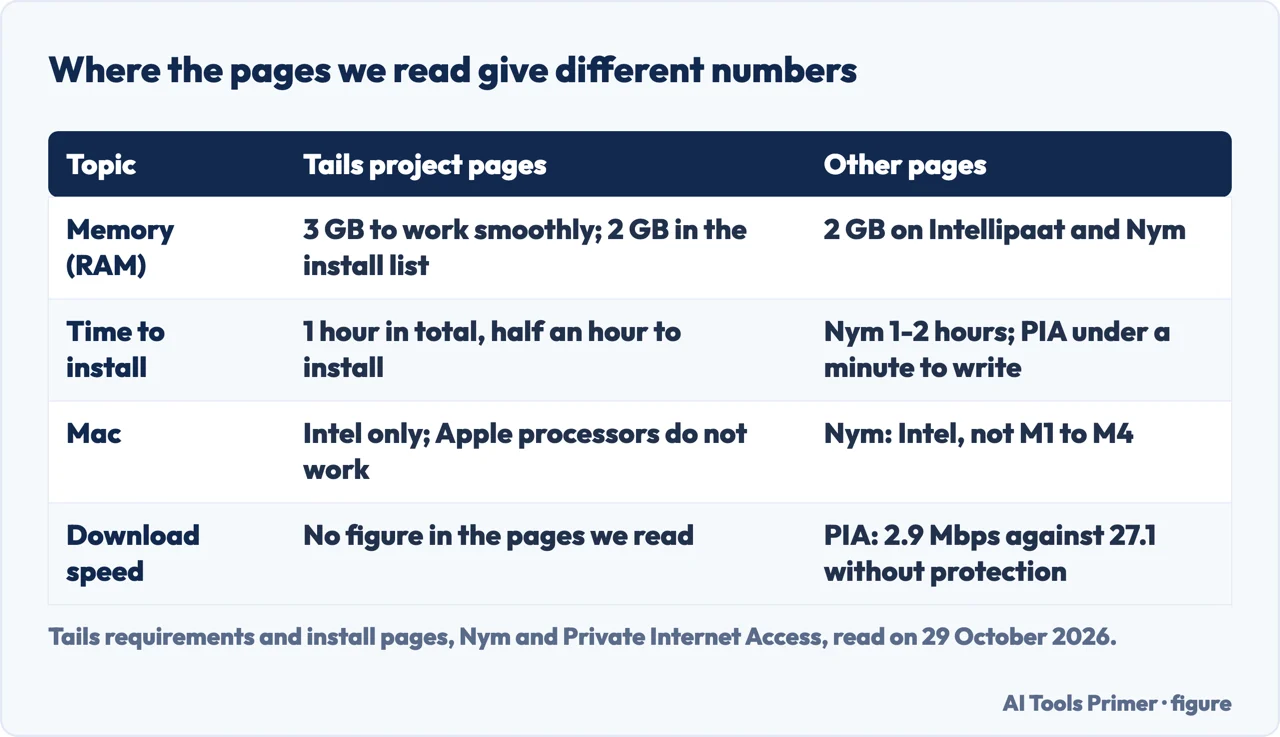
The pages we read give different numbers for memory, time and Macs, and the table below puts them side by side. The install page for macOS lists 2 GB of RAM and a total of 1 hour: 1.8 GB to download and half an hour to install. After that, the FAQ says Tails publishes an upgrade every 2 weeks, with emergency releases when Debian or Tor Browser have important security fixes, and that you should not upgrade it with apt or Synaptic.
What Tor and Tails hide, and what they do not
Everything done on the Internet from Tails goes through the Tor network. The How Tails works page says Tor passes the connection through 3 relays, servers run by different people and organizations around the world. The first relay knows where you come from but not where you are going, and the third knows where you are going but not where you come from. The page counts more than six thousand relays and says applications are blocked automatically if they try to connect without Tor. It lists what is included: Tor Browser with uBlock, Thunderbird, GNOME Secrets for passwords, LibreOffice, OnionShare and Metadata Cleaner, “and many more.”
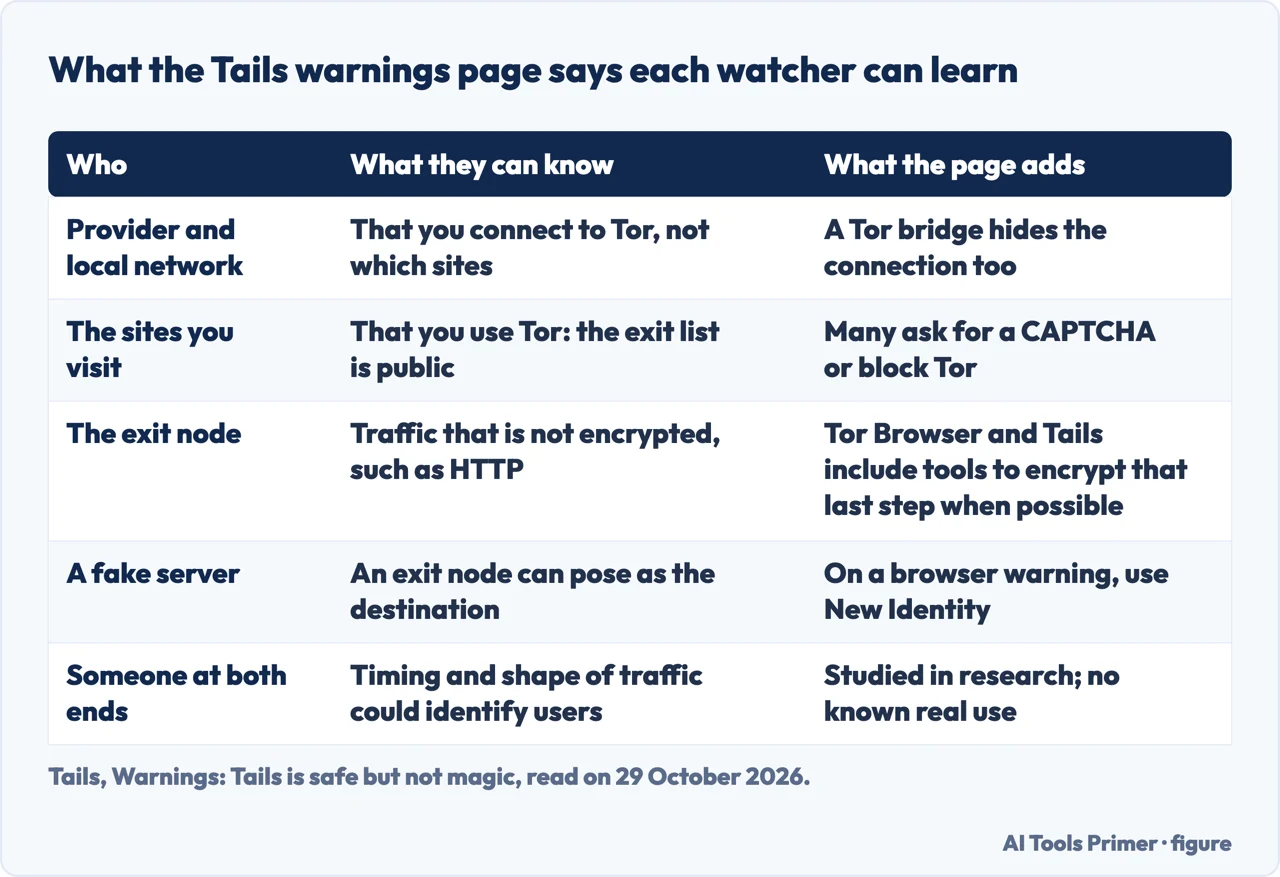
If connecting to Tor is blocked or dangerous where you are, the same page says you can use bridges to hide that you are connected to the Tor network; what a bridge does and does not do has its own page here. The table after this section sets out what each watcher can learn, drawn from the project’s warnings page.
The warnings page puts the idea in one sentence: Tor and Tails do not work by making you look like a random Internet user, but by making all Tor and Tails users look the same. So your provider and your local network can see that you connect to Tor, but the page says they cannot know which sites you visit, and the sites can tell you use Tor because the list of exit nodes is public. The page adds that many sites ask for a CAPTCHA or block Tor, and that the last relay of a circuit, the exit node, can observe traffic that is not encrypted, for example a site reached over HTTP instead of HTTPS. It can also pretend to be the destination server, which is why the page says to pay more attention to security warnings in Tor Browser and to use the New Identity feature if you get one.
Another limit is the one the page calls end-to-end correlation, which is Tor Browser safe covers in more depth. An adversary who could control all 3 relays of a circuit, or who could analyze the timing and shape of the traffic entering and exiting the network, might be able to deanonymize users. The page says Tor chooses 3 relays belonging to 3 different network operators for each circuit, that no anonymity network used for rapid connections such as browsing can protect 100% against such attacks, and that VPNs are less secure than Tor because they do not use 3 independent relays. It also says these attacks have been studied in research papers but that the project does not know of any actual use against Tor users.
On Tor Browser itself, the FAQ says JavaScript is enabled by default in Tails as the best compromise between usability and security, because turning it off makes your browser fingerprint differ from most users and reduces anonymity. It also says that installing extra add-ons might break the security built into Tails. For the wider question, is Tor Browser safe sets out the four questions the word hides.
The Persistent Storage: what stays, and what that costs
By default nothing stays. The How Tails works page describes the Persistent Storage as an optional, encrypted space on the USB stick where you can save documents, browser bookmarks, emails and even some additional software, and says you always decide what is persistent while everything else remains amnesic. Whatever is in it is encrypted automatically. To use it again you start Tails, type the passphrase in the Persistent Storage section of the Welcome Screen and click Unlock Encryption. The usage page then says each feature that is turned on becomes available by itself: personal files in the Persistent folder, Tor Browser bookmarks, and Additional Software packages installed at every start. It also says Tails cannot use a read-only Persistent Storage, so if the stick has a read-only switch it must be in the read-write position.
The FAQ says software that is already in Debian can be added through the Additional Software feature and installed automatically every time Tails starts. Wikipedia adds two cautions in its own words: the Persistent Storage is encrypted but not hidden, so forensic analysis can detect that it exists even though it cannot read it, and at shutdown Tails overwrites most of the memory it used, to guard against a cold boot attack.
The warnings page raises a different cost. If you worry that the files in your Persistent Storage could be used to link your activities together, it suggests a different Tails USB stick for each activity, for example one for activism work and another for journalism work. The requirements page, earlier, gives other reasons for the extra sticks: a backup made by cloning the primary together with its Persistent Storage, and a third stick for manual upgrades.
Where Tails stops protecting you
The warnings page opens by saying Tails is safer than any regular operating system, but that Tails, or any software or operating system, cannot protect you from everything. It groups the limits in three areas: your own activities, the Tor network, and the computer you use. The Tor limits are above; the other two follow.
Your activities. Files carry hidden data. The page says JPEG and other image files often contain where a picture was taken and which camera was used, and Office documents often contain the author and the date and time of creation. Tails includes Metadata Cleaner to remove it. The second habit is using a Tails session for only one purpose at a time. The page gives an example: if you log into different accounts on the same website in one session, the website could determine that the accounts are used by the same person, because websites can tell when 2 accounts use the same Tor circuit. Its advice is to restart Tails between different activities, for example between checking a work email and a whistleblowing email. The same page says it is not aware of any such attacks against people who used Tails for different purposes at a time.
The computer. Tails can run safely on a computer that has a virus, the page says, but it cannot always protect you when it was installed from an infected computer or runs on a computer with a compromised BIOS, firmware or hardware. It advises installing only from a trusted system, not plugging the Tails stick in while another operating system runs, and using the stick only for Tails. On hardware, it says no operating system can protect against alterations such as a physical keylogger, which are more likely on public computers, in Internet cafes or libraries, and on desktop computers where a device is easier to hide. To reduce the risk it suggests pasting saved passwords from a password manager and using the screen keyboard. On firmware, it says all operating systems depend on it, as a car depends on the road, that firmware attacks are complicated and expensive, and that the project does not know of any actual use against Tails users.
The FAQ adds that you cannot verify a Tails stick from inside the Tails running on it, and that if you worry it is corrupted you should do a manual upgrade from a trusted operating system. Wikipedia says Tails can run as a virtual machine but that doing so is potentially insecure, and Nym, which sells a VPN, says a virtual machine can leave traces on the host computer.
Wikipedia also records episodes of attention from governments. In 2014, it says, Das Erste reported that the NSA’s XKeyscore system sets threat definitions for people who search for Tails or visit its website, and Der Spiegel published slides from 2012 in which the NSA judged Tails a “major threat.” For 2017 it describes an FBI operation that identified a Tails user through a zero-day flaw in the default video player, which the developers were never told about and which it says is believed to have been patched later.
When Tails is the wrong tool
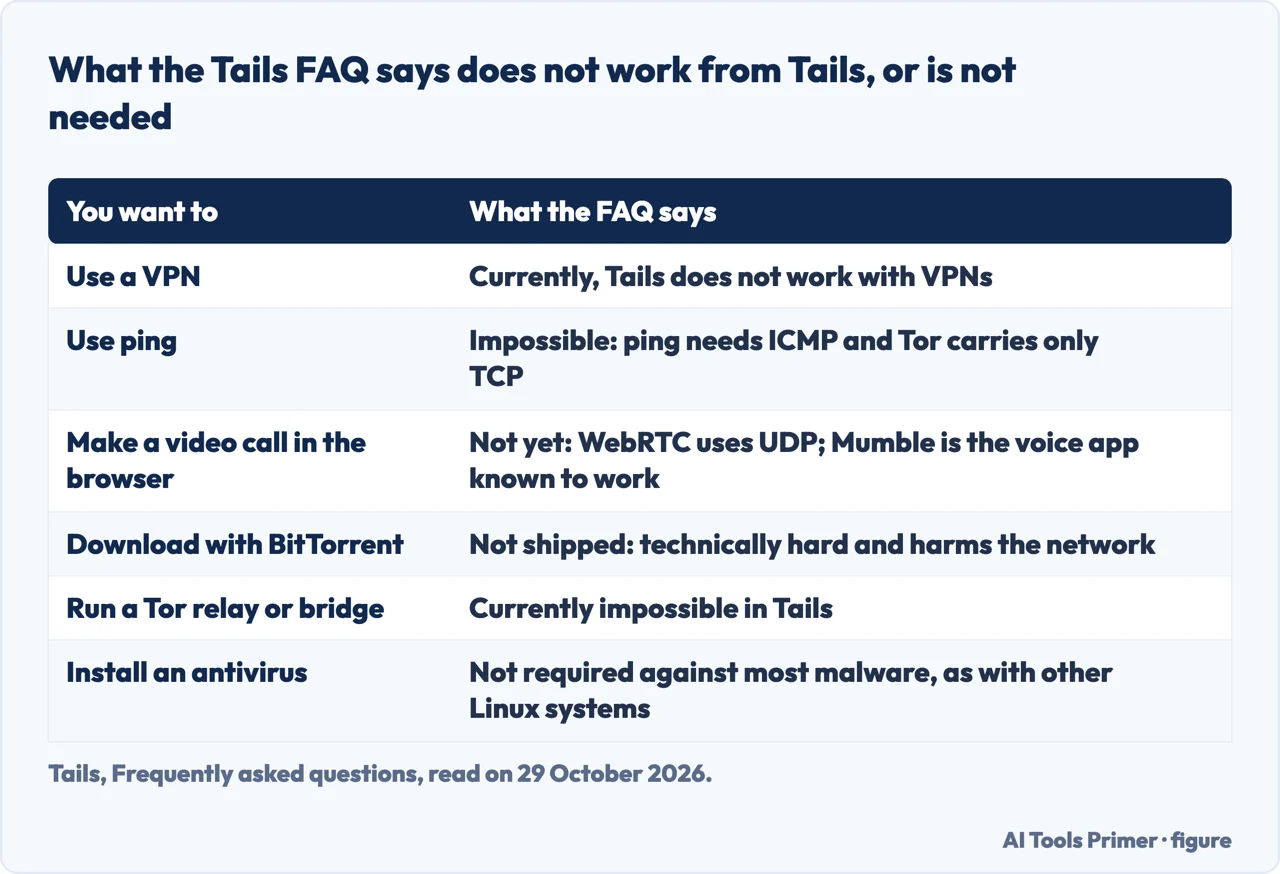
The first mismatch is about VPNs. The FAQ says plainly that Tails currently does not work with VPNs. Its reasoning: Tor gives anonymity because no single point knows both the origin and the destination of a connection, whereas a VPN provider can see where you connect from and where you connect to. The FAQ still lists clear benefits of VPNs where strong anonymity is not needed: reaching sites that block Tor, using videoconferencing tools, reaching intranets, and higher speed. It says the project wants to add, in the future, a browser that would use a VPN instead of Tor.
Nym, which sells a VPN, takes the other side: it suggests integrating Tails with the anonymous mode of its own NymVPN. The pages we read do not reconcile the two statements.
The table after this section lists the other limits the FAQ gives. On messaging, it says WhatsApp Web worked in Tor Browser as of January 2025 and Telegram Web did not, and it points to a tutorial for installing Signal Desktop. On choices of exit country, it says editing the Tor configuration file can weaken anonymity in ways that are hard to understand, which is why it does not explain how.
Is it an everyday system? Packetlabs, a security-testing company, calls it not the ideal everyday operating system, and Intellipaat, a course site, says it can be slower than a regularly installed one. Private Internet Access, which sells a VPN, gives the only measurement among the pages we read: on a three-year-old laptop with 16 GB of RAM, the start took more than a minute to reach the welcome screen and another 20 seconds to reach the desktop, and a speed test showed 2.9 Mbps against 27.1 Mbps without protection and 26.2 Mbps with its own VPN. It is one author’s test, last updated on 31 March 2025, and the pages we read do not give a second one.
The pages we read give no rule for choosing between Tails and Tor Browser on your own system. What they do say: an ordinary computer keeps the four traces listed above (sites visited, files opened, passwords, devices and Wi-Fi networks used), Tails starts from the same clean state every time and blocks applications that try to connect without Tor, and the price is the stick, the restart, the hardware limits and the missing VPN described above. If the aim is only to browse more privately from your own computer, this site has two pages for that: Tor Browser, the entrance page starts with what the browser is for, and what OPSEC is covers the habits that Tails cannot supply.
What we did not use
We did not run Tails and we measured nothing. We did not read the Tails known issues page, the page on the administration password or the one on MAC address anonymization, so nothing here describes them. We did not read the Tails pages on creating the Persistent Storage, so nothing here describes those steps. Wikipedia is a page that changes, and the version and dates above are those of 29 October 2026. The pages we read do not say whether using Tails is legal in any country, and they do not say how many people use it.
Where to start
Four ways in.
- “What is it for?”
- What Tails is, and what “amnesic” means — what
- “What do I need to run it?”
- What you need before you start — need
- “Is it untraceable?”
- What Tor and Tails hide, and what they do not — hides
- “Where does it stop protecting me?”
- Where Tails stops protecting you — stops
More on Tor
Safety, bridges and habits.
Neighbours on privacy
A kill switch, private windows and the deep web.
Questions people also ask
What is Tails OS for?
The Tails home page lists who uses it: activists, journalists and their sources, domestic violence survivors, and anyone who wants extra privacy. It describes Tails as a portable operating system that protects against surveillance and censorship.
Is Tails OS untraceable?
Not completely. Your provider and local network can see that you connect to Tor, and the warnings page says no anonymity network used for fast connections can protect 100% from end-to-end correlation. It also says Tails is safer than any regular operating system but cannot protect you from everything.
Is Tails OS really secure?
The Tails pages say it is safe but not magic. The page warns that protection can fail if Tails is installed from a compromised system, if one session is used for several purposes, or if the computer’s hardware or firmware has been altered, and it also lists the limits of Tor.
How do I unlock the Persistent Storage on a Tails USB stick?
The Persistent Storage is optional and encrypted. The usage page says to enter the passphrase in the Persistent Storage section of the Welcome Screen and click Unlock Encryption; each feature that is turned on is then available by itself. The pages we read do not cover how to create it.
Not covered here. We ran no Tails stick. The statements come from seven pages of the Tails project, Wikipedia, and pages from Nym, Private Internet Access, Packetlabs and Intellipaat, all read on 29 October 2026.
The search volume and difficulty behind this page come from a Semrush reading of 29 August 2026, older than the 60 days the site normally allows.
Sources
- Tails — How Tails works — tails.net, read 29 October 2026.
- Tails — Warnings: Tails is safe but not magic! — tails.net, read 29 October 2026.
- Tails — System requirements and recommended USB sticks — tails.net, read 29 October 2026.
- Tails — Install Tails from macOS — tails.net, read 29 October 2026.
- Tails — Unlocking and using the Persistent Storage — tails.net, read 29 October 2026.
- Tails — Frequently asked questions — www1.tails.net, read 29 October 2026.
- Tails — Home — tails.net, read 29 October 2026.
- Wikipedia — Tails (operating system) — en.wikipedia.org, read 29 October 2026.
- Nym — How to use Tails OS (a VPN seller) — nym.com, read 29 October 2026.
- Private Internet Access — Tails OS (a VPN seller) — www.privateinternetaccess.com, read 29 October 2026.
- Packetlabs — What is Tails OS? — www.packetlabs.net, read 29 October 2026.
- Intellipaat — What is Tails OS? — intellipaat.com, read 29 October 2026.
Written by Alberto Gulotta
Founder and editor of AI Tools Primer, writing from Palermo, Italy. Thirty-five years of taking computers apart, starting with a Commodore 64 — the long version is on the about page.
Something wrong on this page? Write to aitoolsprimer@gmail.com and it gets fixed.
Written on 29 October 2026.
Independence and limits
No affiliate links and no paid placements anywhere on this site. Nobody pays to appear here, and no company has seen this page before you did.
This is general information, not professional advice. Where a page touches money, health, safety or the law, it names its source and the date it was read — and your situation may still differ. See the privacy page and the cookie policy.