
VPN · guide
What a VPN kill switch blocks, and how to test that yours does
By Alberto Gulotta · Updated · 15 min read
Proton, which sells a VPN, describes a VPN kill switch as blocking all internet traffic on your device if the VPN connection drops. What that covers differs by product and by system, which is what this page sets out. To check yours, make the connection fail the way a real drop would, rather than pressing Disconnect.
| What is said | Source |
|---|---|
| The kill switch in Mullvad’s desktop app is always on and cannot be turned off in the settings; it blocks until a secure connection is made or you manually disconnect | Mullvad VPN AB, a VPN seller, on its own app |
| Proton’s standard kill switch acts only on an accidental drop, not on a deliberate disconnect | Proton VPN, a VPN seller, on its own app |
| In the cases it observed, the kill switch was never tripped by the TunnelVision technique | Leviathan Security Group |
What a kill switch blocks, and when it stops
Proton, which sells a VPN, describes its kill switch as blocking all internet traffic on your device if your VPN connection drops. The name covers more than one behaviour, and each seller’s help page speaks only for its own product. For the wider picture, start with the VPN guide.
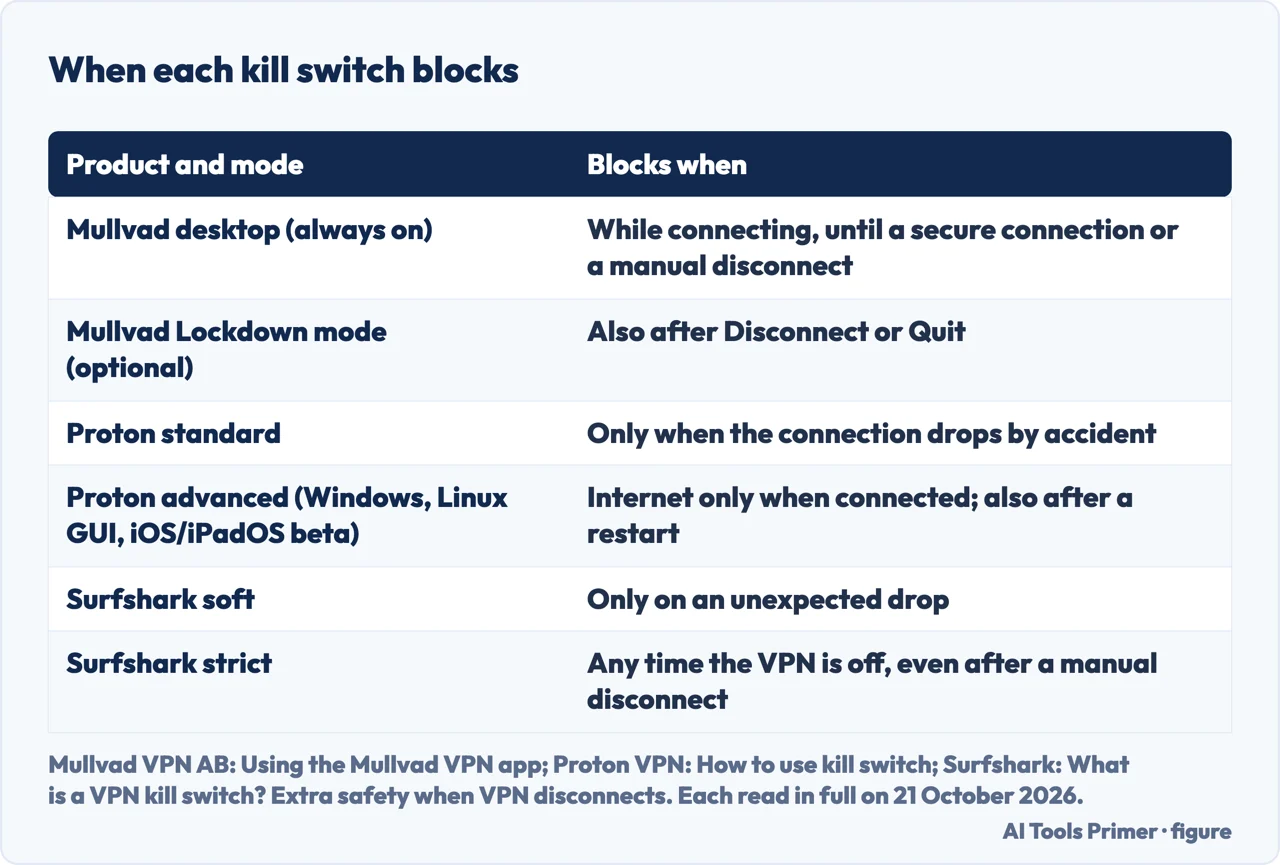
Mullvad VPN AB, which sells a VPN, says the kill switch in its desktop app is always on and cannot be turned off in the settings. It says it continues to block your traffic until a secure connection is made or reestablished, or until you manually disconnect from the app, and it offers an optional Lockdown mode that also blocks after you click Disconnect or Quit.
Proton’s standard kill switch, in its own words, “is only activated when your connection drops by accident”. Proton says its advanced kill switch, available on Windows, the Linux GUI app, and iOS and iPadOS (beta), only allows internet access when connected to Proton VPN, with no exceptions.
Surfshark, which sells a VPN, gives its app two modes. Its soft kill switch acts when the VPN connection drops unexpectedly. Its strict kill switch, Surfshark says, blocks internet access any time the VPN is off, even if you disconnected manually.
Why Disconnect tells you little about an accidental drop
Pressing Disconnect is a deliberate act, and Proton and Surfshark say the lower level of their kill switch acts only when the connection drops by accident or unexpectedly. So if you press Disconnect and the internet keeps working, that fits what the lower level is documented to do. It tells you nothing about whether the block would hold if the connection failed by itself.
Avast, which sells a VPN and antivirus products, advises: “Disconnect your VPN by force-closing the app instead of toggling the connection off to confirm that traffic stops as expected, then reconnect”. It gives this as general advice.
On a Windows VPN profile configured as LockDown, Microsoft says the user can’t disconnect the VPN connection, so the Disconnect test does not apply there. To switch a VPN off on purpose, see turning a VPN off on Windows, Mac, iPhone and Android.
How to test yours
The sequence below is ours, not a vendor’s or a system’s. The sources say what a block does and what you should see when it works, and each step names where its signal comes from. The order of the steps and the choice to cause a failure are this site’s own, and nothing in it is timed. It does not apply to Linux or OpenVPN, covered further down.
- Find out which kind of kill switch you have. Look in the app’s settings for the kill switch and its mode, and note whether it blocks after a manual disconnect.
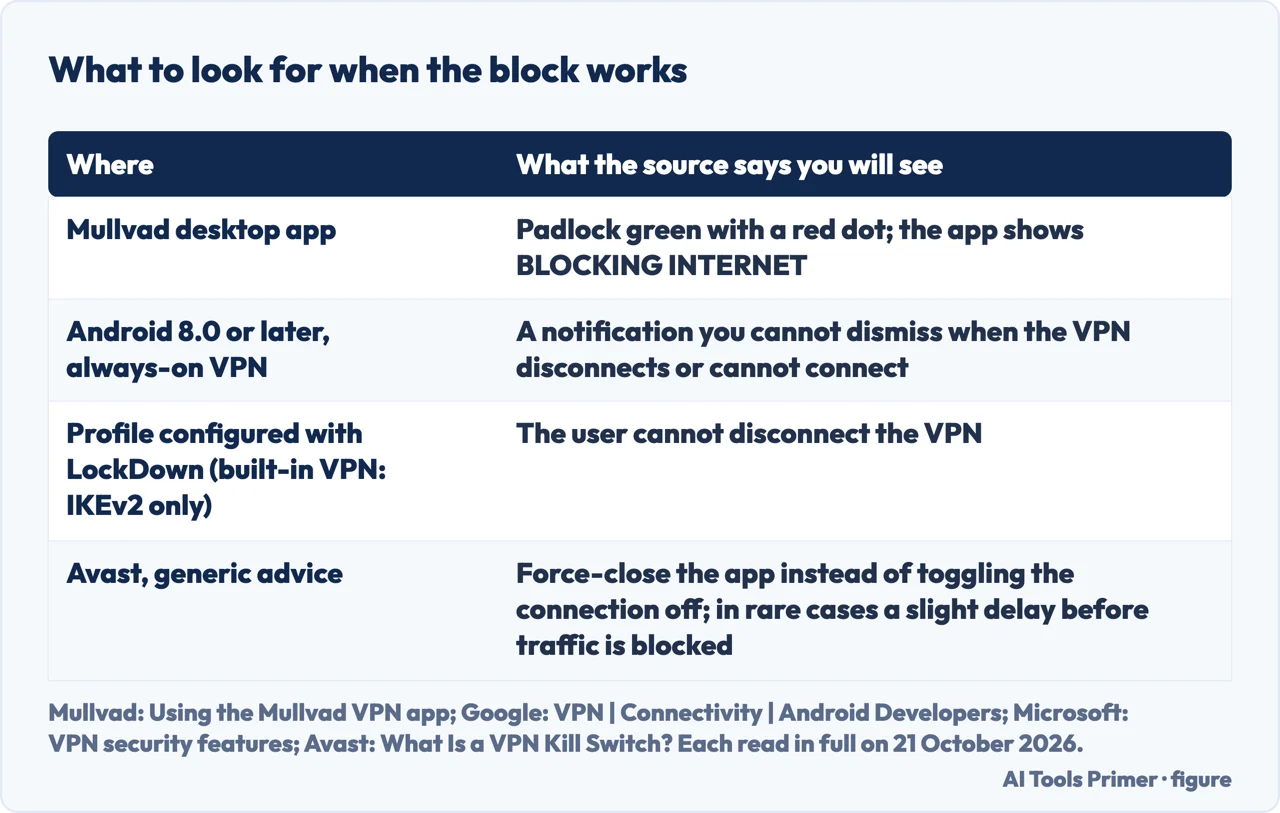
- Know what the app is meant to show. Mullvad says that when its desktop kill switch is blocking, the padlock in the system tray or menu bar turns green with a red dot and the connection screen shows BLOCKING INTERNET. Android’s developer documentation says that from Android 8.0 people see a non-dismissible notification when an always-on VPN connection disconnects or can’t connect. For any other app, the sources describe no signal.
- Make the connection fail without using Disconnect. Avast, which sells a VPN, suggests force-closing the app, and none of the other sources cited on this page describes that step. It is a failure the app does not choose. On a Windows LockDown profile this step does not apply.
- See whether traffic stops. Try a page or an app that needs the internet. Avast admits that in rare cases there may be a slight delay before traffic is blocked. The sources do not give a length for that delay, and this page does not guess one.
- Reconnect and check that normal use returns.
What Windows, Mac, iPhone and Android offer, and what has to be switched on
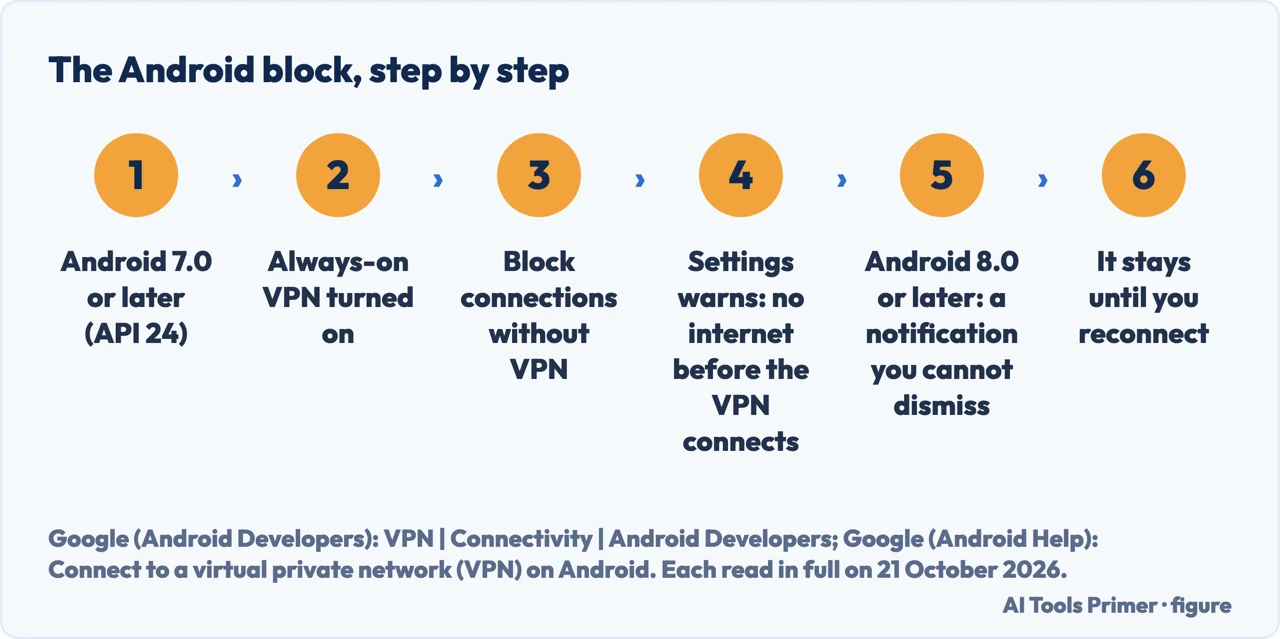
Android. Google’s Android Developers documentation, last updated on 26 February 2026, says an always-on VPN is available from Android 7.0 (API level 24) and can also block connections that do not use the VPN, through the Block connections without VPN switch in Settings. Google Help, whose page says some of its steps only work on Android 14 and up, says that if you have set up a VPN through an app, you won’t have the always-on option, while Proton, which sells a VPN, tells Android users to use Android’s own settings for its kill switch. The sources do not reconcile these two statements, and this page does not settle them.
iPhone, iPad and Mac. Apple’s developer documentation says that a VPN app that sets
includeAllNetworks makes the system drop network traffic when the VPN transitions away
from the connected state. That applies only to apps that set the property, and Apple also says the
system excludes network control traffic that maintains the device’s connection to the local
network, such as DHCP. For an always-on VPN profile on an iOS device supervised with MDM (mobile
device management), Apple says the system drops network traffic when the VPN isn’t connected, a
profile an organisation applies.
Windows. Microsoft’s documentation, updated on 28 January 2025, describes a VPN profile configured with LockDown: if the VPN connection isn’t available, outbound network traffic is blocked, and the user can’t disconnect. For the built-in Windows VPN, LockDown is only available for the IKEv2 connection type. Microsoft’s page does not call this a kill switch. Windows also has a feature called Always On, which Microsoft describes as connecting the active VPN profile automatically on user sign-in, network change and device screen on; that page does not describe it as blocking traffic.
What can still get out
What the sellers admit. Mullvad says that on macOS its app can’t ensure it starts before other applications start sending traffic, so traffic may leak during system startup. Proton, for its macOS app, says some DNS requests from Apple services can bypass the VPN even with the kill switch enabled. It also says that on macOS, when switching servers, there is a brief period where your real IP address may be exposed.
Android in 2022. Mullvad published a blog post on 10 October 2022 that its page now marks as 4 years old and possibly out of date. In it, Mullvad reported that Android sends connectivity checks outside the VPN tunnel every time the device connects to a WiFi network, even when Block connections without VPN is on. This page has not checked that on a current Android. For encrypted DNS there, see private DNS on Android.
TunnelVision. Leviathan Security Group, a security firm, describes a technique, tracked as CVE-2024-3661, that uses DHCP option 121 to push routes so that traffic leaves over the network interface talking to the DHCP server instead of the VPN’s virtual interface. It says the affected systems have a DHCP client that supports option 121, which includes Windows, Linux, iOS and macOS, and not Android. On kill switches, Leviathan writes: “Importantly, the VPN control channel is maintained so features such as kill switches are never tripped, and users continue to show as connected to a VPN in all the cases we’ve observed.” Leviathan speaks about the cases it observed, not about every product.
IPv6, in 2015. A study by Perta and colleagues found that the majority of 14 commercial VPN services suffered from IPv6 traffic leakage. It does not examine kill switches.
Linux and OpenVPN: what the manuals say
This section reports what two manuals say; the sources read for this page describe no way to test either setup.
WireGuard on Linux. The wg-quick(8) manual page, as copied on man7.org and dated 1 January
2016, introduces its kill switch as something one might attempt: its own word is
“attempt”. The rule is an iptables rule added with PostUp, which rejects
output that is not leaving through the tunnel interface or carrying the WireGuard mark, and PreDown
removes it. It is for interfaces with a peer that specifies 0.0.0.0/0 as part of AllowedIPs.
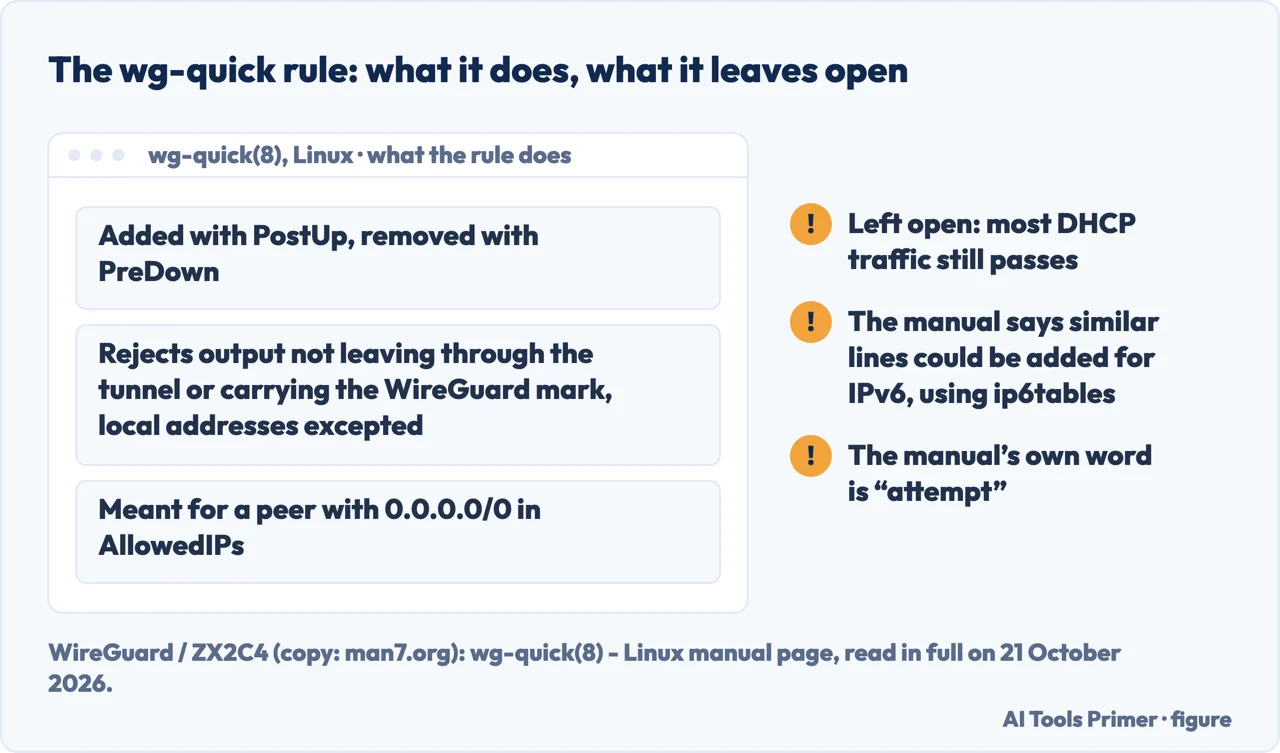
The manual states a limit itself: the rule continues to allow most DHCP traffic through, since most DHCP clients use PF_PACKET sockets, which bypass Netfilter.
OpenVPN. The OpenVPN 2.6 reference manual contains no mention of a kill switch. It does have
options that block one kind of traffic each, such as --block-ipv6 and
--block-outside-dns, which blocks DNS servers on other network adapters to prevent DNS
leaks; the manual says it uses the Windows Filtering Platform and works on Windows Vista or later.
The manual does not call any of them a kill switch.
Where to start
Four ways in.
- “What does it actually block?”
- Start with the levels — what a kill switch blocks
- “How do I check mine?”
- Five steps — how to test yours
- “What does my phone or PC offer, and what do I have to switch on?”
- System by system — what your system offers
- “I run Linux or OpenVPN.”
- What the manuals say — linux and openvpn
Around the tunnel
Two neighbouring pages: switching a VPN off on purpose, and the encrypted lookup that sits beside it.
A different kind of connection
One neighbouring page, on a different kind of connection: how the Tor browser’s bridges work.
Questions people also ask
Should you turn on VPN kill switch?
Surfshark, which sells a VPN, says to turn it on and leave it on. Proton, which sells a VPN, lists limits: on macOS, iOS and iPadOS you cannot connect to devices on your local network, and on most platforms it does not work with split tunnelling.
Which VPN has the best kill switch?
This page does not rank VPNs. Mullvad, Proton and Surfshark each describe kill switch modes that block at different moments, set out in the first section of this page. Check which mode a product offers.
What is a VPN kill switch?
Proton, which sells a VPN, describes it as blocking all internet traffic on your device if your VPN connection drops. Mullvad and Surfshark each describe more than one level of blocking, set out above.
How to disable VPN Kill Switch
Surfshark, which sells a VPN, says to toggle the kill switch off under Settings, then VPN settings. Mullvad, which sells a VPN, says its desktop kill switch cannot be turned off in the settings and blocks until a secure connection is made or you manually disconnect.
Not covered here. This page does not say which VPN to buy and does not rank any; the VPN guide above explains why nothing on this site is ranked yet. It gives no way to test a Linux or OpenVPN setup. The steps above are this site’s own procedure, not one copied from a source, and Avast, which sells a VPN, is the only source cited here that suggests force-closing the app. Switching a VPN off by hand on a computer is on turning off a VPN on Windows and Mac.
Sources
- Google (Android Developers) — VPN | Connectivity | Android Developers, last updated 26 February 2026: always-on VPN from Android 7.0 (API level 24), the Block connections without VPN switch, and the non-dismissible notification from Android 8.0. A developer document — developer.android.com, read 21 October 2026.
- Google (Android Help) — Connect to a virtual private network (VPN) on Android: the always-on notification that stays until you reconnect, and the note that a VPN set up through an app has no always-on option. Android as Google ships it — support.google.com, read 21 October 2026.
- Apple (Developer Documentation) — Routing your VPN network traffic: what the system does when a VPN app sets includeAllNetworks, and always-on VPN profiles on MDM-supervised iOS devices — developer.apple.com, read 21 October 2026.
- Apple (Developer Documentation) — includeAllNetworks | NEVPNProtocol: the property, and the network control traffic such as DHCP that the system excludes — developer.apple.com, read 21 October 2026.
- Microsoft Learn — VPN security features, updated 28 January 2025: LockDown VPN, and the IKEv2 limit for the built-in VPN. Windows — learn.microsoft.com, read 21 October 2026.
- Microsoft Learn — VPN auto-triggered profile options, updated 28 January 2025: the triggers on which Always On connects a profile on Windows, which the page does not describe as blocking traffic — learn.microsoft.com, read 21 October 2026.
- WireGuard / ZX2C4 (copy on man7.org) — wg-quick(8), Linux manual page, dated 1 January 2016: the iptables rule, its PostUp and PreDown lines, and the limits the manual states. Linux only — man7.org, read 21 October 2026.
- OpenVPN — OpenVPN 2.6 Manual: the block-ipv6 and block-outside-dns options. OpenVPN 2.6 — openvpn.net, read 21 October 2026.
- Leviathan Security Group — CVE-2024-3661: TunnelVision, how attackers can decloak routing-based VPNs: what the technique does, the systems affected, and what Leviathan observed about kill switches — www.leviathansecurity.com, read 21 October 2026.
- Perta, Barbera, Tyson, Haddadi and Mei (PoPETs 2015) — A Glance through the VPN Looking Glass: IPv6 Leakage and DNS Hijacking in Commercial VPN clients: the IPv6 finding for 14 services in 2015. The study does not examine kill switches — petsymposium.org, read 21 October 2026.
- Mullvad VPN AB, which sells a VPN — Using the Mullvad VPN app: the desktop kill switch, Lockdown mode, the signals when it blocks, and the macOS startup limit. Mullvad’s own app — mullvad.net, read 21 October 2026.
- Mullvad VPN AB, which sells a VPN — Android leaks connectivity check traffic, 10 October 2022: the connectivity checks outside the tunnel. The page says it is 4 years old and may be out of date — mullvad.net, read 21 October 2026.
- Proton VPN, which sells a VPN — How to use kill switch: the standard and advanced kill switch, the macOS and Android notes, and split tunnelling. Proton’s own app — protonvpn.com, read 21 October 2026.
- Surfshark, which sells a VPN — What is a VPN kill switch? Extra safety when VPN disconnects: the soft and strict modes, and the answers on turning the kill switch on and off. Surfshark’s own app — surfshark.com, read 21 October 2026.
- Avast, which sells a VPN and antivirus products — What Is a VPN Kill Switch? How It Works and Why It Matters: its general advice on testing, and the delay it admits. Not tied to one system — www.avast.com, read 21 October 2026.
Written by Alberto Gulotta
Founder and editor of AI Tools Primer, writing from Palermo, Italy. Thirty-five years of taking computers apart, starting with a Commodore 64 — the long version is on the about page.
Something wrong on this page? Write to aitoolsprimer@gmail.com and it gets fixed.
Written on 21 October 2026.
Independence and limits
No affiliate links and no paid placements anywhere on this site. Nobody pays to appear here, and no company has seen this page before you did.
This is general information, not professional advice. Where a page touches money, health, safety or the law, it names its source and the date it was read — and your situation may still differ. See the privacy page and the cookie policy.