
Tor · guide
Is Tor Browser safe, and safe from whom?
By Alberto Gulotta · Updated · 19 min read
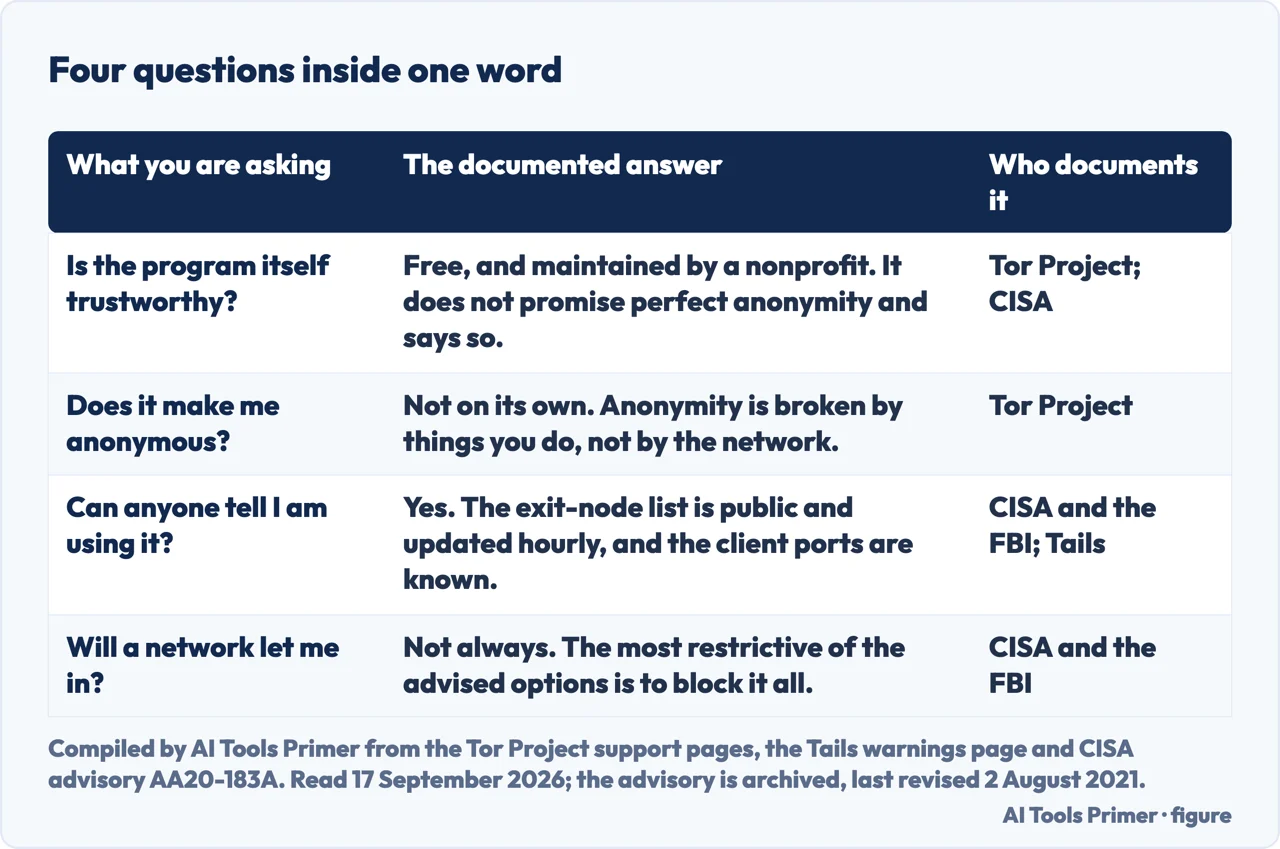
Is Tor Browser safe? The program is free, it is made by a nonprofit, and it does not promise perfect anonymity — its own documentation says so, in the first line. The word hides four separate questions with four different answers, and the shortest route through them is to work out which of the four you are actually asking.
“Tor Browser includes many privacy protections, but it cannot guarantee perfect anonymity.”
That is the first line of the Tor Project’s own page on using the browser safely, and the sentence after it is blunter still: “Generally it is impossible to have perfect anonymity, even with Tor.” It is not a competitor’s assessment and not a security company’s marketing: it is the people who build the thing, on their own support site, declining to make the promise the question assumes. Everything useful about this question follows from taking that sentence literally.
Which of the four questions are you asking?
Four questions, and they do not have the same answer
Work out which one you are asking before you read anybody’s answer, including this page’s.
- 1. Is the program itself trustworthy? It is free, and CISA — writing to tell organisations how to defend against traffic coming out of it — still describes it as maintained by “a nonprofit organization that provides internet anonymity and anti-censorship tools”. Nothing in the three sources read for this page suggests the software does less than it says.
- 2. Does it make you anonymous? Not by itself, and not because of a weakness in the network. The Tor Project is precise about the boundary: “Tor does not protect all of your computer’s Internet traffic when you run it. Tor only protects applications that are properly configured to send their Internet traffic through Tor.” Almost everything that goes wrong happens outside that boundary.
- 3. Can anyone tell you are using it? Yes, and this is the answer that gets left out. Your provider and the network you are on can see it; the site you visit can see it, Tails explains, “because the list of exit nodes of the Tor network is public”. What they cannot see is which sites you visited.
- 4. Will a network let you in? Not always, and by design. CISA and the FBI advise organisations to “block or closely monitor inbound and outbound traffic from known Tor nodes”, and their most restrictive option is to “Block all web traffic to and from public Tor entry and exit nodes.” A page that will not load is not a fault in the browser.
The shorter way of asking — is Tor safe — is the same question and gets the same four answers. The order above is the order in which they cost you something: the code is good, what you do with it is where things go wrong, and the last two are not about you at all. They are about what the network around you can observe, and what it has been advised to do about that.
What undoes the protection, and why
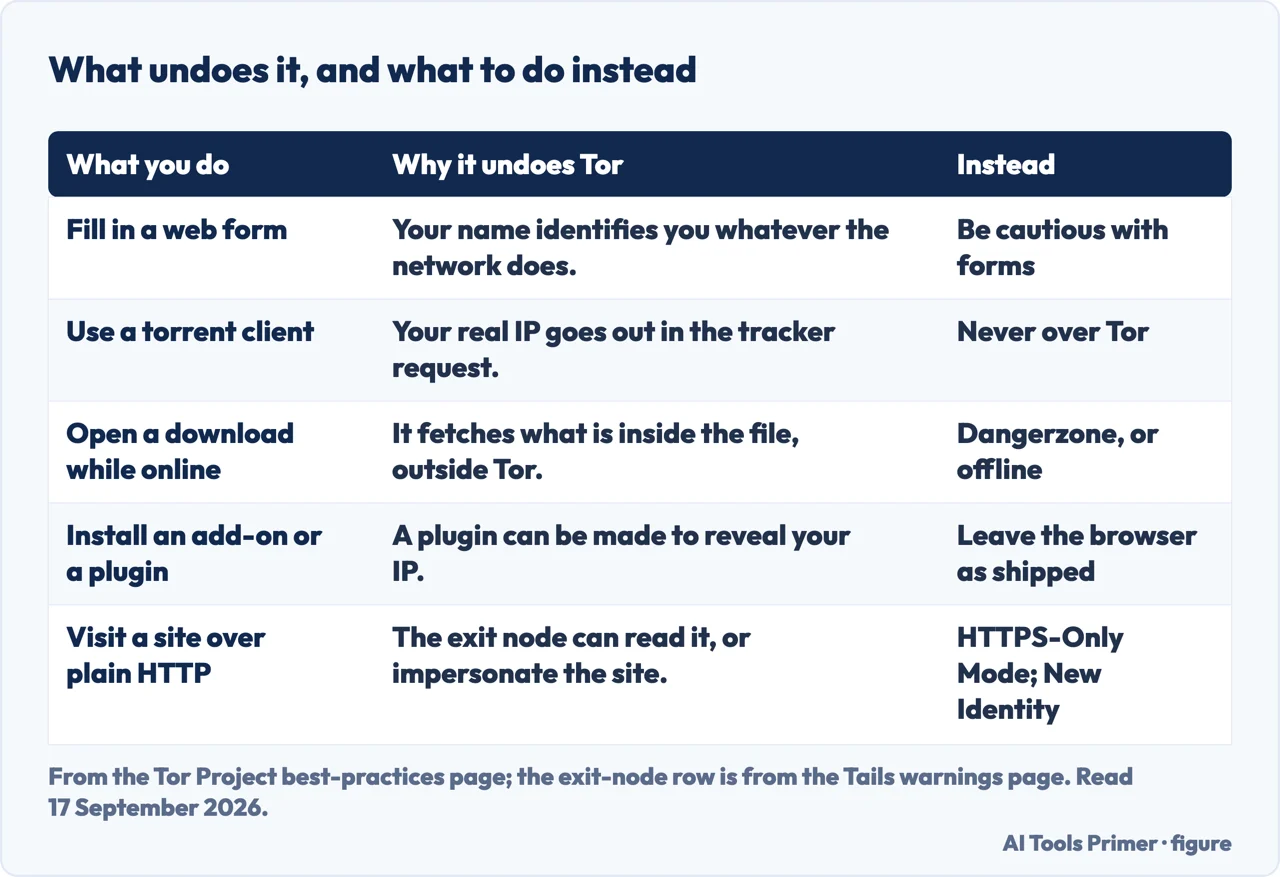
Notice what the five rows in that table have in common: not one of them is a weakness in the network. A form you fill in defeats the whole thing before the traffic leaves the machine — provide a name, an email, an address or a phone number and “you are no longer anonymous to that website”, whatever the three relays did. The Tor Project’s advice there is behavioural rather than technical: “be vigilant and extremely cautious when filling out web forms”. It is also the reason a page about this tool is mostly a page about habits, and why what of you is already public is a better first hour than any browser setting.
Using it safely, step by step
- Take it from the project, and change nothing afterwards. The browser arrives configured; the settings that matter are already set. The Tor Project asks you not to add to it — it blocks plugins such as Flash and Quicktime because “they can be manipulated into revealing your IP address”, and it does not recommend extra add-ons either, on the grounds that they may bypass Tor or harm your anonymity in other ways.
- Understand what is and is not inside the tunnel. Only traffic from applications configured to use Tor goes through it. Everything else on the machine — a mail client, a chat app, an update checker — connects the way it always did, from your own address, at the same time.
- Watch the address bar, because the last hop is not yours. Tor encrypts traffic to and within its own network, but “the encryption of your traffic to the final destination website depends on that website”. The browser ships with HTTPS-Only Mode for exactly this. Tails says what the last relay can do without it: it can observe your traffic, and it can impersonate the site you meant to reach — what Tails calls a machine-in-the-middle attack. What the padlock does and does not say covers the same ground for an ordinary browser.
- Treat a certificate warning as an instruction, not an obstacle. If one appears, Tails’ advice is to “use the New Identity feature of Tor Browser to change exit node” rather than click through. It is the only step on this list that changes the route rather than a setting, and a connection that is not private is worth recognising before you meet one here.
- Never run a torrent client over it. Not as a compromise, not carefully. Torrent applications have been seen ignoring proxy settings and connecting directly even when told to use Tor, and even when they obey, “you will often send out your real IP address in the tracker GET request, because that’s how torrents work”. The Tor Project’s own wording leaves no room: “Under no circumstances is it safe to use BitTorrent and Tor together”.
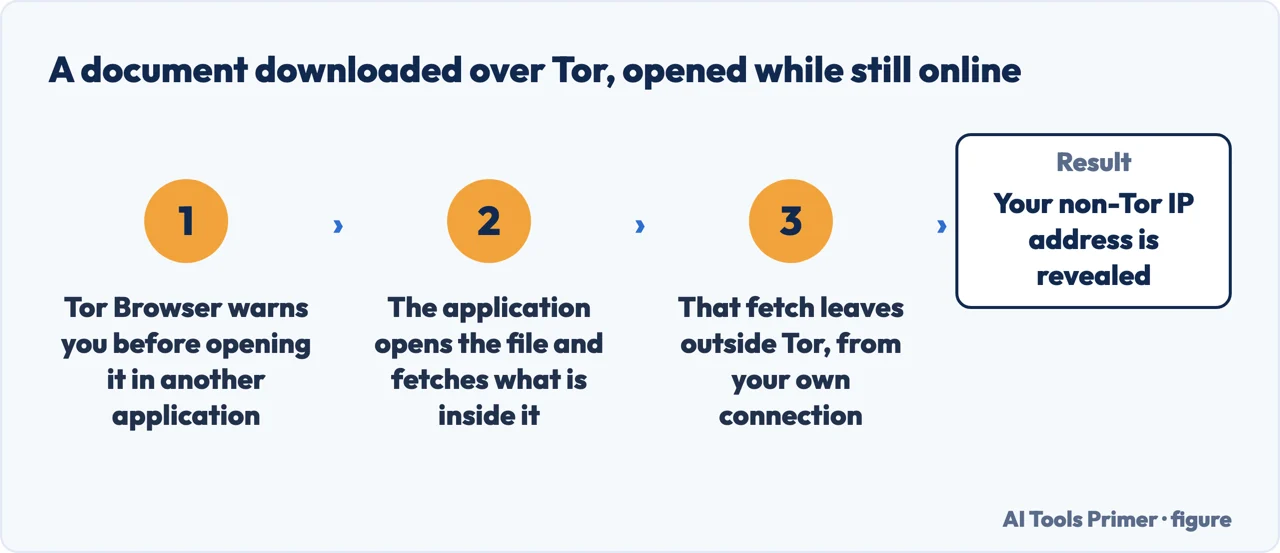
- Do not open a downloaded document while you are still online. The browser warns you before handing a download to another application, and the warning exists because “these documents can contain Internet resources that will be downloaded outside of Tor by the application that opens them”. The consequence is stated plainly: “This will reveal your non-Tor IP address.” The recommended way round it is either “using a disconnected computer, or using dangerzone to create safe PDF files that you can open”.
- If it matters that nobody knows you use it, ask for a bridge. By default Tor “does not prevent somebody watching your Internet traffic from learning that you’re using Tor”, and the remedy is in the same sentence: configure it to reach the network through a bridge instead of connecting to it directly. No bridge addresses appear on this page: the project hands them out itself, and that is the only place to get one.
Who can see that you are using it
Now the third question, which is where this page earns its place. Using Tor is visible, and it is worth being exact about who sees which half of it. Your provider and the network you are sitting on can see the connection but, as Tails puts it, “they cannot know which sites you visit”. The site at the other end has the opposite view: it cannot see you, but it knows the traffic came through Tor, “because the list of exit nodes of the Tor network is public”. That public list is also why, in Tails’ words, “Many websites ask you to solve a CAPTCHA or block access from the Tor network.”
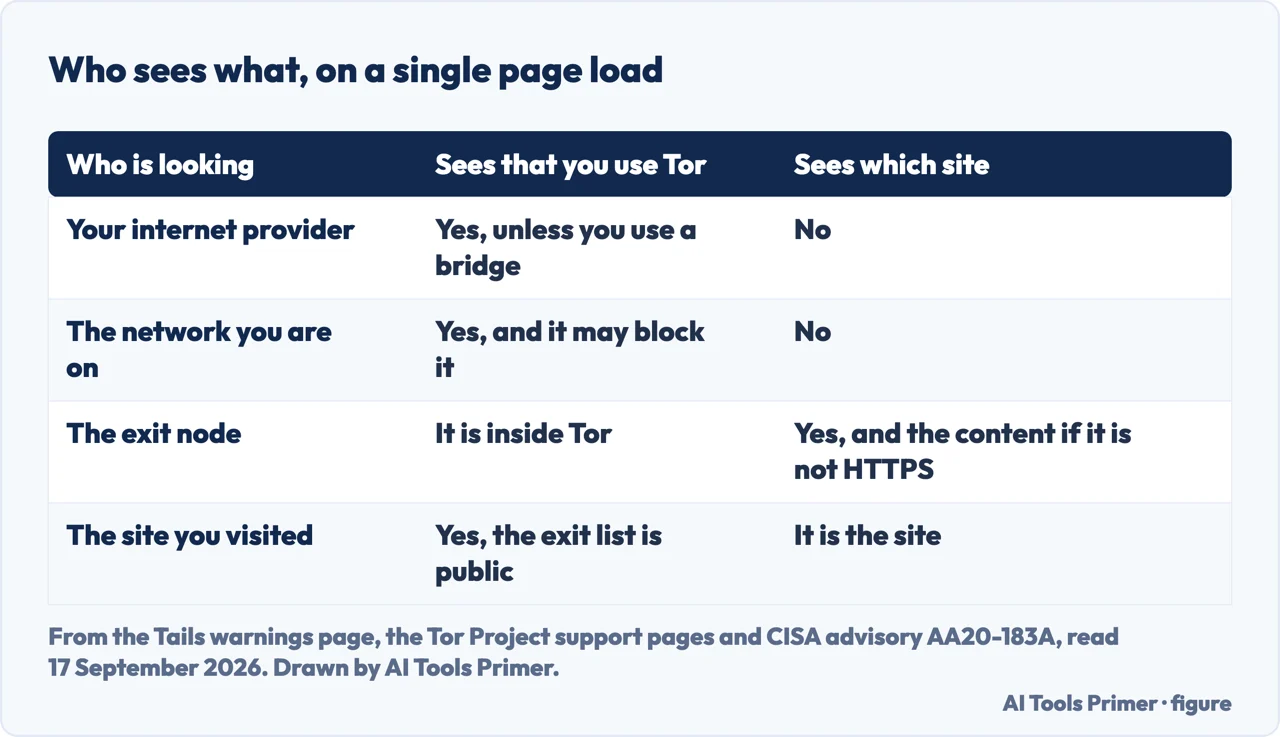
The fourth question has an answer in a document most readers of this subject never meet. CISA — the United States cyber-defence agency — published an advisory, written with contributions from the FBI, on the risks associated with Tor and what organisations should do about the traffic. Its recommendation is to “block or closely monitor inbound and outbound traffic from known Tor nodes”, and its most restrictive option is to “Block all web traffic to and from public Tor entry and exit nodes.” The machinery for doing it is public too: the Tor Project runs the exit list itself, and the advisory notes “the highly dynamic nature of the Tor exit list, which is updated hourly”. It even names the ports — “ports commonly affiliated with Tor include 9001, 9030, 9040, 9050, 9051, and 9150”. This advisory is archived and was last revised on 2 August 2021, which its own page states at the top; the dates matter and they are given here for that reason.
Two things in that document are worth holding onto, and they pull in opposite directions. The first is that it does not treat you as a suspect: organisations are told to weigh “legitimate reasons that non-malicious users may prefer to, or need to, use Tor”, and that “mitigation actions can also impact the access of legitimate users who leverage Tor to protect their privacy”. The second is that blocking is imperfect in a way that is quietly informative: “blocking known Tor nodes does not completely eliminate the threat”, because bridges are not all listed publicly — the same property that makes one useful to a journalist makes it useful to anybody else.
Would a VPN be safer?
Which leaves the question almost everybody arrives holding: would a VPN be safer? The honest version of the answer needs a label on it, because the clearest statement of it comes from the Tor side. Tails writes that no anonymity network used for fast connections can fully protect against correlating both ends of a circuit, and then: “VPNs (Virtual Private Networks) are less secure than Tor, because they do not use 3 independent relays.” It also says, of those correlation attacks, that they have been studied in research papers “but we don’t know of any actual use to deanonymize Tor users”. Read it as what it is — the position of the project that maintains Tor — and then read what a tunnel changes and what it does not for the shape of the other tool, because the two are not answers to the same question. And if the VPN is one you already run, what its kill switch blocks when the connection drops is a separate matter. If what you actually want is for a website to stop recognising your browser, neither is the tool: that is fingerprinting, and what a private browser blocks.
And the last item on the project’s own list is not a setting but a request. “Ultimately the best protection is a social approach: the more Tor users there are near you and the more diverse their interests, the less dangerous it will be that you are one of them.” Tails puts the same idea as a description of how the protection works at all — “Tor and Tails don’t protect you by making you look like any random Internet user, but by making all Tor and Tails users look the same.” It is the reason the fourth question above has the answer it has, and the reason it is not a flaw.
Where to start
Three ways in, depending on which of the four questions brought you here.
- “Does it actually keep me anonymous?”
- What undoes it, and what does not — what undoes it and what does not
- “Would a VPN be safer?”
- The comparison, with a label on it — the other tools
- “Is this the dark web?”
- No, and the difference is in — what this is not
What undoes it, and what does not
Every one of these is about what happens outside the tunnel: what your browser gives away before the network sees anything, what is already public about you, and what a padlock is actually promising.
The other tools
The three things this one is most often weighed against, each answering a different question. None of them is a substitute for another, and the entrance above this page says why.
What this is not
The subject this tool gets confused with, and the two pages that separate them. Reading these first saves a lot of the confusion the question arrives with.
Questions people also ask
Is Tor 100% anonymous?
No, and the project says so first: Tor Browser “cannot guarantee perfect anonymity”, and “Generally it is impossible to have perfect anonymity, even with Tor.” What it protects is traffic from applications configured to go through it. Everything else on the machine, and everything you type into a form, sits outside that.
Can a Tor Browser be traced?
The traffic can be seen leaving your network and seen arriving at the site, and Tails is clear that no fast anonymity network fully defeats an adversary watching both ends. On those correlation attacks it adds that they have been studied in research papers “but we don’t know of any actual use to deanonymize Tor users”.
Can the FBI track Tor?
This page will not answer that, because none of the three sources read for it says so. What they do show is different and checkable: CISA published an advisory with FBI contributions telling organisations to block or closely monitor traffic from known Tor nodes. That is about seeing the traffic, not about identifying the person.
Is Tor illegal in the US?
No legal opinion here. What the read sources show is that a United States federal agency describes the software as maintained by “a nonprofit organization that provides internet anonymity and anti-censorship tools”, and tells organisations to weigh “legitimate reasons that non-malicious users may prefer to, or need to, use Tor”.
What are the risks of using Tor?
The documented ones are habits rather than failures: a web form, a torrent client, a document opened while online, an added plugin, a site visited over plain HTTP. Each has a mechanism and an alternative, and they are in the second table above with the source for every row.
Not covered here. It will not publish a single address: no onion links, no bridge lines, no mirrors, not even as illustration.
It will not name a version. One of the better-known answers to this question has a heading about what is new in a numbered release; the official download page, read on 17 September 2026, came back with about 212 words and no version number in it, so this page gives none.
And it will not tell anybody whose safety depends on this that a web page was enough. Where the stakes are real the right move is training and support from an organisation that does this properly, with your own situation in front of them. What holds instead is simple: safe from whom is answered in the words of the people who build the tool and of the people who warn about it, neither softened.
Sources
- Tor Project, Tor Browser best practices — Security (the statement that Tor Browser includes many privacy protections but cannot guarantee perfect anonymity, and that generally it is impossible to have perfect anonymity even with Tor; the boundary that Tor protects only applications properly configured to send their traffic through it; the warning about web forms and personal information; the two mechanisms by which a torrent client leaks a real IP address, and the flat prohibition on using BitTorrent and Tor together; the reasons not to install plugins or add-ons; the dependence of final-hop encryption on the destination website and the presence of HTTPS-Only Mode; the warning before documents are opened by external applications, the mechanism behind it and the recommendation of a disconnected computer or dangerzone; and the bridge as the way to stop an observer learning that you use Tor, with the closing social argument about diversity of users) — support.torproject.org, read 17 September 2026.
- CISA, Defending Against Malicious Cyber Activity Originating from Tor — advisory AA20-183A, written with contributions from the FBI, last revised 2 August 2021 and marked as archived content on its own page (the description of the Tor Project as a nonprofit providing internet anonymity and anti-censorship tools; the statement that traffic appears to originate from the IP address of a Tor exit node rather than the user’s computer; the recommendation that organisations block or closely monitor inbound and outbound traffic from known Tor nodes, with blocking all web traffic to and from public entry and exit nodes as the most restrictive approach; the Exit List Service and the hourly update of the exit list; the ports commonly affiliated with Tor; the acknowledgement of legitimate, non-malicious users and of the impact that mitigations have on them; and the admission that blocking known nodes does not completely eliminate the threat because bridges are not all listed publicly) — www.cisa.gov, read 17 September 2026.
- Tails, Warnings: Tails is safe but not magic (read here for the limits of the Tor network rather than for Tails itself, and not counted as an independent second source: the page ends by stating that Tails is made by the Tor Project. The statements used are that Tor and Tails protect by making all their users look the same rather than like any random Internet user; that a provider and local network can see the connection but cannot know which sites are visited; that visited sites can tell because the exit-node list is public, and that many sites therefore serve a CAPTCHA or block Tor outright; that the exit node establishes the real connection and can observe traffic or impersonate the destination server; the advice to use New Identity after a security warning; the comparison of VPNs with Tor on the number of independent relays; and the note that end-to-end correlation attacks are studied in research papers with no known actual use against Tor users) — tails.net, read 17 September 2026.
Written by Alberto Gulotta
Founder and editor of AI Tools Primer, writing from Palermo, Italy. Thirty-five years of taking computers apart, starting with a Commodore 64 — the long version is on the about page.
Something wrong on this page? Write to aitoolsprimer@gmail.com and it gets fixed.
Written on 17 September 2026 · last checked 21 October 2026.
Independence and limits
No affiliate links and no paid placements anywhere on this site. Nobody pays to appear here, and no company has seen this page before you did.
This is general information, not professional advice. Where a page touches money, health, safety or the law, it names its source and the date it was read — and your situation may still differ. See the privacy page and the cookie policy.