
Software · guide
Connected without internet, and the test behind the words
By Alberto Gulotta · Updated · 13 min read
Connected without internet means two separate things happened: your device joined the network, and a test it ran afterwards failed. The test is a real request to a real address, and Microsoft publishes both. Knowing what it asks tells you which half of the problem you have before you touch a single cable.
| Source | What it says it applies to | What this guide takes from it |
|---|---|---|
| Microsoft, NCSI overview | Windows Server 2025, 2022, 2019 and 2016 — not Windows 11 or Windows 10, although the text discusses both | What the indicator is, the active and passive probes, proxies and captive portals |
| Microsoft, NCSI frequently asked questions | The same four server releases | The probe address, the expected reply, the hop count, and the list of failure reasons |
| Microsoft, Fix Wi-Fi connection issues in Windows | Windows 10 and Windows 11 | One sentence: that Windows decides by sending a small HTTP request to a server on the internet |
| Google, How to fix Wi-Fi connection problems (Pixel Phone Help) | Pixel phones; some steps need Android 8.1 or later, and the diagnostics tool is US-only on Pixel 11 | The three-way split on a phone, and signing in to a public network |
The test your computer runs
The part of Windows that decides is called the Network Connectivity Status Indicator, and Microsoft describes its job in one line: it “is the component responsible for determining network connectivity exists and if it’s Internet or local-only.” That phrase — internet or local-only — is the whole distinction the icon is drawing. Joining a router is local. Reaching past it is internet. The indicator is the thing that tells the difference, and the support pages say the same in plainer words: “To determine if your PC has limited connectivity with no Internet connection, Windows sends a small HTTP request to a server on the Internet.”
Microsoft’s own name for the state is limited connectivity, and it describes it in one sentence: “Your Windows PC is connected to your local network but isn’t connected to the Internet.” The wording on screen moves about — wifi connected but no internet on one device, nothing but a small exclamation mark on another — and on Windows the verdict underneath is the same test coming back negative.
GET http://www.msftconnecttest.com/connecttest.txt
This is the question. Since Windows 10 version 1607, Microsoft writes, “web probe (HTTP) requests are sent to www.msftconnecttest.com/connecttest.txt”. And this is the answer it is waiting for: a reply whose body contains Microsoft Connect Test. Anything else — a timeout, a redirect, a login page, a 403 from a proxy — and the icon changes. The address is published: it is a text file that exists so that a machine can tell the difference between a network and the internet.
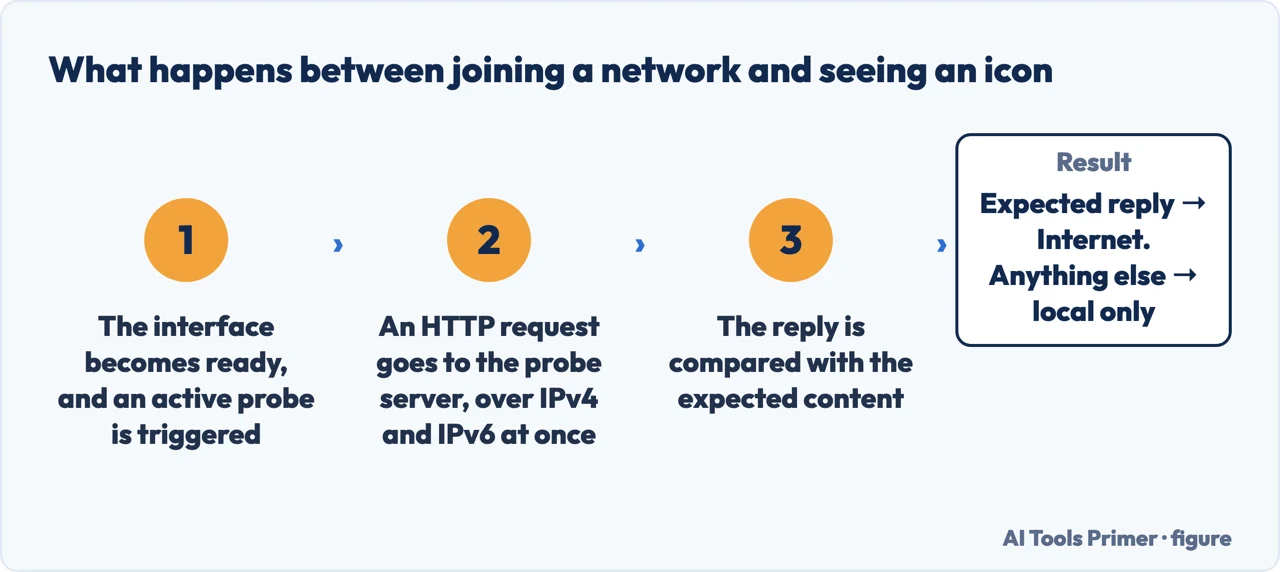
Two details in Microsoft’s description change how you read a failure. The first is that there are two requests, not one: “NCSI sends separate IPv4 and IPv6 active probes in parallel. If either probe succeeds, NCSI determines that the device has internet connectivity.” So an icon that says no internet means both failed. The second is when the test runs at all. Microsoft lists the triggers as interface or network condition changes, proxy detection or changes, and hotspot detection or changes.
Why a café or a hotel shows it
Because the reply is the wrong reply, not because there is no reply. A public network that wants you to accept terms first intercepts the request: Microsoft puts it as captive portals that “may send an HTTP redirect or an empty response to the probe instead of allowing it through to the internet.” The page came back, the words in it were not the words expected, and the indicator does the only honest thing and reports local.
The device is not confused, in other words — it is right, and it is telling you there is a sign-in page you have not filled in. Google gives the same situation from the phone end and the same remedy: “Public networks, like at cafes or airports, often have a webpage for you to complete.” If no page appears, its advice is to look for a notification asking you to sign in, or to open a new page in a new window. Windows will usually open a browser for you, and Microsoft says that is deliberate: it wants you to know the network needs authentication.
The second, quieter test
There is a quieter one running alongside. Passive probing does not ask anything; it watches the traffic already arriving and counts how many hops it has travelled. If the count reaches a minimum, the interface is treated as having internet. Microsoft gives the number: “The default hop count is 8 but this isn’t always optimal for enterprises.” And it gives the rhythm: “If the passive probe is allowed to run, it does so every 15 seconds.”
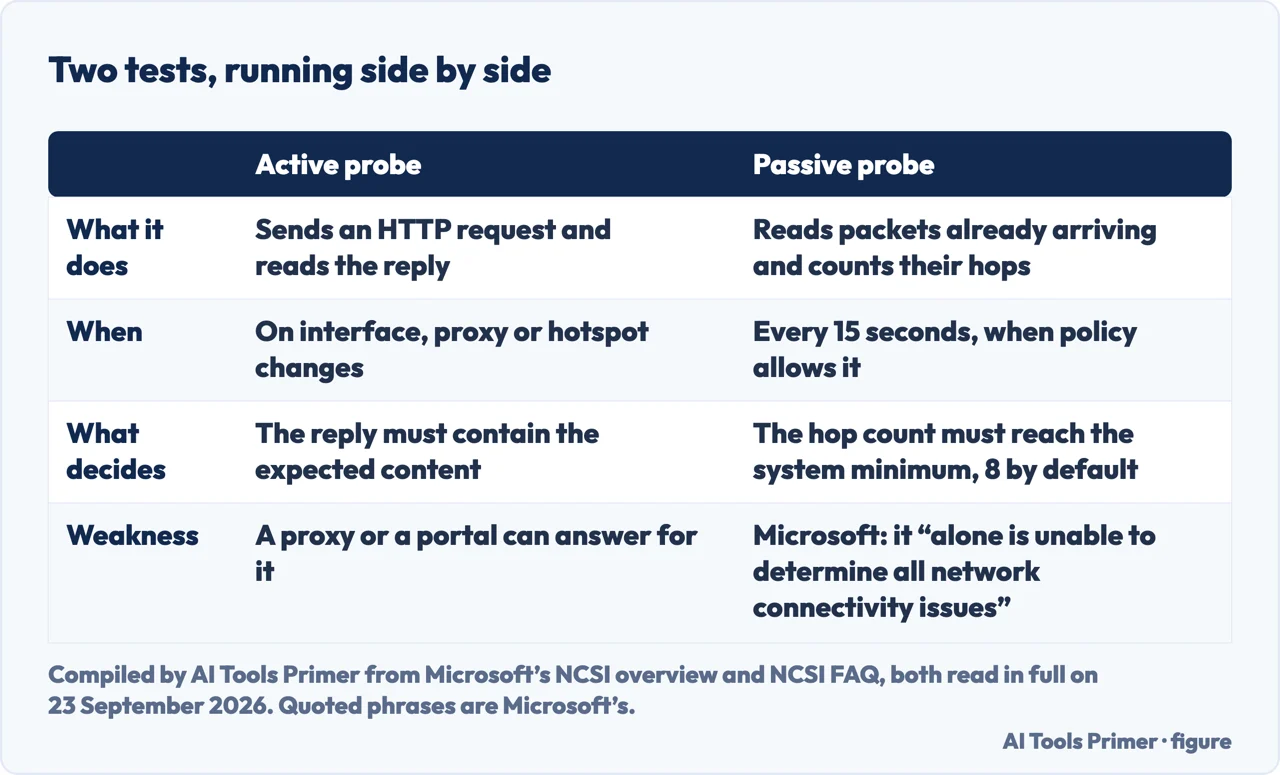
Microsoft warns against switching the active test off as a workaround, because passive polling alone cannot detect every kind of failure.
What actually breaks it
Microsoft publishes the list, with the names it writes into the event log, and each name says where the request stopped.
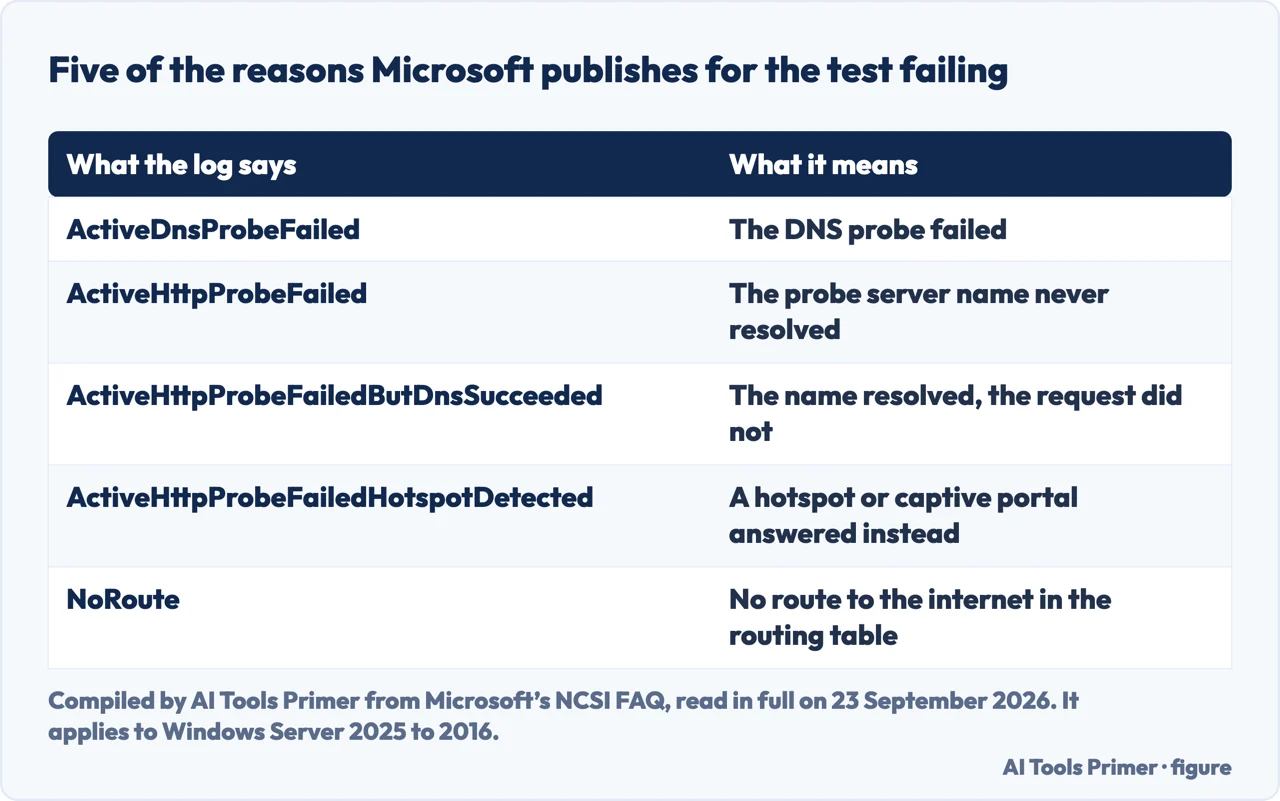
Two of those are worth translating out of the log and into the room. A VPN that has just connected can leave the machine with no route to the internet until the routing table catches up — if the icon changed the moment a VPN came up, that is the first thing to undo, and turning the VPN off is a one-click test. A proxy that blocks the request answers it with a refusal rather than silence: Microsoft’s example is an HTTP 403 Forbidden.
None of that is a repair procedure, and this page deliberately does not carry one. The ordered steps — the second-device test, restarting the modem before the router, the two frequency bands, the network commands — are set out on the page about Wi-Fi that is not working. If the connection works but goes away again and again, the page on a connection that keeps dropping is the right one; if everything connects and one website does not, this site can’t be reached is a different fault entirely.
The same words on a phone
A phone shows its own version of the message and runs its own version of the check. Google’s troubleshooting does not describe the probe, but it does give the one test that separates the three possible culprits, and it is worth doing before anything else: “If your phone connects to the Wi-Fi network but you still have no internet, the problem is most likely with your internet connection.” In other words, join the same network with a second device. If it also fails, stop looking at the phone.
One cause on that page is specific to phones and has nothing to do with radios at all: “An incorrect date and time on your phone can cause Wi-Fi connection problems.” Setting the time automatically rules it out. Beyond that, the phone-side routes are resetting the network settings and rejoining the network from scratch, which needs the network password.
Where to start
Three ways in, depending on where you are standing.
- “What is it even testing?”
- The request, and the reply it wants. Start at the test your computer runs
- “It only does this in cafes.”
- Then it is right, and there is a page to sign. See why a cafe network shows it
- “I want the list of causes.”
- Microsoft publishes one, with names. It is in what actually breaks it
When you want the steps rather than the reason
This page explains the message. These ones do the work, in the order their documentation gives.
When one thing fails and the rest works
A failed connectivity test is a statement about the whole connection. These are the faults that look similar and are not.
The network itself
If the second device fails too, the fault is past your machine. These cover the box in the hall.
Questions people also ask
Why is my Wi-Fi saying connected without internet?
Because your device joined the network and then failed a test. Windows sends a small HTTP request to an address of Microsoft’s and waits for a reply containing a known phrase. No reply, or the wrong reply, and the icon changes — even though the Wi-Fi link itself is fine.
What does it mean to be connected but with no internet?
That the two halves of the journey are not in the same state. The stretch between your device and the router works; the test past the router fails. Microsoft’s own wording is that you can see other devices on your local network but cannot do anything that needs the internet.
Why does my phone keep saying connected without internet?
The same reason, plus two that are specific to phones: a public network holding a sign-in page in front of you, and a clock that is wrong. Google lists an incorrect date and time as a cause of Wi-Fi problems.
Is msftconnecttest.com safe, and can I block it?
It is Microsoft’s own connectivity probe address, and the file it serves is a short text file. Blocking it makes the active test fail. Microsoft advises against disabling active probing, because the quieter passive check cannot detect every kind of failure on its own.
Why does it fix itself after a minute?
One possible reason is the second test. Passive probing watches traffic that is already arriving and counts the hops it has travelled; if it sees enough, it raises the status without asking anything. Microsoft says it runs every 15 seconds when it is allowed to run.
Why does the icon come back by itself after a restart?
Because the test is re-run whenever the interface changes state. Microsoft lists the triggers as interface or network condition changes, proxy detection or changes, and hotspot detection or changes. A restart changes the interface state, so the test runs again.
Not covered here. It is not a repair sequence. The ordered steps live on the Wi-Fi page, and repeating them here would only mean two half-lists instead of one whole one.
It does not cover enterprise configuration of the indicator — private probe servers, group policy, the registry values that change the probe — beyond naming them. That is administrator documentation and it is linked below.
It does not name a cause for your particular machine. The list here is Microsoft’s list of what can break the test, not a diagnosis.
Sources
- Microsoft, Network Connectivity Status Indicator overview for Windows — that the indicator is the component responsible for determining whether connectivity exists and whether it is internet or local-only; that the active probe is an HTTP request to a probe server; that separate IPv4 and IPv6 probes are sent in parallel and either succeeding is enough; that passive probing reads received packets instead; that captive portals may send a redirect or an empty response; that active probing should not be disabled as a workaround; and that from Windows 11 the indicator is hosted in the Network List Manager service. Its Applies to list is Windows Server 2025, 2022, 2019 and 2016. Last updated 25 February 2025; read in full on 23 September 2026 — learn.microsoft.com, read 23 September 2026.
- Microsoft, Network Connectivity Status Indicator FAQ for Windows — the probe address and the file it requests since Windows 10 build 14393; that the expected reply contains Microsoft Connect Test; the events that trigger an active probe; the default hop count of 8; that the passive probe runs every 15 seconds when policy allows; and the table of probe failure reasons with the names written to the event log. Same Applies to list as the overview. Read in full on 23 September 2026 — learn.microsoft.com, read 23 September 2026.
- Microsoft, Fix Wi-Fi connection issues in Windows — read in full for one sentence: that to determine whether the PC has limited connectivity, Windows sends a small HTTP request to a server on the Internet. Its Applies To list is Windows 10 and Windows 11. The ordered repair steps on that page are covered by our own guide on Wi-Fi that is not working, and are deliberately not repeated here. Read in full on 23 September 2026 — support.microsoft.com, read 23 September 2026.
- Google, How to fix Wi-Fi connection problems (Pixel Phone Help) — the three-way split between the phone, the network and the internet connection; that public networks often have a webpage to complete and what to do when it does not appear; and that an incorrect date and time can cause Wi-Fi connection problems. The page notes that some steps need Android 8.1 or later, and that its Wi-Fi diagnostics feature is available only in the US on Pixel 11 phones. Read in full on 23 September 2026 — support.google.com, read 23 September 2026.
Written by Alberto Gulotta
Founder and editor of AI Tools Primer, writing from Palermo, Italy. Thirty-five years of taking computers apart, starting with a Commodore 64 — the long version is on the about page.
Something wrong on this page? Write to aitoolsprimer@gmail.com and it gets fixed.
Written on 24 September 2026.
Independence and limits
No affiliate links and no paid placements anywhere on this site. Nobody pays to appear here, and no company has seen this page before you did.
This is general information, not professional advice. Where a page touches money, health, safety or the law, it names its source and the date it was read — and your situation may still differ. See the privacy page and the cookie policy.