
Software · guide
How to fix slow internet, starting with what is enough
By Alberto Gulotta · Updated · 13 min read
“Slow” is a comparison, and it needs a second half. Before changing anything, it is worth knowing what the connection is being compared against — and a US regulator publishes exactly that, for free, with no product attached.
What the regulator says each activity needs
Minimum download speed in Mbps, from the FCC’s Broadband Speed Guide.
General usage
Watching video
Video calls
Gaming
Read down that list and the striking thing is how low the numbers are. High definition video is 5 to 8 Mbps. A personal video call in HD is 1.5. Browsing and email are 1. The figure that stands out is Ultra HD 4K at 25 — the top of the list, level with the upper end of the student and telecommuting rows, and worth knowing before assuming a connection is at fault.
So a connection that struggles with an HD video call while sitting on a plan many times larger than 1.5 Mbps may not need a bigger download plan. The FCC’s consumer guide lists what else can slow it down: “an old or slow router, an old or slow computer, using the Internet at peak times (7 p.m – 11 p.m.), using high-bandwidth applications or sites, or having several household members online at once.” Microsoft’s network guidance for Teams says what one video-call app does when the connection is short: “when bandwidth is insufficient, Teams prioritizes audio quality over video quality.”
“Speeds are based on running one activity at a time.”
That single caveat is what stops the table above from being the whole answer, and it is one reason a connection can meet every number on it and still feel slow. A household does not run one activity at a time. The FCC publishes a second guide for exactly that, and it works in bands rather than in single figures.
The same question for a household
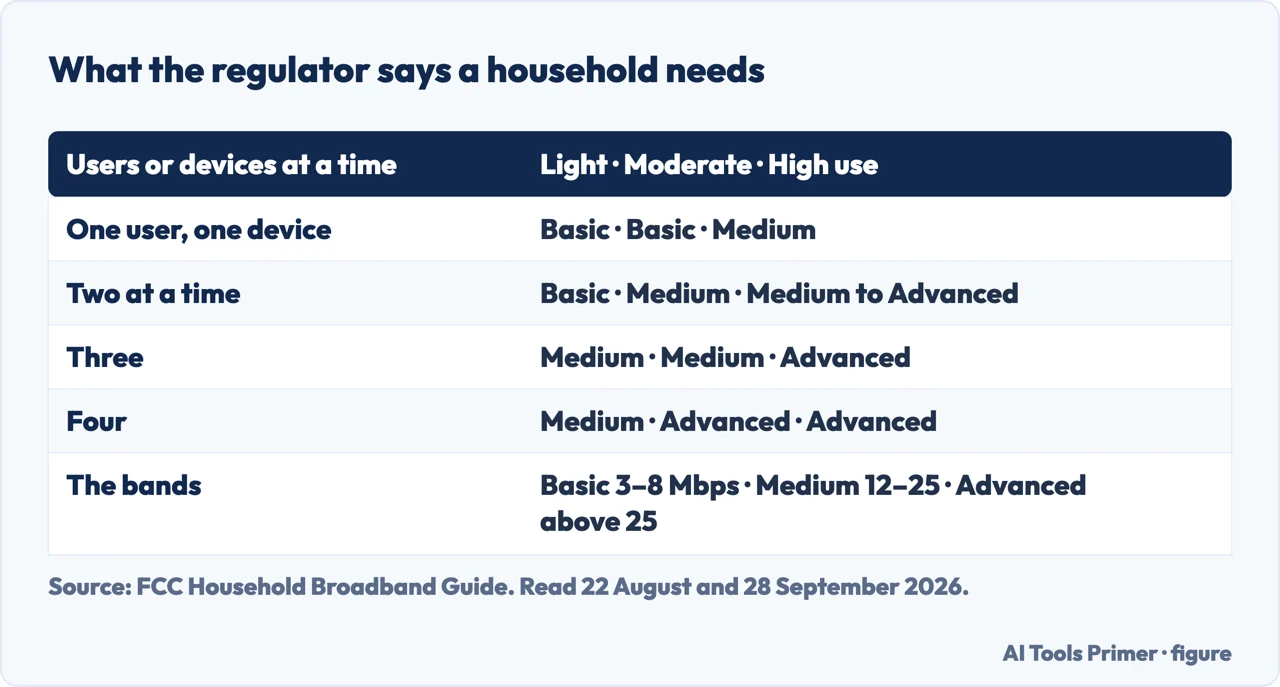
The FCC’s Household Broadband Guide, with its own definitions of the three bands.
- The bands
- Basic Service = 3 to 8 Mbps · Medium Service = 12 to 25 Mbps · Advanced Service = more than 25 Mbps.
- One user on one device
- Light use: Basic. Moderate use: Basic. High use: Medium.
- Two users or devices at a time
- Basic · Medium · Medium/Advanced.
- Three users or devices
- Medium · Medium · Advanced.
- Four users or devices
- Medium · Advanced · Advanced. “Light use” is email, browsing, basic video, VoIP and internet radio; “moderate” adds one high-demand application; “high” is more than one at the same time.
That second table is the more realistic one, and it changes the picture. One user on one device with light or moderate use falls in Basic — three to eight megabits — although some single activities in the first table, 4K at 25 among them, ask for more. Four users or devices at a time, with more than one demanding application running at once, fall in Advanced, which the FCC puts at more than 25. The gap between those two households is the whole argument about broadband plans, and it is a question about how many people are doing what, not about how fast the internet ought to be in general.
It is worth being exact about one word in the FCC’s definitions, because it does a lot of work. “Moderate use” means basic functions plus one high-demand application. “High use” means more than one at the same time. So the difference between the two is not the size of the household — it is whether two demanding things overlap. An evening where one person streams in HD while others are on a multiparty video conference is a “high use” evening, whatever the household usually does.
Three things the download figure does not tell you
The FCC’s consumer guide names them alongside download speed. Each is a way a fast plan can still fall short of what you need.
- Upload speed
- “the speed at which you can send information from your computer or device to the web” The FCC says it matters “especially” for video conferencing, sharing larger files, interactive learning and two-way online gaming — and is blunt about the market: “Ideally, all of these applications would work best if upload speed were as high as download speed, but service providers generally don’t offer that option.” Its advice is to find the download speed you need, then “look for a service that has upload speeds reasonably close to that level”.
- Latency
- “there can be delays in how packets travel. This kind of time lag is called latency. High latency can be a problem with applications that require real-time back-and-forth communication, such as online phone calls, video conferencing, or gaming.” A connection can be fast and still late, and the two are measured separately.
- Data limits
- “Some broadband providers limit the total amount of data you can download and/or upload, for example, to 150 or 250 gigabytes (GB).” The FCC gives the scale to judge it by: “a standard definition movie is typically between 1 to 2 GB, while an HD movie may be 3 to 5 GB.”
“These numbers are rough guidelines and are not based on surveys or experiments conducted by the FCC. You should use your best judgment when choosing your broadband service.”
The regulator puts that on both guides, and it is worth repeating rather than burying. These are reference points, not measurements. They are still worth using, because they come from a body with no plan to sell you — but they are offered as a starting frame rather than as a specification, and the FCC says so itself.
What the table is for, in practice. Work out which row you are in, then compare it with what you are paying for. Three outcomes, and they lead in different directions. If your plan is well above the number and the connection is still slower than you expected, the FCC’s advice is to start at home — “start by seeing whether changing equipment or changing the way you use the Internet improves your broadband experience” — and the neighbouring guides below cover that part. If it does not help, the FCC’s guide says to call the provider. If your plan is at or below it, no amount of moving the router will fix a plan that was never large enough. And if you do not know what you are paying for, that is the first thing to find out, because every other step depends on it.
Both tables above are about download speed, which the FCC calls “the most important factor” but “not the only factor”. Its consumer guide names three more, and any of them can explain a connection that meets every number and still disappoints.
What this page will not do is tell you which plan to buy or which provider is faster. That depends on what is available at an address, and no page can know that. What it can do is give you the number to hold the offer against, from a source with nothing to sell — which is the part the offer itself will not supply.
The guides below take it three ways: the connection itself, the machine at the end of it, and the settings on the devices that share it.
Where to start
Three ways in. Work out your row first; it decides which of the three you need.
- “My plan is much bigger than the number.”
- Then look inside the house first — inside the house
- “The wifi drops or will not connect.”
- That is a different fault — the connection
- “Everything on this machine is slow, not just the internet.”
- Go to the machine
The connection
When the line or the wifi itself is the problem rather than the plan. These guides are about faults and settings rather than about speed figures.
The machine
Sometimes the internet is fine and the computer is not. The symptoms overlap, and the tests that tell them apart are quick.
Inside the house
The devices sharing the connection, and the settings on them that decide how much they take. Where to look when the plan is clearly big enough.
Not covered here. It will not recommend a provider or a plan. What is available depends on the address, and no page can know yours.
It will not present the FCC’s figures as measurements. The FCC says they are rough guidelines not based on its own surveys or experiments, and that sentence belongs next to the numbers.
And it will not give upload minimums. The FCC tables above publish download minimums; what its consumer guide says about upload is quoted in the box above. What holds instead is simple: the per-activity minimum download speeds and the household bands are the Federal Communications Commission’s own, with its statement that they are rough guidelines.
Being seen and heard on a call
The four things that are wrong when they say they cannot see or hear you.
- The same job, in the other places it comes up
- Laptop camera not working, and what the light actually means
- Why is my sound not working, and whose order to follow
- How to connect AirPods to laptop, and the case gesture
Sources
- Federal Communications Commission, Broadband Speed Guide (the table of minimum download speeds in Mbps for typical online activities — general browsing and email at 1, streaming online radio and VoIP calls at less than 0.5, social media at 1, file downloading at 10, student and telecommuting at 5 to 25, standard definition video at 3 to 4, high definition video at 5 to 8, Ultra HD 4K video at 25, a standard personal video call at 1, an HD personal video call at 1.5, HD video teleconferencing at 6, a game console connecting to the internet at 3 and online multiplayer at 4; the note that additional speed may enhance performance and that speeds are based on running one activity at a time; and the statement that these numbers are rough guidelines and are not based on surveys or experiments conducted by the FCC) — www.fcc.gov, read 22 August and 28 September 2026.
- Federal Communications Commission, Household Broadband Guide (the chart comparing minimum download speed needs for light, moderate and high household use with one, two, three or four devices at a time; the definitions of light use as basic functions including email, browsing, basic video, VoIP and internet radio, moderate use as basic functions plus one high-demand application such as streaming HD video, multiparty video conferencing, online gaming or telecommuting, and high use as basic functions plus more than one high-demand application at the same time; the service bands of Basic at 3 to 8 Mbps, Medium at 12 to 25 Mbps and Advanced at more than 25 Mbps; the definition of Mbps as the standard measure of broadband speed, referring to the speed at which information packets are downloaded from or uploaded to the internet; and the same statement that the numbers are rough guidelines not based on FCC surveys or experiments) — www.fcc.gov, read 22 August and 28 September 2026.
- Federal Communications Commission, Broadband Service for the Home: A Consumer’s Guide (that download speed is the most important factor but not the only one; the description of upload speed as the speed at which information is sent from a computer or device to the web, its importance for video conferencing, sharing larger files online, interactive learning, medical applications using HD imaging and two-way online gaming, the note that these applications would work best if upload speed were as high as download speed but that service providers generally do not offer that option, and the advice to find the needed download speed and look for a service with upload speeds reasonably close to it; the description of latency as time lag in how packets travel and the note that high latency can be a problem for applications requiring real-time back-and-forth communication such as online phone calls, video conferencing or gaming; the note that some providers limit total data, for example to 150 or 250 gigabytes, with the scale that a standard definition movie is typically between 1 to 2 GB while an HD movie may be 3 to 5 GB; and the factors that can slow a connection (an old or slow router, an old or slow computer, peak times, high-bandwidth applications, several household members online at once) and the advice to start by changing equipment or usage before calling the provider) — www.fcc.gov, read 22 August and 28 September 2026.
- Microsoft Learn — Prepare your organization's network for Microsoft Teams (that Teams is designed to give the best audio, video and content-sharing experience regardless of network conditions, and that when bandwidth is insufficient Teams prioritises audio quality over video quality; that Teams is always conservative on bandwidth utilisation and can deliver HD video quality in under 1.5 Mbps; that actual consumption varies with video layout, resolution and frames per second, and rises when more bandwidth is available; that the requirements are per endpoint, typically one per user; and, for live events without a content delivery network, roughly 2 Mbps per viewer, or 3 Mbps for 1080p) — learn.microsoft.com, read 5 September and 28 September 2026.
Written by Alberto Gulotta
Founder and editor of AI Tools Primer, writing from Palermo, Italy. Thirty-five years of taking computers apart, starting with a Commodore 64 — the long version is on the about page.
Something wrong on this page? Write to aitoolsprimer@gmail.com and it gets fixed.
Written on 22 August 2026 · last checked 30 September 2026.
Independence and limits
No affiliate links and no paid placements anywhere on this site. Nobody pays to appear here, and no company has seen this page before you did.
This is general information, not professional advice. Where a page touches money, health, safety or the law, it names its source and the date it was read — and your situation may still differ. See the privacy page and the cookie policy.