Why is my sound not working has an unusual property: the manufacturers do not publish lists of things to try, they publish sequences, and they say so. Microsoft writes “The tips are listed in order”; Dell writes “Follow the steps in order”. The trouble is that the sequences do not agree, and one check that can silence a computer before Windows even loads appears at opposite ends of two of them and not at all in the third.
Microsoft
13 steps, declared order
The hub page states it outright: “The tips are listed in order.” Thirteen
numbered steps, and the automated troubleshooter sits before Step 1.
Counted on the page: the words BIOS and UEFI appear zero times, in both
the Windows 11 and the Windows 10 tab.
Dell
7 steps, declared order
“Follow the steps in order. Start with the first one and see if it helps. If it
doesn’t, move on to the next step.”
And the first bullet of Step 1 of 7: “If you’re using the built-in speakers,
make sure they’re enabled in the BIOS or UEFI settings.”
HP
5 fixes, numbered
On HP’s editorial Tech Takes article, the same check is item 5 of 5, under
“Update BIOS”: “tab over to the Advanced menu and make sure that the sound card
is enabled”.
HP numbers its five fixes but does not state in words that the order is binding.
Look at where the BIOS check sits. Dell puts it in the first bullet of Step 1 of 7. HP puts it fifth of five. Microsoft never mentions it. That is not a small difference of emphasis: a reader who follows Microsoft’s thirteen steps to the end, faithfully, is never told to check whether the sound hardware is switched on below the operating system.
This page is not saying Microsoft is wrong to leave it out — its pages are about Windows, and firmware settings are the machine maker’s territory. It is saying that the reader does not know that, and follows the most authoritative-looking list to the bottom.
Inside Microsoft’s own pages there are three more disagreements, and all three can be checked by counting.
Three places where Microsoft disagrees with Microsoft
The same troubleshooter is first and last. On the hub page it comes before Step 1:
“start by running the automated audio troubleshooter in the Get Help app”. On
Microsoft’s page for the exact symptom — no sound from speakers or headphones
— the identical tool is Solution 4 of 4, the last thing on the page. Both pages
say “Applies To: Windows 11, Windows 10”.
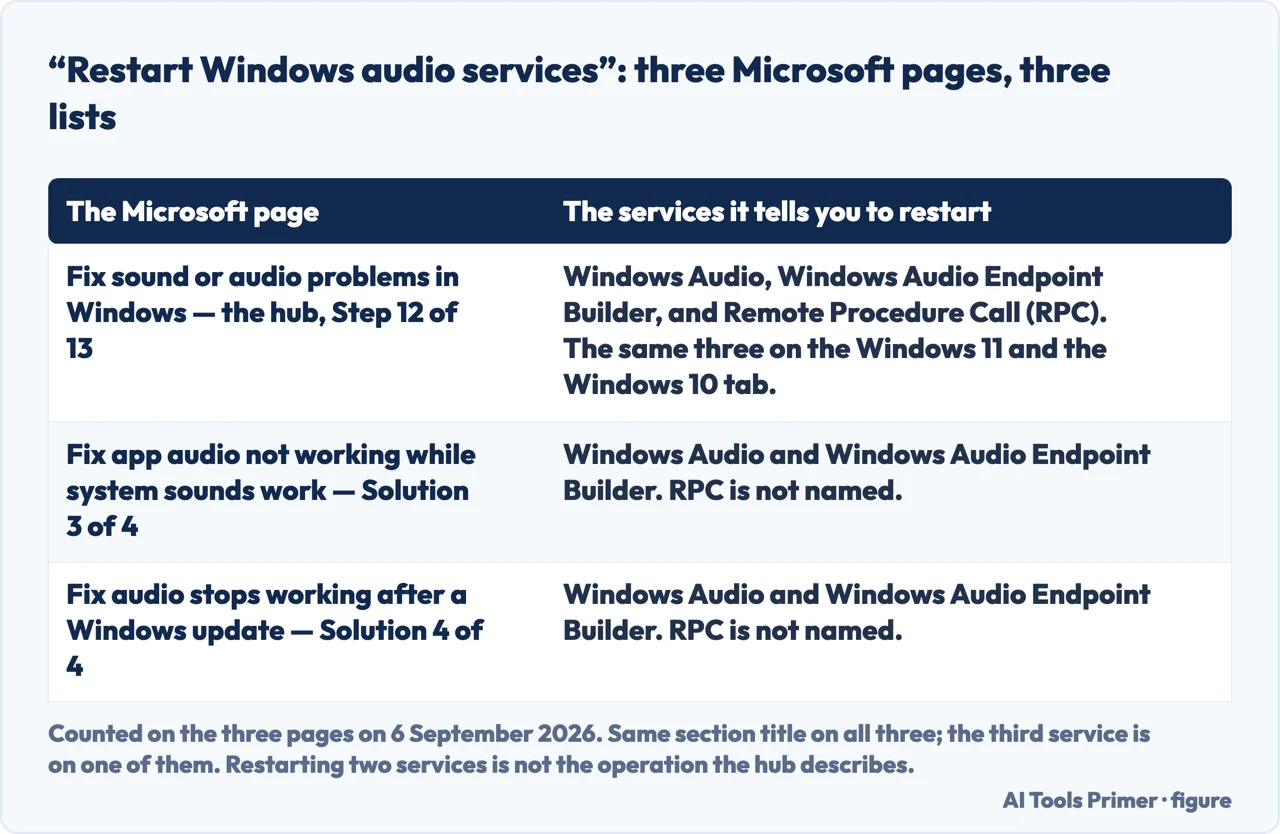
“Restart Windows audio services” means two different lists. The hub
names three: Windows Audio, Windows Audio Endpoint Builder, and Remote Procedure Call
(RPC). Two other Microsoft pages with almost the same section title name only the first
two. RPC appears on one page of the three.
The driver advice points both ways. For audio that stopped after an update, the hub
sends you to roll the driver back; Microsoft’s page dedicated to that exact scenario
puts installing further updates and updating the driver first, and the rollback third.
Every count above was made by reading the pages in full rather than their summaries. None of it
means Microsoft is wrong: the pages are written for different entry points and each is
internally sensible. The consequence is still practical. If you followed one page and it
failed, following the next one is not starting again from a fresh angle — it is often the
same steps in a different sequence, with one item quietly added or missing.
The RPC one deserves a sentence on its own, because it is the kind of detail that decides whether a step works. Restarting two of three related services is not the same operation as restarting three, and a reader who used the page that lists two will conclude the step did not help — while the page that lists three is describing something slightly different under the same heading.
The three pages are worth naming, because the difference is countable rather than arguable. The hub is the only one of the three that names the third service; the other two carry the same section title and stop at two. One of those two is the page written for the exact case in which sound disappears after an update — the one a reader in that situation is most likely to be sent to.
The same section title on three Microsoft pages, and three different lists under it. Counted by reading all three on 6 September 2026. Figure drawn by AI Tools Primer.
There is one more thing all these lists share, and it is the reason so many of them fail: they are all about the system. The sound may not be a system problem at all.
A published cause that lives inside a single application, and that no system-level
check will reveal:
Microsoft: “Apps can use a different output device than the system
default.”
That describes a computer whose sound is fine and one program that is silent, and it is not
visible in the Sound settings everybody is told to open. Microsoft’s fix is in a different
place from the system output setting: Settings → System → Sound → Volume
mixer, where each app has its own Output device entry. If system sounds play and one
program does not, this is the first place to look and it is two pages away from where the
troubleshooting starts.
On the first page of Google for this question, read on 23 August 2026, there are exactly
two manufacturer documents: Microsoft’s hub page and an HP Tech Takes
article — which is HP’s editorial area, not support.hp.com. Around them sit a
video carousel, a Reddit thread with 162 replies, a Quora answer, a Lenovo glossary entry and a
Google Account Community thread about a phone. Dell’s seven-step sequence is not on that
page, and it is the one that puts the BIOS check first.
So the order this page suggests, assembled from the published ones rather than invented. First, does anything play at all? If system sounds work and one program is silent, go straight to the Volume mixer and that program’s own output device — the system lists will not find it. If nothing plays anywhere, check the output device selected in Sound settings, then work through your own manufacturer’s sequence rather than a generic one, and if it is a desktop or a laptop whose speakers never worked, the BIOS or UEFI check belongs near the beginning, where Dell puts it, not at the end.
What this page will not do is give you a single ordered list of its own. Three manufacturers publish three orders for their own hardware, and replacing them with a fourth invented here would be adding to the problem rather than describing it.
It will not tell you to reinstall the driver first. Microsoft’s two pages disagree about which direction to move the driver, and doing the irreversible half of that pair before the reversible half is the wrong way round.
And it will not recommend an external sound card or a USB adapter. Those are a genuine answer to some of these faults, none has been tested here, and this is a category where an untested recommendation is simply an advertisement.
Where to start
Three ways in. If one program is silent and everything else works, take the third.
Microsoft thirteen steps, Dell seven, HP five — and the firmware check appears first, last, and not at all. Two of the three state that the order is binding.
Not covered here. It will not publish a fourth ordered list. Three manufacturers already publish three for their own hardware, and inventing another one adds to the confusion this page is about.
It will not tell you to update or roll back the driver as a first move. Microsoft’s own two pages point in opposite directions on that, and one of the two directions is harder to undo.
It will not recommend an external sound card or USB audio adapter. Untested here.
And it carries no affiliate links, including for speakers and headphones, the products a guide on this subject usually exists to sell. What holds instead is simple: the three orders and the counts above were taken by reading each manufacturer page in full, then opened again on 6 September 2026.
Being seen and heard on a call
Four guides: a laptop camera that is not working, sound that is not working, connecting AirPods to a laptop and slow internet.
Dell — No Sound on Computer: Troubleshoot Audio Issues (the declared order, “Follow the steps in order. Start with the first one and see if it helps. If it doesn’t, move on to the next step.”, and the first bullet of Step 1, that if you’re using the built-in speakers you should make sure they’re enabled in the BIOS or UEFI settings) — www.dell.com, read 27 August 2026.
HP Tech Takes — Why Is My Sound Not Working? 5 Troubleshooting Tips for PCs (the fifth of the five tips: restart the computer and run the BIOS/UEFI setup menu, look at the audio settings in BIOS, tab over to the Advanced menu and make sure that the sound card is enabled) — www.hp.com, read 27 August 2026.
Microsoft, Fix sound or audio problems in Windows — Microsoft Support (the hub page, which states that the tips are listed in order so you start with the first and continue if it does not help, and places the automated audio troubleshooter in the Get Help app before Step 1. Counted on the page on 24 August 2026: thirteen numbered steps, and the words BIOS and UEFI appear zero times in both the Windows 11 and the Windows 10 tab) — support.microsoft.com, read 24 August 2026.
Microsoft, Fix audio issues when no sound plays from speakers or headphones in Windows — Microsoft Support (the page for this exact symptom, where the same automated Audio troubleshooter appears as Solution 4, the last of four, rather than ahead of the list as it does on the hub page; and the causes it names, including the wrong audio output device being selected, the sound being muted, audio enhancements interfering, and the audio driver not working correctly) — support.microsoft.com, read 24 August 2026.
Microsoft, Fix app audio not working while system sounds work in Windows — Microsoft Support (that apps can use a different output device than the system default, and that the correct output device should be confirmed for the affected app) — support.microsoft.com, read 6 September 2026.
Microsoft, Fix audio stops working after a Windows update in Windows — Microsoft Support (the page written for the exact case in which sound disappears after an update, whose four solutions are, in order, installing the latest Windows updates, updating the audio driver, rolling the audio driver back, and restarting the Windows audio services; the note that the Roll Back Driver option is available only if a previous driver version exists; and the services it names for Solution 4, which are Windows Audio and Windows Audio Endpoint Builder and not Remote Procedure Call) — support.microsoft.com, read 6 September 2026.
AG
Written by Alberto Gulotta
Founder and editor of AI Tools Primer, writing from Palermo, Italy. Thirty-five years of
taking computers apart, starting with a Commodore 64 — the long version is on the
about page.
Written on 23 August 2026 · last checked 23 September 2026.
§
Independence and limits
No affiliate links and no paid placements anywhere on this site. Nobody pays to appear here,
and no company has seen this page before you did.
This is general information, not professional advice. Where a page touches money, health,
safety or the law, it names its source and the date it was read — and your situation may
still differ. See the privacy page and the
cookie policy.