Windows
off“Airplane mode disables Bluetooth. Ensure it is turned off.”
Microsoft lists it as a numbered solution on the page about a Bluetooth toggle that has vanished.

Software · guide
By Alberto Gulotta · Updated · 11 min read
Why is my bluetooth not working covers three different situations that look identical: the switch will not turn on, the switch is greyed out, or the switch has disappeared from settings altogether. In the manufacturers’ documentation, the first two are usually a state rather than a fault — and the states are published.
Start with the setting that switches Bluetooth off without anyone noticing, because it does three different things depending on what you are holding.
Windows
off“Airplane mode disables Bluetooth. Ensure it is turned off.”
Microsoft lists it as a numbered solution on the page about a Bluetooth toggle that has vanished.
iPhone and iPad
onApple, describing what Airplane Mode does: “This turns off all radios except for Bluetooth.”
The exception is deliberate and documented. Airplane Mode on an iPhone is not a reason for Bluetooth to be off.
Android
off, then it remembers“When you first turn on Airplane mode on your Android phone, Wi-Fi and Bluetooth turn off.”
“The next time you turn on Airplane mode, your phone will remember your previous setting.”
Read those three together and the odd one out is clear. On an iPhone, Airplane Mode is not a reason for Bluetooth to be off: Apple keeps it on by design and says so. On Windows it is off. On Android it is off the first time and then follows whatever you chose last — so the same switch, on the same flight, can leave you with Bluetooth on or off depending on a decision you made months ago.
Apple adds one more rule in the same place, and it is the one that surprises people: “If you turn off Bluetooth while you’re in Airplane Mode, your device turns off Bluetooth the next time that you turn on Airplane Mode.” The exception has a memory too.
Then the case that generates the most unnecessary alarm.
Apple, on the Bluetooth button in Control Centre: “Tap the Bluetooth button. The icon dims (grayed out), and your device disconnects from any accessory it’s connected to.” — and among the conditions that switch it back on by itself: “It’s 5 AM local time.”
Two things follow. First, the dimmed icon in Control Centre is a disconnection, not a shutdown: the radio is still on, which is why AirDrop, Location and the Apple Watch keep working. Second, it comes back on its own — at five in the morning, among other triggers Apple lists. Somebody who switched Bluetooth off from Control Centre last night and finds it on this morning has not been hacked and has not made a mistake: that is the published behaviour. To actually turn it off, the switch is in Settings, not in Control Centre.
Now the third situation, which is the one that is sometimes a real fault.
Microsoft, on a toggle that is not there at all: “The Bluetooth icon or toggle may be missing or appear grayed out in Settings or Quick settings if Windows cannot detect or enable the Bluetooth feature. When this happens, Bluetooth options may not appear, or you may not be able to turn Bluetooth on or off.”
The causes it lists are: “incorrect Bluetooth settings, outdated or incompatible drivers, stopped system services, hardware malfunctions, or problems by recent Windows updates.” And before any of them, on a different Microsoft page, the sentence nobody wants but somebody needs: “Some devices don’t have Bluetooth.” A desktop PC that has never shown a Bluetooth switch may simply have no radio in it, and no amount of driver work will conjure one.
It is worth pausing on that last sentence rather than skipping past it. A missing Bluetooth switch on a desktop is not always a problem to be solved; on machines without the hardware it is the correct display. Microsoft says it in four words, and it saves an evening of driver hunting.
The remaining family of cases has nothing to do with the switch at all.
Apple, on an accessory that will not come back: “Unpair the accessory from your other devices.” Microsoft, on a list that looks empty: “If you don’t see your Bluetooth device displayed in the list of devices, you may need to set your Bluetooth devices discovery setting” — the list is filtered by default.
Both describe the same shape of problem: nothing is broken, something else is holding the connection or hiding the device. A pair of headphones already connected to a tablet in the next room will not appear on the phone; a device that is present but not shown is a display setting rather than a fault. Neither is a driver problem, and neither is visible from the Bluetooth switch.
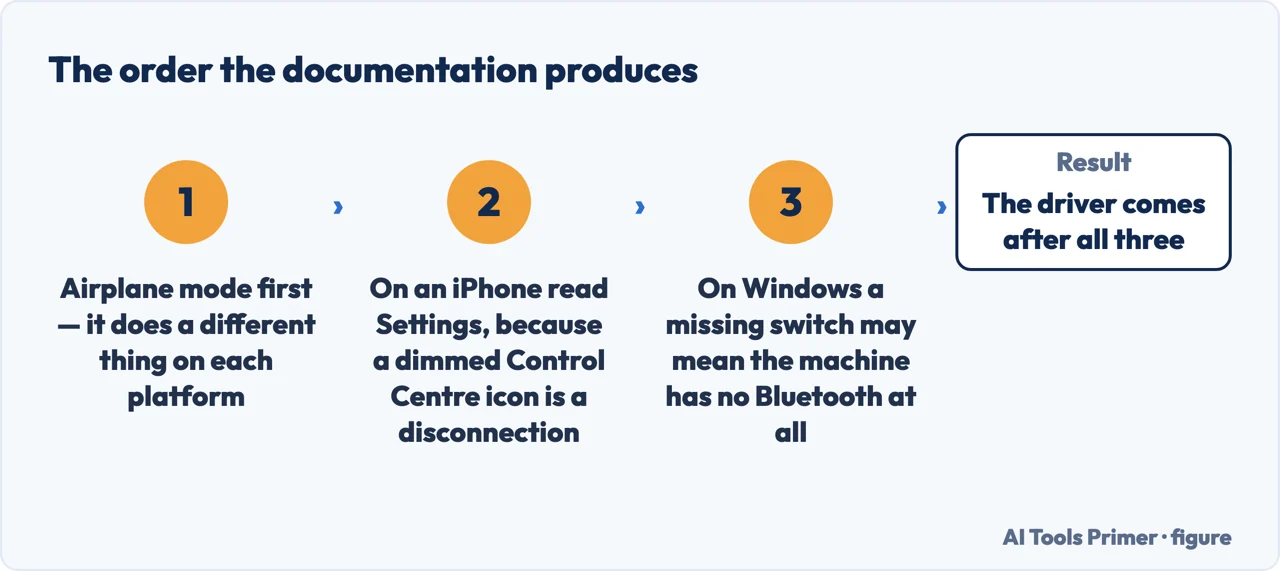
So the order that comes out of the documentation. Check Airplane Mode first, knowing that what it did depends on your platform and, on Android, on a choice you have forgotten making. On an iPhone, check Settings rather than Control Centre, because the dimmed icon there means disconnected. On Windows, if the switch is absent, read Microsoft’s own list of causes and check first whether the machine has Bluetooth at all. And if the switch is on and a device still will not appear, look at where that device is connected now and at the discovery setting that filters the list.
A note on scope. This guide is about Bluetooth itself refusing to work. Pairing a new accessory is a different job with its own documented gaps, and a car that connects but stays silent is a third thing again; both are linked below.
What this page will not do is tell you your Bluetooth chip has failed. Microsoft lists hardware malfunction among five possible causes and puts it fourth, after settings, drivers and services.
It will not recommend a USB Bluetooth adapter. It is a real answer for a machine without the hardware, none has been tested here, and Microsoft notes that USB devices too close together cause their own interference.
And it will not tell you to reinstall the driver first. There is a service to restart and a power setting to untick before that, both published, and both reversible in seconds.
Three ways in, matching the three things people mean by this question.
The same setting turns Bluetooth off on Windows, leaves it on by design on iPhone, and on Android turns it off once and then remembers.
Apple publishes that the dimmed Control Centre icon disconnects rather than switches off, and that Bluetooth returns at five in the morning.
Microsoft names five causes and, on another page, the possibility nobody suggests: the machine may have no Bluetooth in it.
Not covered here. It will not tell you the Bluetooth hardware has failed. Microsoft lists that fourth of five causes, after settings, drivers and services.
It will not recommend a USB Bluetooth adapter, although for a machine without the hardware that is the real answer. Nothing here has been tested.
It will not tell you to reinstall the driver first. A service restart and a power setting come before it, and both take seconds to undo.
And it carries no affiliate links, including for adapters and headphones, the products a guide on this subject usually exists to sell. What holds instead is simple: the three airplane-mode behaviours and the meaning of the dimmed icon come from Microsoft, Apple and Google, from the pages that publish them.
Written by Alberto Gulotta
Founder and editor of AI Tools Primer, writing from Palermo, Italy. Thirty-five years of taking computers apart, starting with a Commodore 64 — the long version is on the about page.
Something wrong on this page? Write to aitoolsprimer@gmail.com and it gets fixed.
Written on 23 August 2026 · last checked 23 September 2026.
Independence and limits
No affiliate links and no paid placements anywhere on this site. Nobody pays to appear here, and no company has seen this page before you did.
This is general information, not professional advice. Where a page touches money, health, safety or the law, it names its source and the date it was read — and your situation may still differ. See the privacy page and the cookie policy.