Bluetooth not connecting to car has a familiar ritual: turn it off, forget the device, pair again. Apple and Google document that and more — including a car that, by Google’s own warning, may never be able to carry the stream.
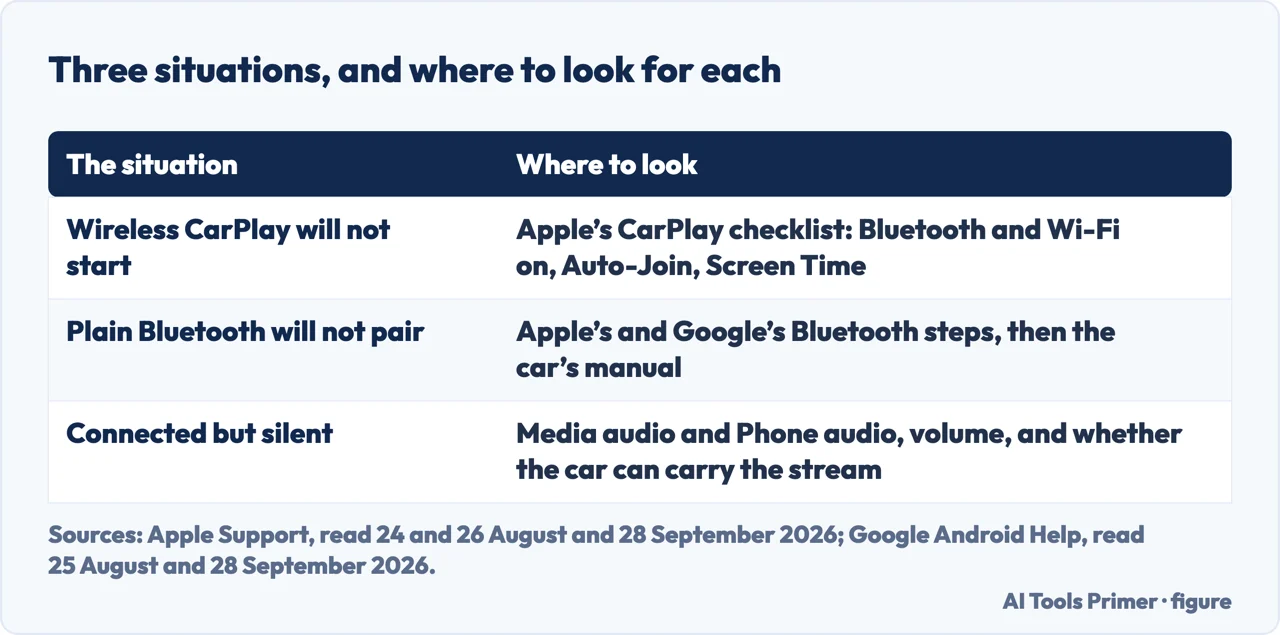
Which situation you are in decides which list to follow. Figure drawn by AI Tools Primer.
Start with the three situations in the figure: on an iPhone, they decide which of Apple’s two pages applies.
If the car has wireless CarPlay
iphone
Bluetooth on: Settings → Bluetooth.
Then, in Apple’s own words, “go to Settings > Wi-Fi, and make sure that
Wi-Fi is also turned on. Tap the CarPlay network, and check that
Auto-Join is turned on.”
“If your iPhone isn’t detected by CarPlay, make sure that CarPlay
isn’t restricted. Go to Settings > Screen Time > Content & Privacy Restrictions. If Content & Privacy Restrictions is on, tap Allowed Apps, and make sure that CarPlay is enabled.”
Starting over: “Go to Settings > General > CarPlay, tap your car, then tap
Forget This Car. Then set up CarPlay again.”
If it is plain Bluetooth
iphone
“Go to Settings > Bluetooth, and turn off Bluetooth. Wait for about
5 seconds, then turn Bluetooth back on.”
“Make sure that your stereo is using the latest firmware from the car
manufacturer.”
“If you’ve connected multiple phones to your car stereo, try
renaming your device: Go to Settings > General > About > Name, and type a
new name.”
Where to start the pairing: “Most cars require a phone setup on the car
display.”
On a Pixel, or Android
android
Open the saved device and check two separate switches: “Turn on
Media audio.” and “Turn on Phone audio.”
Make room: “If you see devices you’re not currently using, next to each
device name, tap Settings → Forget → Forget device.”
Where to start: “To learn whether to pair from your phone or car,
check your car’s manual.”
Two limits Google prints itself: “Some of these steps work only on Android 8.0 and up or on Pixel watches with the Pixel watch Android companion app version 4.1 and up”, and, for a custom Android version, “check with your device manufacturer”.
Look at the first column again. For a car with wireless CarPlay, Apple’s troubleshooting has seven steps, and the first already goes past Bluetooth: Bluetooth on, then Wi-Fi on, the CarPlay network, and Auto-Join. The others are the CarPlay logo on the car’s display, a restart of the phone and the car, Siri, Screen Time, forgetting the car, and the stereo’s firmware. If that is your car, Bluetooth settings alone are not the whole list.
Connected, and silent
Google documents two separate switches in a saved device’s settings, and two warnings that have nothing to do with pairing at all:
“Turn on Media audio.” — “Turn on Phone audio.”
“Important: Not all cars can play music by Bluetooth. If the problem is with
a car, check the car’s manual.”
“Important: Not all cars can make or get phone calls by Bluetooth.”
Read those together and a whole category of complaint stops being a pairing problem. The car
shows the phone as connected; music will not play, or calls go to the handset. Re-pairing is not what Google suggests for it. Its checks are the two switches, the volume on the phone and in the car, and whether another paired device is taking the music or the calls — and, on the same page, twice under a bold “Important:”, the warning that the car may not carry that stream at all.
That distinction — between a phone that will not pair and a phone that pairs but carries nothing — comes from two words in Google’s interface rather than from any diagnosis.
If the phone is a Pixel, part of this triage has a tool of its own:
“Important: Bluetooth diagnostics are available on Pixel 6 and up,
including Fold.”
Settings → Connected devices → Bluetooth diagnostics. Google lists what the phone can send, and the list is the triage otherwise done by hand: “Connection test results
for media audio, hands-free calling, and hearing aid profile”, and, for a car, “For car infotainment, whether Android Auto is supported”. It is already on the phone and costs nothing. The threshold is Google’s own: below a Pixel 6, by its
statement, this tool is not there.
What Google publishes about the rest of the Android world is worth quoting rather than paraphrasing, because it sets the limits of its own page: “Some of these steps work only on Android 8.0 and up or on Pixel watches with the Pixel watch Android companion app version 4.1 and up”, and, for a custom Android version, “If these steps don’t work for you, check with your device manufacturer”. That page is Android Help; Pixel Phone Help words its own limit differently: “If you use a custom Android version and these steps don’t work for you, get help from your device manufacturer and mobile carrier.” On a Samsung, a Xiaomi or a OnePlus the menus are the manufacturer’s, and this page does not pretend to have checked them.
The plain-Bluetooth path, in the second column, is short; Apple’s own list also starts with “Restart your device.” and includes “Update your device.” The five second wait Apple specifies between off and on is Apple’s number, not a superstition: “turn off Bluetooth. Wait for about 5 seconds, then turn Bluetooth back on.” The firmware line is one of two steps in the list that are about the car rather than the phone; the other is the car’s manual, quoted further down. The firmware line: “make sure that your stereo is using the latest firmware from the car manufacturer.”
One thing is worth settling before any of the steps, because it removes a whole line of guesswork. Hands-free calling over Bluetooth has a published standard, and the body that publishes it states what compliance buys: it “assures interoperability between a Bluetooth enabled Hands-Free device and any Bluetooth equipped Mobile Phone supporting this profile”. The profile in question is the one written for this exact situation — it exists so that “a Mobile Phone can be used in conjunction with a Hands-Free device (e.g., installed in the car or represented by a wearable device such as a headset)”. So a phone and a car that both support this profile are meant to work together for hands-free calls. Music is a different matter, and Google’s warning about it stands.
Then the boundary, which both companies draw in the same place.
Apple: “Check the manual that came with your car for more information on
how to pair with a Bluetooth device. Most cars require a phone setup on the car display.”
Google: “To clear phones paired with your car, follow your car’s
manual.” And: “To learn whether to pair from your phone or car, check your
car’s manual.”
Both companies stop at the same sentence. Apple adds that most cars want the pairing started on the car’s screen; Google gives both routes, from the phone and from the car, and sends you to the manual to choose. Where they stop is the honest boundary of
this page too. Clearing a full pairing list on the head unit, a firmware update for the
stereo, a manufacturer’s own reset sequence — those live in the car’s
documentation, and both phone makers send you to that documentation.
On the phone side, Apple’s remedy for a car paired with several phones is renaming the phone, in the steps quoted in the next section. That is a workaround, not a cleanup — the old entries
stay where they are. Neither Apple nor Google publishes a maximum number of devices a car can store, so this page does not state one.
Before any of the deeper steps there is a cause that sits on the other side of the windscreen, and it is invisible from the phone.
Both sides remember, and Google says to clear both
The phone and the car each keep their own list of paired devices. Apple’s steps: “if you’ve connected multiple phones to your
car stereo, try renaming your device: Go to Settings > General > About > Name, and
type a new name. Then try connecting again.” Apple does not say why renaming helps.
Google clears both ends. On the phone: “open your phone’s Settings app”,
tap “Connected devices”, then “Saved devices” — “if you don’t see ‘Saved devices,’ tap Bluetooth” — and for anything you are not using, and for the car itself, “tap Settings → Forget → Forget device”. Then the half that needs no phone at all: “to clear phones
paired with your car, follow your car’s manual. Clear any phones you’re not currently using.
If you paired your phone and car before, clear your phone.” Only then “refresh the device
list, then pair” — and even the direction is not assumed: “to learn whether to pair from your
phone or car, check your car’s manual”.
Google’s steps treat the two lists separately, so deleting the pairing on the phone alone leaves the car’s half in place.
One consequence of that boundary deserves saying plainly, because it changes what to do next. When the phone side has been exhausted — Bluetooth cycled, the two audio switches on, old devices forgotten, the device renamed — the remaining work is in the car, and the instructions for it are in the car’s manual. That is not a shrug. It is where the two companies who make the phones say the answer lives, and it is a more useful place to be sent than another round of forget-and-re-pair.
What this page will not do is name your car. Nothing here has been tested against SYNC, Uconnect, MMI or iDrive, and the documentation used covers phones, not head units. Where the answer is in the car, this page says so rather than guessing at a menu it has never seen.
Where to start
Three ways in. If the car has wireless CarPlay, take the second — it is a different problem.
Not covered here. It will not tell you how many devices your car can store; neither phone maker’s documentation gives a number, and an unsourced number is worse than an absence.
It will not recommend a Bluetooth adapter, a dongle or an app to fix a car stereo. Nothing here has been tested, and a recommendation without a test is an advertisement.
It will not give you steps for your head unit. The pages used here are about phones; the car is documented by the company that built it, and both Apple and Google say so.
And it carries no affiliate links, which in a category full of adapters and car accessories means turning down the obvious way to make it pay. What holds instead is simple: where Apple and Google stop, this page stops too, and it sends you to your car’s own manual for the rest, as Google itself does.
Sources
Apple Support — How to connect your iPhone, iPad, or iPod touch to your car (that CarPlay is the route for an iPhone where the vehicle supports it and USB playback or Bluetooth otherwise; that a CarPlay USB port might be labelled with a CarPlay icon or a smartphone icon; that for wireless CarPlay the iPhone may offer to connect wirelessly after a first USB connection, or the voice command button on the steering wheel can be held, or the car put into wireless or Bluetooth pairing mode before choosing the car under Settings, General, CarPlay, Available Cars; that iPad and iPod touch do not support CarPlay; and, for the Bluetooth route, the instructions to restart the device, to go to Settings and Bluetooth and turn Bluetooth off, wait for about 5 seconds and turn it back on, to update the device, to make sure that the stereo is using the latest firmware from the car manufacturer, to check the manual that came with the car since most cars require a phone setup on the car display, and, if multiple phones have been connected to the car stereo, to rename the device under Settings, General, About, Name before trying again) — support.apple.com, read 24 August and 28 September 2026.
Google, Fix Bluetooth problems on Android — Android Help (the Important note that the reader is using a custom Android version and should check with the device manufacturer if the steps do not work, and that some steps work only on Android 8.0 and up; the basic checks of turning Bluetooth off and on again, confirming the devices are paired and connected, and restarting the devices; for a car that will not pair, the three stages of clearing devices from the phone’s memory by opening Settings, tapping Connected devices and Saved devices — or Bluetooth if Saved devices is not shown — and choosing Forget device for unused devices and for the car, then clearing phones from the car’s own memory by following the car’s manual and removing unused phones and the phone itself, then refreshing the device list and pairing, checking the car’s manual to learn whether to pair from the phone or from the car; the Media audio and Phone audio switches, and the two “Important” warnings that not all cars can play music or make or get calls by Bluetooth; and the checks that the volume is up on the phone and car and that other paired devices are not playing the music or getting the calls) — support.google.com, read 25 August and 28 September 2026.
Bluetooth SIG, Hands-Free Profile 1.8 — the adopted specification page (that the profile defines the functions by which a mobile phone can be used with a hands-free device installed in a car, and that compliance with the specification assures interoperability between a Bluetooth enabled hands-free device and any Bluetooth equipped mobile phone supporting the profile) — www.bluetooth.com, read 25 August and 28 September 2026.
Apple, If you need help with CarPlay — Apple Support (the instruction to check that Wi-Fi is on and to tap the CarPlay network with Auto-Join turned on for a wireless connection; the check that CarPlay is not restricted under Screen Time, Content & Privacy Restrictions and Allowed Apps; the route through Settings, General, CarPlay to Forget This Car before setting CarPlay up again; and the other steps of the seven: the CarPlay logo on the car’s display, restarting the iPhone and the car, Siri, and the stereo’s firmware) — support.apple.com, read 26 August and 28 September 2026.
Google, Fix Bluetooth problems — Pixel Phone Help (that Bluetooth diagnostics are available on Pixel 6 and up, including Fold, reached through Settings and Connected devices; what is shared when an accessory is selected for troubleshooting, including for car infotainment whether Android Auto is supported, and connection test results for media audio, hands-free calling and hearing aid profile; and the note that with a custom Android version the device manufacturer and mobile carrier are the ones to ask) — support.google.com, read 26 August and 28 September 2026.
AG
Written by Alberto Gulotta
Founder and editor of AI Tools Primer, writing from Palermo, Italy. Thirty-five years of
taking computers apart, starting with a Commodore 64 — the long version is on the
about page.
Written on 23 August 2026 · last checked 30 September 2026.
§
Independence and limits
No affiliate links and no paid placements anywhere on this site. Nobody pays to appear here,
and no company has seen this page before you did.
This is general information, not professional advice. Where a page touches money, health,
safety or the law, it names its source and the date it was read — and your situation may
still differ. See the privacy page and the
cookie policy.