There are two procedures, not one, and the difference is not a detail: on the newest AirPods there is no setup button to hold.
On AirPods 4 and AirPods Pro 3, the instruction is not to hold a button. It is:
“Double-tap the front of the case while the status light is on.”
Holding the small button on the back for fifteen seconds is Apple’s instruction for one generation of AirPods and not for the other. Apple publishes a completely different procedure
for the newest ones, and no amount of holding will substitute for it. So the first question
is not how to reset them; it is which pair you have.
AirPods 1, 2, 3 · Pro 1, 2
hold the setup button
AirPods in the case, lid closed, 30 seconds.
On a paired iPhone or iPad: Settings → Bluetooth. If they are in My Devices, tap
More Info → Forget This Device, then confirm.
Open the lid.
Press and hold the setup button on the back of the case “for about
15 seconds”.
Wait for the light: amber, then white.
AirPods 4 · AirPods Pro 3
three taps, each on a cue
Same start: case, lid closed, 30 seconds.
Same Forget This Device step if they are listed.
Open the lid.
Double-tap the front “while the status light is on”.
Double-tap again “when the status light flashes white”.
Double-tap a third time “when the status light flashes faster”.
Then: amber, then white.
Two things in those lists are worth pulling out. The first is step two, which comes before any button or tap and is the same on both: if the AirPods still appear under Bluetooth on a paired iPhone, Forget This Device first. Apple puts it in the numbered sequence rather than as an aside, and it is conditional — “if your AirPods don’t appear in the list, continue to the next step”.
The second is that both procedures start identically: in the case, lid closed, thirty seconds. That wait is not decoration; it is the first instruction in both of Apple’s lists.
The light is the instrument
Every one of Apple’s procedures ends at the same signal, and the newest one uses the light as a metronome.
Amber, then white
The reset has happened. Apple: at that point “you can follow the steps on your device’s
screen to reconnect your AirPods”.
White alone, flashing
On the newest models this is a cue in the middle of the sequence, not the end — it
is when to tap the second time.
Flashing faster
The cue for the third tap. Which is why the newer procedure has to be read before it
is attempted: the timing is the procedure.
The newer procedure deserves a moment on its own, because it is unlike anything else on a phone. You are not pressing something and waiting. You are answering three cues, each one a different state of the same small light: on, flashing white, flashing faster. A tap at the wrong moment is not a tap that does nothing — it is a tap out of sequence, and the sequence is what the case is listening for.
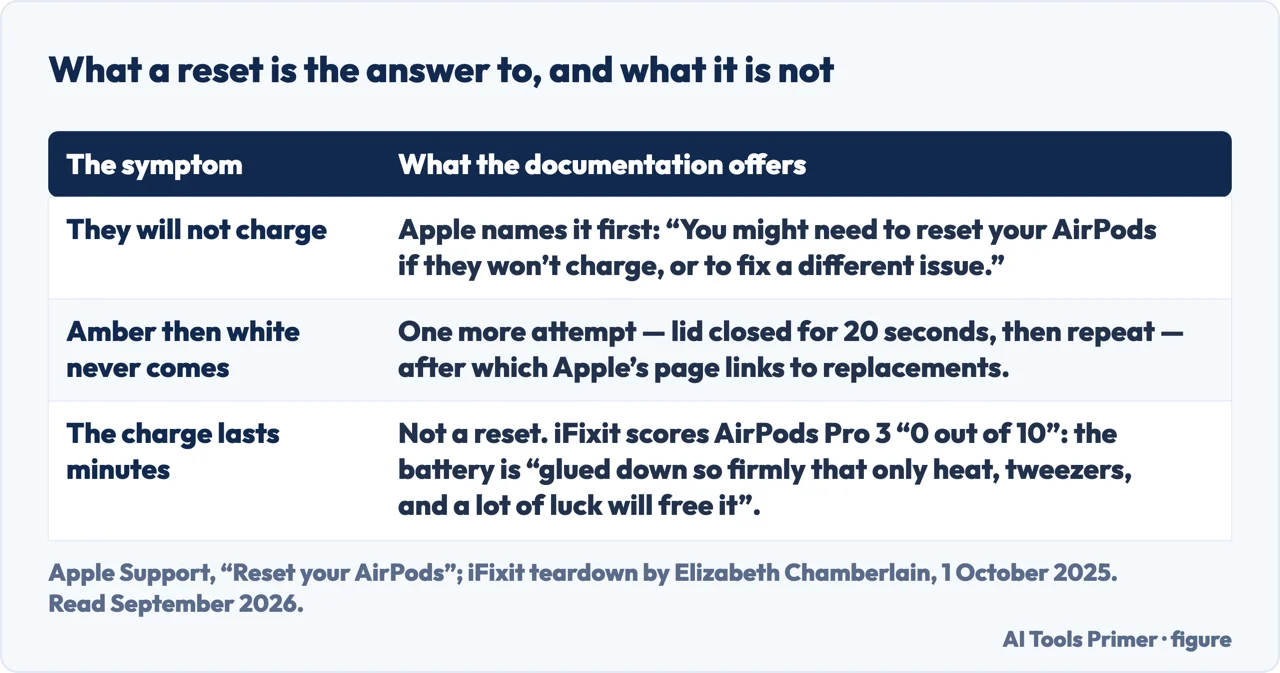
If the white never comes. Apple gives a second attempt with a
different number in it: put the AirPods in the case and close the lid for 20 seconds — not
the thirty from the first step — then open it and repeat the procedure for your model. That is
the whole of the published remedy. If it still does not reach amber-then-white, the article’s
next link is about replacement AirPods or a replacement case, which is Apple saying,
without saying it, that the procedure has run out.
Quotations from Apple and from iFixit’s teardown. Figure drawn by AI Tools Primer.
Apple also names when to do any of this, and it is narrower than “when they misbehave”. The article opens with it: “You might need to reset your AirPods if they won’t charge, or to fix a different issue.” A reset is the remedy for a pair that is not charging or is faulty in some way — it is not a maintenance routine, and it costs you the pairing.
“AirPods Max can be associated with one Apple Account. If you want to use
AirPods Max that someone else has used, they need to first remove them from their Apple
Account.”
Worth knowing before buying a used pair, and before selling one. The reset is on your side of
the transaction; this part is on the other person’s, and no procedure you can perform
replaces it. For AirPods Max the reset itself is two buttons — the listening mode button and
the Digital Crown — held for 15 seconds, “until the LED flashes amber, then white”.
The AirPods Max instructions carry one more distinction that is easy to blur, and it is a useful one because the two actions use the same two buttons. Apple separates them by duration and by light: hold “until the LED flashes amber” and you have restarted them; hold for fifteen seconds “until the LED flashes amber, then white” and you have reset them. Same grip, different outcome, and the light is the only thing that tells you which one you did.
One preparation Apple states for AirPods Max and not for the others: “Before restarting or resetting, charge your AirPods Max to at least 50 percent.” With the exception it attaches immediately — “If your AirPods Max won’t charge, reset them.”
After any of this, reconnecting is the same for every model: AirPods in the case with the lid open, close to the device, then follow what appears on the screen. There is nothing to type and nothing to find in settings.
What this page will not do is tell you a reset will fix your problem. Apple names charging failure and “a different issue”, which is honest and unspecific, and the procedure ends at a link about replacements. A reset is worth trying and is not a diagnosis, and anything that claims otherwise is claiming more than the manufacturer does.
The guides below take it three ways: the two procedures, the light that reports on them, and the neighbouring things that go wrong with a paired device.
Where to start
Three ways in. The first question is which AirPods you have.
AirPods Max attach to one Apple Account, and only the previous owner can detach them. A reset does not do it, and no procedure on your side substitutes.
Not covered here. It will not give one procedure. Apple publishes two for AirPods and a third for AirPods Max, and the newest models have no setup button to hold.
It will not promise a reset fixes the problem. Apple names charging failure and “a different issue”, then links to replacements — which is as far as the documentation goes.
And it will not suggest a way round the Apple Account on second-hand AirPods Max. Apple says the previous owner has to remove them, and nothing on your side replaces that. What holds instead is simple: the two reset procedures and the light cues that report them are Apple’s own, quoted with the AirPods Max distinction between restarting and resetting.
Sources
Apple, How to reset your AirPods and AirPods Pro (that a reset may be needed if the AirPods will not charge or to fix a different issue; the procedure for AirPods 1, 2, 3 and AirPods Pro 1 and 2 of placing them in the case with the lid closed for thirty seconds, going to Settings then Bluetooth on a paired iPhone or iPad and tapping More Info then Forget This Device if they appear in My Devices, opening the lid and pressing and holding the setup button on the back of the case for about fifteen seconds until the status light flashes amber then white; the separate procedure for AirPods 4 and AirPods Pro 3 of double-tapping the front of the case while the status light is on, double-tapping again when it flashes white and a third time when it flashes faster, until the light flashes amber then white; the remedy when the light does not flash white, of closing the lid for twenty seconds and repeating the model-appropriate procedure; and the reconnection instruction of placing the AirPods in the open case close to the device and following the on-screen steps) — support.apple.com, read 22 August 2026.
Apple, How to restart or reset your AirPods Max (that the AirPods Max should be charged to at least fifty percent before restarting or resetting, with the exception that a pair which will not charge should be reset; that restarting is done by pressing and holding the listening mode button and the Digital Crown until the LED flashes amber; that resetting to factory settings is done by holding the same two controls for fifteen seconds until the LED flashes amber then white; and that AirPods Max can be associated with one Apple Account, so a pair someone else has used must first be removed from that person’s Apple Account) — support.apple.com, read 22 August 2026.
iFixit — AirPods Pro 3 Teardown: Still a Tragedy, by Elizabeth Chamberlain, 1 October 2025, for the repairability score of 0 out of 10, the battery glued down so firmly that only heat, tweezers and a lot of luck will free it, and the verdict that they are disposable by design — www.ifixit.com, read 5 September 2026.
AG
Written by Alberto Gulotta
Founder and editor of AI Tools Primer, writing from Palermo, Italy. Thirty-five years of
taking computers apart, starting with a Commodore 64 — the long version is on the
about page.
Written on 22 August 2026 · last checked 23 September 2026.
§
Independence and limits
No affiliate links and no paid placements anywhere on this site. Nobody pays to appear here,
and no company has seen this page before you did.
This is general information, not professional advice. Where a page touches money, health,
safety or the law, it names its source and the date it was read — and your situation may
still differ. See the privacy page and the
cookie policy.