The FTC: “This is the one you use to connect your devices to the network. A unique and secure Wi-Fi network password prevents strangers from getting onto your network.”
Change it and every device you own has to be told the new one.

Software · guide
By Alberto Gulotta · Updated · 9 min read
No general guide can give you the exact menu. How to change wifi password depends on who made the box in the hall, and the Federal Trade Commission — which publishes consumer guidance on exactly this and has nothing to sell — tells you to search for your router maker’s steps and, failing that, to contact the manufacturer, rather than pretending otherwise. What it does give you is this: there are two passwords in there, and only one of them is the one you came for.
The FTC: “This is the one you use to connect your devices to the network. A unique and secure Wi-Fi network password prevents strangers from getting onto your network.”
Change it and every device you own has to be told the new one.
The FTC: “This is the one that lets you into the administrative side of the device. There, you’re able to do things like change settings (including the Wi-Fi network password).”
And the consequence, in the agency’s own words: if somebody got into the admin side, they “could change the settings (including your Wi-Fi network password). That would undo any other security steps you may be taking.”
One thing to expect on the way: Windows does not call it the Wi-Fi password everywhere. On Windows 10, Microsoft’s steps show it in a box labelled “Network security key”; on Windows 11 the line is called “Wi-Fi network password” — the same string under two names; what a network security key is also has the part that decides how much the string is worth.
Read the two passwords side by side. The Wi-Fi password keeps strangers off the network. The admin password guards the room where the Wi-Fi password is decided — so changing the first while leaving the second at whatever the factory set is a lock fitted to a door with the key still taped to it. The FTC puts the consequence in one clause: it “would undo any other security steps you may be taking.”
And there is a specific version of this that catches households rather than hackers. If you are changing the network password because you want somebody off the network — a former flatmate, a neighbour who was given it years ago, an old contractor — then the admin password is the one that decides whether the change holds. Anyone who can reach the administrative side can change the settings, the Wi-Fi password included.
“First find the name of your router’s manufacturer. Then go online and search for ‘how to change [your router manufacturer] admin password’ and ‘how to change [your router manufacturer] Wi-Fi network password.’”
That is the Federal Trade Commission’s own instruction, and it is worth noticing what it implies: there is no single menu. The route differs by manufacturer. Any page that shows you one set of screenshots and calls it the answer is showing you one router. What is the same everywhere is the pair of passwords above, and what happens after you press save.
And the FTC gives the fallback for when neither search lands — “contact the manufacturer directly”.
What stops working the moment you save
That list is the reason to do this on a quiet evening rather than ten minutes before a meeting.
While you are in there, three switches the FTC says to turn off. Remote management, which “allows you to change settings over the internet”. UPnP, which “lets your devices find each other on the network”. And WPS, which the agency describes precisely: it “lets you push a button on the router to connect a device to the internet instead of entering the Wi-Fi network password.”
Read that last one against the job you came here to do. You are changing the password so that only the people you choose can join — and WPS, described above, is a way to join without it. The FTC’s summary of all three is even-handed: they “may make it easier to, say, add devices to your network or let guests use your Wi-Fi — but they can make your network less secure.”
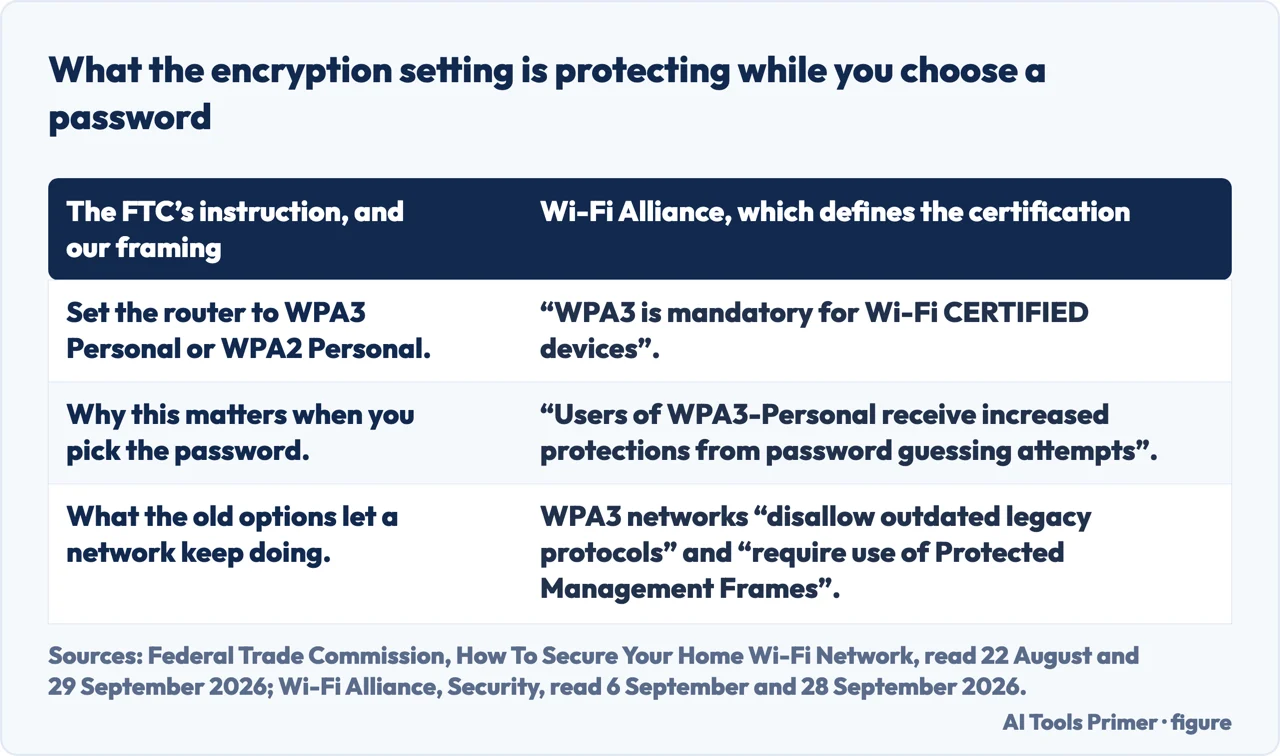
While the settings are open there is one more thing the FTC treats as basic rather than advanced: the encryption. Its instruction is to set the router to WPA3 Personal or WPA2 Personal — “WPA3 is the newer — and best — encryption available, but both will work to scramble your information.” If your router offers only WPA or WEP, the agency calls those “outdated and not secure”, says to try a software update first, and if that does not produce the newer options, to “consider getting a new router”. That is a federal consumer agency saying in writing that the hardware itself can be the thing to replace.
It is worth knowing what that setting buys. The Wi-Fi Alliance, which defines the certification those letters refer to, says that “WPA3 is mandatory for Wi-Fi CERTIFIED devices” and that “Users of WPA3-Personal receive increased protections from password guessing attempts”. Its own summary of a WPA3 network is three lines: use the latest security protocols, “Disallow outdated legacy protocols”, and “Require use of Protected Management Frames (PMF)”.
One alternative is worth knowing before you change anything, because it may remove the reason you are here at all. The FTC: “Many routers let you set up a guest network with a different name and password”, and gives two reasons — “having a separate login means fewer people have your primary Wi-Fi network password”, and if a guest “(unknowingly) has malware on their phone or tablet, it won’t get onto your primary network and your devices.” If the reason you are here is that you keep handing the password to visitors, a guest network means never handing out the main one again.
And the last step: log out as administrator when you are done. The FTC spells out why, and it is the same argument as the whole page — while you are logged in as administrator, “you’re able to change passwords and otherwise manage settings that control the security of your network.” Leaving that session open is leaving the door you just locked propped with a shoe.
The guide below starts one step earlier: finding the password your devices already hold.
Three ways in.
Seeing it before you replace it.
Not covered here. It will not show you one router’s screenshots and call it the answer. The FTC itself sends you to the manufacturer for the route, and the honest thing is to say what is the same everywhere.
It will not treat the Wi-Fi password as the only password. The admin one decides whether the change you just made survives.
And it will not send you to a third-party tool to do any of this. The steps here happen in the router’s own settings and on your own devices, for nothing. What holds instead is simple: the two passwords and the guest-network reasoning are quoted from the Federal Trade Commission’s consumer guidance.
Written by Alberto Gulotta
Founder and editor of AI Tools Primer, writing from Palermo, Italy. Thirty-five years of taking computers apart, starting with a Commodore 64 — the long version is on the about page.
Something wrong on this page? Write to aitoolsprimer@gmail.com and it gets fixed.
Written on 22 August 2026 · last checked 30 September 2026.
Independence and limits
No affiliate links and no paid placements anywhere on this site. Nobody pays to appear here, and no company has seen this page before you did.
This is general information, not professional advice. Where a page touches money, health, safety or the law, it names its source and the date it was read — and your situation may still differ. See the privacy page and the cookie policy.