
Password · guide
What is an authenticator app, and where do its six digits come from?
By Alberto Gulotta · Updated · 17 min read
What is an authenticator app? It keeps a secret key and shows a code worked out from that secret and the clock. The service you sign in to holds the same secret and checks the code against its own sum. This page sets out how that works, where the codes are kept, and what the app does not stop.
| Question | Answer | Where it comes from |
|---|---|---|
| What does the app hold? | A secret that the service also holds, used as the seed for each code | NIST, RFC 6238 |
| What makes the code change? | The current time, in steps of 30 seconds by default | RFC 6238 |
| How long is the code? | At least six digits | RFC 4226 |
| Does it need a network? | Google says codes can be made without internet or mobile service; Duo says “Most authenticator apps require internet connectivity” | Google, Duo |
| Does it stop phishing? | NIST says OTP authentication is not phishing-resistant | NIST |
What an authenticator app is
Duo, Yubico and Google describe the same object in different words. Duo, which sells an access security product, says an authenticator app is a software tool that can be installed on a smartphone, computer or tablet to help implement multi-factor authentication. It adds that these apps work by generating random, time-sensitive one-time codes or push notifications to help users verify their identity. Yubico, which sells physical security keys, is more specific about the code: its page says the app is usually installed on a smartphone or other device and generates a random passcode every 30 seconds, which can be used for sign-in and for two-factor authentication. Google’s help page for its own app says it can generate one-time verification codes for sites and apps that support Authenticator app 2-Step Verification.
NIST’s digital identity guidelines (SP 800-63B-4) give the idea a formal place. Under single-factor OTP authenticators, NIST includes hardware devices and software generators installed on devices such as mobile phones. Such an authenticator has an embedded secret that is used as the seed for generating one-time passwords. The password is displayed on the authenticator and typed in by hand, which proves possession and control of the authenticator, and NIST counts it as something you have. A multi-factor version exists too: the same kind of generator, but it produces the password only after an activation factor, which NIST gives as something you know or something you are.
Two of the vendor pages call the code random, and the specifications are more exact. RFC 4226 says the shared secrets are randomly generated, and RFC 6238 says an OTP generated within the same time step will be the same. The RFCs place the randomness in the secret; the digits are the result of a calculation.
Where the six digits come from
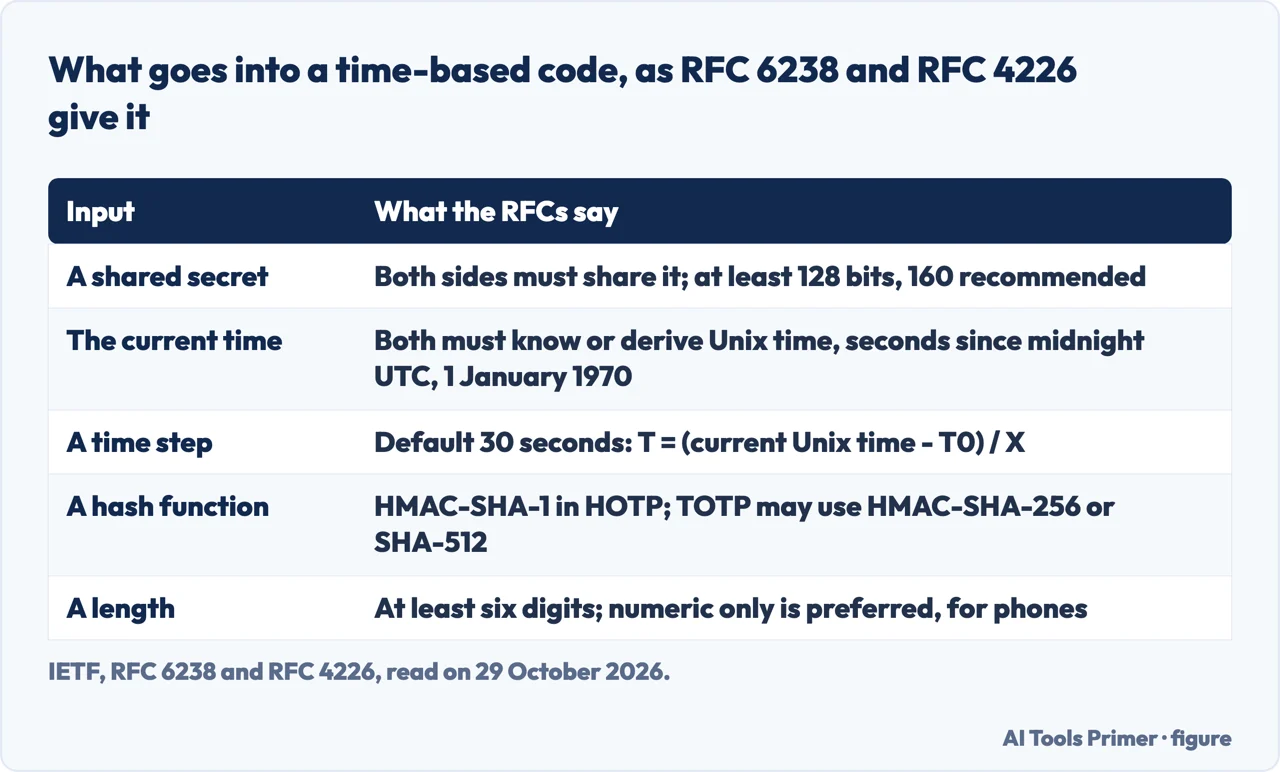
The recipe starts in RFC 4226, published in December 2005, which defines HOTP, an HMAC-based one-time password. A key K and a counter C go through HMAC-SHA-1 and a truncation step, written HOTP(K,C) = Truncate(HMAC-SHA-1(K,C)). RFC 6238, published in May 2011, defines TOTP as the time-based variant of that algorithm: a value T, derived from a time reference and a time step, replaces the counter C. TOTP implementations may use HMAC-SHA-256 or HMAC-SHA-512 in place of SHA-1.
The value T is worked out as T = (current Unix time - T0) / X. The current Unix time is the number of seconds since midnight UTC on 1 January 1970. X is the time step in seconds, with a default of 30, and T0 is where counting starts, with a default of 0, the Unix epoch. The RFC’s own example uses those defaults: T is 1 if the current Unix time is 59 seconds, and 2 if it is 60 seconds. Since T changes only at the step boundary, the same inputs give the same code for the whole of that step.
RFC 6238 lists what both sides need. Its first requirement says the prover, such as a soft token on a phone, and the verifier, the validation server, must know or be able to derive the current Unix time, and adds that the precision of the time the prover uses affects how often clock synchronization should be done. The second says they must share the same secret, or the knowledge of a secret transformation that yields a shared secret. The third makes HOTP the building block, and the fourth says both must use the same time-step value.
On the size of the secret and the code, RFC 4226 is specific. The HOTP value must be at least six digits and, it says, preferably numeric only so that it can be entered on “restricted devices such as phones”; implementations must extract a 6-digit code at a minimum. The shared secret must be at least 128 bits, and the RFC recommends 160 bits. NIST sets its own minimum for similar ingredients: the secret key and its algorithm must provide at least 112 bits of security strength, and the output may be truncated to as few as six decimal digits. The two sets of figures come from different documents.
The Duo, Yubico and Google pages we read do not explain how the secret becomes the digits. Yubico gets as far as saying the passcode is generated from a secret shared between the service and your device, as well as the current time. Both RFCs carry the label Informational, and RFC 6238’s status note says it is not an Internet Standards Track specification but is published for informational purposes. We use them because they are where the calculation is written down.
Why the clock matters and the network may not
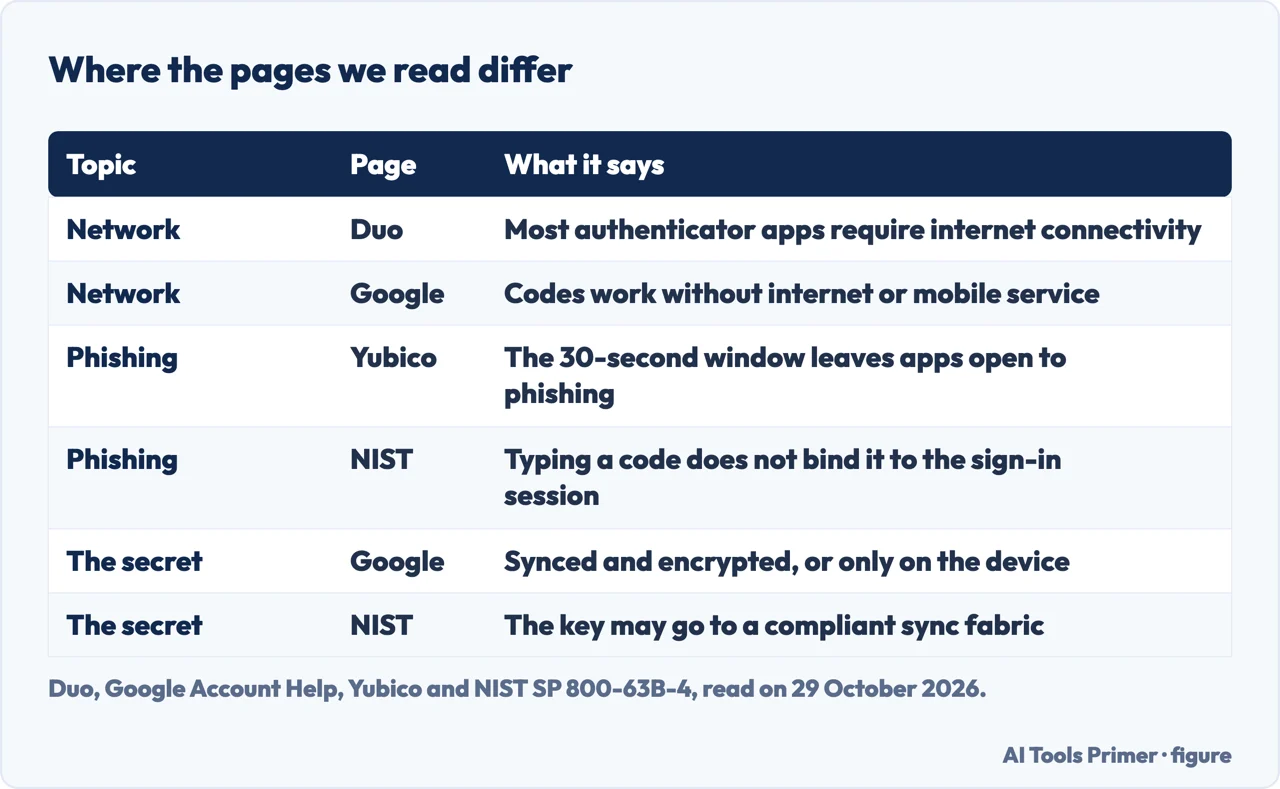
Google’s help page says you can still generate codes without an internet connection or mobile service. Duo’s page reads differently: it says most authenticator apps require internet connectivity, and its troubleshooting advice starts with checking the network connection on the device where the app is installed. Duo’s sentence on how apps work names two outputs, time-sensitive one-time codes or push notifications, and the pages we read do not say which of the two its connectivity advice is about. RFC 6238’s first four requirements concern the time, the secret, the HOTP building block and the time-step value, and not a connection between the app and the server.
What the app does need is the time. Google’s page says the time correction setting is no longer available in version 7.0 of its app, which now uses the time setting on your operating system. Its checklist for a code that does not work asks whether you entered the code before it expired, whether it is the code for the correct app or service and the correct Google Account, and whether the time on your device is synced and correct for your local time zone. Our page on when an authenticator stops working follows the clock problem through a Microsoft example.
The service allows for a phone clock that is a little off. RFC 6238 recommends that the validator be set with a limit to the number of time steps a prover can be out of sync before being rejected. Its example: with a 30-second step and two steps accepted backward, the maximum drift is around 89 seconds, which is 29 seconds in the calculated time step plus 60 seconds for the two backward steps. After a successful validation the server can record the detected drift for that token and adjust for it when the next code arrives. Network delay is treated separately: the RFC recommends allowing at most one time step for it.
The RFC recommends a default step of 30 seconds, chosen as a balance between security and usability. A larger step exposes a larger window to attack, and a step as long as 10 minutes “most probably won’t be suitable”, it says, because a user would have to wait for the next window to get a different valid code. NIST words the limit differently: a nonce based on a real-time clock must be changed at least once every two minutes, and a time-based OTP must have a defined lifetime, set by the expected clock drift in either direction plus an allowance for network delay and for entering the code.
A code that has been accepted should not be accepted a second time. RFC 6238 says a prover may send the same OTP inside a time-step window more than once, and that the verifier must not accept the second attempt after a successful validation. NIST says a verifier accepts a given OTP only once while it is valid, for replay resistance.
Where the codes are kept, and what happens to them
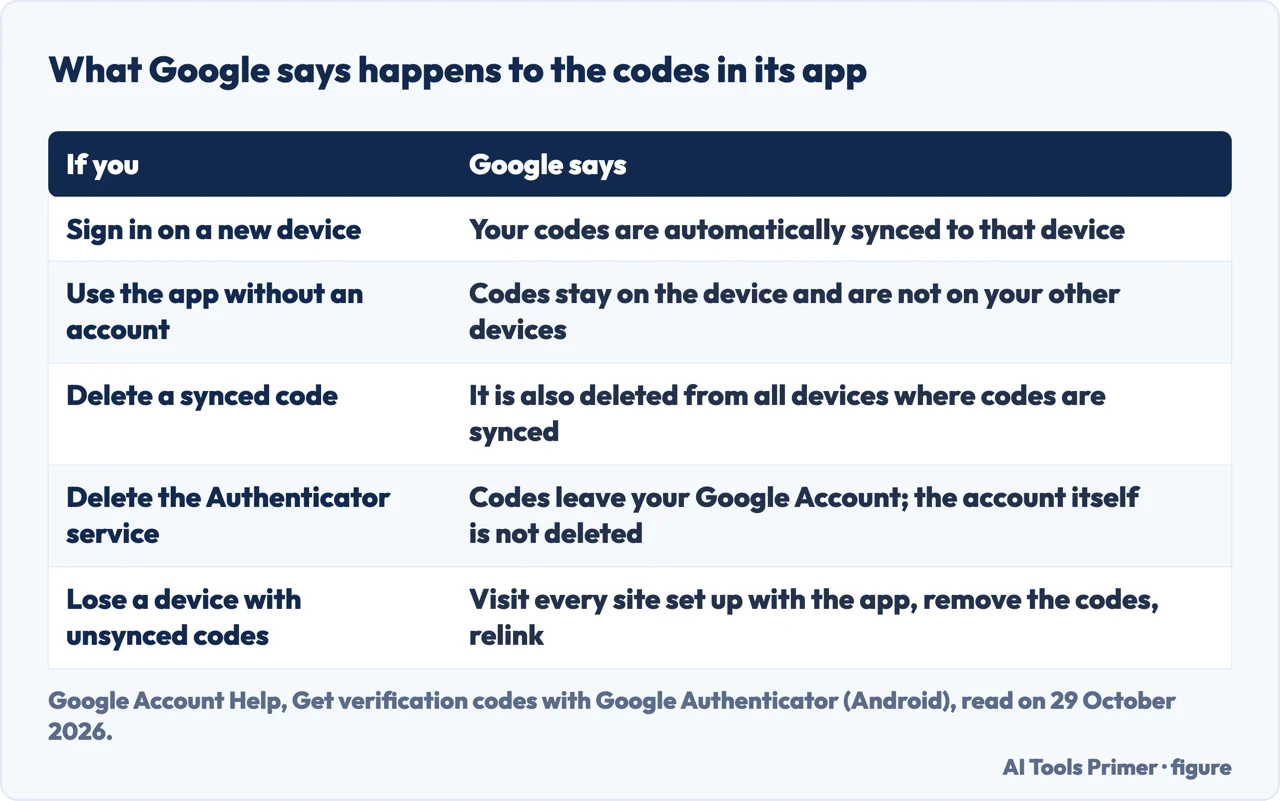
Where the secret lives depends on the app. For Google Authenticator, Google’s page describes two arrangements. Signed in to a Google Account, your codes synchronize across all your devices, and Google says it encrypts Authenticator codes both in transit and at rest across its products. Used without an account, the codes are stored on the device alone and are not available on your other devices. Switching an app that already saved codes to the account over to the no-account mode removes the codes from all of your Google Accounts and stores them on the device. Google also says it may take up to 7 days for Google Authenticator to show up as an available option for sign in when you set it up for a Google Account.
To move codes by hand, Google’s page gives these steps. On the new device, install the app, tap Get Started and sign in to your Google Account. On the old device, open Menu, Transfer codes, Export codes, unlock the device, select the accounts and tap Next. Back on the new device, open Menu, Transfer codes, Import codes and scan the QR code. A transfer of more than one account may create more than one QR code.
The secret is not only on the phone. NIST explains that verifiers effectively duplicate the process of generating the OTP, so the symmetric keys used by authenticators are also present in the verifier, where they must be strongly protected against unauthorized disclosure. For a change of device, NIST says the subscriber should bind the authenticator application on the new device to the account and invalidate the application no longer used; alternatively, the subscriber may export the secret key and store it in a sync fabric, then retrieve the key with the new device.
Google’s page attaches consequences to deleting. Deleting a synced code also deletes it from all devices where codes are synced. Deleting the Google Authenticator service removes the codes from your Google Account and from all your devices, and the Google Account itself is not deleted. Its Privacy Screen setting asks for a PIN, pattern or biometric prompt before the app can be used. Among its best practices it lists syncing the codes, turning on Privacy Screen, enrolling in additional forms of 2-Step Verification so you do not lock yourself out, and considering passkeys.
For a lost or stolen device, Google says to make sure the codes stored on it cannot be accessed by others, using the remote erase option for iOS or Android. If that option is unavailable and the codes are synced to the Google Account, you can remove them by removing the device from the account. If they are not synced, you need to visit every site where the app is set up, remove the codes and relink the new device.
NIST describes a backup for the same situation. A typical use of look-up secrets is one-time saved recovery codes that the subscriber stores for use if another authenticator is lost or malfunctions. Each must be at least six decimal digits and can be used successfully only once, and NIST adds that look-up secrets are not phishing-resistant. Our page on turning two-factor off covers where that switch exists and where it has gone.
Duo lists what can lock you out of an authenticator app: replacing or misplacing an authorized device, an out-of-date operating system, a jailbroken or otherwise insecure device, improper app integration, and network issues. For a new phone, Duo says it is generally recommended to add the new device to an authenticator app before turning in the old one, and that corporate-managed apps typically need an administrator. For a social media account, Duo says the best place to start is a recovery code provided by the third-party app’s vendor.
What an authenticator app does not stop
NIST says plainly that OTP authentication is not phishing-resistant. Its reason is about how the code travels. Authenticators that involve manual entry of an output, out-of-band and OTP authenticators among them, are not phishing-resistant because manual entry does not bind the output to the specific session being authenticated: an impostor verifier could relay an authenticator output to the real verifier and successfully authenticate. NIST defines phishing resistance as the ability of the protocol to prevent the disclosure of authentication secrets and valid outputs to an impostor verifier without relying on the vigilance of the person signing in, and says it requires cryptographic authentication. Its example is WebAuthn, used by authenticators that implement the FIDO2 specifications, which gets there by choosing an authenticator secret based on the authenticated domain name of the verifier.
Yubico, which sells security keys, gives another reason. Its page says authenticator apps are still vulnerable to phishing due to the 30-second window, and that security keys are considered more convenient and more secure. The two explanations are not the same one: Yubico’s is about time and NIST’s is about the session. RFC 6238 touches the time side in general terms, saying that when an OTP is generated and exposed to a third party before it is consumed, the third party can consume it within the time-step window.
The app is also not the only thing guarding the code. RFC 4226 says truncating the HMAC value to a shorter one makes a brute force attack possible, so the authentication server needs to detect and stop it. It recommends a throttling parameter that caps the number of possible attempts, or a delay that grows after each failed attempt, and it says delay or lockout schemes must be across login sessions to prevent attacks based on multiple parallel guessing techniques. That protection sits on the server and not in the phone.
For the weaker neighbour of the app code, see codes by text message, and for the vocabulary around these methods see two-factor and two-step.
What the pages we read do not say
We read six pages: RFC 6238, RFC 4226, the authenticators section of NIST SP 800-63B-4, Google’s help page for Google Authenticator on Android phones and tablets, Yubico’s glossary entry and Duo’s explainer. Yubico and Duo sell authentication products, so where we use them it is for what they describe, with that noted. Duo calls its own app one of the best on the market and Yubico points to its own keys; the pages we read include no test or count that would back a ranking, so we rank nothing.
Several things people ask are not answered there. The pages we read do not say how many authenticator apps exist or how many people use them. Google’s page does not say how many seconds a code lasts or which algorithm the app uses, and it says codes are encrypted in transit and at rest without saying more about how the secret is held in the account. It also does not give a price for the app. Duo’s page lists monthly per-user prices for its own editions, which is a different product.
We tested no authenticator app. We did not open the PCMag comparison or the Descope, Lenovo and NABP pages that Google listed for this question. The Google page we read is the Android one, and Google keeps a separate page for iPhone and iPad. We left the truncation step of RFC 4226 out.
Where to start
Four ways in.
- “What is it, exactly?”
- What an authenticator app is — what
- “Where do the digits come from?”
- Where the six digits come from — digits
- “Where are my codes kept?”
- Where the codes are kept — keep
- “Does it stop phishing?”
- What an authenticator app does not stop — limits
The second factor
The methods that sit beside an authenticator app.
When the codes are in the way
Switching off, resetting and losing a number.
Questions people also ask
Do I really need an authenticator app?
Duo, which sells an authentication product, says that if you use any application that stores sensitive data you should be using one. The RFC and NIST text we read describes how the codes work and what they resist, not who needs one.
Where do I find the authenticator app?
Duo says authenticator apps are usually downloaded onto your smartphone, tablet or computer, and suggests using the device’s search feature with the name of the app. If it is not there, check that it is downloaded and updated to the current version.
What is an example of an authenticator app?
The pages we read name Google Authenticator, Duo Mobile and Yubico Authenticator. Our page on when an authenticator stops working uses Microsoft Authenticator.
How much does the Authenticator app cost?
The Google help page we read does not mention a price. Duo’s page lists monthly per-user prices for its own editions, which are a different product.
Not covered here. We tested no authenticator app. The statements come from RFC 6238, RFC 4226, NIST SP 800-63B-4, a Google Account Help page, a Yubico glossary page and a Duo page, all read on 29 October 2026.
The search volume and difficulty behind this page come from a Semrush reading of 29 August 2026, older than the 60 days the site normally allows.
Sources
- IETF — RFC 6238, TOTP: Time-Based One-Time Password Algorithm — datatracker.ietf.org, read 29 October 2026.
- IETF — RFC 4226, HOTP: An HMAC-Based One-Time Password Algorithm — datatracker.ietf.org, read 29 October 2026.
- NIST — SP 800-63B-4, Authenticators — pages.nist.gov, read 29 October 2026.
- Google Account Help — Get verification codes with Google Authenticator (Android) — support.google.com, read 29 October 2026.
- Yubico — What is an Authenticator App? — www.yubico.com, read 29 October 2026.
- Duo — What Is An Authenticator App? — duo.com, read 29 October 2026.
Written by Alberto Gulotta
Founder and editor of AI Tools Primer, writing from Palermo, Italy. Thirty-five years of taking computers apart, starting with a Commodore 64 — the long version is on the about page.
Something wrong on this page? Write to aitoolsprimer@gmail.com and it gets fixed.
Written on 29 October 2026.
Independence and limits
No affiliate links and no paid placements anywhere on this site. Nobody pays to appear here, and no company has seen this page before you did.
This is general information, not professional advice. Where a page touches money, health, safety or the law, it names its source and the date it was read — and your situation may still differ. See the privacy page and the cookie policy.