
Password · guide
Forgot password: three services, one reset, then the clean-up
By Alberto Gulotta · Updated · 18 min read
Forgot password means proving the account is yours. Google asks questions and sends an email, Apple points to a trusted device or recovery factors, and Microsoft’s local accounts use security questions or a reset disk. After the reset, OWASP says it alone may not restore control of a compromised account.
| Question | Answer | Where it comes from |
|---|---|---|
| What does a reset send me? | Google says an email; OWASP describes a token by email or a code by SMS | Google, OWASP |
| What if the email does not arrive? | Google says to check junk, spam and bulk folders, ask again and check every address you may have used | |
| What does Apple call the easiest way? | A trusted device and a trusted phone number | Apple |
| Can support send me a reset link? | Microsoft says its support agents are not allowed to | Microsoft |
| Is a reset enough after a hack? | OWASP says a reset alone may not restore control; the FTC lists steps for afterwards | OWASP, FTC |
What the reset button is doing
OWASP’s Forgot Password cheat sheet is written for the people who build the Forgot Password button. It says systems with user accounts include a service that lets the user request a reset, and that this service is “a common source of vulnerabilities”, such as the user enumeration attack. Because it is a guide for developers, what follows is what it says a service should do. It is not a report of what any named service does.
Some of its points change what appears on your screen. The guide says the reply should be the same message for accounts that exist and accounts that do not, and that the time taken to respond should be uniform. Our reading, not the guide’s wording: a page that answers the same way whether or not an address has an account is following that advice, so the reply alone does not tell you whether the account exists.
The guide says the method for the reset should be communicated by a side-channel; its URL tokens are typically sent by email and its PINs through a side-channel such as SMS. You prove who you are by presenting the token, which arrives by email, or the code, which arrives by SMS or another mechanism, and then you set a new password. It asks that tokens and codes be made with a cryptographically secure random number generator, be long enough to resist brute force, be single use, expire after an appropriate period and be invalidated once used. The pages we read do not give a number for that period, so we do not either.
Two more points matter if you are the one locked out. The guide says the account should not be changed until a valid token is presented, and gives locking out the account as its example of a change. It also says accounts should not be locked in response to a forgotten password attack, because that would deny access to users whose usernames are known. And it says that without limits an attacker could make thousands of reset requests an hour for one account, flooding the inbox or the SMS with useless requests.
That flooding is the guide’s description of what excessive automated requests can do, and it does not say the requests mean anyone got in. Our reading: a pile of reset emails you did not ask for is not, by itself, a sign that the account was opened. The FTC’s list of signs of a hacked account, which we come to below, has four entries, and unrequested reset emails are not among them.
Three pages, three kinds of proof
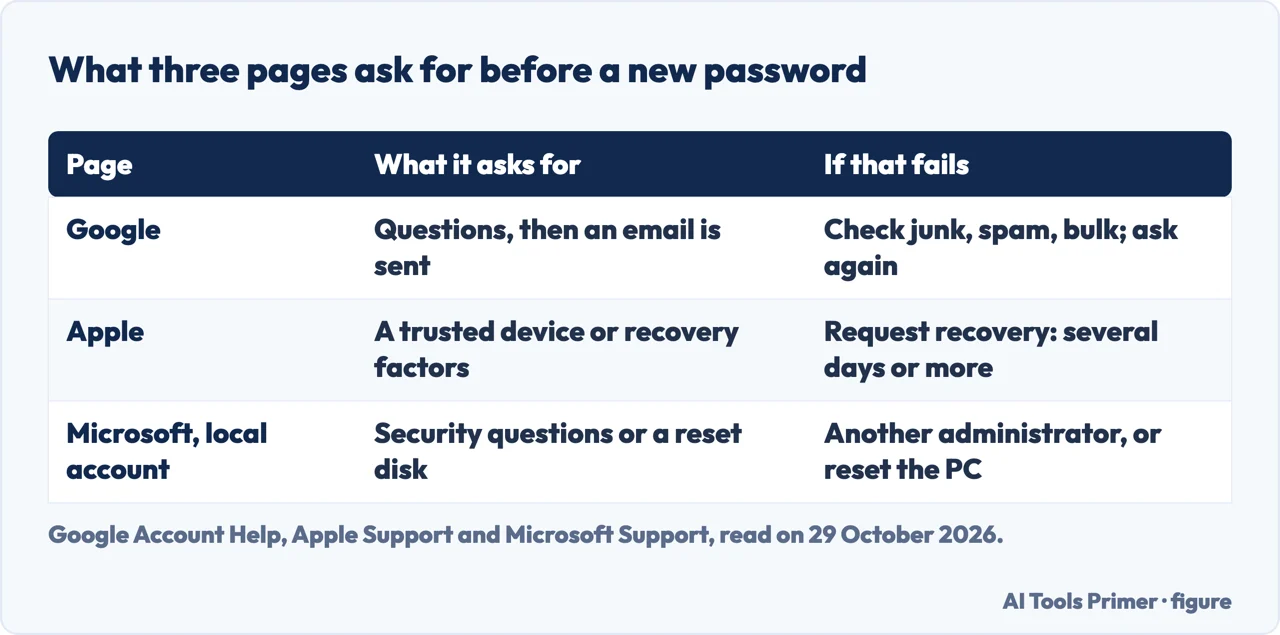
Google’s Account Help page on changing or resetting a password says the password is used to access many Google products, such as Gmail and YouTube, and that you can change it for security reasons or reset it if you forget it. To reset, you follow the steps to recover your account; you are asked some questions to confirm it is your account and an email is sent to you. If the email does not arrive, the page lists four things to do: check the junk, spam or bulk folders, add noreply@google.com to your address book, request another email, and check all the email addresses you might have used to sign up or sign in. For the new password it says to choose one you have not already used with this account. Our page on resetting a Gmail password goes further into that service.
Apple’s page, published on 5 October 2026, starts from the button: look for “Forgot Password?” when you set up a device, sign in through the Settings app or buy something in the App Store, and follow the onscreen instructions. Those instructions direct you to a trusted device, ask for recovery factors, or help you regain access after a waiting period. A trusted device is an iPhone, iPad, Apple Watch, Apple Vision Pro or Mac on which you have already signed in to your Apple Account with two-factor authentication. Apple says that if you will soon have a trusted device or trusted phone number, you should wait, because you will regain access more quickly, and that if you are already signed in on a trusted device you may not need account recovery at all: you can change the password there.
Without a trusted device, Apple says the options depend on your recovery factors: a trusted phone number; a six-digit code from a recovery contact; the email address of the Apple Account; the CVV of the card linked to the account; or a recovery key or physical security keys, which change the process. One detail is worth knowing in advance. If the card issuer declines the CVV check, Apple says you get an alert that the information is incorrect even if you typed it correctly, and that you should then select “Don’t have access to this card.”
Microsoft’s page is about a local account password in Windows. From the sign-in screen you select the password entry button, then OK and Reset password, and answer the security questions you set up when the account was created. If you made a password reset disk, you can use that instead. When you are already signed in, Settings, Accounts, Sign-in options, Password, Change needs the old password to create a new one; if you forgot it, the I forgot my password option leads to the security questions and a new password. If you can reach an administrator account on the PC, you can open Computer Management, expand Local Users and Groups, Users, right-click the user and select Set Password. Without an administrator account, Microsoft says you will need to reset the Windows device.
Put side by side, the three pages ask for different proof. Google combines questions with an email, Apple names a trusted device and a trusted phone number as the easiest way, and Microsoft’s local-account page relies on answers or a disk prepared before the password was lost. Our reading: Apple’s trusted device and Microsoft’s security answers or reset disk are both something set up before the password was lost, while Apple also offers account recovery with a wait for people who have neither. Our pages on a forgotten Mac password, a Microsoft password and a ChatGPT password cover those services on their own terms.
When support cannot send a link
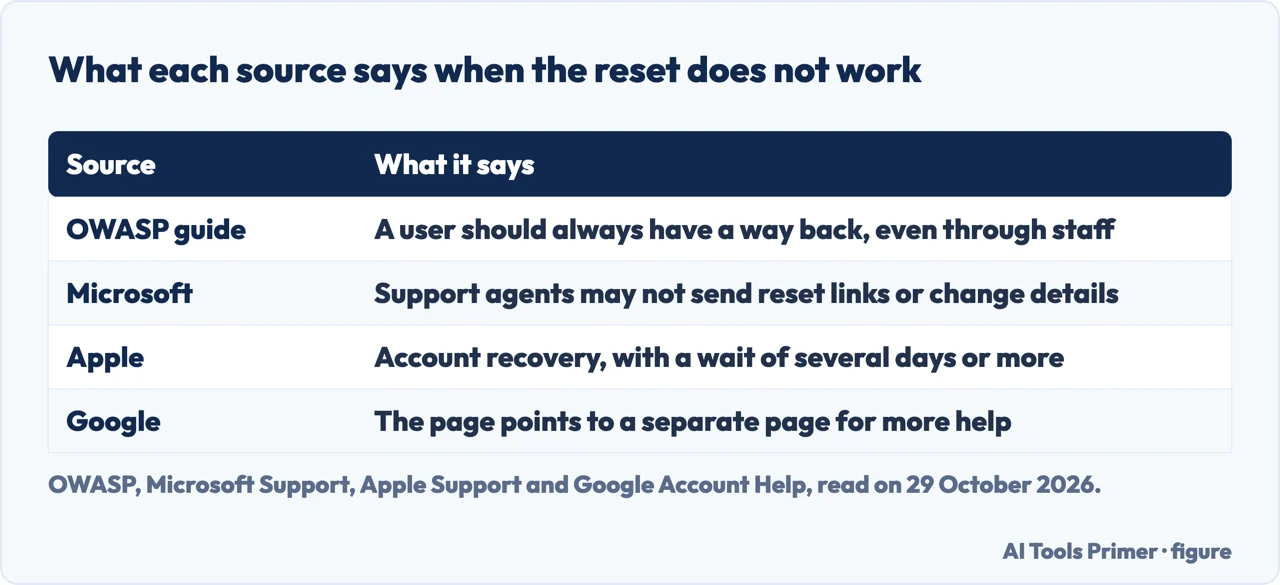
The pages differ on what happens when the reset steps do not work. OWASP’s guide says to make sure a user always has a way to recover the account, even if that means contacting the support team and proving identity to staff. Microsoft’s page says something different about its own staff: its support agents are not allowed to send password reset links, or to access and change account details, and if the listed options do not work, Microsoft support cannot help you retrieve or get around a lost password. If you cannot sign in to a Microsoft account, it points to a sign-in helper tool.
Apple describes a waiting period. If you cannot reset the password, you can request account recovery, and Apple says that for your security the process could take “several days or more.” You start at iforgot.apple.com in Safari on a device with iOS 17 or later or macOS 27 or later, and when possible the site redirects you to a trusted device. You can also use the Support app on a borrowed device or one at an Apple Store: open Support Tools, select Reset Password, then Help Someone Else. Apple says the information you enter is not stored on the borrowed device.
While the wait runs, Apple lists what cancels the request. If you remember the password and sign in, the request is cancelled. If you find a device still signed in with your Apple Account, such as an old iPad, and use it to change the password, that also cancels it. If you cannot use that device, for example because you do not know its passcode, Apple says to turn it off, because activity from a signed-in device cancels the request. If you started recovery on the web, Apple says to turn off all your Apple devices during the wait; if you started on a device with iOS 17, iPadOS 17 or macOS 27 or later, you can keep using that device.
Google’s page ends by pointing to a separate page for more help if you cannot reset the password or sign in. We did not open it, so the page we read does not say what to do when no recovery address is left. The Google and Microsoft pages we read give no time for a normal reset, and the OWASP guide gives none for how long a link or code lasts.
One more difference is the security question. Microsoft’s local-account page uses them as a way back, answered from what you set up at creation. OWASP’s guide says they should not be the sole mechanism for resetting passwords, because the answers are frequently easy for attackers to guess or obtain, though they can add a layer alongside the other methods it describes. The gap is between a guide for builders and a support page for users, and we do not rank them.
Is that email yours?
A reset usually lands in an inbox, which is why a false one is worth thinking about. The FTC’s consumer advice on phishing says scammers send emails pretending to be companies you might know and trust, such as a bank or a utility company, to get you to click links or open attachments. Its advice is not to click links or download attachments in unexpected messages and, if you think a message could be real, to contact the company or bank through a phone number, email or website you know is real. It adds that FTC data shows email was the top method scammers used to contact people in 2024.
Our reading of that advice, which is not an FTC sentence about reset emails: if a reset email arrives that you did not ask for, you can leave its link alone, go to a website you know is real and start a reset from there. The pages we read do not say how to tell a false reset email by its sender address. What the FTC phishing page adds is what to do with a phishing message: forward it to the Anti-Phishing Working Group at reportphishing@apwg.org, report it to the FTC at ReportFraud.ftc.gov, and once you have checked it out and reported it, delete the message. It also says to mark spam that reaches your inbox as spam or junk, and that two-factor authentication makes it harder for scammers to get into your account even if they have your username and password.
The FTC’s page on recovering a hacked account explains why the email matters so much. Say you forget a password, use the reset feature, get an email with a reset link, click it and change the password. If someone hacked your email account, it says, they could request a reset link for any of your other accounts, take the link from your inbox, change the password and lock you out. That is why it calls it critical to protect the email account with a strong password and two-factor authentication.
What a service sends after the reset is a separate matter. OWASP’s guide says the service should email you to say the password has been reset, without the password in the message. It also says the service should not log you in automatically after the reset: you sign in the usual way. Our reading: a notice like that, when you did not reset anything, fits one of the signs on the FTC’s list, a notification about a change to your username or password that you did not make. The FTC’s other signs are being unable to log in, a notification of a login from a device you do not recognise or a place you are not, and friends or family reporting messages you did not send.
For an account that may already be taken, the FTC’s first steps come before the provider’s recovery: make sure your computer’s security software is up to date and run a scan; if the scan finds suspicious software, delete it and restart; then follow the provider’s account recovery instructions.
After you are back in
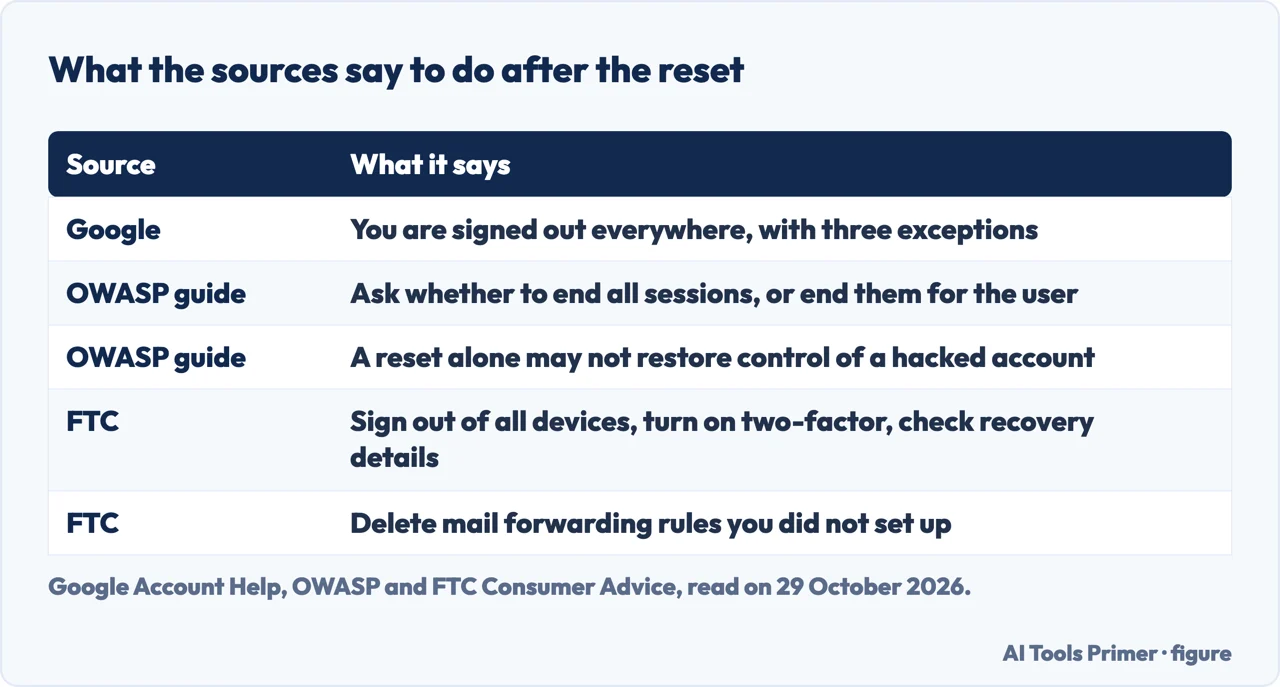
OWASP’s guide has a section on recovery after a suspected compromise. Its first line is that a password reset alone may not restore control of a compromised account, because an attacker may still have an active session or may have changed the recovery information or multi-factor methods. For the service, it says not to rely only on recently added or changed recovery information, not to automatically restore recovery addresses or numbers that were replaced, since they may have been replaced because they were lost or compromised, to review recovery addresses, phone numbers and MFA methods with the verified owner, and, after recovery, to invalidate existing sessions and outstanding reset and recovery links or codes.
The pages differ on sessions. Google says that after you change or reset the password you are signed out everywhere except on devices you use to verify it is you, some devices with third-party apps you have given account access, and home devices you have given account access. OWASP says the service should ask whether you want to invalidate all your existing sessions, or do it automatically. The FTC puts it in your hands: sign out of all devices, so that anyone logged in on another device is removed.
The FTC page lists what to do once you are back in, under three headings. To secure the account: change the password to a strong one; sign out of all devices; turn on two-factor authentication, also called two-step verification, where it is available, with a PIN or a one-time code as the something else; and check that the recovery email addresses and phone numbers are ones you entered and can reach. To check for signs of access: look at your email settings for rules that forward mail and delete any you did not set up; look in the sent folder for emails you did not send and in the deleted folder for messages the hacker may have read and deleted; and look at social media for messages you did not send and for friends you do not recognise. Then tell your contacts, so they do not click links in emails from you and ignore pleas for help or money.
For what the standards say a new password needs, our page on changing passwords covers the NIST and NCSC advice. The three sources here describe the steps after a reset in different words, and we have not ranked them.
What we did not use
We reset no password on any account. Every statement on this page comes from the six pages listed under Sources. OWASP’s page is written for developers, so we have kept it to what it says a service should do. Apple’s page is dated 5 October 2026; from the rest of our sources we relied on no publication date.
Where to start
Four ways in.
- “What does the button do?”
- What the reset button is doing — reset
- “What if support cannot help?”
- When support cannot send a link — support
- “Is this email real?”
- Is that email yours? — email
- “I am back in. Now what?”
- After you are back in — after
One service at a time
The services this page compares, each on its own.
Around the reset
Changing, an account with no password, and a social account.
Questions people also ask
How do I get my password if I forgot it?
The pages we read describe resetting to a new password. Microsoft says its support cannot help you retrieve a lost password. Google asks questions and sends an email, Apple starts from a trusted device or recovery factors, and Microsoft’s local accounts use security questions or a reset disk.
Is it forgot password or forget password?
The pages we read do not discuss which wording is right, so we do not rule on it. Apple’s page tells you to look for a button labelled “Forgot Password?” and Google says you can reset a password if you forget it.
What is a forgotten password?
On these pages it is a password you can no longer supply, so you reset it instead of changing it. Google says you can change a password for security reasons or reset it if you forget it, and Microsoft separates a reset from the sign-in screen from a change that needs the old password.
How can I get my forgot Gmail password?
Google says to follow the steps to recover your account, answer some questions and use the email it sends. If it does not arrive, check junk, spam and bulk folders, add noreply@google.com to your address book and check every address you may have used. See also our page on resetting a Gmail password.
Not covered here. We reset no password on any account. The statements come from OWASP, Google Account Help, Apple Support, Microsoft Support and two FTC Consumer Advice pages, all read on 29 October 2026.
The search volume and difficulty behind this page come from a Semrush reading of 29 August 2026, older than the 60 days the site normally allows.
Sources
- OWASP — Forgot Password Cheat Sheet — cheatsheetseries.owasp.org, read 29 October 2026.
- Google Account Help — Change or reset your password — support.google.com, read 29 October 2026.
- Apple Support — If you forgot your password and can’t sign in to your Apple Account — support.apple.com, read 29 October 2026.
- Microsoft Support — Change or reset your local account password in Windows — support.microsoft.com, read 29 October 2026.
- FTC Consumer Advice — How To Recover Your Hacked Email or Social Media Account — consumer.ftc.gov, read 29 October 2026.
- FTC Consumer Advice — Protect yourself from phishing scams — consumer.ftc.gov, read 29 October 2026.
Written by Alberto Gulotta
Founder and editor of AI Tools Primer, writing from Palermo, Italy. Thirty-five years of taking computers apart, starting with a Commodore 64 — the long version is on the about page.
Something wrong on this page? Write to aitoolsprimer@gmail.com and it gets fixed.
Written on 29 October 2026.
Independence and limits
No affiliate links and no paid placements anywhere on this site. Nobody pays to appear here, and no company has seen this page before you did.
This is general information, not professional advice. Where a page touches money, health, safety or the law, it names its source and the date it was read — and your situation may still differ. See the privacy page and the cookie policy.