
Password · guide
Backup codes for two-factor: what Google, GitHub and others say
By Alberto Gulotta · Updated · 14 min read
Backup codes are the way in when your normal second step is out of reach. Google and Login.gov give ten, GitHub gives 16, Stripe gives one backup code and Microsoft one recovery code of 25 digits. The pages we read differ on where to keep them and on what a new set does.
| Question | Answer | Where it comes from |
|---|---|---|
| How many codes are there? | Google and Login.gov say ten, GitHub says 16, Stripe gives one and Microsoft gives one of 25 digits | Each service’s own page |
| Can a code be used twice? | Google, Login.gov and GitHub say each code works once | Google, Login.gov, GitHub |
| What does a new set do? | Google, GitHub, Stripe and Microsoft say it cancels the old one | Google, GitHub, Stripe, Microsoft |
| Where should I keep them? | Google says printed, with important documents; GitHub says a secure password manager; Stripe ranks paper and a safe first | Google, GitHub, Stripe |
| Which is the weakest option? | Login.gov calls backup codes the least secure option for two-factor authentication | Login.gov |
What a backup code is, and when it is the way in
Google’s help page puts the idea in one sentence: if you cannot sign in to your Google Account with your normal 2-Step Verification, you can use a backup code for the second step. It lists the cases it has in mind: you lose your phone, you change your phone number, or you otherwise cannot get codes by text, call or Google Authenticator. The page adds two conditions. 2-Step Verification has to be turned on for the codes to work, and once a code has been used to sign in, that code becomes inactive.
WorkOS, a company that sells developer tools and whose blog post of 24 July 2025 we read, gives the same idea a wider frame. It says backup codes are also called recovery codes or one-time use backup codes, that they are static strings of numbers or letters and digits, and that they are usually handed over when you set up the second factor. It says they work when you cannot receive a text message, use an authenticator app or reach a hardware token. It also says the codes are not tied to a device, so a broken or stolen phone does not stop them working, and that a username and password are still needed before a code is accepted. A blog from a vendor is not a rule for any one service, so we use it for the definition and for what it says, not as proof of how Google or GitHub behave.
Stripe describes the code by what it can do. Its page says a backup code lets you disable two-step authentication on your account and sign in if you cannot complete the authentication step, and it warns that anyone who holds both your password and the backup code has full access to the account. Microsoft uses a different name for something close: a recovery code of 25 digits, meant to help you regain access if you forget your password or your account is compromised. The names are not settled even inside one page. Login.gov titles its page “Backup codes” and then calls them recovery codes in the sentence that tells you how to treat them.
How many codes, and where each service makes them
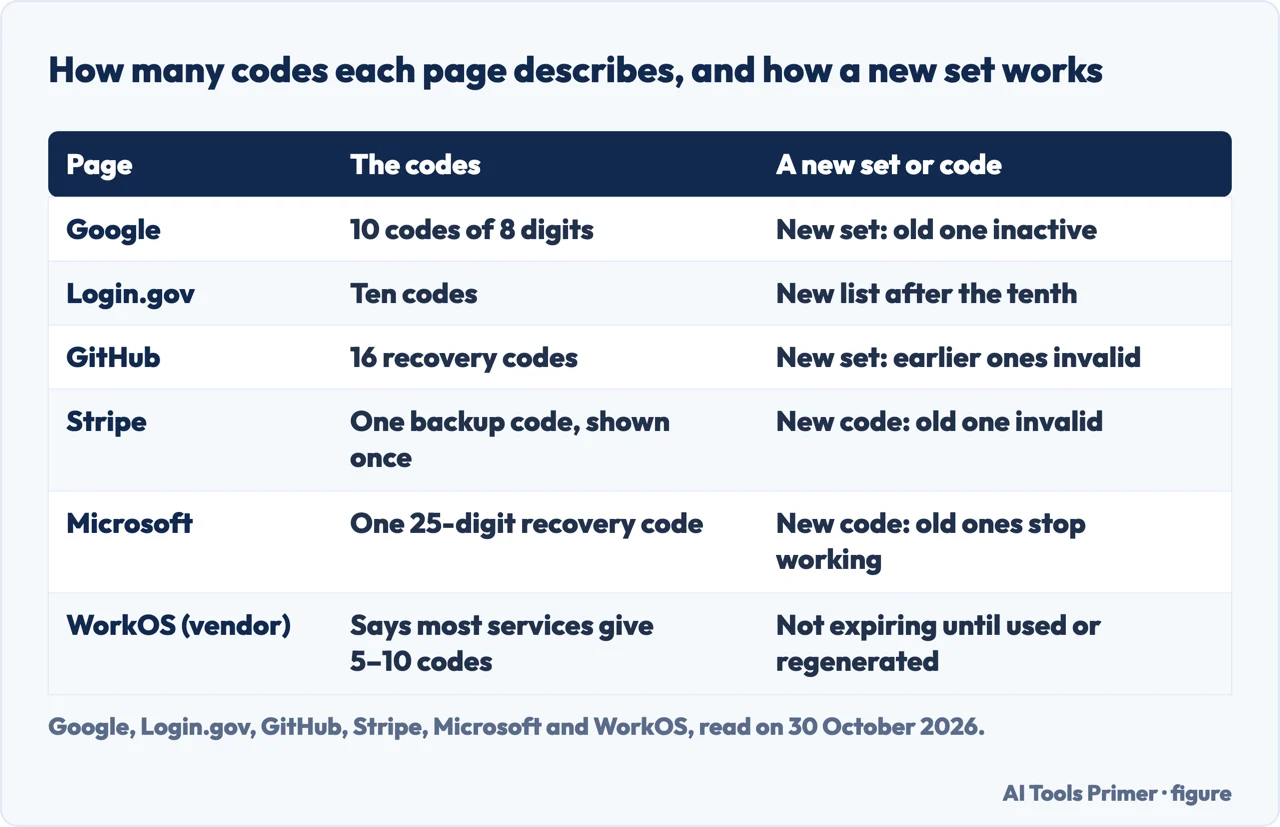
The number is the first thing the pages disagree on. Google says you can get a new set of 10 backup codes whenever you want, and its sign-in step asks for one of your 8-digit backup codes. Login.gov says it generates a set of ten codes. GitHub says that if you have used all 16 recovery codes you can generate another list. Stripe shows a single backup code. Microsoft has a single recovery code of 25 digits. WorkOS says that “most services generate a list of 5–10 backup codes”, a general statement from a vendor: a range that reaches Google’s ten but not GitHub’s 16.
The routes to them are different too. In Google, you open your Google Account, click Security & sign-in, click 2-Step Verification, and under “Backup codes” click Continue; from there the page lists Get backup codes, Refresh, Delete, Download Codes and Print codes. In GitHub you click your profile picture, then Settings, then Password and authentication, and next to “Recovery codes” you click View, where the options are Download, Print and Copy. Stripe’s page gives no menu path for the first code: it says Stripe shows you a backup code when you enable two-step authentication for the first time, and that it is only displayed once, so it is important to write it down. Microsoft sends you to account.live.com/proofs/manage/additional, to the Recovery code section, where you select Generate a new code. For Login.gov the page we read describes the codes but not the menu.
Where each page says to keep them
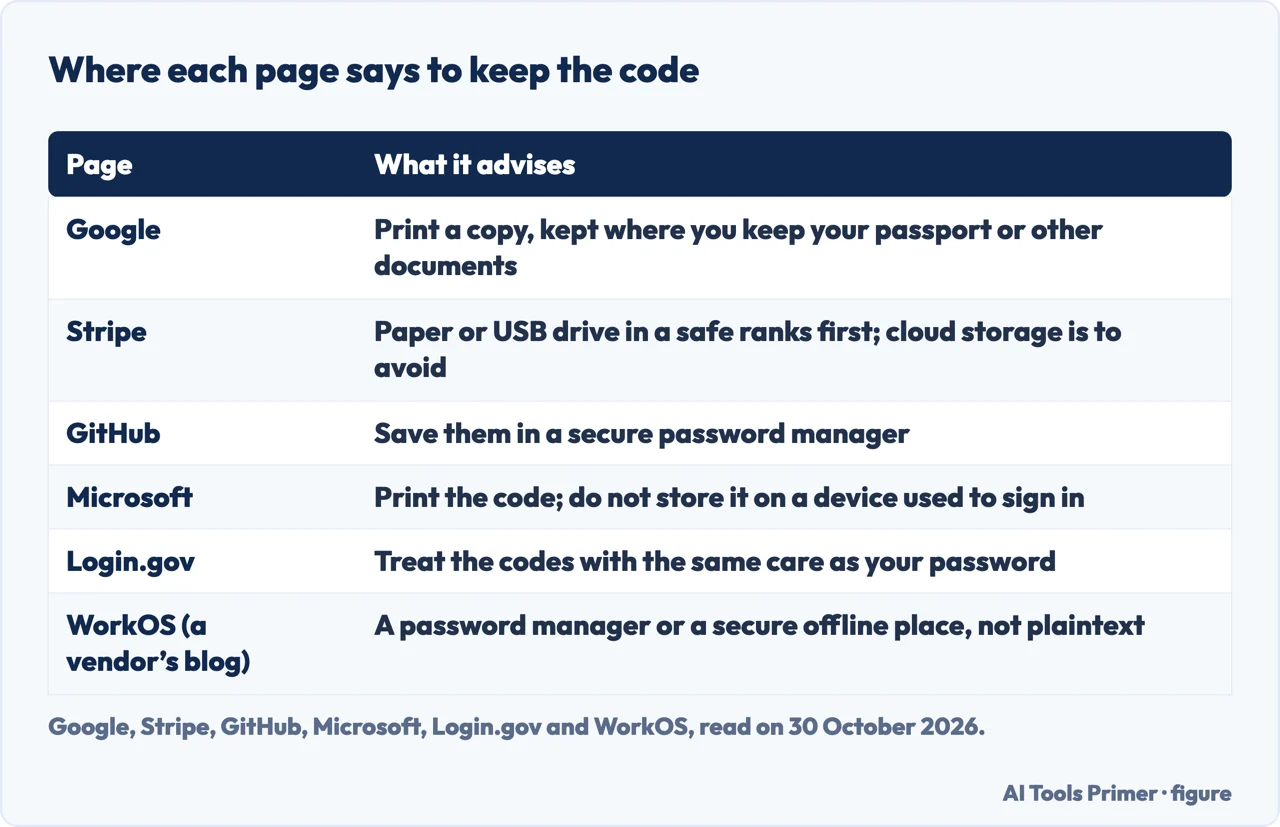
The advice is where the pages differ most, and the differences are real, not wording. Google suggests printing a copy and keeping it where you keep your passport or other important documents. Its page also describes the file you get from Download Codes, named Backup-codes-username.txt with your own username, and says to search your computer for it if you need to find it again. Microsoft says to print the recovery code and keep it in a safe place, and for security not to store it on a device used to sign in to your account. Login.gov says the codes must be printed or written down, which it says makes them more vulnerable to theft and phishing, and tells you to treat them with the same level of care as your password. Google adds the one rule about handing them over: do not share your backup codes with anyone, and Google never asks for a backup code other than at sign in. GitHub says the same, not to share or distribute your recovery codes.
GitHub and WorkOS point to a password manager. GitHub recommends saving the recovery codes with a secure password manager, and its page puts a Copy button next to Download and Print for that purpose. WorkOS says to use a trusted password manager or a secure offline location, and never to leave the codes in plaintext on your desktop or in your inbox.
Stripe is the page that ranks the options. From most to least secure it lists a piece of paper or a USB drive locked in a safe or a safe deposit box; a piece of paper in a filing cabinet or somewhere unlikely to be found or photographed; a dedicated USB drive connected to your computer only when needed; and a password manager, but as a password field and not as plain text. It says to avoid cloud storage, a hard drive, removable storage that is frequently connected to your computer, and a password manager used as plain text. So a password manager is GitHub’s recommendation and the last entry on Stripe’s list, with a condition attached. The pages from Google, GitHub, Microsoft, Login.gov and WorkOS that we read give their advice without a ranking of the options.
Using one when the second step fails
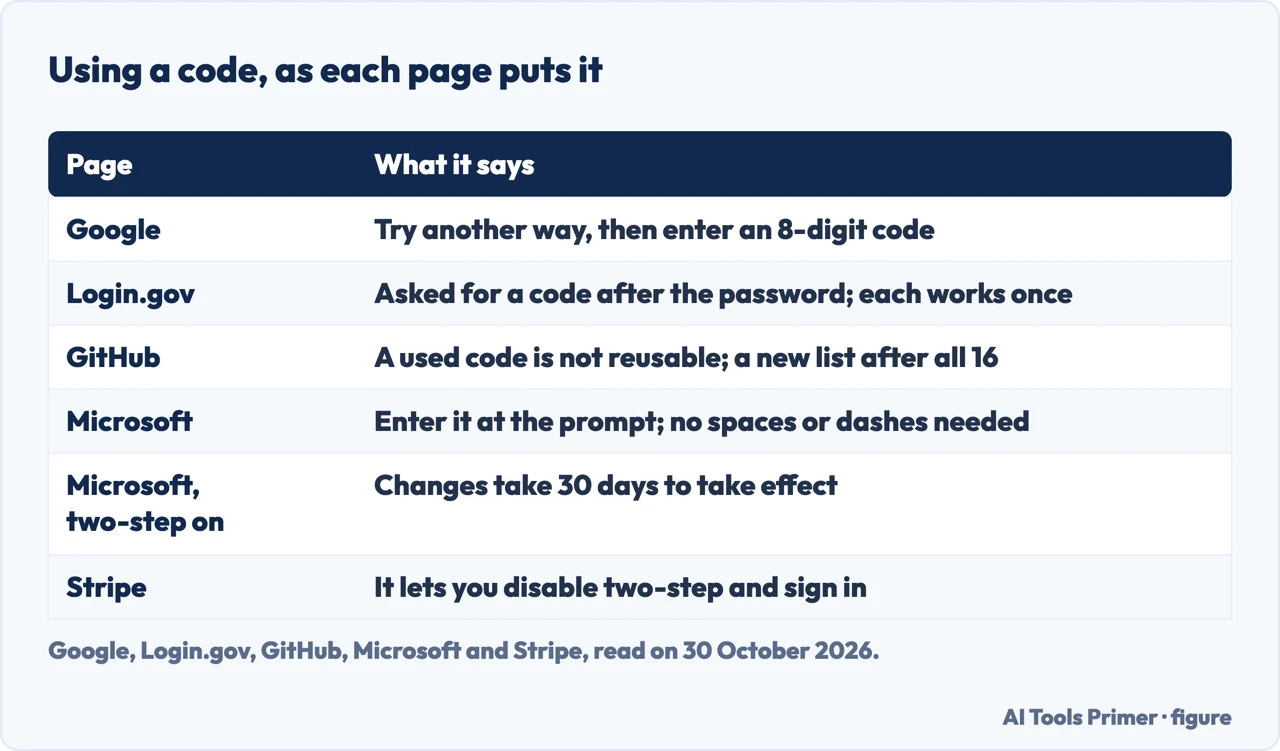
Google’s steps are short: find your backup codes, sign in to your Google Account, click Try another way, click Enter one of your 8-digit backup codes, and enter one of your unused codes. Its tip is that because each code can be used only once, you might want to mark the code as used. Login.gov describes the same shape from the other side: after you sign in with your username and password you are prompted for a code, each code may be used only once, and when the tenth has been used you are prompted to download a new list. GitHub says a recovery code, once used to regain access, cannot be reused.
Microsoft’s page is a sign-in route and not a second-step prompt. You start by entering your username at account.microsoft.com/account; if you have no sign-in verification method or have forgotten your password you select Other ways to sign in, then Use my password and Forgot password?, then Use a different verification option and I don’t have any of these. At the prompt that asks whether you have an account recovery code, you enter it. The page says recovery codes are not case-sensitive and do not need spaces or dashes, and that once a valid code is entered you are given the option to update your password. A note at the end says that if your account has two-step verification turned on, you must wait 30 days for changes to take effect. The page does not say which changes that covers, and we did not test it.
Stripe’s page is the one that says what the code is for in a single line: to disable two-step authentication and sign in. What happens after that is not on the page we read.
Replacing, deleting and the other ways back in
Four of the pages say a new code cancels the old one. Google says that when you create a new set the old set automatically becomes inactive, and that if you lose or run out of codes, or think they were stolen, you can create a new set by clicking Refresh; the Delete button deletes your codes and automatically inactivates them. GitHub says generating a new set of recovery codes invalidates any codes you generated before. Stripe says that if you lost your backup code and can still sign in, you generate a new one from your two-step authentication settings and that this invalidates the old one, and it says the same if you suspect the code is compromised, as soon as possible. Microsoft says that as soon as you create a new recovery code, any previous codes will no longer work.
Microsoft’s page adds a limit the others do not state: you cannot retrieve or download an existing recovery code. If you can sign in, you create a new one at any time; if you cannot, the page points to the Microsoft account sign-in helper. Google has its own limit: it says you cannot download backup codes if you are in the Advanced Protection Program. Login.gov’s way of replacing is built into use: the new list is offered after the tenth code.
GitHub’s page goes furthest beyond the codes. It strongly recommends configuring two or more authentication methods, and lists other recovery methods: SSH keys, set up with the key type authentication; personal access tokens, with the repo scope; and verified devices. It also says that reconfiguring your 2FA settings without disabling 2FA does not change the recovery codes, while disabling and re-enabling it updates them. Backups of TOTP apps are a separate matter on the same page: the process differs for each app, and it names 1Password, Google Authenticator and Microsoft Authenticator as examples. Our page on an authenticator that stops working covers the app side, and codes by text message covers the method the backup code stands in for when a phone number is lost.
What the pages we read do not say
Google’s page does not say how many of your codes are left, and it does not say whether a code expires with time. WorkOS says the codes do not expire until they are used or regenerated, but that is a general statement from a vendor and not a statement about Google. Login.gov calls backup codes the least secure option and gives the reason as printing or writing them down; the page does not explain further. The Stripe page we read does not say what follows once you have disabled two-step authentication. The pages we read do not put the services side by side, which is why the figures above are our own tables, each cell taken from one page. Our page on turning two-factor off covers the other end of a code’s life: Google’s instruction, quoted there, to destroy the backup codes you saved once 2-Step Verification is switched off.
We tested nothing: we generated no code and signed in to no account. We did not open the Google Account page for backup codes, which needs a sign-in, the glossary entry at nhimg.org, the article at sdmfoundation.org or the thread at security.stackexchange.com. Stripe’s separate instructions for a locked-out account were not opened either.
Where to start
Four ways in.
- “How many are there?”
- How many codes, and where each service makes them — count
- “Where do I keep them?”
- Where each page says to keep them — keep
- “How do I use one?”
- Using one when the second step fails — use
- “I lost them.”
- Replacing, deleting and the other ways back in — replace
Other ways to the second step
The app, the text message and the difference between two names.
When the usual way in has gone
A code that fails, a switch to turn off, an account to get back into.
Questions people also ask
How do I find my backup code?
Google says to open your Google Account, click Security & sign-in, then 2-Step Verification, and under “Backup codes” click Continue. For a file you already downloaded, it says to search your computer for Backup-codes-username.txt. GitHub puts its recovery codes under Settings, Password and authentication, next to “Recovery codes”.
What is your backup code?
It is the code a service gave you for the second step of signing in. Google describes 10 codes of 8 digits, each usable once; Stripe shows one backup code when you first enable two-step authentication, displayed once; Microsoft calls its 25-digit code a recovery code.
How do I recover my 8-digit backup code for Gmail?
Google says that if you downloaded the codes, you can search your computer for Backup-codes-username.txt. If you lose or run out of codes, or think they were stolen, it says to create a new set with Refresh, and the old set becomes inactive.
How do I make a backup code?
Google says to turn on 2-Step Verification, then click Get backup codes under “Backup codes”. GitHub shows its recovery codes when you configure two-factor authentication, and Microsoft says to select Generate a new code in the Recovery code section.
Not covered here. We generated no code and signed in to no account. The statements come from pages of Google, Login.gov, Stripe, GitHub and Microsoft and from a WorkOS blog post, all read on 30 October 2026.
The search volume and difficulty behind this page come from a reading of 29 August 2026, older than the 60 days the site normally allows. What holds instead is simple: every statement is attributed to the page that makes it, with the date it was read.
Sources
- Google Account Help — Sign in with backup codes — support.google.com, read 30 October 2026.
- Login.gov — Backup codes — www.login.gov, read 30 October 2026.
- Stripe Support — Backup codes for two-step authentication — support.stripe.com, read 30 October 2026.
- GitHub Docs — Configuring two-factor authentication recovery methods — docs.github.com, read 30 October 2026.
- Microsoft Support — How to get a Microsoft account recovery code — support.microsoft.com, read 30 October 2026.
- WorkOS — How backup MFA codes work (a vendor’s blog, used for the definition only) — workos.com, read 30 October 2026.
Written by Alberto Gulotta
Founder and editor of AI Tools Primer, writing from Palermo, Italy. Thirty-five years of taking computers apart, starting with a Commodore 64 — the long version is on the about page.
Something wrong on this page? Write to aitoolsprimer@gmail.com and it gets fixed.
Written on 30 October 2026.
Independence and limits
No affiliate links and no paid placements anywhere on this site. Nobody pays to appear here, and no company has seen this page before you did.
This is general information, not professional advice. Where a page touches money, health, safety or the law, it names its source and the date it was read — and your situation may still differ. See the privacy page and the cookie policy.