
Password · guide
What is a passkey and how does it work, as five pages put it
By Alberto Gulotta · Updated · 17 min read
What is a passkey and how does it work: a sign-in credential built on FIDO standards, where your device keeps a private key, the website keeps a public one and you approve with the gesture that unlocks the device, as five pages from FIDO, Apple, Google, Microsoft and the NCSC describe it.
| Question | Answer | Where it comes from |
|---|---|---|
| What is a passkey? | A sign-in credential based on FIDO standards, kept on a phone, a computer or a security key | FIDO Alliance |
| What does the website keep? | The public key, which Apple says is not a secret | Apple, Microsoft |
| Why does a fake site get nothing? | The passkey is tied to the domain it was registered with | Microsoft |
| Is it a second factor? | Four wordings: it bypasses the second step, counts as multi-factor, is as secure or more, or is stronger than password plus code | Google, Microsoft, NCSC, FIDO |
| Do I still have a password? | On Google, yes, and a setting decides which is asked first | |
| What if I lose the device? | A device-bound passkey is lost without another recovery method; Apple describes recovery for synced ones | Microsoft, Apple |
| What does it cost? | The pages we read do not say | — |
What a passkey is, and what the word covers
The FIDO Alliance, whose standards passkeys are built on, describes a passkey as a sign-in credential that can be stored on your phone or computer, or in a hardware security key. You approve a sign-in the way you unlock the device, with biometrics, a PIN or a pattern, and the page says you no longer enter usernames and passwords or additional factors. Apple calls passkeys a replacement for passwords that gives websites and apps a passwordless sign-in. Microsoft puts it as confirming it is you with your face or a fingerprint instead of typing a password, and the National Cyber Security Centre (NCSC) describes a passwordless method that uses the biometrics or lock-screen PIN of the device you already have.
FIDO also says what the word is. “The word passkey is a common noun”, written in lowercase except at the start of a sentence or in a title, and it is a cross-platform term, not a feature tied to one platform. The standards underneath are FIDO2. FIDO’s page names two parts, WebAuthn, the browser API that manages passkeys, and CTAP. Apple says passkeys are built on WebAuthn with public key cryptography, and that platform vendors worked together within the FIDO Alliance so that implementations are compatible across platforms.
FIDO’s page also carries numbers, and we did not open the sources it names for them. It says passwords are behind 80% of breaches today and cites Verizon for 77% of hacking-related breaches involving stolen credentials. On adoption, it reports a 2024 survey commissioned by the FIDO Alliance in which 53% of people had enabled passkeys on at least one account and 22% on every account they could. It adds that passkeys result in 20% more successful sign-ins than passwords. The NCSC gives a different kind of figure, saying passkey logins are up to 8 times faster than signing in with a username, password and 2SV code.
How it works: a key pair and a signed challenge
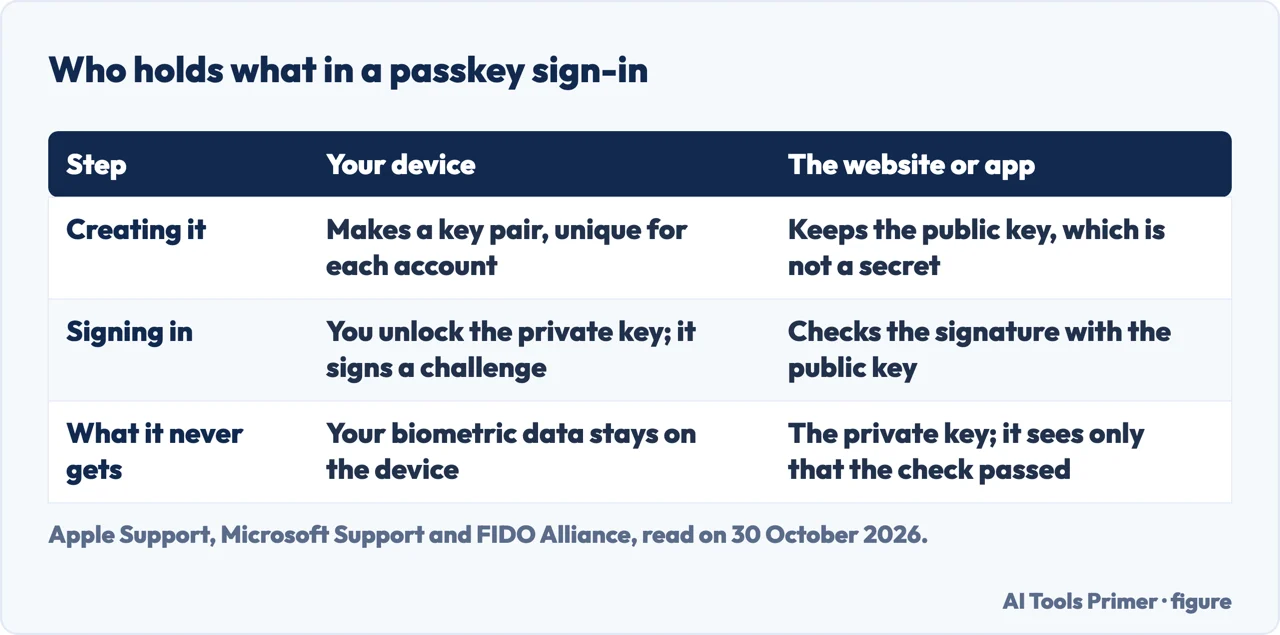
Apple and Microsoft describe the same mechanism from two sides. Apple says that during account registration the operating system creates a unique cryptographic key pair for that account, generated by the device. One key is public and is stored on the server, and Apple says it is not a secret. The other is private, is what is needed to sign in, and the server never learns it. Microsoft says the private key is stored securely on your device and the public key is registered with the website or application.
Signing in is a proof, not a password. Microsoft says your device has to prove it has the private key: after you unlock it, the device digitally signs a challenge from the website or application, and the site checks the signature with the public key before granting access. FIDO calls this a challenge-response protocol based on asymmetric cryptography and says it removes sensitive secrets from the server. Apple’s page says “No shared secret is transmitted” and that the server does not need to protect the public key.
FIDO draws a consequence for breaches: it says breaches of password databases no longer pose a threat because there are no passwords to steal. The unlocking step stays on the device. FIDO says biometric processing continues to stay on the device and is never sent to a remote server, so the server only sees an assurance that the biometric check was successful, and Google and Microsoft each say the biometric data is never shared with them. Microsoft adds that passkeys are unique to each website or application, so you do not have to worry about someone using one to reach other services.
Why a look-alike site gets nothing
Microsoft ties the phishing answer to the domain. When a passkey is created, it says, the passkey is associated with the specific domain that the website or app is registered with. Its example is netflix.com: a passkey created for that domain can only be used there, and while you may be tricked into landing on a similar-looking site, your device will not present your passkey to it. Google words it from the other side. Unlike passwords, passkeys can’t be shared, copied, written down or accidentally given to someone else, which it says makes them more secure against phishing. The NCSC says passkeys can’t be intercepted, reused or stolen like passwords, and that this removes a common route to compromised accounts.
The NCSC adds a wider claim. It says there is substantial evidence of malicious actors using phishing against password sign-ins, that adopting passkeys reduces the effectiveness of that activity, and that, combined with keeping devices and apps up to date, passkeys significantly reduce the likelihood of phishing attacks.
A passkey does not have to be on the computer in front of you. Google’s steps: on the computer’s sign-in page, enter your username, click “Try another way” and then “Use your passkey”. A QR code appears; scan it with the phone’s camera, check that Bluetooth is on, tap the passkey prompt on the phone and verify with your fingerprint, face unlock or PIN. The next time you sign in with the same computer and phone combination, Google says you get a phone notification automatically. FIDO calls this cross-device authentication and says it uses Bluetooth Low Energy to verify physical proximity without depending on Bluetooth security for the sign-in itself; the transport, named hybrid, adds a layer of standard cryptography on top. Microsoft describes the proximity check as the reason a remote attacker cannot use the passkey from far away.
Passkeys and the second step
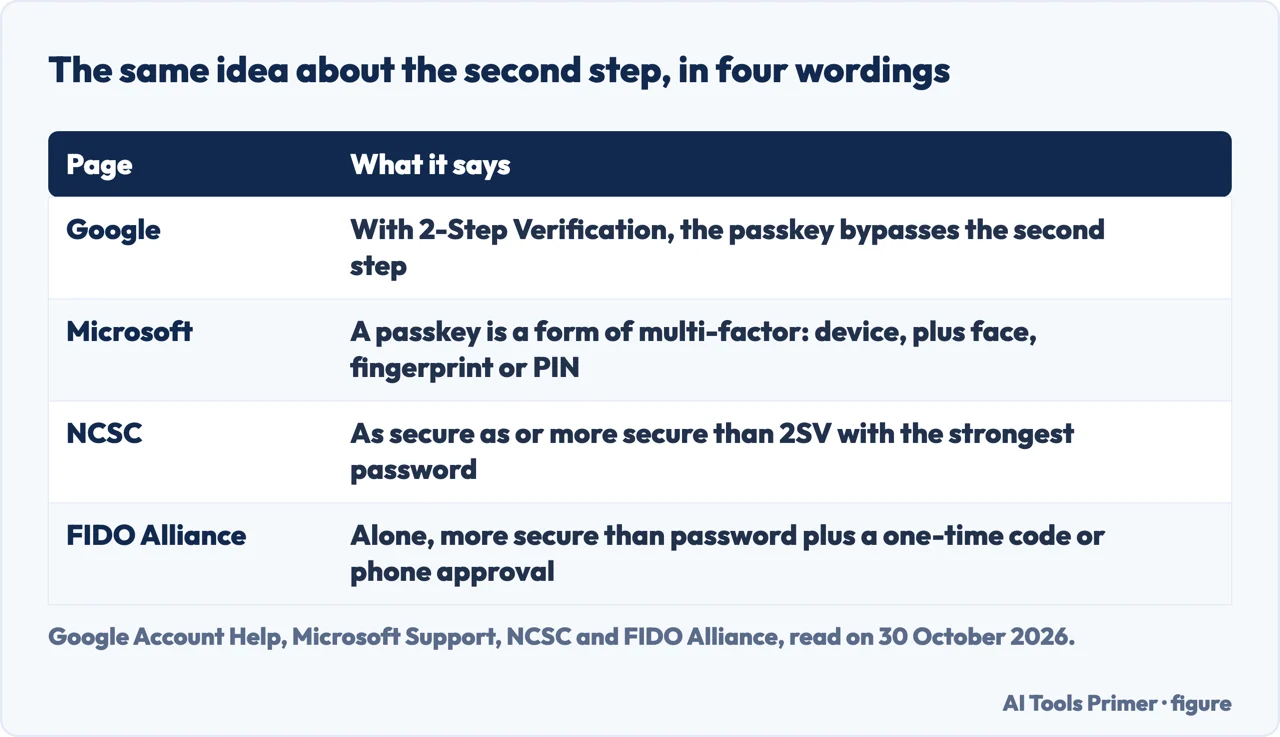
The pages word the second step four ways. Google says that if an account has 2-Step Verification or is enrolled in its Advanced Protection Program, the passkey bypasses the second authentication step, since the passkey verifies that you own the device. Microsoft says passkeys are considered a form of multi-factor authentication: the device that stores the passkey is something you have, and unlocking it with biometric information or a PIN is something you are, or something you know. The NCSC says its technical paper shows passkeys are always as secure as or more secure than 2SV using the strongest password; we did not read that paper. FIDO calls a passkey a primary factor that, standing alone, is more secure than a password plus a one-time code or a password plus a phone approval, and says those second factors are “inconvenient and still phishable”.
FIDO also says a passkey can replace flows such as a password plus an SMS code, and notes that some regulatory regimes still have to evolve to recognize passkeys as one of the officially listed forms of multi-factor authentication. The Apple, Google, Microsoft and NCSC pages we read do not discuss regulation.
Do you still have a password? On Google, yes. The page says that adding a passkey does not change or remove any authentication or recovery factors already on the account. Creating a passkey opts you into a passkey-first, password-less sign-in by default, but you can still use your password, and to have it asked first you turn off “Skip password when possible” under Security & sign-in. With that switched off and 2-Step Verification on, Google says any of your passkeys can be the second step. On a Google Workspace account from a school or employer you may not be able to sign in with just a passkey, and the account settings page shows whether the admin allows it. The NCSC covers the case where no passkey is offered: keep using strong passwords, for example generated by a password manager, and turn on 2SV.
Our pages on codes by text message, authenticator apps and two-factor and two-step cover the methods a passkey is compared with.
Where a passkey is kept, and what a lost device means
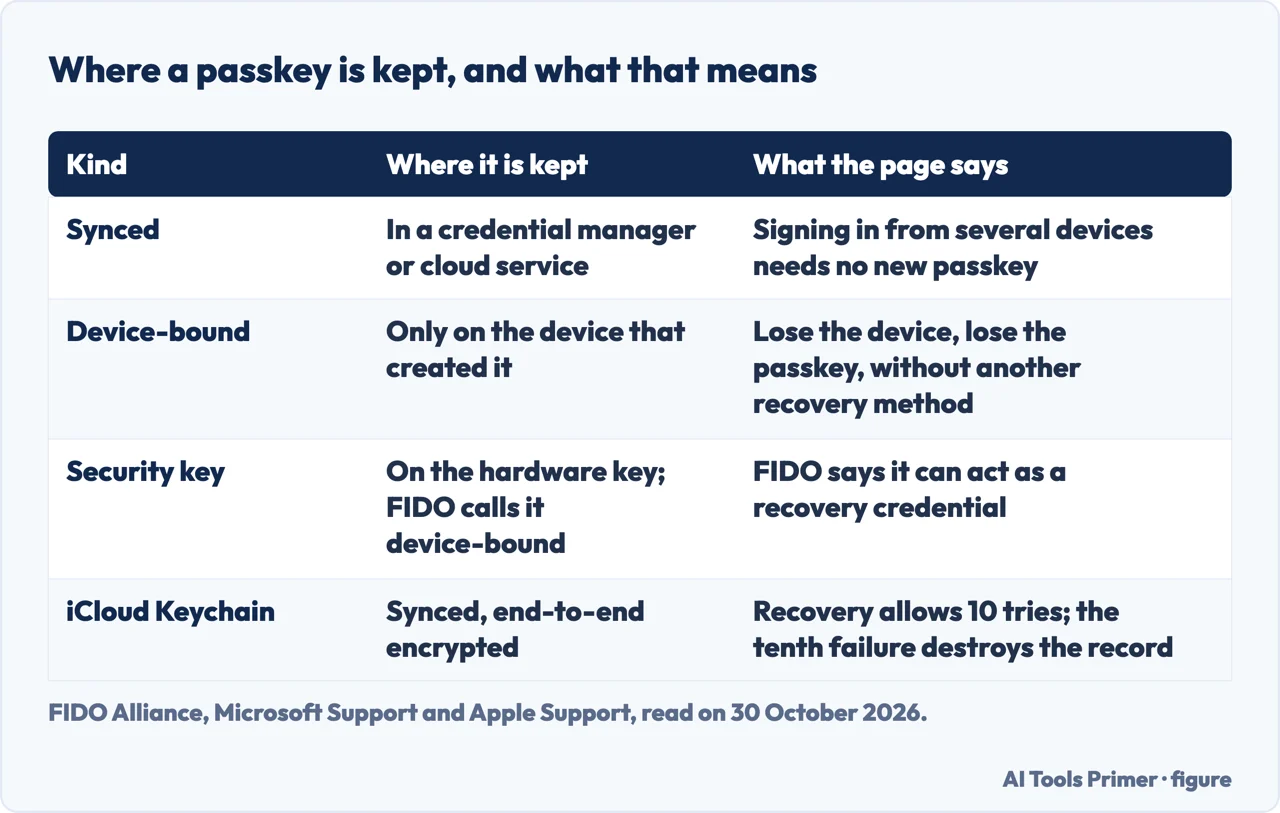
FIDO and Microsoft split passkeys into two kinds. A synced passkey is saved in a credential manager or cloud service and can move between your devices; Microsoft names its own Password Manager as an example. A device-bound passkey, Microsoft says, is stored only on the device where it was created and does not sync to other devices or the cloud. FIDO counts the passkeys on FIDO security keys among the device-bound ones. The provider that holds them can be built into the system or browser, and FIDO gives iCloud Keychain and Google Password Manager as examples, or it can come from a third party, with 1Password and Dashlane as examples. FIDO says a passkey created on one device is synced to the others that use the same provider and account, and a new device set up with that provider receives them.
What a lost device means depends on the kind. Microsoft says a device-bound passkey lets you sign in only from that device or with a backup passkey, and losing the device loses the passkey unless you have another recovery method. For synced passkeys, Apple says iCloud Keychain is end-to-end encrypted with keys not known to Apple, rate limited against brute-force attacks, and recoverable even if the user loses all their devices. Recovery asks for your iCloud account and password, a reply to an SMS sent to your registered phone number, and then your device passcode. Apple allows 10 attempts: after several failures the record is locked and you must call Apple Support, and after the tenth failed attempt the record is destroyed. Apple also says an Apple Account using iCloud Keychain requires two-factor authentication, and that registering a passkey without it prompts you to set it up.
Google’s page covers loss from the account side. If you lose a device with a passkey, or made one on a shared device by mistake, you sign in on a device you can reach and remove it: Security & sign-in, “Passkeys and security keys”, select the passkey, tap Remove. A passkey created automatically by an Android device is removed by signing that device out under Manage all devices. After you sign out of an Android device you can sign in with its passkey for up to 6 hours; after that you need another method, and signing in again generates a new passkey and the old one expires. Google also warns that once a passkey exists, anyone who can unlock the device can reach the account, even after you sign out, and says to create passkeys only on devices you personally own and use. A newly created passkey may need 7 days before it is available at sign-in.
Microsoft advises saving passkeys to a synced credential manager whenever possible and, if you keep one only on a device, creating passkeys on your other devices as a digital spare key.
FIDO takes a position of its own. It says security keys hold device-bound passkeys in hardware, offer the highest level of assurance, suit people who do not own a smartphone, and can act as a recovery credential if you lose access to every device your passkeys were synced to. On security it calls passkeys backed by passwords or synced across devices “vulnerable to theft”, and sets against them device-bound passkeys with a hardware-backed root of trust. The Apple, Google, Microsoft and NCSC pages we read do not make that claim. Apple describes protections for the keychain even if the Apple Account is compromised, and Google’s page shows how to put a passkey on a hardware security key that supports FIDO2: Create a passkey, Use another device, then insert the key and enter its PIN or touch its fingerprint sensor.
Setting one up, and what the pages do not say
Google and Microsoft agree on the basics: a computer running at least Windows 10, macOS Ventura or ChromeOS 109, a phone running Android 9 or iOS 16 or later, or a hardware security key that supports FIDO2, and a browser at Chrome 109, Safari 16 or Edge 109 or later. Google adds Firefox 122 to its browser list and tells you to turn on the phone’s screen lock, Bluetooth if you will use the phone to sign in on a computer, and iCloud Keychain on Apple devices. It also says that on some operating systems and browsers you may not be able to create or use passkeys in Incognito mode. Microsoft adds that passkeys in Microsoft Authenticator need iOS 17 or Android 14 or newer, and that Microsoft Password Manager is rolling out and is only available in Edge version 142 and newer, with a personal profile.
On Google, the steps are: go to myaccount.google.com/signinoptions/passkeys, tap Create a passkey and unlock your device; repeat on each device where you want one. Google says that once you have created your first passkey, your next sign-in on a device that supports passkeys may prompt you to create one for that device. The NCSC’s advice for any service is to look in the account’s security or privacy settings for the offer, and to start with one when creating a new account; Microsoft says to accept the “Create a passkey?” pop-up when a site offers it. Google also says that if it detects a suspicious passkey it disables it and notifies you, and the passkey is deleted if you take no action within 30 days of the warning.
Some questions are left open by the pages we read. They do not say what a passkey costs a person: FIDO speaks of lower costs for organisations, including for authentication by SMS text message, but the pages do not give a price for the person signing in. FIDO points to a Passkey Directory of businesses that use passkeys, which we did not open, so we cannot list the sites that support them. For Google, the page tells you to remove the passkey from a lost device but does not describe losing every device; Apple addresses that for iCloud Keychain, and the NCSC says a credential manager’s backup means you should not completely lose access to your passkeys. The cryptography is described only as public key and asymmetric cryptography; the pages do not name algorithms or formats. And the NCSC’s technical paper comparing passkeys with 2SV is cited but we did not read it.
This page rests on five documents, the FIDO Alliance, Apple Support, Google Account Help, Microsoft Support and the NCSC, each linked under Sources and read on 30 October 2026.
Where to start
Four ways in.
- “How does it work?”
- A key pair and a signed challenge — how it works
- “Can a fake site use it?”
- Why a look-alike site gets nothing — phishing
- “Do I still have a password?”
- Passkeys and the second step — second step
- “What if I lose the device?”
- Where a passkey is kept, and what a lost device means — where
The codes a passkey is compared with
Text messages, authenticator apps and the two-step question.
Where passkeys can be kept
Credential managers from Apple, Google and Microsoft.
Questions people also ask
What are the cons of passkey?
Three cautions. Microsoft says a device-bound passkey is lost with the device unless another recovery method exists. Google says anyone who can unlock the device can reach the account, and a new passkey may need 7 days. FIDO says passkeys “backed by passwords or synced across devices are vulnerable to theft”; the other four do not.
What is an example of a passkey?
Microsoft’s example is netflix.com: a passkey created for that domain can only be used with it, so a similar-looking site is not given the passkey. You sign in with Face ID, a fingerprint or your usual unlock PIN on a phone, or Windows Hello on a computer.
Do I still have a password if I have a passkey?
On Google, yes. Adding a passkey does not change or remove the factors already on the account, you can still sign in with your password, and the “Skip password when possible” setting decides which is asked first.
How much does passkey cost?
The pages we read do not say what a passkey costs a person. FIDO mentions lower costs for organisations, including for authentication by SMS text message, and gives no price for anyone signing in.
Not covered here. We tried no passkey. The statements come from five pages, read on 30 October 2026: the FIDO Alliance, Apple Support, Google Account Help, Microsoft Support and the NCSC.
The search volume and difficulty behind this page come from a Semrush reading of 29 August 2026, older than the 60 days the site normally allows.
Sources
- FIDO Alliance — FIDO Passkeys: Passwordless Authentication — fidoalliance.org, read 30 October 2026.
- Apple Support — About the security of passkeys — support.apple.com, read 30 October 2026.
- Google Account Help — Sign in with a passkey instead of a password — support.google.com, read 30 October 2026.
- Microsoft Support — What are passkeys and why they matter — support.microsoft.com, read 30 October 2026.
- NCSC — Passkeys: what you need to know — www.ncsc.gov.uk, read 30 October 2026.
Written by Alberto Gulotta
Founder and editor of AI Tools Primer, writing from Palermo, Italy. Thirty-five years of taking computers apart, starting with a Commodore 64 — the long version is on the about page.
Something wrong on this page? Write to aitoolsprimer@gmail.com and it gets fixed.
Written on 30 October 2026.
Independence and limits
No affiliate links and no paid placements anywhere on this site. Nobody pays to appear here, and no company has seen this page before you did.
This is general information, not professional advice. Where a page touches money, health, safety or the law, it names its source and the date it was read — and your situation may still differ. See the privacy page and the cookie policy.