
Password · guide
Bitwarden password generator: the settings and the numbers
By Alberto Gulotta · Updated · 16 min read
The Bitwarden password generator is in every Bitwarden app and on a free web page, and its defaults differ by place: 14 characters on the web tool, five words for a passphrase there, three on the command line, while NIST asks 15 characters of a password used alone.
| Question | Answer | Where it comes from |
|---|---|---|
| Where is it? | In all Bitwarden apps; people who are not members are pointed to a free page | Bitwarden Help |
| What length does Bitwarden suggest? | At least 14 characters; a blog box on its tool page says 14 to 16 | Bitwarden |
| What does NIST ask? | 15 characters for a password used alone, 8 inside multi-factor | NIST SP 800-63B-4 |
| How many words? | Five on the web tool, three on the command line; the EFF says six | Bitwarden, EFF |
| What do the minimums do? | Bitwarden says to keep numbers and specials at 0-1 unless a site demands more | Bitwarden Help |
| Which word list does it use? | The Bitwarden pages we read do not say | Bitwarden |
Where the generator lives and what it keeps
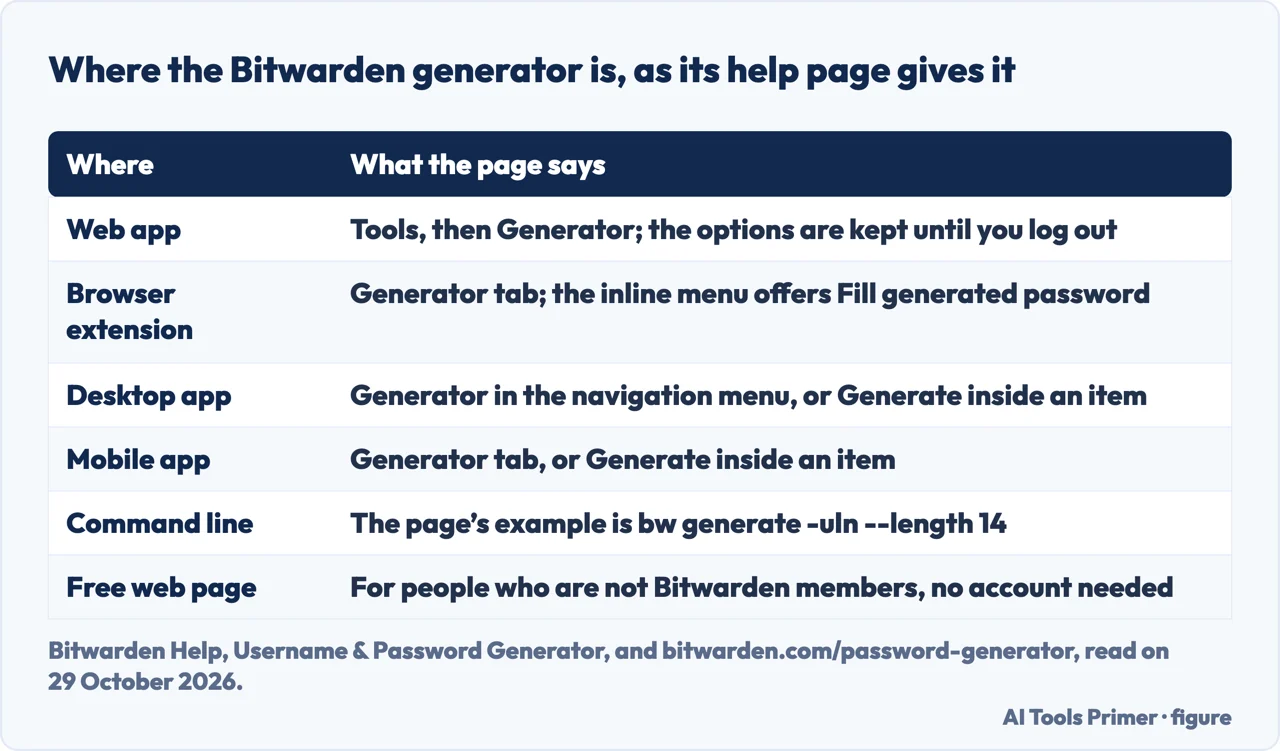
Bitwarden Help says the password generator is available in all Bitwarden apps, and the username generator in the web vault, the browser extension, the desktop app and the mobile app. The same page points people who are not Bitwarden members to a free password generator on bitwarden.com, and the FAQ on that tool page says no account is required. The web app route is Tools, then Generator, or the Generate button on the screen where an item is added or edited. In the browser extension and on mobile it is the Generator tab, and on the desktop app the Generator entry in the navigation menu.
Two details change what happens to a password you generate. In the web app, the help page says the options you specify are saved until you log out. And every client has a Generator history, which the page says gives access to passwords and usernames created in either place with that specific client, even if you do not save them to an item, and which is cleared when you log out. The wording is the same for the web app, the extension, the desktop app and mobile, so the page ties the history to the specific client you used.
The browser extension adds a third door. If you are creating an account that is not stored in Bitwarden, the inline autofill menu offers a Fill generated password prompt, and the help page says it uses the settings from the extension’s Generator tab. It also says to choose New login when prompted to save, so the generated password ends up in the vault. A Bitwarden blog post about the same menu adds that if you forget to add the login to your vault before submitting, Bitwarden offers to save it afterwards. A second blog post, on passphrases, describes the other route inside the app: a new vault item, the icon with two circular arrows, then Options and Passphrase, where every change to an option changes the passphrase on screen.
For a terminal, the help page shows bw generate -uln --length 14 as its example and lists three more flags for passwords: --minNumber, --minSpecial and --ambiguous. The command-line page gives the same command a minimum length of 5.
What each option changes
The help page describes a password as a randomly generated string of a customizable set of character types, and lists seven settings: Length; Minimum numbers, which applies if 0-9 is enabled; Minimum special, which applies if the special characters are enabled; and one switch each for A-Z, a-z, 0-9 and !@#$%^&*. An eighth, Avoid ambiguous characters, prevents a password from having both a 1 and an l, or both a 0 and an o. On the free web tool the starting point is a length of 14 with the A-Z, a-z, 0-9 and special-character switches shown, and the FAQ on that page says the length can run from 5 to 128 characters.
The one setting Bitwarden warns about is the pair of minimums. Unless you need to satisfy a site’s specific password requirements, the help page recommends keeping Minimum Numbers and Minimum Special as low as possible, 0-1, because over-constraint limits the strength of generated passwords. The pages we read do not say what the minimums are set to by default.
A passphrase, in the same help page, is a randomly generated group of words, with the example panda-lunchroom-uplifting-resisting. It has four options: the number of words, the word separator, Capitalize, which capitalizes the first letter of each word, and Include number, which adds a single numerical character. The tool page for passphrases starts at five words, and the command line starts lower: Bitwarden’s command-line page says bw generate --passphrase produces a three-word passphrase separated by a dash by default, the same as passing --words 3 --separator -.
Bitwarden also says which of the two to use for what. Its password tool page describes a password as the right shape for accounts you do not need to memorize and can autofill from the password manager, and a passphrase, words connected with dashes, as the shape for something you type by hand, such as logging in to a streaming service on a TV.
The numbers behind “strong”
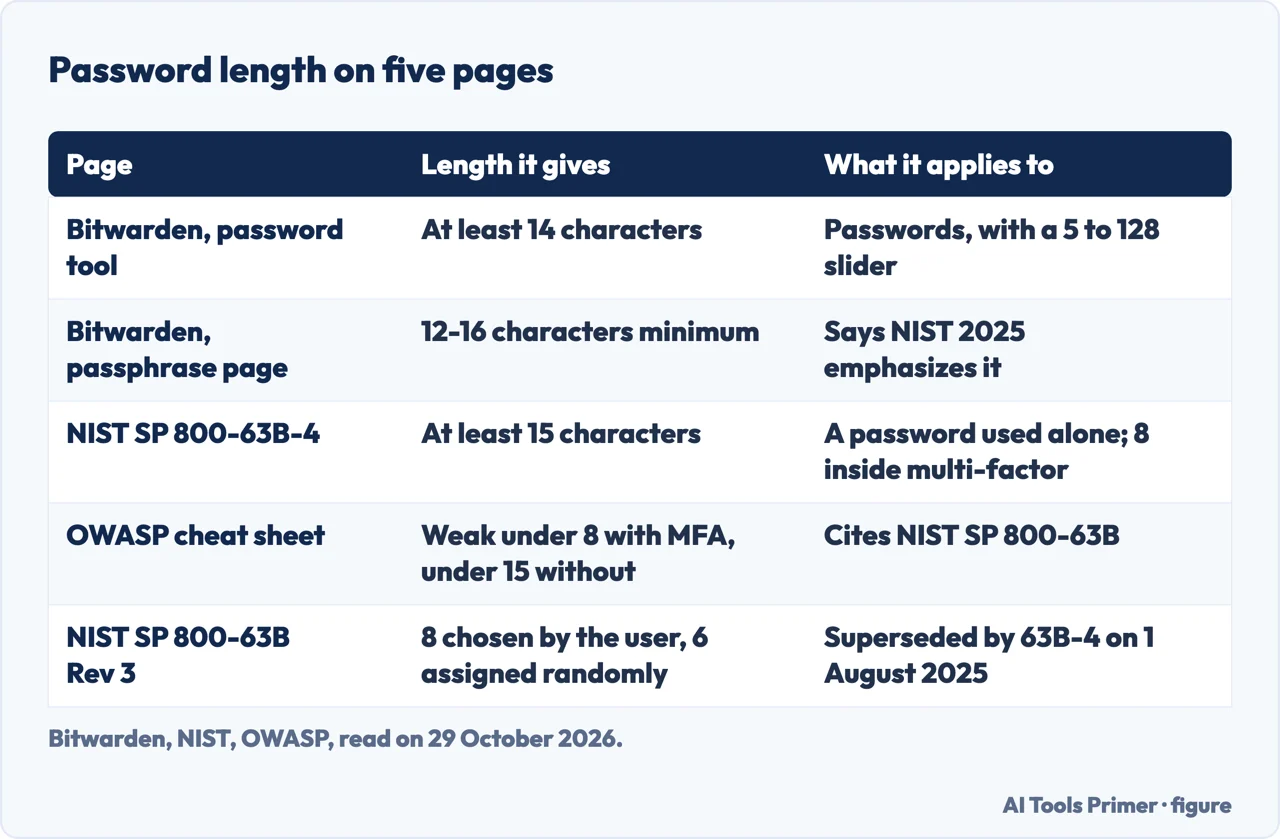
Bitwarden’s own pages agree on 14 characters as the figure to start from. The FAQ on its password tool says to make passwords at least 14 characters, and its article on strong password ideas lists Long as at least 14 characters. A blog box on the tool page goes a little higher, with experts recommending a random mix of at least 14 to 16 characters. The passphrase tool page cites an outside source instead: it says the 2025 NIST guidelines emphasize longer passwords, 12 to 16 characters as a minimum, and tells you to align your passphrase length with that.
NIST’s own page gives different numbers. In SP 800-63B-4, the section on password verifiers says verifiers and CSPs SHALL require passwords used as a single-factor mechanism to be a minimum of 15 characters, and may allow shorter ones, never under eight, when the password is only part of multi-factor authentication. It adds that verifiers SHOULD permit a maximum of at least 64 characters and SHALL NOT impose other composition rules, such as requiring mixtures of character types. The requirement is written for verifiers and CSPs, the services that check passwords. The earlier revision of SP 800-63B, which NIST’s page says was superseded on 1 August 2025, asked for 8 characters if the subscriber chose the secret and 6 if the verifier assigned it at random with an approved random bit generator.
So the comparison is 14 against 15, and the two do not describe the same thing: Bitwarden gives advice for a generated password, while NIST sets what a service must require of a password that stands alone. For a reader this means the 14-character default of the web tool sits one character under the 15 that SP 800-63B-4 asks a service to require of a password used alone, and the same tool accepts lengths up to 128, so reaching 15 or more is a setting and not a limit (our reading of the two pages, not a statement by either). The Bitwarden pages we read do not mention SP 800-63B-4 by number, and the NIST page does not mention Bitwarden. OWASP’s Authentication Cheat Sheet repeats the NIST figures as a test of weakness, calling passwords shorter than 8 characters weak with multi-factor authentication and shorter than 15 weak without it, and asks for a maximum of at least 64 characters so that passphrases fit. It also says there should be no requirement for upper or lower case, numbers or special characters, and that passwords should not be silently truncated.
Bits of entropy are the usual way to put a number on strength, and here the arithmetic is ours, not any page’s. The character set in Bitwarden’s help page, A-Z, a-z, 0-9 and the eight special characters shown, is 70 symbols. If every character is picked evenly from those 70, each one is worth about 6.13 bits: an 8-character password is about 49 bits, a 14-character one about 86 bits and a 16-character one about 98 bits. A minimum of numbers or special characters, or the ambiguous-character filter, narrows the choice a little and lowers those counts a little. OWASP, quoting NIST, says estimating entropy for user-chosen passwords is challenging and that entropy estimates should be treated as illustrative, so these counts are best read the same way. They also describe a generated password, which is the case here.
The EFF makes a related point from the attacker’s side. Its passphrase page says that computers are fast enough to guess passwords shorter than ten or so characters quickly, so short passwords of any kind, even random ones, may be too weak where an attacker can try an unlimited number of guesses, with the example of someone cracking a device’s encryption password. It adds that this is not necessarily true for an online account, where the speed and quantity of guesses are limited.
Password or passphrase: three, five or six words
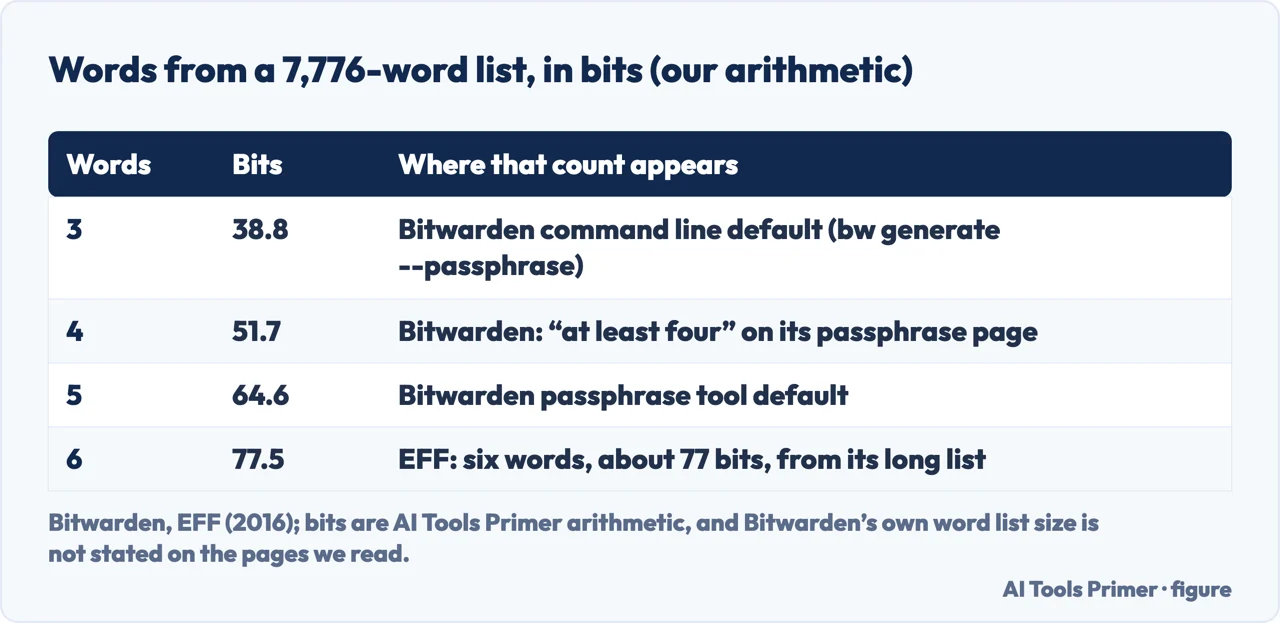
Bitwarden gives three different numbers of words. The passphrase tool page starts at five, says to aim for at least four, and ideally five, six, or even more. The command line, as its help page puts it, starts at three. A Bitwarden blog post on the passphrase generator quotes CISA recommending a memorable phrase of four to seven unrelated words. The EFF, which published its word lists in 2016, recommends six words from its long list for most uses.
Of the pages we read, the EFF is the one that shows the working. Its long list has about 7,776 words, which is 6 to the fifth power, one word for each outcome of rolling five dice. It counts 12.9 bits per word, so six words come to about 77 bits, and each extra word adds about 12.9 more. Its short lists have about 1,296 words and give 10.3 bits per word, which is why it says eight words from a short list come to about 82 bits. For a list of n words and k words chosen, it says there are n to the power k possible passphrases and an attacker needs about half that many guesses on average. The EFF also says that a list of the same length gives no significantly different strength, so the gain comes from the number of words and the size of the list, not from which list it is.
The table below puts Bitwarden’s numbers of words on the EFF’s scale. It is our arithmetic, and it holds only if Bitwarden’s list has 7,776 entries. The Bitwarden pages we read do not say how long the list is, so the bit counts are a way of reading the EFF’s method, not a measurement of Bitwarden’s tool. If the list were shorter, each word would be worth less.
The EFF also says where a passphrase is especially suitable: when it directly encrypts information, as with full-disk encryption on a laptop or mobile device, or unlocks a password safe or password manager application. Bitwarden’s tool page makes a different cut, with passphrases for what you type by hand and passwords for what the manager autofills. The two do not contradict each other, and neither page ranks the other’s case. The EFF adds that a passphrase should be used for a single purpose and not for more than one online account.
Usernames and aliases
The same help page covers a username generator, and it has four types in a Type menu: Random word, which is the default, Plus addressed email, Catch-all email and Forwarded email alias. Random word can capitalize the username and include a 4-digit number.
Plus addressed email uses your email provider’s sub-addressing. The page’s example is alice+gsd4aqqe@bitwarden.com, and it says a sign-up made with an address like that still sends mail to alice@bitwarden.com, while you can filter on the added string. Catch-all email uses your own domain’s configured catch-all inbox and generates a random address at the domain you specify. On the Add/Edit Item screen of the browser extensions and the desktop app, both can instead be based on the item, using the email address for plus addressing or the domain name for catch-all; the page says other places default to random because they do not know the login’s address.
Forwarded email alias connects the generator to an outside aliasing service. Most Bitwarden apps list SimpleLogin, Addy.io, Firefox Relay, Fastmail, Forward Email and DuckDuckGo, and the page says the mobile app supports four of them: SimpleLogin, Addy.io, Forward Email and Firefox Relay. It says the option is available to all Bitwarden users, but that some external aliasing services may require a subscription. For each service the page walks through creating an API key or token in that service and pasting it into the API Key field in Bitwarden.
What the pages we read leave open
The Bitwarden pages we read do not say which list of words the generator draws from. A bit count for a passphrase depends on it, which is why the table of words is labelled as arithmetic. The documentation also does not give the default for the minimum of numbers and special characters, though it gives the 0-1 advice.
Bitwarden’s crack-time statements are not consistent between its own pages. The FAQ on the password tool says a 14-character password takes billions of years to guess and an 8-character one just hours, while the article on strong password ideas says an 8-character password can be cracked in minutes and a 16-character one could take billions of years. The pages we read do not state the guessing speed behind either set of figures, and we have not repeated them as facts. The same FAQ says passwords are generated locally on the device using cryptographic randomness and are never stored on Bitwarden servers. That is Bitwarden’s statement about its own tool, and the NIST, OWASP and EFF pages we read do not discuss it.
We tested nothing: the generator was not run on an account, and what is described here is what the pages say. For NIST we used the web page for SP 800-63B-4, not its PDF. We did not use the Reddit thread, the Tech Insider page or a Bitwarden blog post on a password workflow that Google listed, and the Google AI box was read only in part.
Where to start
Four ways in.
- “Where do I find it?”
- Where the generator lives and what it keeps — where
- “What does each option do?”
- What each option changes — options
- “How long should it be?”
- The numbers behind “strong” — numbers
- “Password or passphrase?”
- Password or passphrase: three, five or six words — words
Bitwarden and the rules for passwords
The manager around the generator, and what the standards say about the passwords it makes.
The managers already on your devices
The password managers built into browsers and phones.
Questions people also ask
How to use the Bitwarden password generator?
Bitwarden Help says to choose Tools, then Generator in the web app, the Generator tab in the browser extension and mobile app, or Generator in the desktop navigation menu. Each also has a Generate button on the screen where an item is added or edited.
Is the Bitwarden password generator free?
Bitwarden Help says people who are not Bitwarden members can still use its free password generator, and the FAQ on the tool page says no account is required.
How long should a generated password be?
Bitwarden says at least 14 characters. NIST SP 800-63B-4 says 15 for a password used alone and 8 when it is only part of multi-factor authentication. The EFF recommends six words for a passphrase from its long list.
What is a passphrase generator?
Bitwarden Help describes a passphrase as a randomly generated group of words, such as panda-lunchroom-uplifting-resisting, with options for the number of words, the separator, capitalizing and including a number.
Not covered here. We tested nothing: the generator was not run on an account. The statements come from Bitwarden Help, Bitwarden’s tool pages and blog, NIST SP 800-63B-4 and its earlier revision, the OWASP Authentication Cheat Sheet and two EFF pages, all read on 29 October 2026.
The search volume and difficulty behind this page come from a Semrush reading of 29 August 2026, older than the 60 days the site normally allows.
Sources
- Bitwarden Help — Username & Password Generator — bitwarden.com, read 29 October 2026.
- Bitwarden — Free Password Generator — bitwarden.com, read 29 October 2026.
- Bitwarden — Secure Passphrase Generator — bitwarden.com, read 29 October 2026.
- Bitwarden — How to create strong password ideas for better security — bitwarden.com, read 29 October 2026.
- Bitwarden blog — How to use the Bitwarden Passphrase Generator — bitwarden.com, read 29 October 2026.
- Bitwarden blog — Create a strong password for a new login with one click — bitwarden.com, read 29 October 2026.
- Bitwarden Help — Password Manager CLI — bitwarden.com, read 29 October 2026.
- NIST — SP 800-63B-4, Authenticators — pages.nist.gov, read 29 October 2026.
- NIST — SP 800-63B (Revision 3) — pages.nist.gov, read 29 October 2026.
- OWASP — Authentication Cheat Sheet — cheatsheetseries.owasp.org, read 29 October 2026.
- EFF — EFF’s New Wordlists for Random Passphrases — www.eff.org, read 29 October 2026.
- EFF — EFF Dice-Generated Passphrases — www.eff.org, read 29 October 2026.
Written by Alberto Gulotta
Founder and editor of AI Tools Primer, writing from Palermo, Italy. Thirty-five years of taking computers apart, starting with a Commodore 64 — the long version is on the about page.
Something wrong on this page? Write to aitoolsprimer@gmail.com and it gets fixed.
Written on 29 October 2026.
Independence and limits
No affiliate links and no paid placements anywhere on this site. Nobody pays to appear here, and no company has seen this page before you did.
This is general information, not professional advice. Where a page touches money, health, safety or the law, it names its source and the date it was read — and your situation may still differ. See the privacy page and the cookie policy.