
Anonymity · guide
Anti-detect browsers: what a profile fakes and how sites catch it
By Alberto Gulotta · Updated · 15 min read
Anti-detect browsers are modified browsers that fake what a website reads about the machine, such as screen size, time zone, fonts and graphics output, and keep separate profiles, each with its own made-up identity. Sellers and fraud defenders describe them differently, so this page sets their accounts side by side.
| Question | Answer | Where it comes from |
|---|---|---|
| What is it? | A modified browser, built on Chromium or Firefox, that fakes or randomizes what a site reads, with separate profiles | Fingerprint, CaptchaFox, Group-IB |
| What does a profile hold? | A made-up device, its own cookies and storage, and its own proxy IP | CaptchaFox, Group-IB, GoLogin |
| Who is it sold to? | GoLogin names marketers, e-commerce sellers, affiliate and SMM teams and scraping teams; Fingerprint says affiliate marketers and multi-accounting operators | GoLogin, Fingerprint |
| How do sites catch it? | By looking for signals that contradict each other, then at behavior, network and how rare the device is | Fingerprint, CaptchaFox, Group-IB |
| Is it legal? | Group-IB says legal for privacy and market research, illegal for fraud; GoLogin says “In most countries, yes”; neither cites a law | Group-IB, GoLogin |
What an anti-detect browser is, and what a profile holds
Fingerprint defines an anti-detect browser as a modified browser, usually built on Chromium or Firefox, designed to spoof or randomize the signals a website reads to identify a visitor. Group-IB describes a tool built on a popular browser that conceals the user’s actual digital identity. What sets it apart from a normal browser is the set of profiles. CaptchaFox says it keeps dozens or hundreds of isolated profiles, each with its own coherent fake identity, cookies and storage. GoLogin, which sells one, adds that to a website every profile looks like a separate real device, so accounts run from one computer are not linked.
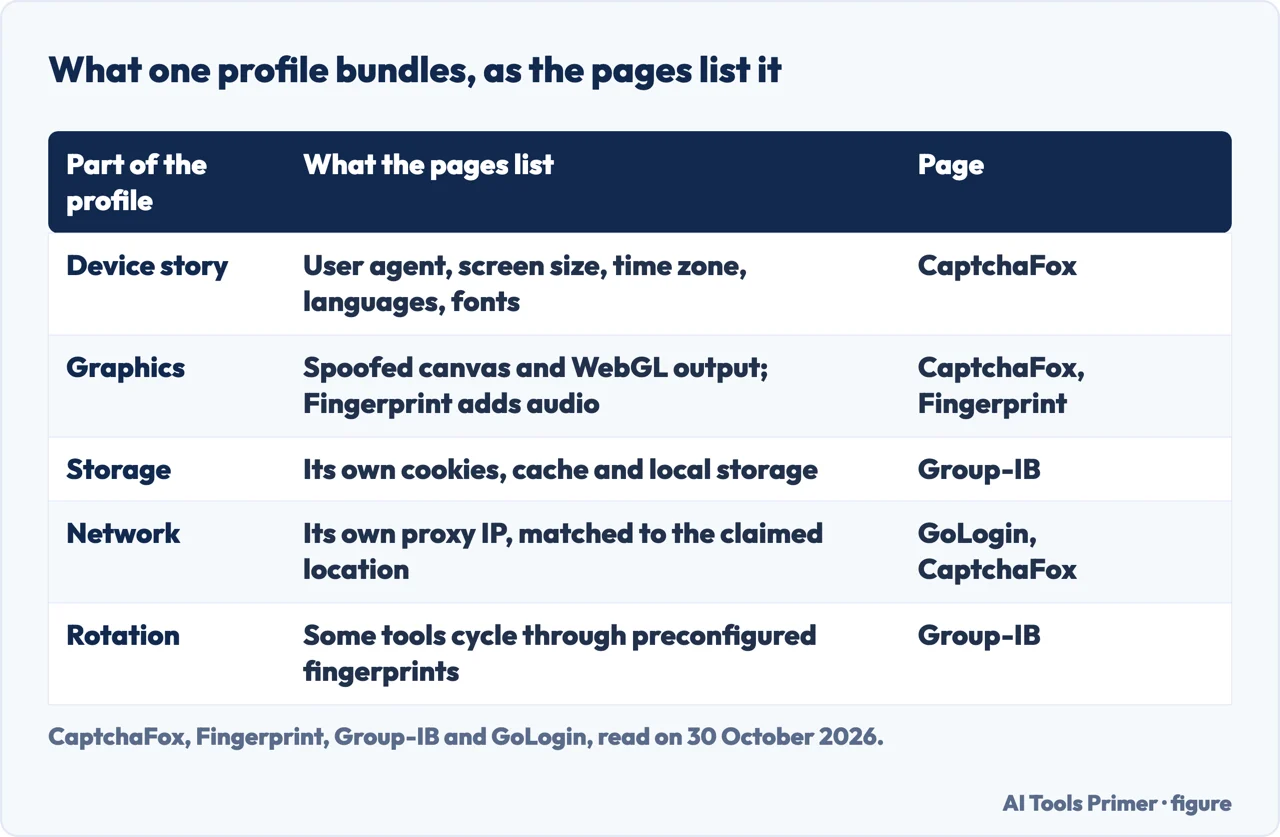
The pages list the same parts of a profile with small differences. CaptchaFox names a chosen user agent, screen resolution, time zone, language set and font list, plus spoofed output for canvas and WebGL probes. Fingerprint’s list is close and adds audio. Group-IB adds isolated cookies, cache and local storage for each profile, and a different IP address for each. GoLogin includes hardware data and a proxy IP of its own in the profile.
On how it works, Group-IB says the browser inserts a layer that catches the queries a page makes through JavaScript and other APIs and returns fake values in place of the real ones. Fingerprint counts three techniques: browser spoofing, anti-fingerprinting and automation. Group-IB lists seven: IP address spoofing, profile isolation, cookie management, canvas fingerprinting, WebRTC leak prevention, changed HTTP headers and requests, and fingerprint rotation. The counts differ, and the pages describe the same kind of tool.
Two of the pages stress that the fake has to look believable. CaptchaFox says good implementations aim for plausibility rather than randomness, because a fingerprint that mimics a common consumer device draws less attention than an exotic one. Group-IB’s summary says the values are fake but internally consistent. Fingerprint adds that some tools lean on the same randomization ideas that privacy-focused browsers use.
The proxy is the other half of the disguise
GoLogin puts it as a division of labor: the browser hides your device and a proxy hides your network. It says you need both, because a perfect fingerprint behind the same IP as ten other accounts still gets those accounts linked. Group-IB makes the same point from the defenders’ side: changing fingerprints is not enough if all activity comes from one IP, so the browser routes each profile through a proxy, a VPN or Tor, with an example of one profile on a U.S. residential proxy and another that appears to be in Europe or Asia. CaptchaFox says each profile gets its own network path, in practice a residential proxy matching the claimed geography.
GoLogin gives rules for the setup, and they are the seller’s rules. Give every profile its own proxy and keep it for the life of the account. Use sticky sessions rather than IPs that rotate on every request, since an account whose IP changes city every few minutes looks hijacked. Match the proxy country to the account. Let the browser set the time zone, language and geolocation from the proxy IP, then check them. Its example of a miss is a South Carolina IP with an Alaska time zone, which the Pixelscan checker flagged in AdsPower.
GoLogin sorts proxies into three types. Residential suits social media, marketplaces and ad accounts, costs more and is billed per gigabyte. Mobile is listed for TikTok, Instagram and high-risk accounts, with the most trusted IPs and the highest price. Datacenter suits scraping, testing and low-risk sites, and is cheap and fast but easy to flag on social platforms. Group-IB explains why residential proxies matter to a defender: they relay traffic through genuine home connections, so the session resembles an ordinary local customer.
For what a proxy does on its own, outside this setup, see our page on what a proxy is.
What they are sold for, and what defenders say they are used for
The sellers’ account and the defenders’ account differ, and it helps to keep track of who is speaking. GoLogin says marketers, e-commerce sellers, affiliate and SMM teams and web scraping teams use these browsers to keep accounts isolated. Fingerprint says they are marketed to affiliate marketers and “multi-accounting” operators, and names AdsPower, Dolphin Anty, Octo Browser and GoLogin among the popular commercial products. CaptchaFox says they are sold openly by subscription. GoLogin’s review, with prices it says it checked on 4 October 2026, puts entry plans between $4 and $30 a month and says eleven of the twelve browsers it tested have a free plan. We did not check those prices on the makers’ own pages. GoLogin also says free plans do not include enough proxy traffic for real work, and warns that cracked builds from sources outside the maker can leak the real IP or carry malware that steals cookies and sessions.
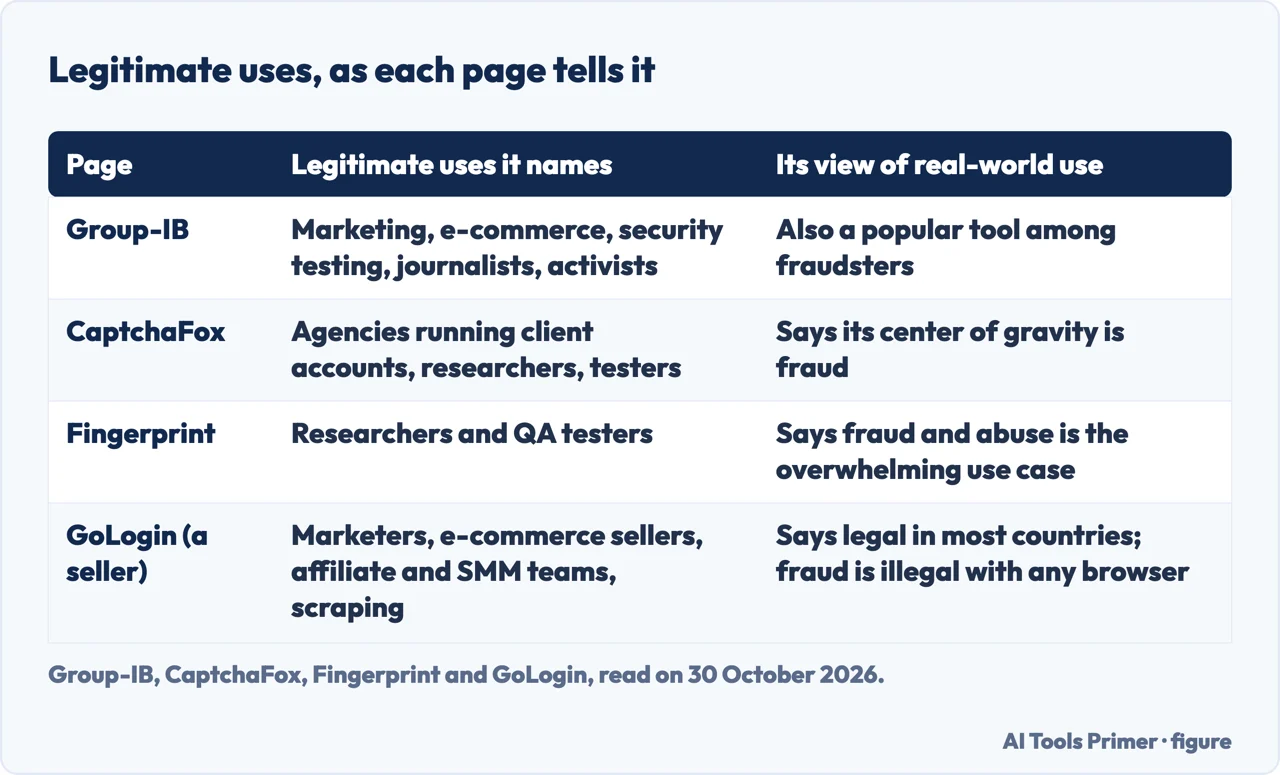
On legitimate use, the defenders give different answers, and each sells something that detects these browsers. Group-IB names four settings: marketing and advertising teams running several client accounts, e-commerce sellers testing how listings look in different regions or comparing prices, security testers and researchers, and privacy-conscious users, journalists and activists. It calls the common theme multi-account management and anonymity. CaptchaFox allows the occasional legitimate use, such as agencies, researchers and testers, but says the tooling’s center of gravity is fraud. Fingerprint’s FAQ names researchers and QA testers and then says the overwhelming use case in practice is fraud and abuse. The pages we read do not give a count of users or a share of fraud; “overwhelming” and “center of gravity” are judgments.
The fraud they describe is specific. Group-IB lists account takeover with stolen cookies or credentials, carding, fake accounts built to abuse promotions, bonus abuse and affiliate fraud on gambling sites, fake loan applications, banking session hijacking, credential stuffing and synthetic identities. Fingerprint names multi-accounting, bonus abuse, ad fraud and account takeover. CaptchaFox lists promo and referral farming, marketplace manipulation, coordinated fake engagement, and running purchased or stolen accounts in parallel. Group-IB adds that criminals also develop browsers of their own and sell them on the dark web.
Automation comes up on both sides. Group-IB’s FAQ says these browsers are paired with Selenium, Puppeteer or Playwright for bulk registration and credential stuffing. GoLogin says headless mode, Chrome DevTools Protocol traces and default Puppeteer or Playwright setups are well known to anti-bot systems, and that more teams now run AI agents through profiles.
How sites catch them
Fingerprint and Group-IB start from why older defenses fall short. Fingerprint says user agent and header checks are trivial to spoof, IP reputation is muddied by VPNs, proxies and residential networks, and a single-signal rule can be beaten by presenting a common value. Group-IB goes through device fingerprinting, IP and location checks, static rules and account linking, and says each is weakened because the browser controls what it reports. CaptchaFox says limits enforced per device dissolve once the devices are synthetic.
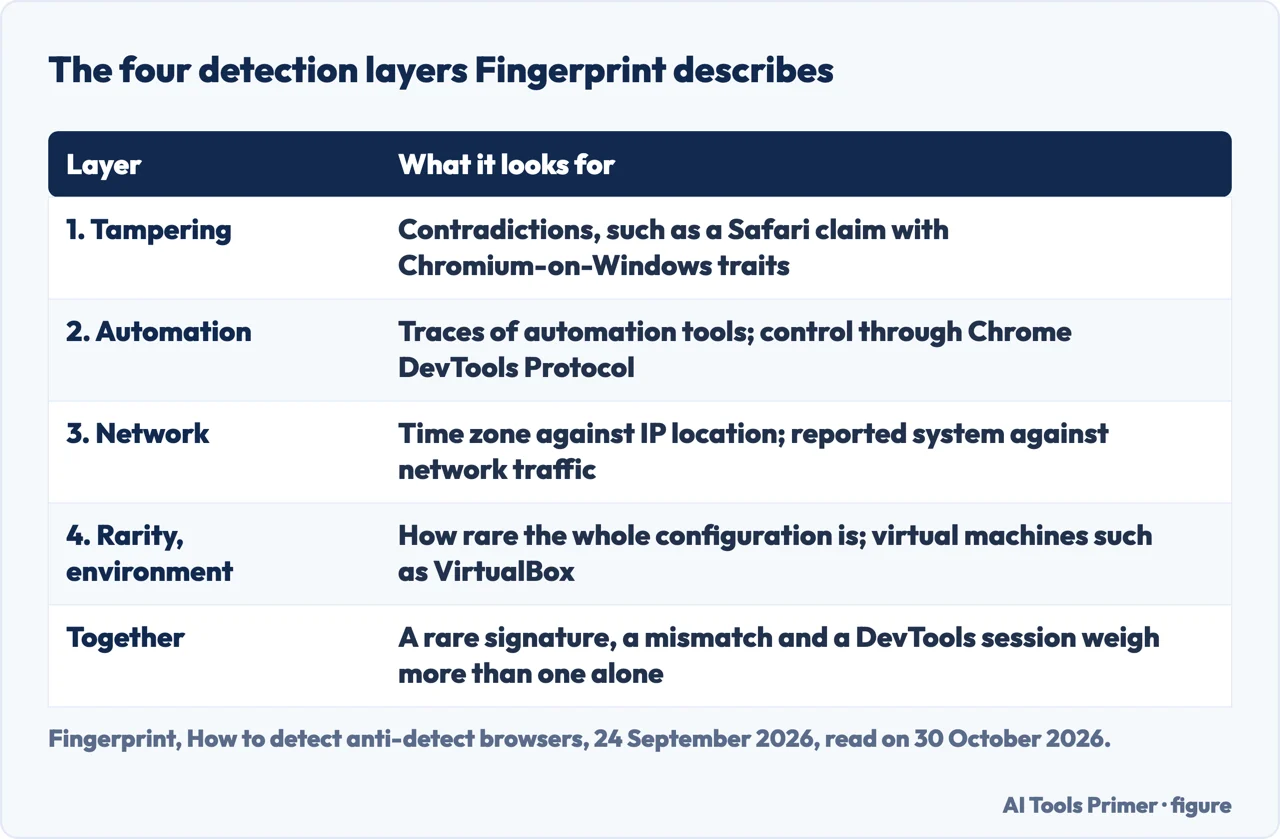
All three then point to the same weak spot: consistency. Fingerprint says spoofing one attribute is easy and spoofing dozens so they all agree is much harder, and gives the example of a profile that claims to be Safari on macOS while its rendering, supported APIs or fonts point to Chromium on Windows. CaptchaFox lists rendering behavior, timing, TLS fingerprints and the real performance of the claimed hardware. GoLogin, writing as a seller, agrees with the premise: its heading is “Consistency is the new battleground”. It says Iphey’s verdict of an inconsistent browser fingerprint hit 7 of the 11 browsers that launched in its test, that sites compare the TLS and HTTP/2 handshake with the browser a profile claims to be, and that platforms score sessions and add friction quietly, through more captchas, verification requests and lower ad delivery, instead of banning on the first signal.
Fingerprint organizes detection into four layers, in the table above: tampering and internal inconsistency, automation and developer tooling, network intelligence, and device rarity and environment. It says a request that shows a rare signature, a time zone mismatch and a DevTools-controlled session is far more suspect than any one of those alone. Group-IB adds behavior (how a user types, moves a cursor and navigates), active probes that make canvas noise show itself, linking accounts through signals that profile isolation does not remove, such as shared payment instruments, scoring the network instead of relying on blocklists, and step-up checks with passkeys or hardware keys. CaptchaFox says the profiles multiply but the operator’s interaction patterns and workflows repeat across them.
Read these with the speakers in mind. Group-IB, CaptchaFox and Fingerprint each sell a product that does this detection, and GoLogin sells the browsers. GoLogin’s test was run by GoLogin: the browsers ran on one Windows 11 computer and were checked with Pixelscan, Iphey and CreepJS. Three passed all three on default settings, GoLogin among them, eight were flagged by at least one checker, and one did not start. GoLogin itself says a clean result is not invisibility; it means the checkers did not flag a leak with those settings on that day. The pages we read do not describe a test of a named product run by an outside party.
Not the same thing as a private browser
The two EFF pages and the MDN glossary entry we read describe fingerprinting in general and do not mention anti-detect browsers, so the link drawn here is ours. MDN lists the browser version, time zone and language, codecs, fonts, settings and display size as elements of a fingerprint. EFF’s Surveillance Self-Defense guide says a fingerprint has to be persistent and unique to work for a tracker, and notes that fingerprinting may also be used for fraud and bot detection, with the same technology. Its Cover Your Tracks test logs a hash of the canvas image and compares the visitor’s browser configuration with recent visitors.
EFF describes two ways for a tool to break fingerprinting. One randomizes results such as canvas and AudioContext output, which can break persistence, but EFF warns that a tracker may detect that a randomization tool is in use, and that this can itself become a fingerprinting characteristic. The other makes every instance look the same, which is the method it attributes to Tor Browser. EFF also warns that changing a setting by hand can backfire: Safari on iOS given the user agent of Chrome on Windows would appear completely unique, it says, and it names Tor Browser, Brave or Firefox as the safer bet for joining a privacy pool.
GoLogin draws the same line from its side. In its FAQ, Tor Browser, Brave and Firefox with fingerprinting protection reduce what sites can learn by blocking or blending in, while anti-detect browsers give each profile a “complete, realistic fingerprint”, which it says is what you need to run several accounts. Put side by side, the two strategies point in opposite directions: blend into a crowd, or build several separate individuals. Our pages on private browsers, Brave and the Tor browser cover the first approach, and incognito mode covers the setting that is sometimes called private.
Where the legal line sits, as the pages put it
Two of the pages answer the legal question directly. Group-IB’s FAQ says anti-detect browsers can be legal when used for privacy and market research, but become illegal when used for fraud, bypassing security systems or illicit activities. GoLogin’s FAQ answers “In most countries, yes”, describes the software as legal for privacy, multi-account management, ad verification and testing, and adds that breaking a platform’s terms can get accounts banned, while fraud is illegal with any browser. Both put the line at the purpose and not at the tool.
There is a difference in what each adds. Group-IB lists bypassing security systems next to fraud as illegal. GoLogin separates a ban from a crime: breaking a platform’s terms costs you the account, and fraud is the illegal part. The pages we read do not cite a law, a court ruling or an authority, and GoLogin does not name the countries behind “most”. We did not read the terms of any particular platform, so this page does not say what Meta, Google, Amazon or any other site forbids. It reports what seven pages say; it is not legal advice.
Where to start
Six ways in.
- “What is an anti-detect browser?”
- What it is and what a profile holds — what it is
- “Why does it need a proxy?”
- The proxy is the other half of the disguise — proxy
- “Who uses one?”
- What they are sold for, and what defenders say — sold for
- “Can a site tell?”
- How sites catch them — caught
- “Is it the same as a private browser?”
- Not the same thing as a private browser — private browser
- “Is it legal?”
- Where the legal line sits — legal
Browsers and what they show
What a browser blocks, deletes and gives away.
The network side
Proxies and the name lookup.
Questions people also ask
What is the best anti-detect browser?
The pages we read do not name one best product. Fingerprint lists AdsPower, Dolphin Anty, Octo Browser and GoLogin as popular commercial products without ranking them. GoLogin, a seller, ranks twelve on its own test, where GoLogin, Octo Browser and Hidemium passed all three checkers.
What is an anti-detect browser?
Fingerprint calls it a modified browser, usually built on Chromium or Firefox, designed to spoof or randomize the signals a website reads. CaptchaFox adds that it keeps dozens or hundreds of isolated profiles, each with its own fake identity, cookies and storage.
What browsers do I use to be undetected?
The pages we read do not promise that any browser is undetectable. GoLogin says every vendor claims to be, and that a clean checker result is not invisibility. For personal privacy it names Tor Browser, Brave and Firefox with fingerprinting protection, which block or blend in.
What is the most untraceable browser?
GoLogin’s FAQ says Tor Browser is the hardest to trace because it routes traffic through several relays and makes users look alike, but that Tor can be blocked and gives you one identity. EFF describes Tor Browser as making all of its instances look the same.
Not covered here. We ran no anti-detect browser and no fingerprint checker. The statements come from seven pages, from Group-IB, CaptchaFox, Fingerprint, GoLogin, EFF (two pages) and MDN, all read on 30 October 2026. Prices and test results from GoLogin were not checked on the pages of the makers.
The search volume and difficulty behind this page come from a Semrush reading of 29 August 2026, older than the 60 days the site normally allows.
Sources
- Group-IB — Antidetect Browsers: Risks, Detection & Fraud Prevention (updated 8 May 2026) — www.group-ib.com, read 30 October 2026.
- CaptchaFox — What Is an Anti-Detect Browser? (20 July 2026) — captchafox.com, read 30 October 2026.
- Fingerprint — How to detect anti-detect browsers: 4-layer approach (24 September 2026) — fingerprint.com, read 30 October 2026.
- GoLogin — Best Antidetect Browsers 2026: 12 Tested on 3 Checkers (a seller’s page, updated 7 October 2026) — gologin.com, read 30 October 2026.
- EFF Surveillance Self-Defense — What Is Fingerprinting? (reviewed 27 August 2024) — ssd.eff.org, read 30 October 2026.
- EFF — Cover Your Tracks (about) — coveryourtracks.eff.org, read 30 October 2026.
- MDN Web Docs — Fingerprinting (glossary) — developer.mozilla.org, read 30 October 2026.
Written by Alberto Gulotta
Founder and editor of AI Tools Primer, writing from Palermo, Italy. Thirty-five years of taking computers apart, starting with a Commodore 64 — the long version is on the about page.
Something wrong on this page? Write to aitoolsprimer@gmail.com and it gets fixed.
Written on 30 October 2026.
Independence and limits
No affiliate links and no paid placements anywhere on this site. Nobody pays to appear here, and no company has seen this page before you did.
This is general information, not professional advice. Where a page touches money, health, safety or the law, it names its source and the date it was read — and your situation may still differ. See the privacy page and the cookie policy.