
Anonymity · guide
Is Brave browser safe? What it blocks, what it doesn’t, what it sells
By Alberto Gulotta · Updated · 20 min read
Is Brave browser safe? Against trackers, Brave’s own pages say yes: Shields block trackers and cross-site cookies by default. If your personal safety depends on staying anonymous, its support page says it highly recommends Tor Browser over its own Tor windows. Privacy Guides, an independent reviewer, discourages Rewards and Wallet.
| Fact | Source |
|---|---|
| Shields are on by default for every site you visit | Brave’s Shields page, undated, so Brave’s own account |
| Brave says that from version 1.30 it does not filter-list block same-site subresources by default, though it still selectively blocks first-party requests it knows are harmful | Brave post on web compatibility, undated, so Brave’s own account of that version |
| Brave’s Tor window does not implement most of Tor Browser’s privacy protections | Brave Support |
| More than $160,000 in bounties paid and 567 reports resolved when read in October 2026 | Brave’s HackerOne programme page |
| Release 1.97.57, desktop, 14 October 2026, upgraded Chromium to 155.0.8059.80 | Brave release notes |
| A Rewards Payment ID is assigned if you enable Rewards | Brave Browser Privacy Policy, updated 23 September 2026 |
What Brave Blocks by Default
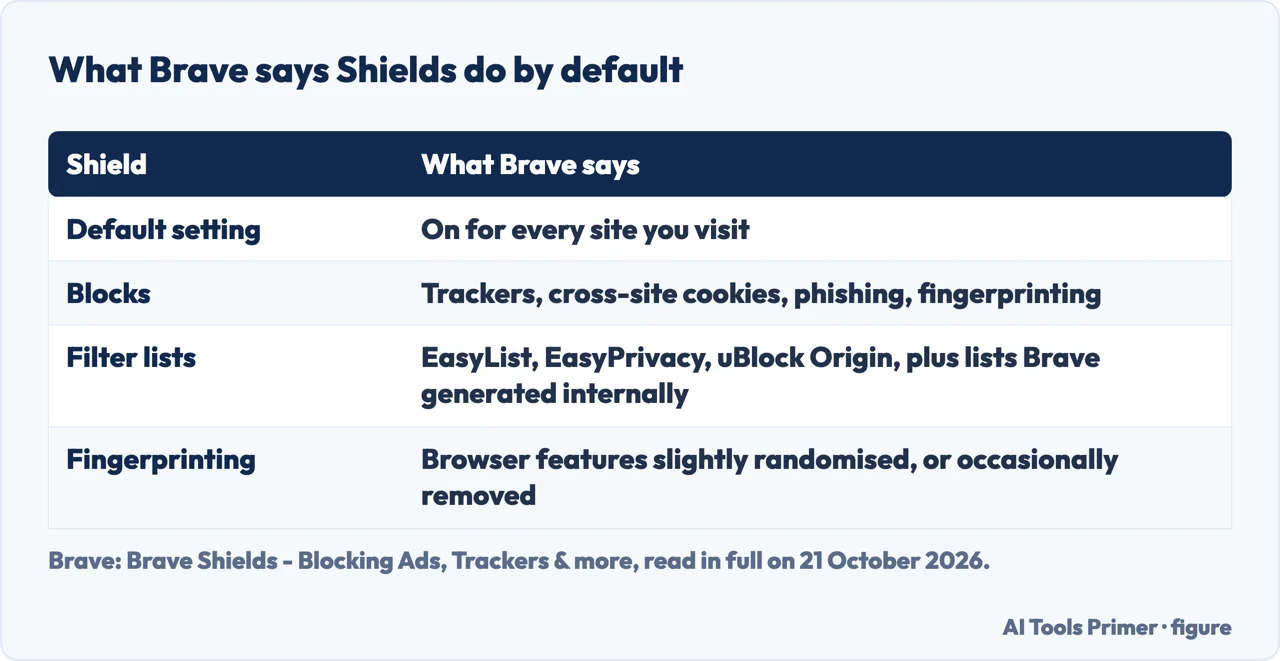
Everything in this section is Brave describing Brave. The Shields page is a product page with no date, and it says what is switched on, not how well it works. It says that by default Shields are on for every site you visit, and by its account they block trackers, cross-site cookies, phishing and fingerprinting.
The network blocking runs on lists: Brave says it applies filter lists from the EasyList and EasyPrivacy projects, from the uBlock Origin project, and lists it has generated internally. An undated Brave post describes three levels of tracker protection in Shields — aggressive, standard and allow all — and names standard as the default. A second undated post says Brave has by default blocked all third-party application storage, such as cookies, localStorage and indexedDB.
For fingerprinting, the Shields page says Brave slightly randomises, or occasionally removes, the browser features trackers use to follow you. Whether that holds is a separate question, taken up below.
What the Default Lets Through, and What Brave Receives
The same undated post on web compatibility says that, starting in version 1.30, Brave by default does not apply network-level filter-list blocking to same-site subresources. It adds that Brave will still selectively block first-party requests it knows are user-harmful or unwanted, and that users who want the older, more aggressive behaviour can choose the aggressive setting. Brave’s stated reason is that the largest privacy gain from filter-list blocking is in preventing third parties from learning your IP address. The post is undated and written for version 1.30, so this is Brave’s account of that version, not a statement of today’s default.
What Brave itself receives is set out in its Browser Privacy Policy, updated 23 September 2026. The policy opens by saying the company does not collect or retain a user’s browsing history. That is Brave’s statement of its own practice, and nothing on the page lets a reader check it. Several features still make requests, and the policy lists them.
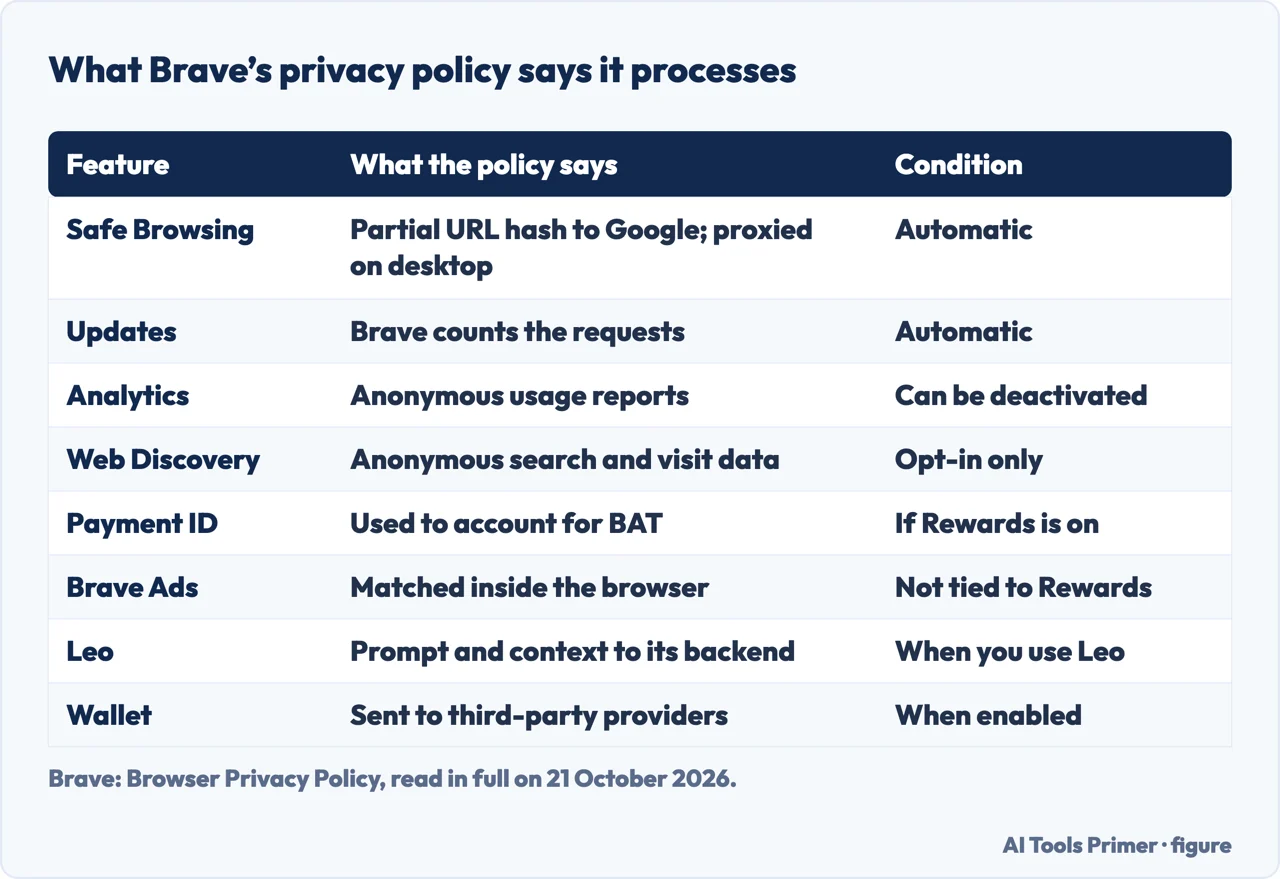
Safe Browsing differs by platform. On desktop, the policy says Brave uses Google Safe Browsing: Google receives a partial hash of the site’s URL, and Brave proxies the request in order to prevent your IP address from being shared with Google. On Android, the same policy says Brave relies on the operating system’s service, which exposes your IP address to Google. On iOS, Brave uses Safari’s Safe Browsing, which draws on Google and Tencent services depending on your region, and the policy says Apple proxies the requests, exposing your device IP address to Apple.
Brave also checks for updates by itself; the policy says it counts the number and type of those requests to produce aggregate statistics. Its product analytics, which the policy calls Privacy Preserving Product Analytics and Brave’s privacy-features page calls P3A, are anonymous reports of general use, such as whether Shields, Rewards and Ads are switched on, and the policy says they can be deactivated in Settings. The Web Discovery Project is different: it is opt-in, and if you opt in you contribute some anonymous data about searches and web page visits.
Where Fingerprinting Protection Stops
Brave’s fingerprinting defence, which it calls farbling, is described in two Brave posts and one university paper, and they do not describe the same moment. An undated Brave post, Fingerprinting defenses 2.0, was written while the system was still under development. It names three levels: Off, Default and Maximum. For the Default level, the post says Brave expects that the defences “could be circumvented by motivated, targeted attacks”.
The earlier post, from 2020, describes randomisation as it launched in Nightly, applied then to canvas and WebAudio. It carries an update dated 2 June 2020, saying a fingerprinting site had been changed to ignore canvas and audio fingerprints as a countermeasure to Brave’s randomisations. It describes the launch, not the browser you install today.
The WWW’25 paper by Nguyen and Vadrevu, from Louisiana State University, compares the built-in protections of Chrome, Firefox, Brave, Tor and Safari against canvas fingerprinting only. It attacks the randomisation in Brave’s Default mode and concludes that “no fully deployable defense against canvas fingerprinting attacks exists currently”: a finding about canvas, not about every kind of fingerprinting. In the paper’s disclosure section, Brave acknowledged that the attack reintroduces some entropy into the browser’s fingerprinting capabilities, and said it plans to limit Canvas API read-backs between user activations. The paper also says Brave has deprecated the Maximum mode in favour of more user-friendly approaches, so the three levels in the older post are not a current menu. The text read for this page does not name the Brave version the authors tested.
The Electronic Frontier Foundation’s Cover Your Tracks page adds a warning that applies to any defence: “sometimes your protections themselves can become part of your fingerprint.”
What Brave Changes in Chromium
Wikipedia says Brave is developed by US-based Brave Software, Inc., and that in October 2018 Brave announced it would build the browser on top of the Chromium codebase. Brave’s privacy-features page, a vendor’s judgement of its competitors, says Chromium is unfortunately not good for user privacy, at least not the version in Chrome and Edge. Among the changes it lists are proxying communication with Google services through Brave servers and reimplementing Sync so that it is encrypted client-side.
Brave’s wiki on deviations from Chromium lists what it disables entirely: Chrome’s
Privacy Sandbox, where “we aim to disable all given our concerns”, Google account
integration and DNS prefetching. It also lists SafeBrowsing, geolocation and component-update
requests that go through Brave servers, so that Google learns nothing about which client sends
them, not even the IP address. One exception is documented: if the Widevine setting in
brave://settings/extensions is enabled, installing the DRM components goes through
Google servers.
For most Chromium security issues, Brave’s HackerOne page says, it waits for the fix in Chromium and inherits it. Release 1.97.57, a desktop release of 14 October 2026, upgraded Chromium to 155.0.8059.80. The same page says unexpected outbound network connections are always in scope, and when we read it in October 2026 it showed more than $160,000 in bounties paid and 567 reports resolved.
What the Tor Window Is Not
Brave’s support page describes a private window that uses Tor as a proxy. It is not Tor Browser, and the page says so plainly: “Brave does NOT implement most of the privacy protections from Tor Browser.” Brave’s HackerOne page adds that Tor windows in Brave generally do not have additional fingerprinting protection other than for the IP address, because Brave’s goals there are substantially weaker than Tor Browser’s.
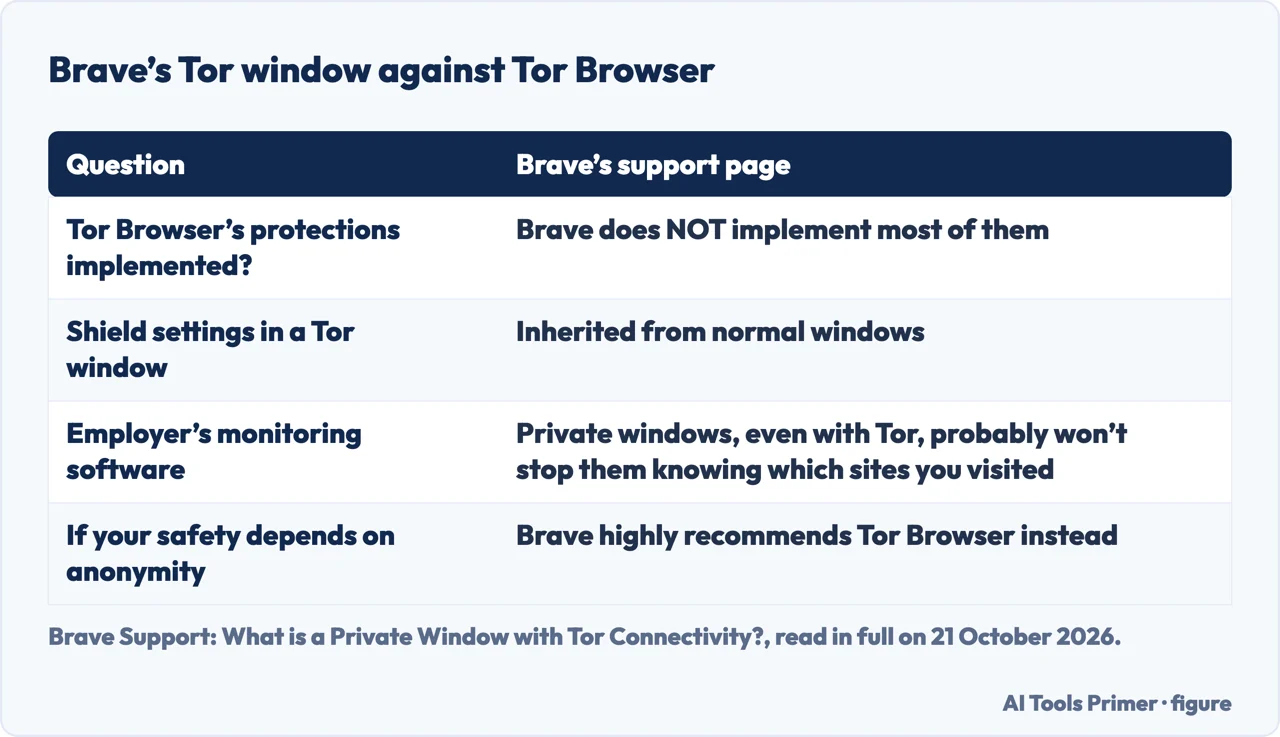
Shield site settings in Tor windows are inherited from normal windows, the support page says, and global settings changed in a Tor window apply to normal windows too. It also says that if your employer administers your device, using private windows, even with Tor, probably will not stop them knowing which sites you have visited, and that software installed by someone else may monitor your activity, which Brave cannot protect you from. If your personal safety depends on remaining anonymous, the page says it highly recommends Tor Browser instead of Brave’s Tor windows.
The window is still maintained: release 1.97.57 fixed an issue where Tor windows could fail to connect to the Tor network in certain cases. For what the real thing involves, the Tor Browser guide covers the habits the project says undo it, and Tor bridges cover the case where Tor itself is blocked. What a private window deletes in general is on the incognito mode page.
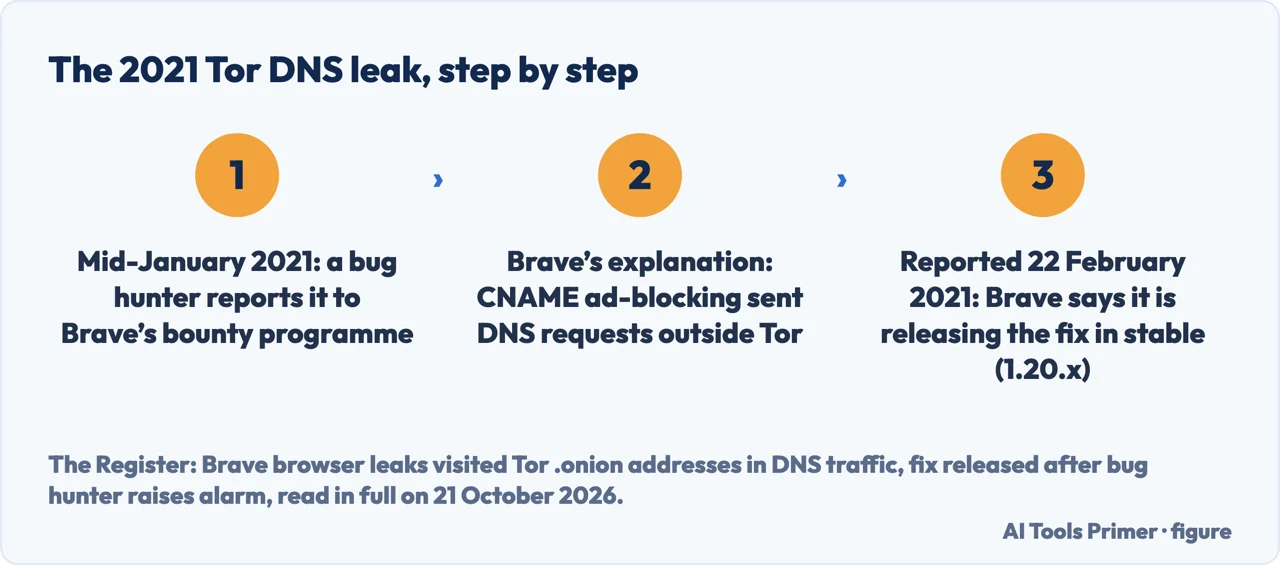
In 2021 the Tor windows of an earlier Brave version leaked. ESET’s WeLiveSecurity reported on 22 February 2021 that a bug in the ad blocking component of Brave’s Tor feature caused the browser to leak DNS requests for .onion sites. The Register reports that a bug hunter raised it in mid-January through Brave’s HackerOne bounty programme. A Brave spokesperson told The Register the root cause was a new ad-blocking feature, CNAME ad-blocking, which started DNS requests that did not go through Tor, and that Brave was accelerating the timeline and releasing the fix “today” in stable 1.20.x, in a report The Register published on 22 February 2021.
A related problem sat in the normal window. Brave’s own issue tracker, in issue #14261 opened on 19 February 2021, records that a .onion address typed in a regular window also leaked DNS, whether or not the option to redirect .onion automatically was selected. For what an encrypted lookup does and does not cover, see private DNS.
The Parts That Are a Business Model
In June 2020 Decrypt reported that Brave had been earning affiliate commissions by redirecting certain search queries to crypto companies via affiliate links. The Verge, on 8 June 2020, described the mechanism: typing binance.us in the address bar made Brave autocomplete it to a URL carrying an affiliate referral code. Brendan Eich, whom The Verge called Brave’s co-founder and CEO at the time, said autocomplete should not add any code and that the company had made a mistake, and in June 2020 he promised “We will never revise typed in domains again, I promise”. We did not check whether the promise has been kept since.
Brave Rewards pays out. Brave’s Rewards page says you can earn tokens, called Basic Attention Tokens or BAT, for ads you see in Brave. The privacy policy says that if you enable Rewards, Brave assigns the browser a Rewards Payment ID, and that it cannot tell which specific Brave Private Ads you have seen or interacted with. The same policy says “you may see Brave Ads even if you do not have Brave Rewards enabled”. It adds that ads displayed within Brave Search results can be opted out of, with Aggressively block trackers and ads in Shields.
Brave’s Wallet page describes a crypto wallet built into the browser that just needs to be switched on. The policy says Wallet relies on third-party providers and on DEX aggregators such as 0x, for swaps on EVM-compatible chains, and Jupiter, for swaps on Solana. They also process your wallet address, related transaction data and IP address but, it says, only to fulfil the transaction, including getting a quote. By enabling Wallet, it adds, you consent to relying on these services to interact with the blockchain when necessary.
Leo is Brave’s AI assistant. For general chat, the policy says, your prompt and conversation context go to Leo’s backend server, and in some cases queries derived from your input go to Brave Search. Brave’s Leo page, asked whether Leo hallucinates, answers yes and recommends double-checking its answers.
Settings Brave’s Own Policy Points To
Brave’s privacy policy writes out the paths for the settings below, and these are the only ones this page lists. Each step is as the policy states it, with one note from Privacy Guides, an independent reviewer, on analytics.
- Open the settings page. The policy says you can quickly access settings by copying
brave://settingsinto your address bar. - Switch off product analytics. The policy says its Privacy Preserving Product Analytics can be deactivated in Settings. Privacy Guides recommends unchecking P3A, the automatic daily usage ping and diagnostic reports.
- Opt out of New Tab ads. The policy names Settings > New Tab > Customize the background image.
- Opt out of ads in Brave Search results. The policy says to use Aggressively block trackers and ads in Shields.
- Manage Leo history. The policy says Leo conversation history is managed at
brave://settings/leo-ai.
Beyond those steps, Privacy Guides recommends Brave if you need Chromium browser compatibility, and Mullvad Browser for strong anti-fingerprinting out of the box. It discourages Brave Rewards, which it says relies on a custodial account and KYC from a select number of providers, and says Brave Wallet operates locally on your computer but supports no private cryptocurrencies, so it would discourage that as well. It suggests disabling Brave’s Web3 features unless you use them, since they can add to your fingerprint and attack surface.
Brave is one of several browser questions in the private browsers and fingerprinting guide.
Where to start
Six ways in.
- “What does Brave block by default?”
- Start with Shields — what brave blocks by default
- “What does it send back to Brave?”
- Read what the policy says — what the default lets through
- “Does the fingerprinting protection hold?”
- See where it stops — where fingerprinting protection stops
- “Is the Tor window Tor Browser?”
- Brave’s own answer — what the tor window is not
- “Which parts earn Brave money?”
- Follow the revenue — the parts that are a business model
- “Which settings should I change?”
- The settings the policy points to — settings the policy points to
The questions underneath this one
Three questions sit underneath this one: what a private window deletes, what Tor changes, and what happens in the lookup before a connection.
The same settings from other angles
A private window, a blocked one and a tunnel are three different tools, and each page below keeps to one.
Questions people also ask
What is the downside of Brave browser?
The sources name four limits. Brave says its Default fingerprinting level could be circumvented by motivated, targeted attacks. Its Tor window does not implement most of Tor Browser’s protections. Brave Ads can appear without Rewards. Privacy Guides, an independent reviewer, discourages Rewards and Wallet.
Is Brave a Chinese browser?
Wikipedia says Brave is developed by US-based Brave Software, Inc. Brave’s privacy policy names Tencent only for iOS: there Brave uses Safari’s Safe Browsing, which uses Google and Tencent services depending on region. The policy says Apple proxies the requests, exposing your device IP address to Apple.
Which is safer, Chrome or Brave?
No independent head-to-head test was read for this page. Brave’s bug-bounty page says that for most Chromium security issues it waits for the Chromium fix and inherits it. Its deviations list says it disables Chrome’s Privacy Sandbox, and its privacy-features page says it proxies communication with Google services through Brave servers.
Why is Brave closing?
No source read for this page says Brave is closing. Brave’s release notes list desktop release 1.97.57 of 14 October 2026, and Wikipedia reports that Brave announced 100 million monthly active users in October 2025.
Not covered here. It does not cover what incognito mode deletes in general, which is on the incognito mode page, or Tor Browser itself, which has its own guide. It does not compare Brave with a VPN or recommend any product; what a tunnel changes is on the VPN page. It does not cover Brave on Android or iOS beyond Safe Browsing, nor Brave Search, News, Talk, Sync, VPN, extensions, Manifest V2, speed or battery. No independent audit of the browser was read for this page, so none is claimed. On iPhone, turning private browsing off is a different question.
Sources
- Brave — Brave Shields - Blocking Ads, Trackers & more: what Brave says Shields block by default, the filter lists and the fingerprint randomisation. A vendor product page, undated — brave.com, read 21 October 2026.
- Brave — Browser Privacy Policy, updated 23 September 2026: Safe Browsing on desktop, Android and iOS, update counts, product analytics, Web Discovery, Rewards, Ads, Wallet and Leo. Describes what Brave says it does; no third party verifies it — brave.com, read 21 October 2026.
- Brave — Improving privacy by improving Web compatibility: the three Shields levels and what is not filtered by default from version 1.30. A vendor post, undated — brave.com, read 21 October 2026.
- Brave — Ephemeral third-party site storage: third-party storage blocked by default. A vendor post, undated — brave.com, read 21 October 2026.
- Brave — Fingerprinting defenses 2.0: the three levels of farbling and the stated limit of the Default level. Undated, written while the system was described as under development — brave.com, read 21 October 2026.
- Brave — Fingerprint randomization: randomisation as launched in Nightly in 2020, with an update of 2 June 2020. Describes the launch, not the current state — brave.com, read 21 October 2026.
- Brave — Privacy Protection & Security Features: what Brave says it changes from Chromium. A vendor’s judgement — brave.com, read 21 October 2026.
- Brave on GitHub — Deviations from Chromium (features we disable or remove): features disabled and services proxied through Brave servers — github.com, read 21 October 2026.
- HackerOne — Brave Bug Bounty Program: scope, exclusions and the programme statistics as shown in October 2026 — hackerone.com, read 21 October 2026.
- Brave — Brave Release Notes: desktop 1.97.57 of 14 October 2026 and its Chromium version — brave.com, read 21 October 2026.
- Brave Support — What is a Private Window with Tor Connectivity?: the limits of the Tor window, in Brave’s own words. Undated — support.brave.app, read 21 October 2026.
- Brave on GitHub — .onion request in regular window should also avoid DNS leakage (issue #14261): the 2021 leak in the normal window — github.com, read 21 October 2026.
- Brave — What is Brave Rewards?: Rewards and BAT. A vendor product page, undated — brave.com, read 21 October 2026.
- Brave — Brave Wallet - Secure Crypto Wallet: the built-in wallet that has to be switched on. A vendor product page, undated — brave.com, read 21 October 2026.
- Brave — Brave Leo AI: the assistant and its answer on hallucination. A vendor product page, undated — brave.com, read 21 October 2026.
- Privacy Guides — Privacy Respecting Web Browsers for PC and Mac: an independent reviewer’s view of Brave, Rewards, Wallet and data collection settings. Undated — www.privacyguides.org, read 21 October 2026.
- Nguyen and Vadrevu, ACM Web Conference (WWW’25) — Breaking the Shield: Analyzing and Attacking Canvas Fingerprinting Defenses in the Wild, WWW’25, 28 April to 2 May 2025: canvas fingerprinting only, and the Default mode of Brave’s farbling — phanivadrevu.com, read 21 October 2026.
- Electronic Frontier Foundation — Cover Your Tracks, Learn: fingerprinting in general — coveryourtracks.eff.org, read 21 October 2026.
- ESET WeLiveSecurity — Brave browser’s Tor mode exposed users’ dark web activity, 22 February 2021: the DNS leak in the Tor windows of that version — www.welivesecurity.com, read 21 October 2026.
- The Register — Brave browser leaks visited Tor .onion addresses in DNS traffic, fix released after bug hunter raises alarm, 22 February 2021: the report, the cause as Brave gave it and the fix in stable 1.20.x — www.theregister.com, read 21 October 2026.
- The Verge — Brave browser CEO apologizes for automatically adding affiliate links to cryptocurrency URLs, 8 June 2020: the autocomplete mechanism and the apology — www.theverge.com, read 21 October 2026.
- Decrypt — Privacy browser Brave under fire for violating users’ trust, June 2020: the affiliate commissions and the promise on typed-in domains — decrypt.co, read 21 October 2026.
- Wikipedia — Brave (web browser): a tertiary source, used only for who develops Brave, when it moved to Chromium and the user count it announced — en.wikipedia.org, read 21 October 2026.
Written by Alberto Gulotta
Founder and editor of AI Tools Primer, writing from Palermo, Italy. Thirty-five years of taking computers apart, starting with a Commodore 64 — the long version is on the about page.
Something wrong on this page? Write to aitoolsprimer@gmail.com and it gets fixed.
Written on 21 October 2026.
Independence and limits
No affiliate links and no paid placements anywhere on this site. Nobody pays to appear here, and no company has seen this page before you did.
This is general information, not professional advice. Where a page touches money, health, safety or the law, it names its source and the date it was read — and your situation may still differ. See the privacy page and the cookie policy.