
Anonymity · guide
What is DNS over HTTPS? The lookup, the resolver and the fallback
By Alberto Gulotta · Updated · 16 min read
What is DNS over HTTPS: the lookup of a site’s address wrapped inside an ordinary encrypted web request, which hides it from the network between you and the resolver, while the resolver you pick still receives each domain, and Firefox and Chrome each switch it on and fall back in their own way.
| Question | Answer | Where it comes from |
|---|---|---|
| What does it encrypt? | The DNS question and its answer, sent inside an ordinary HTTPS request instead of in plaintext | Cloudflare, RFC 8484 |
| Who still sees each domain? | The resolver you choose; SSL.com says the provider can still see your DNS queries | SSL.com, Mozilla Hacks |
| Does it hide the site you open? | Not fully: in 2018 Mozilla said the unencrypted server name still showed it to your ISP | Mozilla Hacks, 2018 |
| How long are logs kept? | Mozilla in 2018 gave 24 hours for Cloudflare; Cloudflare in 2020 wrote within 25 hours | Mozilla Hacks, Cloudflare Blog |
| Is it on by default? | Chrome: yes, in automatic mode. Firefox: in available regions, at the Default level | Chrome Help, Mozilla Support |
| DoH or DoT? | Cloudflare calls it up for debate: DoT for network security, DoH for privacy | Cloudflare Learning Center |
What DNS over HTTPS is, in one lookup
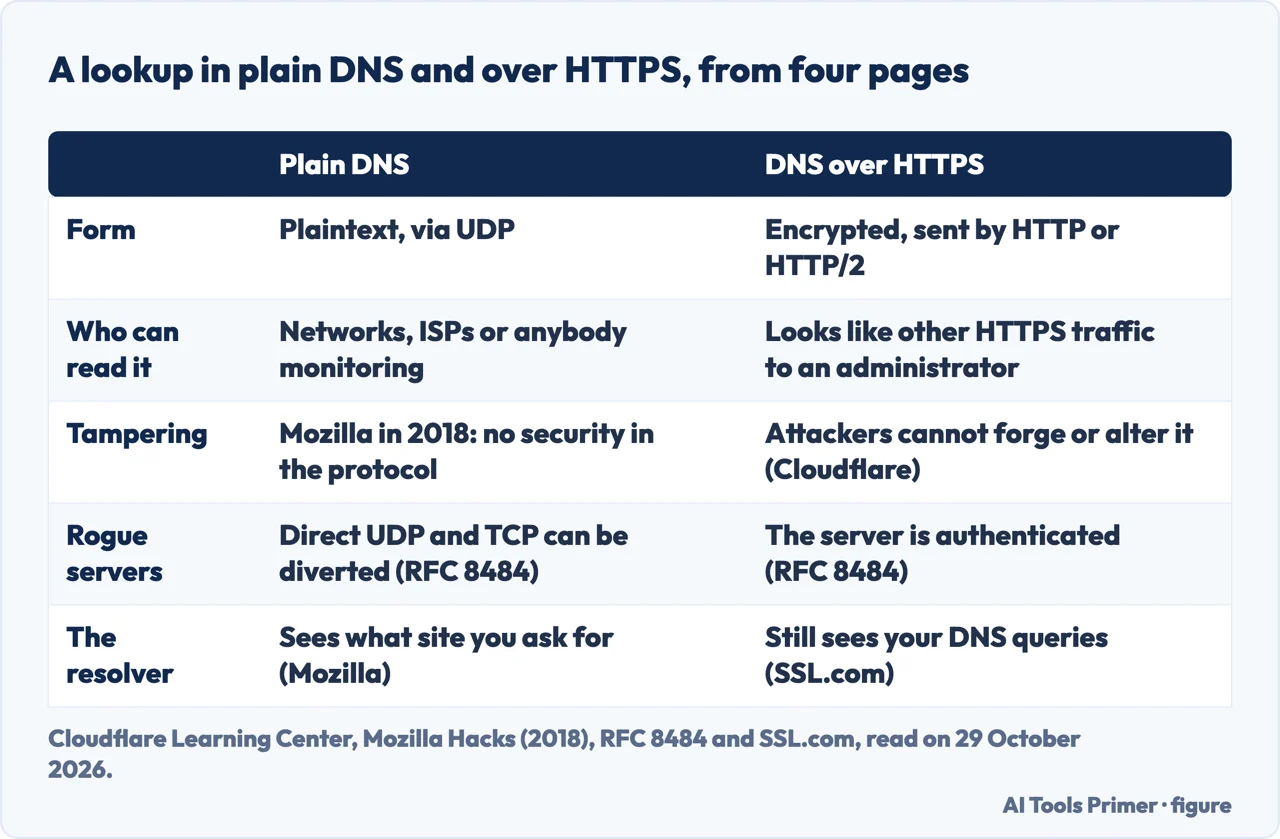
Cloudflare’s Learning Center calls DNS the phonebook of the Internet: resolvers translate human-readable domain names into IP addresses. By default, it says, DNS queries and responses are sent in plaintext, via UDP, which means they can be read by networks, ISPs or anybody able to monitor transmissions. Even if a website uses HTTPS, the DNS query required to reach it is exposed. Its picture is a postcard: anyone handling the mail may catch a glimpse of the text on the back, and the two encrypted DNS standards put an envelope around every postcard.
DNS over HTTPS, or DoH, is the second of two such standards. Cloudflare says that with DoH the queries and responses are encrypted but sent by the HTTP or HTTP/2 protocols instead of directly over UDP, so that attackers can’t forge or alter DNS traffic, and that from a network administrator’s perspective it looks like other HTTPS traffic. Its developer documentation, updated on 5 May 2026, puts it as wrapping DNS queries inside regular HTTPS requests on port 443, the default port for HTTPS web traffic, and adds that DoH supports HTTP, HTTP/2 and HTTP/3.
The specification is RFC 8484, from the IETF, dated October 2018 and written by P. Hoffman and P. McManus. It maps each DNS query and response pair onto one HTTP exchange, says that DoH servers must implement both the POST and the GET method, and names two main uses it was designed around: stopping devices on the path from interfering with DNS, and letting web applications reach DNS information. Cloudflare’s Learning Center also notes that each of these standards was developed separately and has its own RFC.
What it hides, and from whom
RFC 8484 sorts the privacy questions into two places, on the wire and in the server. On the wire, it says DoH encrypts DNS traffic and requires authentication of the server, which mitigates passive surveillance and active attacks that try to divert DNS traffic to rogue servers. DNS over TLS gives similar protection, it adds, while direct UDP and TCP transports are vulnerable to this class of attack. It also says that the use of port 443, and the ability to mix DoH with other HTTPS traffic on the same connection, can deter unprivileged on-path devices from interfering and make traffic analysis more difficult.
Mozilla’s 2018 article, a cartoon by Lin Clark published on 31 May 2018, describes what the plain version leaves open. It names two major risks: tracking and spoofing. Tracking means the DNS server and anyone on the path to it can build a profile of the sites that have been looked up. Spoofing means someone on the path changes the answer, giving a wrong IP address in order to block you from the real site or send you to a scam one. It adds that the resolver changes with the network, a coffee shop or a hotel having its own, and Mozilla asks who knows what that resolver’s data collection policies are.
What the lookup hides is therefore the path to the resolver. The resolver itself is a different matter. SSL.com, a certificate seller whose FAQ we used only for this sentence, says that although DoH improves privacy from network observers, your DoH provider can still see your DNS queries, and some providers may log queries for performance optimization. Put next to Mozilla’s account of a resolver that receives each lookup, the reading is that DoH hides the lookup from the network between you and the resolver, while the resolver still receives each domain.
Mozilla’s article also says what its 2018 design did not fix. After the DNS lookup, the browser connects to the web server and the first message includes a server name indication, which Mozilla described as unencrypted, so your ISP could still work out which sites you visit. Once connected, the connection is encrypted, and under HTTP/2 connection coalescing the further sites hosted on that server can be reached without sending a new name in the open. The article dates from 2018 and the pages we read do not mention Encrypted Client Hello, so we cannot say from them whether the server name is still sent in the clear today.
Who the resolver is, and what it keeps
Mozilla’s 2018 article pairs DoH with what it calls a Trusted Recursive Resolver, and says Firefox could then ignore the resolver the network provides and go straight to Cloudflare. It reports that Cloudflare had committed to throwing away personally identifiable data after 24 hours, to never pass it to third parties, and to regular audits. It adds that users can configure Firefox to use whichever DoH-supporting recursive resolver they want. It also describes two more steps: sending each server only the part of the domain name it needs, called QNAME minimization, and not forwarding the first 24 bits of your IP address to DNS servers.
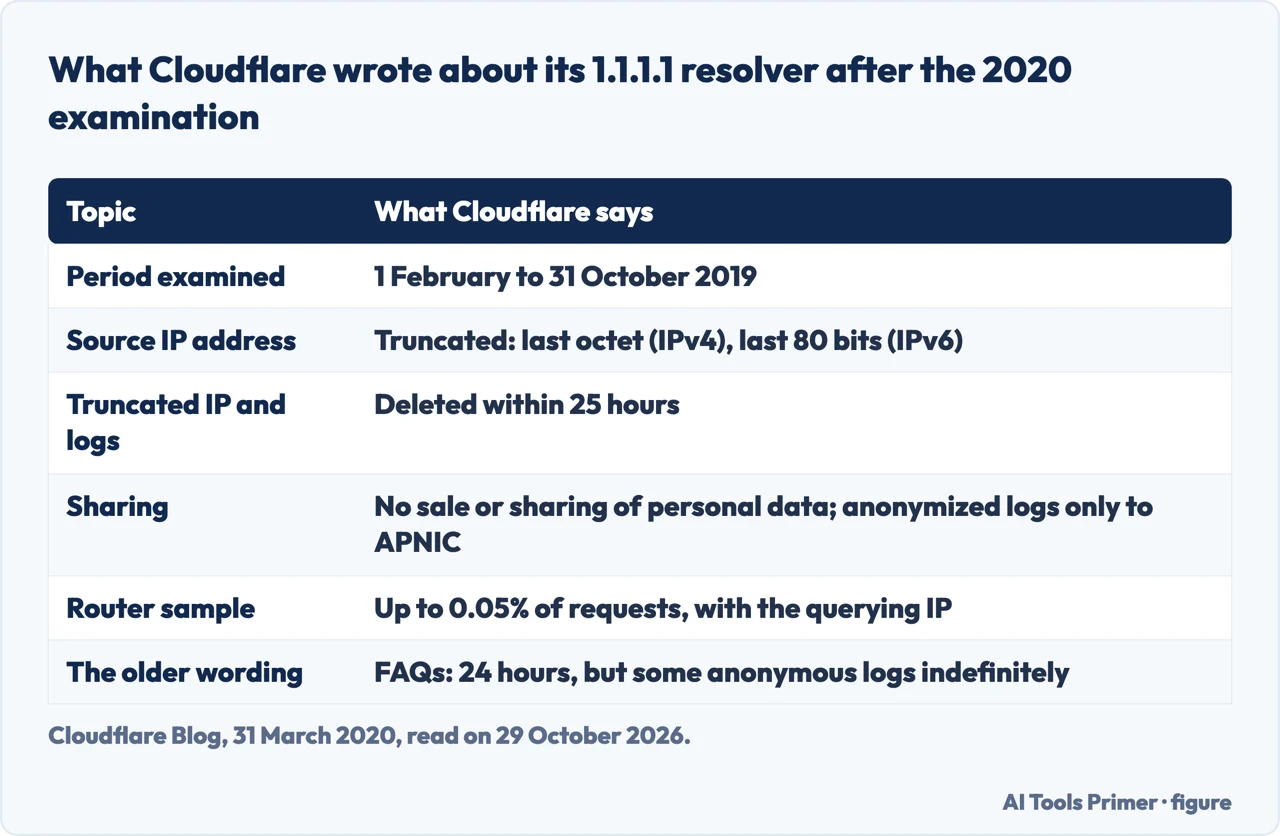
The figures changed in 2020. In a post of 31 March 2020, Cloudflare reported the result of an examination of its 1.1.1.1 resolver covering 1 February to 31 October 2019. It wrote that the source IP address is truncated, the last octet for IPv4 and the last 80 bits for IPv6, and that the truncated address and the resolver logs are deleted within 25 hours. It wrote that it does not sell or share the personal data or use it to target advertisements, and that only APNIC receives the anonymized logs, for research. It also disclosed that its routers capture up to 0.05% of requests passing through them, with the querying IP address, for network troubleshooting and attack mitigation, and said that this sample is not linked to the DNS queries handled by the 1.1.1.1 service.
The two sources differ. Mozilla gave 24 hours; Cloudflare wrote 25, and the 2020 post does not say why the figure moved. It does say the earlier statements had been confusing: its FAQs said it would not retain transactional logs for more than 24 hours but that some anonymous logs would be retained indefinitely, and the launch post did not capture that distinction. The pages we read give these terms only for Cloudflare, and do not give the retention terms of other resolvers.
RFC 8484 adds a point about the server side. The DNS message format contains no client identifiers, but HTTPS brings its own ways of correlating requests, such as explicit cookies and the fingerprint of the set and order of HTTP request header fields. At the IP level, the client address is an obvious correlation, which the RFC says can be mitigated by a NAT, proxy, VPN or simple address rotation, and aggravated when one entity runs both the DNS server and the DHCP server.
DoH, DoT and DNSSEC
DNS over TLS, or DoT, uses the same security protocol that HTTPS websites use, and Cloudflare says the most important difference from DoH is the port: DoT uses only port 853, DoH uses port 443. Because DoT has a dedicated port, anyone with network visibility can see DoT traffic coming and going, even though the requests and responses are encrypted. DoH is camouflaged within other HTTPS traffic, since it all comes and goes from the same port.
Which is better, Cloudflare says, is up for debate. From a network security standpoint it calls DoT arguably better, because it lets network administrators monitor and block DNS queries, and DoH queries cannot easily be blocked without blocking all other HTTPS traffic. From a privacy perspective it calls DoH arguably preferable, giving administrators less visibility and users more privacy. Mozilla’s 2018 article does not compare the two, and RFC 8484 says only that DoT provides similar protections on the wire. Android’s Private DNS setting is the DoT side of this pair and has its own page: Private DNS on Android.
DNSSEC is a different tool. Cloudflare describes it as a set of security extensions for verifying the identity of DNS root servers and authoritative nameservers in their communications with resolvers, designed to prevent DNS cache poisoning among other attacks, and it says plainly that DNSSEC does not encrypt communications. DoT and DoH do encrypt the queries. Cloudflare adds that its 1.1.1.1 resolver supports DoT, DoH and DNSSEC.
Turning it on, and the fallback
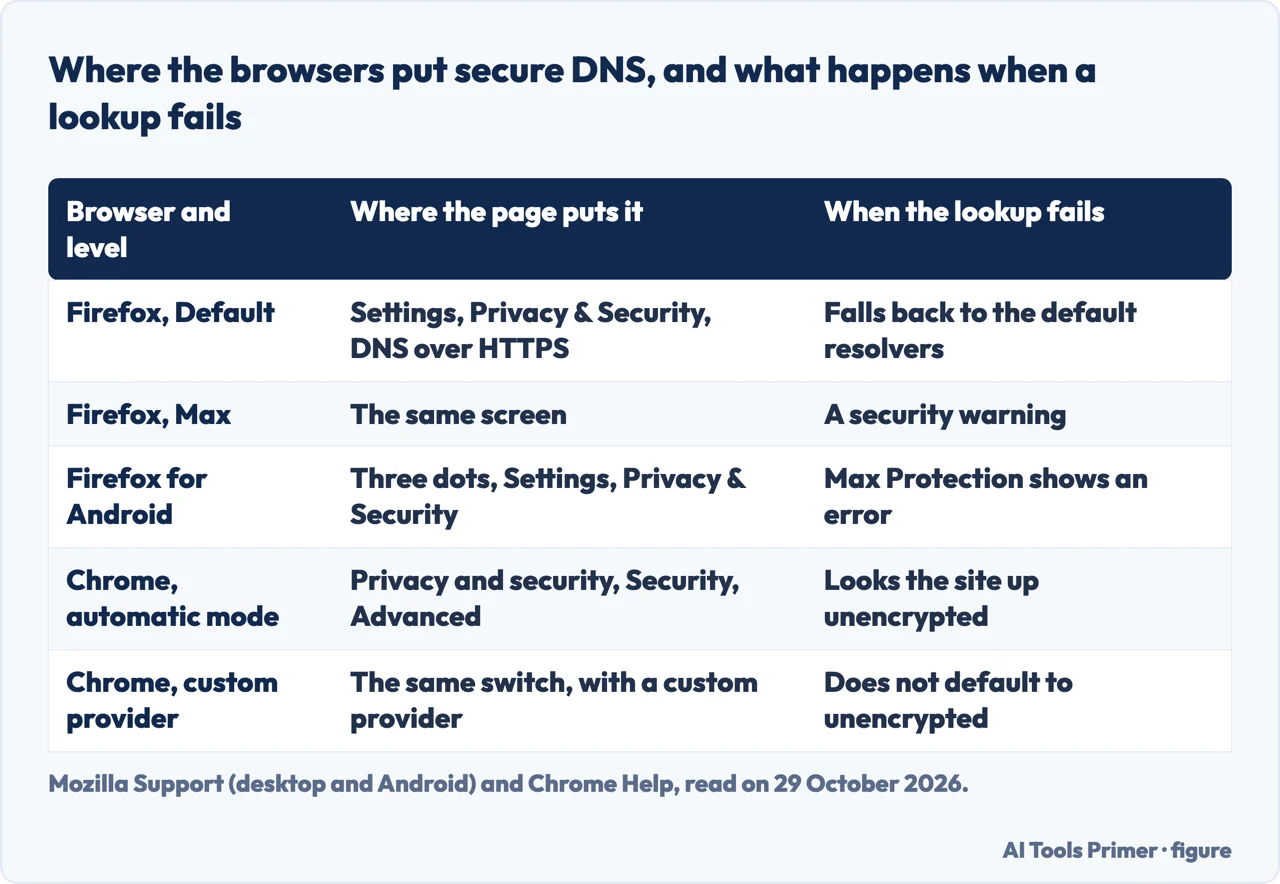
Firefox on a computer has the most settings. Mozilla Support, whose page showed “Last updated: 3 weeks ago” on 29 October 2026, says to open Settings, choose Privacy & Security, scroll to the DNS over HTTPS section and click Advanced settings. There are five levels. Default enables secure DNS in available regions and falls back to the default resolvers if there are issues; it can use local providers, and it disables DoH when a VPN, parental control or enterprise policies are active, or when a network tells Firefox not to use secure DNS. Increased keeps DoH active with the provider you select and switches to a backup only if that provider has issues. Max always uses secure DNS and shows a security warning if it cannot connect to the resolver, with an option to add an exception for that domain. Custom always uses the provider you select and switches to a backup only if that provider has issues, with an option to be warned if secure DNS isn’t available. Off uses your default resolver.
The page also says what the status line means: Active, Not active or Off. Not active means Firefox detected errors or conditions such as a VPN, parental controls or enterprise policies that tell it not to use DoH. As for why a network would do that, Mozilla says some organizations restrict access to certain websites and, if an organization has its own secure DNS, it will ask Firefox not to bypass it.
Firefox for Android, on a page marked 9/25/25, has four levels and a different path: the three-dot menu, Settings, then Privacy & Security, then DNS over HTTPS. Its Default list names parental control, enterprise policies and a network signal as reasons to disable DoH, and does not name a VPN. It says that in a region without a conforming partner you can enable DoH by choosing Increased or Max. Cloudflare’s Learning Center said that in February 2020 Firefox began enabling DoH for U.S. users by default, with queries going to Cloudflare or NextDNS, while Mozilla’s pages now say available regions. The pages we read do not list those regions.
Chrome Help says secure DNS is on by default in automatic mode, and that if Chrome has issues looking up a site in this mode it will look it up in the unencrypted mode. With a custom provider, Chrome won’t default to unencrypted mode, and error messages may say the server’s IP address couldn’t be found. On a managed device or with parental controls on, the feature cannot be used. The steps: open Settings, choose Privacy and security, then Security, and under Advanced turn Use secure DNS on or off. On a Chromebook, the Advanced section links to ChromeOS settings. The Chrome Help page we read does not describe a status line like Firefox’s, so what a fallback looks like is not something it shows.
When the resolver should not see your address
Oblivious DoH is a separate document, RFC 9230, published in June 2022 as an Independent Submission with the category Experimental, and by authors from Apple, Fastly and Cloudflare. It describes a protocol that lets clients hide their IP addresses from DNS resolvers by sending encrypted DoH messages through a proxy, so that no single server entity is aware of both the client IP address and the content of the queries. It names three roles, Client, Oblivious Proxy and Oblivious Target, and expects the Proxy and the Target not to collude.
The RFC is explicit about its standing. It says the protocol was developed outside the IETF and is published to guide implementation, ensure interoperability and enable wide-scale experimentation, and that it is not an Internet Standards Track specification. The pages we read do not describe a switch for it in Firefox or Chrome. The older RFC 8484 already lists a NAT, proxy, VPN or address rotation as ways to blunt the correlation of a client address.
Put together, the sources describe a specific job. Mozilla’s own summary of its design is that it reduced the number of people who can see what sites you are visiting, and that this does not eliminate data leaks entirely. Cloudflare says that DoH keeps attackers from forging or altering the lookup. The pages we read do not describe DoH as a way of hiding who you are. For the wider question of what a browser, a proxy or a network can and cannot see, the private browser guides of this site are the place to go on.
What we did not use
We ran no test on a browser or a network, so the page cannot tell you which setting your own device is using. We read the Wikipedia article and used none of its claims, and from SSL.com we took the one sentence quoted above. The pages we read do not mention DNS over QUIC.
Where to start
Four ways in.
- “What does it hide?”
- What it hides, and from whom — hides
- “Who keeps my lookups?”
- Who the resolver is, and what it keeps — resolver
- “DoH or DoT?”
- DoH, DoT and DNSSEC — dot
- “Is it on in my browser?”
- Turning it on, and the fallback — switch
Where the lookup goes
Resolvers, speed and the tunnel around them.
What the browser shows
Browsers, and who can still see.
Questions people also ask
Should you use DNS over HTTPS?
Mozilla Support calls it a recommended feature that enhances privacy, and Chrome has secure DNS on by default in automatic mode. Cloudflare says which of DoT or DoH is better is up for debate. The pages we read support only that DoH hides the lookup from the network, not from the resolver, which SSL.com says can still see your queries.
Does 1.1.1.1 use DNS over HTTPS?
Cloudflare’s documentation for 1.1.1.1 has a DNS over HTTPS page, and its Learning Center says 1.1.1.1 supports both DoT and DoH, and DNSSEC as well.
Am I using DNS over HTTPS?
In Firefox the DoH status reads Active, Not active or Off. Mozilla Support lists causes of Not active: a VPN, parental controls, enterprise policies, no connection to the provider, a slow connection, no internet, a provider problem, or network signals under Default protection. The Chrome Help page we read describes the Use secure DNS switch but not a status line.
DNS over HTTPS / TLS / QUIC?
Cloudflare gives the difference between the first two as the port: DoT uses 853, DoH uses 443, which also makes DoT visible to anyone watching the network. The pages we read do not describe DNS over QUIC.
Not covered here. We ran no test on a browser or a network. The statements come from Cloudflare, Mozilla, Google Chrome Help, two RFCs and one sentence of SSL.com, all read on 29 October 2026.
The search volume and difficulty behind this page come from a Semrush reading of 29 August 2026, older than the 60 days the site normally allows.
Sources
- Cloudflare Learning Center — DNS over TLS vs. DNS over HTTPS — www.cloudflare.com, read 29 October 2026.
- Cloudflare 1.1.1.1 documentation — DNS over HTTPS — developers.cloudflare.com, read 29 October 2026.
- Cloudflare Blog — Announcing the results of the 1.1.1.1 public DNS resolver privacy examination — blog.cloudflare.com, read 29 October 2026.
- Mozilla Hacks — A cartoon intro to DNS over HTTPS — hacks.mozilla.org, read 29 October 2026.
- Mozilla Support — Configure DNS over HTTPS protection levels in Firefox — support.mozilla.org, read 29 October 2026.
- Mozilla Support — Configure DNS over HTTPS protection levels in Firefox for Android — support.mozilla.org, read 29 October 2026.
- Google Chrome Help — Manage Chrome safety and security — support.google.com, read 29 October 2026.
- IETF — RFC 8484, DNS Queries over HTTPS (DoH) — www.rfc-editor.org, read 29 October 2026.
- RFC Editor, Independent Submission — RFC 9230, Oblivious DNS over HTTPS — www.rfc-editor.org, read 29 October 2026.
- SSL.com — What is DNS over HTTPS (DoH)? — www.ssl.com, read 29 October 2026.
Written by Alberto Gulotta
Founder and editor of AI Tools Primer, writing from Palermo, Italy. Thirty-five years of taking computers apart, starting with a Commodore 64 — the long version is on the about page.
Something wrong on this page? Write to aitoolsprimer@gmail.com and it gets fixed.
Written on 29 October 2026.
Independence and limits
No affiliate links and no paid placements anywhere on this site. Nobody pays to appear here, and no company has seen this page before you did.
This is general information, not professional advice. Where a page touches money, health, safety or the law, it names its source and the date it was read — and your situation may still differ. See the privacy page and the cookie policy.