
Web · guide
How to fix slow dns lookup: what to test and what to change
By Alberto Gulotta · Updated · 10 min read
How to fix slow dns lookup: Microsoft’s DNS client checks on Windows start with ipconfig /all and a ping to the DNS server, and clear cached failures with ipconfig /flushdns. Google says ping does not measure resolution speed and names DNS testing tools for that. Measuring before switching to 8.8.8.8 or 1.1.1.1 is our suggestion.
| Step | Command or tool | What it does |
|---|---|---|
| See the DNS servers | ipconfig /all | Shows the address, gateway and DNS servers the computer uses |
| Reach the server | ping and the server’s address | Tests the connection to the DNS server; ICMP must be allowed through the firewall |
| Test a lookup | nslookup and a name | Asks the configured DNS server, without the local cache |
| Read the cache | ipconfig /displaydns | Shows the DNS client resolver cache |
| Clear the cache | ipconfig /flushdns | Flushes and resets the DNS client resolver cache |
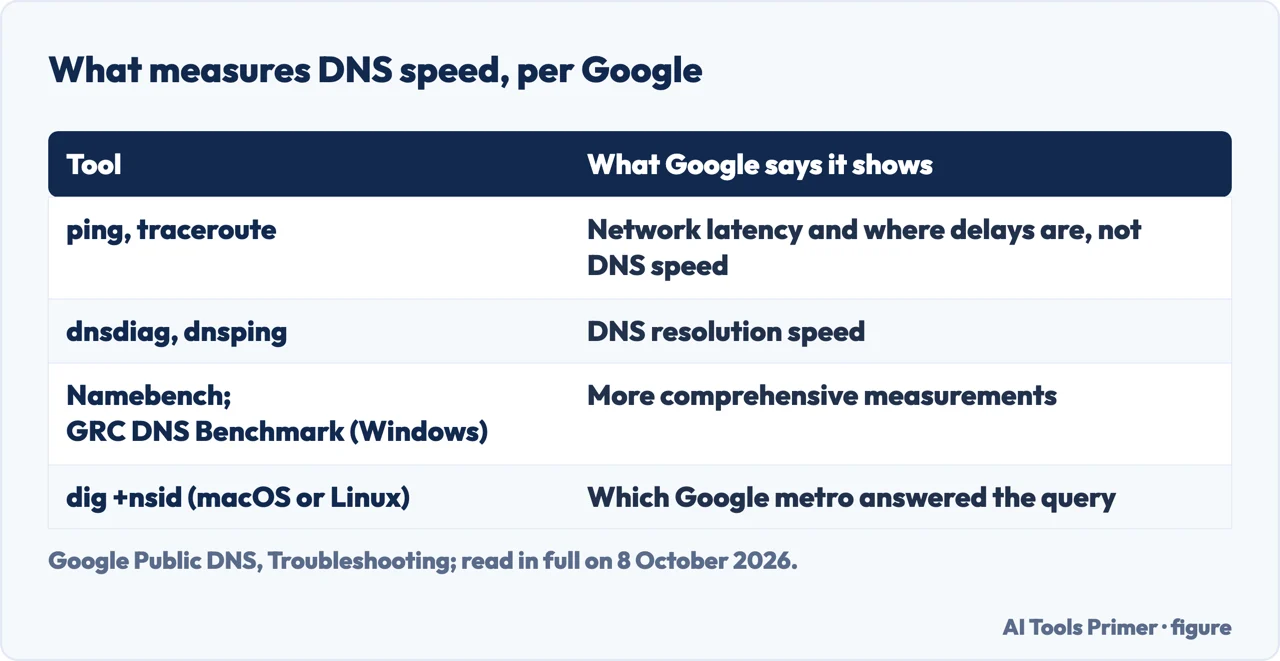
| Measure speed | dnsdiag, dnsping, Namebench, GRC DNS Benchmark | Google: these measure DNS resolution; ping and traceroute do not |
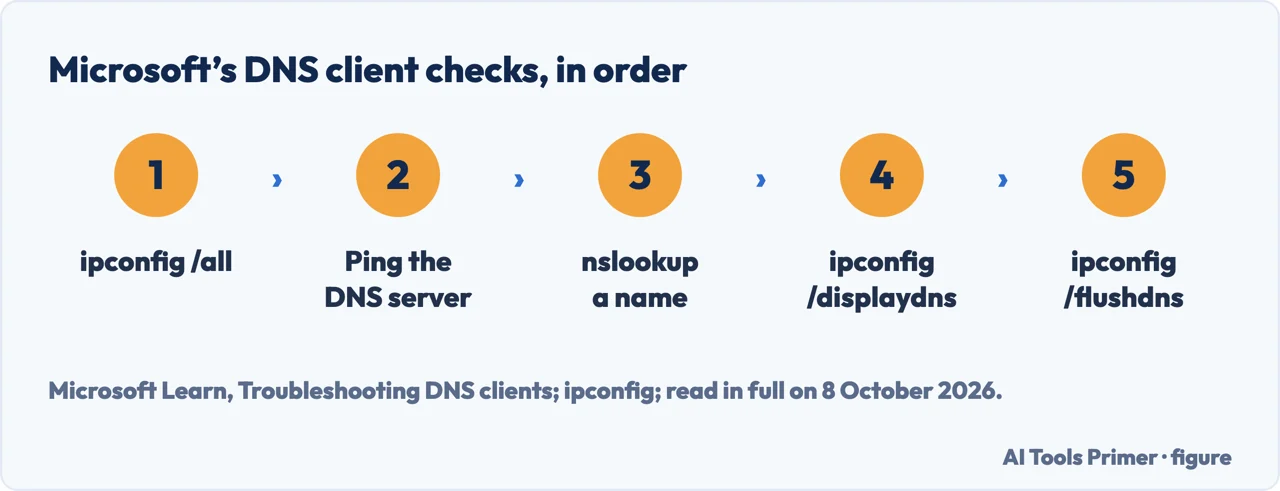
- Read the configuration. In a Command Prompt opened as administrator,
ipconfig /all. Microsoft says to check that the computer has a valid address, subnet mask and default gateway, and that the DNS servers listed are the right ones. If the computer has no valid TCP/IP configuration and gets its address automatically, Microsoft says to renew it withipconfig /renew. - Ping the DNS server. Ping the preferred DNS server by its IP address. If no configured DNS server answers, Microsoft says the problem is more likely the network connection between the computer and the DNS servers. ICMP traffic has to be allowed through the firewall for ping to work.
- Test a lookup with nslookup. Microsoft notes that nslookup does not use the computer’s DNS cache, so the answer comes from the configured DNS server. Its tests go from the computer’s own name to the DNS server, the failing name and a public internet address.
- Read the cache. If the tests work,
ipconfig /displaydnsand look for the name that failed. Name does not exist under it means a negative answer from a DNS server was cached on the computer. - Clear it.
ipconfig /flushdnsflushes and resets the DNS client resolver cache; Microsoft says it discards negative entries and any other entries added dynamically. Microsoft gives it for a name that fails; that it helps with a slow one is our reading. - Then measure, by our reading. Microsoft’s next step is its section on DNS servers; for speed, Google names DNS testing tools, below. Measuring before changing the DNS server is our suggestion.
Is it the lookup or the connection?
Ping does not measure DNS speed. Google’s troubleshooting page for its Public DNS says tools such as traceroute and ping report network latency but do not measure the speed of DNS resolution; they help find where a delay is, or confirm that a server can be reached. To measure resolution it names DNS testing tools, farrokhi/dnsdiag and dnsping, and for fuller measurements Namebench or the GRC DNS Benchmark for Windows.
Distance counts. Google says the network distance between the device and the Google Public DNS
resolver directly contributes to resolution speed. Its resolvers report the airport code of the metro that handled a query, which
dig @dns.google. +nsid shows on macOS or Linux; a metro far from you means higher latency, which
Google says can be due to various reasons, including sub-optimal routing between your network and Google or a
lack of serving capacity in a closer metro.
Dropped queries. Google says it is normal for a very small fraction of DNS requests to be dropped; at one percent or more, it suggests a DNS testing tool to look into it.
Changing the DNS server
Where the server comes from. Google explains that DHCP usually sets a computer to use the internet provider’s DNS servers, and that using another resolver means changing the DNS settings by hand. Before changing them, Google and Cloudflare both say to write down the current addresses.
The addresses. Google Public DNS: 8.8.8.8 and 8.8.4.4, and for IPv6 2001:4860:4860::8888 and 2001:4860:4860::8844. Cloudflare: 1.1.1.1 and 1.0.0.1. For the most reliable service, Google says to set at least two addresses, not the same one as both primary and secondary; the order does not matter.
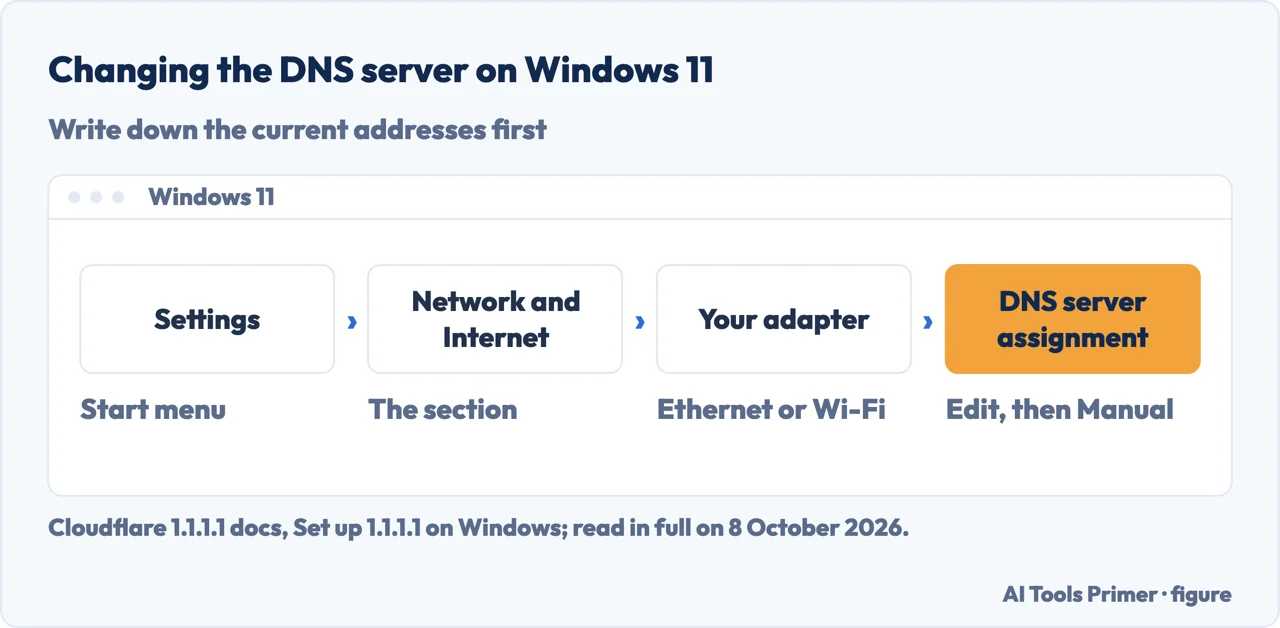
On Windows 11. Cloudflare’s steps: Settings, Network and Internet, the Ethernet or Wi-Fi adapter, DNS server assignment, Edit, then Manual instead of Automatic (DHCP); turn on IPv4 and enter the addresses, then Save. Google’s example, for Windows 10, goes through the Control Panel and the IPv4 properties of the adapter.
Two cautions. Cloudflare says setting a static IP address to configure a DNS server may prevent connecting to some public Wi-Fi networks that use captive portals, the sign-in pages some wireless networks use. Google says that at work, using Google Public DNS might limit access to the private names of an office network, and to check the IT policy first.
Test it. Google’s check: open a site such as google.com, quit the browser, load it again and refresh several times, so the page is not coming from a cache.
8.8.8.8 or 1.1.1.1
What Cloudflare says. Its documentation says 1.1.1.1 has been measured as the fastest public DNS resolver and that, unlike most DNS resolvers, it does not sell user data to advertisers. It is Cloudflare’s statement about its own service.
What Google says. Its FAQ invites you to try Google Public DNS alongside other resolvers, lists speed, reliability, security and validity of responses among the many things to consider, and says the experience may vary greatly by location. Queries reach the nearest Google location by anycast routing.
What this page does. It does not rank the two. Google names DNS testing tools for measuring resolution; running one from your own network is our suggestion.
Which Windows. Microsoft’s article on DNS clients is written for Windows Server 2016 to 2025; its page on ipconfig, the command it relies on, applies to those and to Windows 10 and 11. Google’s setup examples are for Windows 10 and macOS 10.15 and say menus differ by version; Cloudflare gives steps for Windows 10 and 11.
Other network faults. A browser error that names DNS is in this site can’t be reached, and encrypting the lookups on Android in what is private DNS. A slow connection rather than slow lookups is in how to fix slow internet, a computer that says it has no internet in connected without internet, and the DNS servers some game makers suggest in how to reduce ping.
Where to start
Four ways in.
- “Where do I start?”
- The Windows checks — the windows checks
- “How slow is it, really?”
- Measuring the lookup — measuring the lookup
- “I want another server.”
- Changing the DNS server — changing the dns server
- “Google or Cloudflare?”
- 8.8.8.8 or 1.1.1.1 — google or cloudflare
More on connections
When the network, not the lookup, is slow.
Questions people also ask
Is 8.8 8.8 or 1.1 1.1 better?
Each company describes its own service. Cloudflare says 1.1.1.1 has been measured as the fastest public resolver and that it does not sell user data to advertisers. Google says the distance to its resolver directly contributes to speed, and lists speed, reliability, security and valid responses among the things to consider. Measuring from your own network is our suggestion.
Is 1.1 1.1 DNS the fastest?
Cloudflare says it has been measured as the fastest public DNS resolver; that is Cloudflare’s claim about its own service. Google’s troubleshooting page says the network distance to its resolver directly contributes to resolution speed, and names DNS testing tools for measuring it; ping and traceroute do not measure it.
Is 8.8 8.8 the fastest DNS?
The Google pages read for this guide do not claim that. They say queries go to the nearest Google location by anycast, that a far-away metro means higher latency, and that experience may vary greatly by location. Google gives a dig command that shows which metro answered.
How can I fix DNS issues?
Microsoft’s checks on Windows: ipconfig /all to see the DNS servers, ping the server’s address, test names with nslookup, then ipconfig /displaydns. If a failing name shows Name does not exist, clear the cache with ipconfig /flushdns. For names Google Public DNS fails to resolve, Google offers a lookup form at dns.google.
Not covered here. It does not cover running a DNS server, or the DNS settings of a router, which differ by make.
Nor does it give a command to clear the DNS cache on a Mac or a phone: the pages read for it document that only for Windows.
Sources
- Microsoft Learn — Troubleshooting DNS clients (Windows Server 2016 to 2025): ipconfig /all, ping, nslookup, displaydns and flushdns — learn.microsoft.com, read 8 October 2026.
- Microsoft Learn — ipconfig (Windows Server, Windows 10 and 11): /displaydns and /flushdns — learn.microsoft.com, read 8 October 2026.
- Google Public DNS — Troubleshooting: why ping does not measure DNS speed, the testing tools, and the metro that answers — developers.google.com, read 8 October 2026.
- Google Public DNS — Frequently Asked Questions: primary and secondary resolvers, anycast, office networks — developers.google.com, read 8 October 2026.
- Google Public DNS — Get Started: the addresses, Windows 10 and macOS steps, and the test — developers.google.com, read 8 October 2026.
- Cloudflare 1.1.1.1 docs — 1.1.1.1 (DNS Resolver): what Cloudflare says about its resolver — developers.cloudflare.com, read 8 October 2026.
- Cloudflare 1.1.1.1 docs — Set up 1.1.1.1 on Windows: Windows 10 and 11 steps and the captive-portal note — developers.cloudflare.com, read 8 October 2026.
Written by Alberto Gulotta
Founder and editor of AI Tools Primer, writing from Palermo, Italy. Thirty-five years of taking computers apart, starting with a Commodore 64 — the long version is on the about page.
Something wrong on this page? Write to aitoolsprimer@gmail.com and it gets fixed.
Written on 8 October 2026.
Independence and limits
No affiliate links and no paid placements anywhere on this site. Nobody pays to appear here, and no company has seen this page before you did.
This is general information, not professional advice. Where a page touches money, health, safety or the law, it names its source and the date it was read — and your situation may still differ. See the privacy page and the cookie policy.