
Software · guide
How to reduce ping in online games, step by step
By Alberto Gulotta · Updated · 11 min read
How to reduce ping: play over a wired Ethernet connection, stop large downloads, uploads and streams on the same network, choose the game server or region nearest to you, turn off any VPN, and restart the modem and router. Epic, EA and Riot give these steps between them; if ping stays high, Epic’s next step is the internet provider.
| Point | What the publisher says | Publisher page |
|---|---|---|
| Usual range | Generally 50 to 150 ms; under 100 runs well, under 50 is particularly good | EA, Apex Legends |
| Packet loss | Should be 0%; consistently above about 1% causes problems | Epic, Fortnite |
| Most disruptive traffic | Uploads on the same network | Epic, Fortnite |
| Wi-Fi | Wired is more stable; 2.4 GHz generally gives higher ping than 5 GHz | Riot; EA SPORTS FC |
| VPN | EA: can add distance to the data centre and raise ping; Riot: can cause connection issues | EA SPORTS FC; Riot |
| Sudden spikes | Usually how the internet provider routes traffic | Epic, Fortnite |
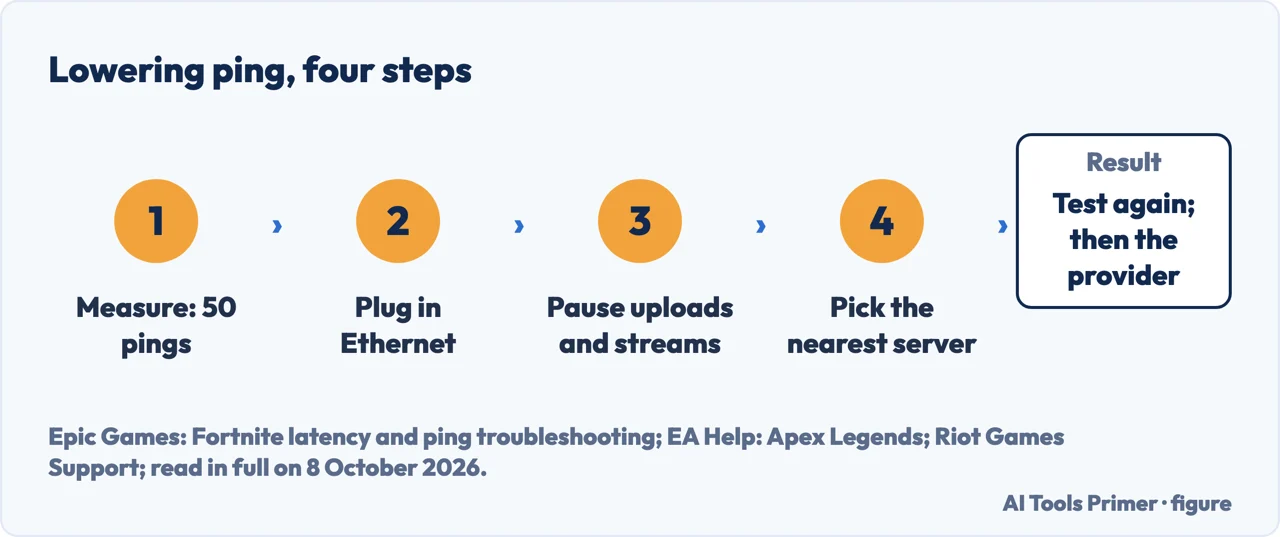
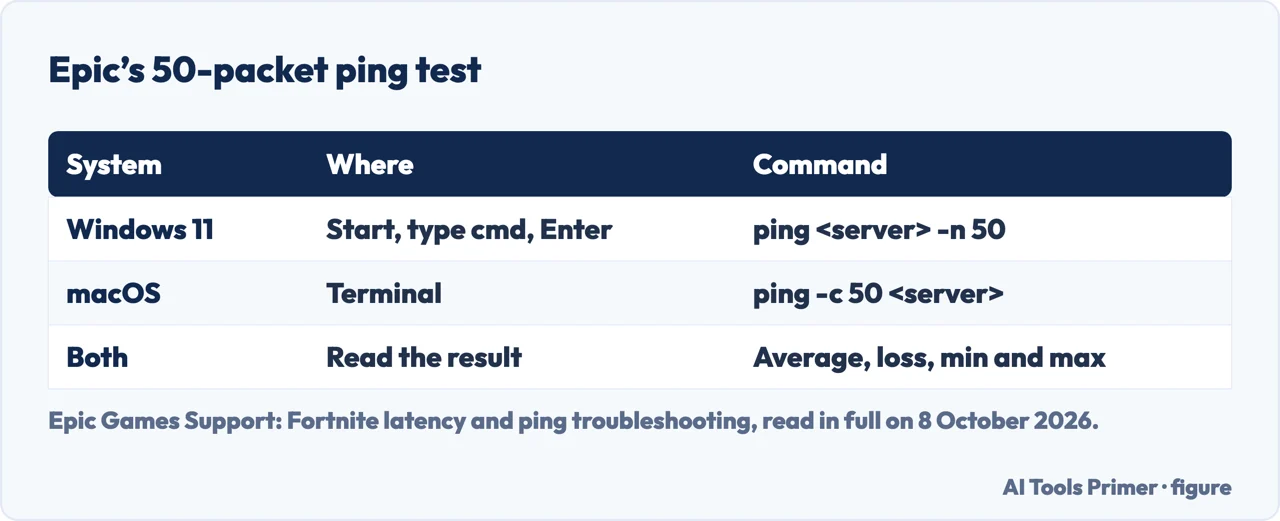
- Measure it first. Epic’s test on Windows 11: Start, type cmd, press Enter, then
pingfollowed by a game server address and-n 50; on a Mac, Terminal andping -c 50followed by the address. Fifty packets give the average, the packet loss and the spread between minimum and maximum. Epic’s own addresses are for its Fortnite servers; the game’s own display, where there is one, shows the ping in the match. - Plug in an Ethernet cable. Epic says wireless can add delay because of signal loss; Riot calls a wired connection faster and more stable, and asks for it whenever possible.
- Stop what else is using the line. Large downloads, uploads and video streams on the same network, in Epic’s list; uploads are the worst, because most home connections have much less upload capacity than download. On the computer itself, EA asks to close game downloads, streaming apps and updates.
- Pick the nearest server. In Apex Legends, Data Center on the launch screen; in Fortnite, a Subregion Preference under Settings › Game › Language and Region, which Epic says lands you on your ideal Subregion more often but may increase queue times and reduce match quality; in Battlefield 6, the Server Browser for Portal experiences. EA says a far-away data centre raises ping because the data travels further.
- Turn off a VPN or proxy. Riot says they can cause connection problems that cannot be resolved; EA says a VPN can add distance between you and the game’s data centres.
- Restart the modem and router, then test again. Epic puts the restart first; EA’s FC page says to unplug console or PC and router for 30 seconds. Test under the same load as when the ping was bad: Epic notes that an idle line can look perfect.
What ping is, and what moves it
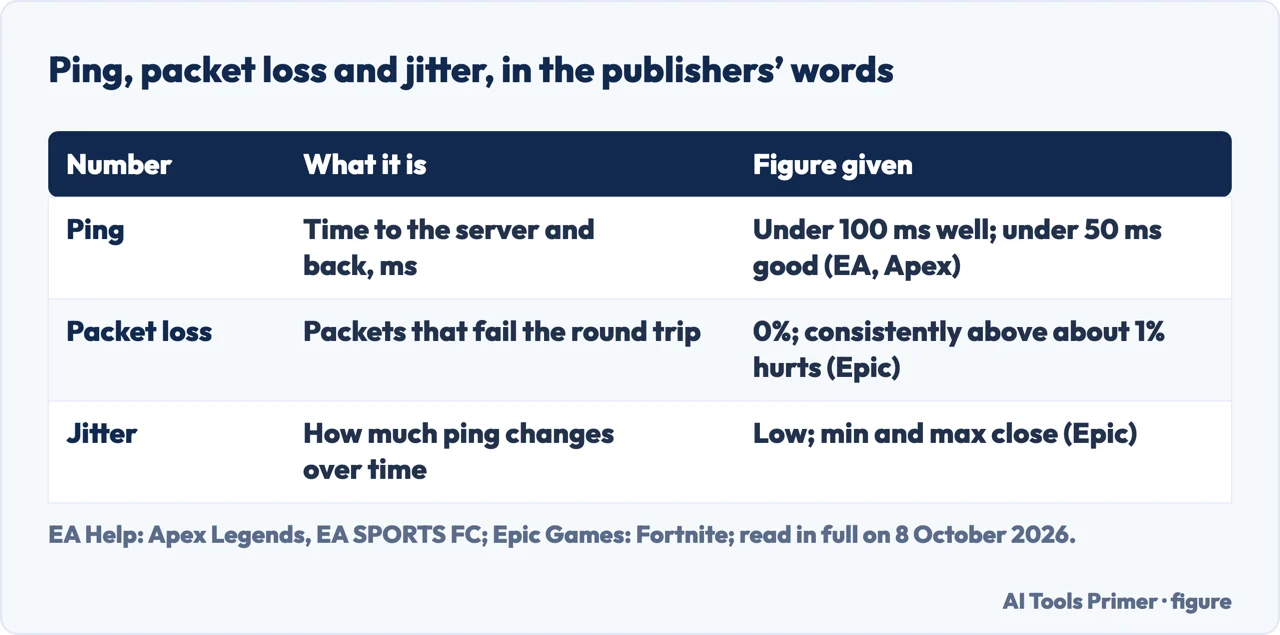
Epic defines latency, also called ping, as the time data takes to go from your device to the game server and back, measured in milliseconds. EA’s definition for Apex Legends is the same trip, to its data centres.
Epic lists three things that change it: congestion, when another device fills the connection and the game’s data waits in line; routing, the path to the servers; and matchmaking, the server a match runs on, which can differ from match to match. A sudden jump, Epic says, is usually caused by how the internet provider routes traffic through exchange points.
Two more numbers travel with ping. Packet loss, as EA defines it, is the share of packets that fail to make the round trip. Jitter, in EA’s page on EA SPORTS FC, measures how much the ping changes over time; Epic’s test reads it from how far apart the minimum and maximum are.
How high is too high
EA is the one publisher read that gives ping figures, and it gives them for Apex Legends: ping is generally between 50 and 150 ms; under 100 ms keeps the game running well; under 50 ms is particularly good; over 100 ms you may start to experience lag. Epic does not publish a ping figure in its Fortnite page, but does for packet loss: 0%, and anything consistently above about 1% causes problems even when the average ping is fine.
Riot’s two pages read for VALORANT and the Riot Client give steps and no figure.
How to lower ping in games without a cable
Use 5 GHz near the router. EA’s FC page says 2.4 GHz reaches further but is generally slower and leads to higher ping and potential packet loss and jitter, while 5 GHz is faster and generally more stable, with a shorter range. Epic says to test both bands and keep the better result.
Move the router into the open. Epic: not in closets, basements or blocked spaces; EA’s Battlefield 6 page: with its antenna, if it has one, pointed at the device, and as close to it as possible.
Try another Wi-Fi channel. EA’s FC page says overlapping channels slow a connection where many networks are near, and for 2.4 GHz names channels 1, 6 and 11 as the ones that do not overlap.
Quality of service. Epic says a router’s QoS or gaming mode keeps the game’s data ahead of large transfers from other devices, under names such as Quality of Service, Smart Queue or Gaming Mode; the router’s manual has the steps.
Firmware, or another router. Epic and EA both list a firmware update; Epic adds that a faulty router can affect performance and suggests trying a different one.
On a Windows PC
Network driver. Riot and EA both say to update it from Device Manager › Network adapters.
A public DNS server. Riot’s VALORANT page says the provider’s DNS server is not always ideal for gaming, and gives Google’s 8.8.8.8 and 8.8.4.4 or Cloudflare’s 1.1.1.1 and 1.0.0.1, entered in the adapter’s Internet Protocol Version 4 properties. It warns that some providers block third-party DNS, and that if you lose internet access you need to put your original settings back. EA’s Battlefield 6 page suggests Google Public DNS for another reason: a provider routing your data through a DNS gateway that isn’t working correctly.
Renew the address. Riot’s commands, in Command Prompt with all browsers and applications closed:
ipconfig /release, ipconfig /renew, then ipconfig /flushdns, then
restart the computer.
Power saving. EA’s FC page, among its advanced steps, says to turn off power-saving mode in the Ethernet or Wi-Fi adapter properties.
When the next step is the internet provider
When ping stays high, Epic sends you to the internet provider with the server address tested, the test result and the ping seen in the game, and then, if problems continue, to its own support team. It adds a detail for that call: the test uses ICMP while the game uses UDP, and many networks give ICMP lower priority, so a normal-looking test does not rule out a problem on the path the game uses.
EA’s FC page suggests checking whether another provider in your area scores better on its ISP leaderboard.
When the whole line is slow. Ping is a delay, not a speed; for a connection that is slow at everything, see how to fix slow internet, and for one that drops, why your wifi keeps disconnecting.
Where to start
Five ways in.
- “Just give me the steps.”
- In order — the steps in order
- “Is my number bad?”
- The figures — how high is too high
- “I can only use Wi-Fi.”
- Without a cable — if wired is not possible
- “I play on a PC.”
- Windows steps — on a windows pc
- “Nothing worked.”
- The provider — when to call the provider
More on the connection itself
Speed, dropouts and the Wi-Fi itself each have a guide of their own.
Questions people also ask
Is 200 ping bad for gaming?
EA’s page for Apex Legends puts ping generally between 50 and 150 ms and says that over 100 ms you may start to experience lag. 200 ms is twice that figure. The first steps it gives are the nearest data centre and a check of your own connection.
How to get 20ms ping?
No publisher read promises a figure; EA calls under 50 ms particularly good for Apex Legends and says a far-away data centre raises ping, so pick the closest one. Epic adds a wired connection and no uploads on the network while you play. Our reading: 20 ms needs a server close to you.
Is 150 ping bad for gaming?
150 ms is the top of the range EA gives for Apex Legends, 50 to 150 ms. EA says that above 100 ms you may start to experience lag, and that under 100 ms the game runs well. Its page names the closest data centre and, among causes at home, a wireless connection and many people on the same Wi-Fi.
Why is my ping so high with good Wi-Fi?
By our reading, a strong signal is not the whole trip. Epic names congestion from other devices, especially uploads, the route your provider takes, and the server a match lands on; EA adds a far data centre and a VPN. Epic also says wireless can add delay through signal loss, and suggests a cable.
Not covered here. It does not cover consoles setting by setting, port forwarding or firewall rules.
Nor does it cover the paid tools that promise lower ping: no publisher read recommends one, and Riot asks not to connect to a game server through a VPN or a proxy.
Sources
- Epic Games Support — Fortnite latency and ping troubleshooting: what ping is, congestion, routing and matchmaking, the 50-packet test on Windows 11 and macOS, packet loss and jitter, the home-network steps, and ICMP against UDP — www.epicgames.com, read 8 October 2026.
- EA Help — Troubleshoot high ping, packet loss, and lag in Apex Legends: the 50 to 150 ms range, the data centre, and the causes at home — help.ea.com, read 8 October 2026.
- EA Help — Troubleshoot Connection Quality, EA SPORTS FC: 2.4 GHz against 5 GHz, channels 1, 6 and 11, VPN, QoS, power saving, and jitter — help.ea.com, read 8 October 2026.
- EA Help — How to troubleshoot high ping and lag in Battlefield 6: server distance, router placement, the wireless channel, and Google Public DNS — help.ea.com, read 8 October 2026.
- Riot Games Support — Troubleshooting Your Network Connection, VALORANT: wired connection, VPN, public DNS servers, and renewing the IP address — support.riotgames.com, read 8 October 2026.
- Riot Games Support — Troubleshoot PC Connection: wireless interference, VPN and proxy, and the network adapter driver — support.riotgames.com, read 8 October 2026.
Written by Alberto Gulotta
Founder and editor of AI Tools Primer, writing from Palermo, Italy. Thirty-five years of taking computers apart, starting with a Commodore 64 — the long version is on the about page.
Something wrong on this page? Write to aitoolsprimer@gmail.com and it gets fixed.
Written on 8 October 2026.
Independence and limits
No affiliate links and no paid placements anywhere on this site. Nobody pays to appear here, and no company has seen this page before you did.
This is general information, not professional advice. Where a page touches money, health, safety or the law, it names its source and the date it was read — and your situation may still differ. See the privacy page and the cookie policy.