
Business · guide
Email marketing tools: contacts, sends and the limits four vendors set
By Alberto Gulotta · Updated · 14 min read
Email marketing tools are priced by lists and sends, and the vendors count both differently. Mailchimp counts contacts, MailerLite counts active subscribers, Brevo’s free plan names a daily send cap, and Constant Contact offers a free trial, not a free plan. This page sets their own published limits side by side, with no ranking.
| Question | Answer | Where it comes from |
|---|---|---|
| What is a “send”? | One email to one contact: a single email to 500 contacts is 500 sends | Mailchimp, MailerLite |
| Who has a free plan? | Mailchimp, Brevo and MailerLite do; Constant Contact offers a free trial instead | All four |
| How large is a free plan? | Mailchimp: 250 contacts, 500 sends a month. MailerLite: 250 active subscribers, 2,500 emails per 30 days | Mailchimp, MailerLite |
| How is the monthly send ceiling set? | As a multiple of the list, from 10 times to 24 times depending on vendor and plan | Mailchimp, MailerLite, Constant Contact |
| What happens past a limit? | It differs: a hold on sending, an automatic upgrade, or a charge of $0.002 per extra send | Mailchimp, MailerLite, Constant Contact |
What the pages describe as an email marketing tool
The pages we read come from four vendors: Mailchimp, Brevo, MailerLite and Constant Contact. They are help, pricing and billing pages, so they describe what each vendor sells and how it counts, not how any of it performs. We opened no account and tested nothing. The lists of features under each plan still give a working picture of the category. Mailchimp’s guide says its Free plan includes one audience, one seat, a limited selection of email templates and basic reporting, and that the paid plans add things such as scheduled emails, A/B testing and automation flows, with custom-coded email templates and multivariate testing on Standard.
Brevo’s Starter heading names email and SMS, transactional messages and a drag and drop email editor, and adds that SMS credit is sold separately. Constant Contact’s pricing page lists a drag-and-drop email editor, an AI copy generator, templates, social posting and sign-up forms on every plan, with email scheduling and subject line A/B testing on Standard. MailerLite’s pricing page says its Free plan comes with campaigns, automations, a website, a landing page and signup forms. Across the four, an email marketing tool is a service that stores a list of contacts, builds and sends email to it, and charges according to the size of the list or the number of sends.
Rules about who may be emailed and what each message must contain sit outside any plan. Our pages on email marketing consent and the rules and on unsubscribing from emails cover those. What follows is only the arithmetic the four vendors publish.
Four ways to count the same list
Mailchimp counts contacts. Its guide defines a contact as an individual member of your audience and says subscribed, unsubscribed and non-subscribed contacts all go into the contact count. Archived, cleaned and deleted contacts do not count toward the contact total or the price of the plan. The contact limit is the largest number you can store at any point in the billing cycle, and you set it when you choose a pricing tier.
MailerLite counts active subscribers. Its help page says the limit rests on unique subscribers with the Active status, and that unsubscribed and bounced contacts do not count. It then adds a rule about time: the count is cumulative during one billing cycle, so any address that was Active at any point in the cycle counts, even if it is deleted later. The limit resets on the billing anniversary. The page’s example has subscribers deleted on 1 April and a billing date of 5 April, and says they keep counting until 4 April. It also says that deleting subscribers and uploading new ones to get around the limits breaks its terms of service.
Constant Contact ties the price to contacts and to a tier. Its billing FAQ says pricing follows the highest tiered number of active contacts you have had, so entering a higher tier during a month changes the subscription going forward. Brevo’s pricing page, in the text we read, measures its plans in emails: Starter and Professional carry a monthly email figure in their headings, and a pay-as-you-go option deducts one credit for each email sent. The text does not give a contact count for any Brevo plan.
The word “send” is also defined. Mailchimp says each email sent to an individual contact counts as one send, so one email to 500 contacts equals 500 sends, and test and transactional emails count toward the monthly sending limit. MailerLite gives the same example: a campaign sent to 500 people uses 500 of the monthly allowance. Brevo’s pay-as-you-go answer gives the same unit, one email sent for one credit.
What the free plans allow
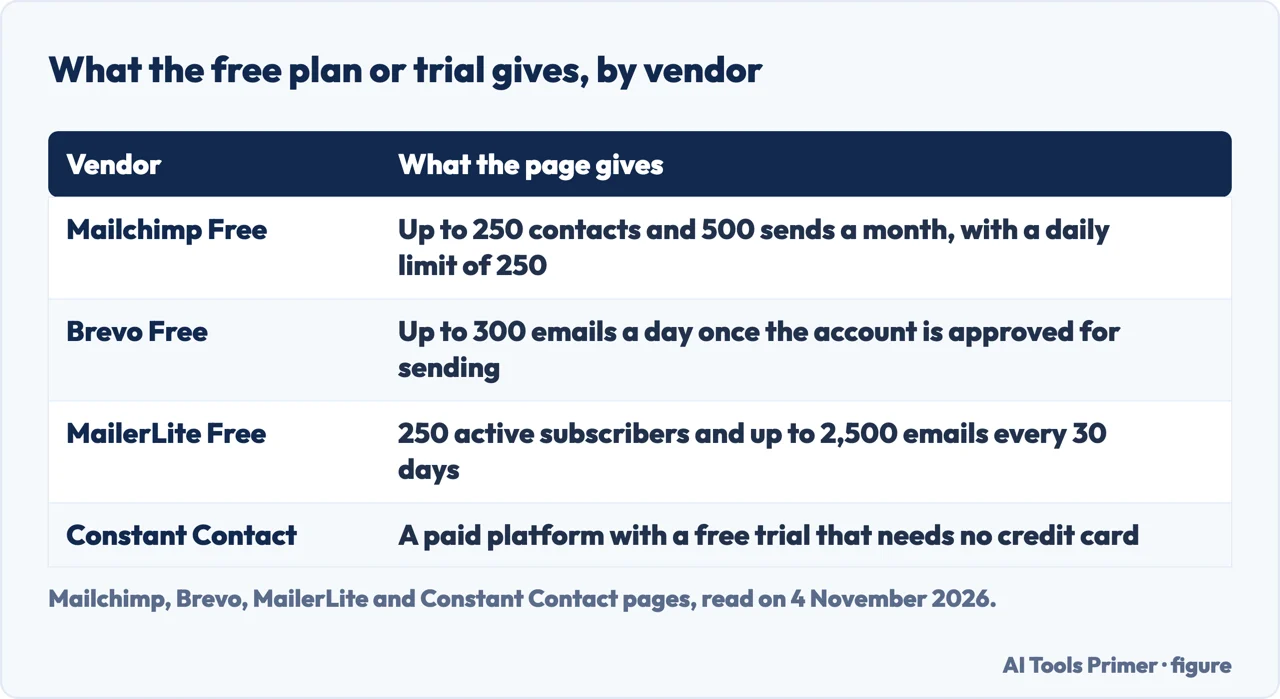
Mailchimp’s Free plan includes up to 250 contacts and 500 sends per month, with a daily send limit of 250, one audience and one seat. By the guide’s own definition of a send, 250 contacts at the limit and 500 sends is two emails to the whole list in a month, and the daily limit is one email to the whole list in a day. Landing pages and forms are there to try. If the contact count goes above 250, a hold is placed on sending live emails or test emails until you upgrade or reduce the total, while you can still work on emails and templates and collect and import new contacts.
Brevo’s pricing page heads its free option “Free forever, no credit card needed”. Its FAQ says that signing up needs only an email address and the name of the organization, that a new account has a Free plan to upload contacts, and that once Brevo approves the account for sending, it can send up to 300 emails per day. The pages we read do not give a limit on contacts for the Free plan, and they do not say what happens after the 300.
MailerLite applies its Free plan to every account. It covers the first 250 active subscribers and up to 2,500 emails every 30 days; its pricing page adds two user seats. By the same arithmetic, that is ten emails to a full list. The help page gives the active items: three automations, three forms, one landing page, one website of up to five pages and one digital product. Past 250 active subscribers its FAQ says sending is locked until you pay or remove active subscribers.
Constant Contact’s pricing page calls it a paid platform and says you can start with a free trial and no credit card, and that every new plan is backed by a 30-day money-back guarantee. The four pages measure the free offers in different units: sends per month and per day, emails per day, and active subscribers with emails per 30 days. The pages do not say which count suits which list, and the figures are not like for like. Nor do the vendor pages we read rank the four.
Sending volume as the list grows
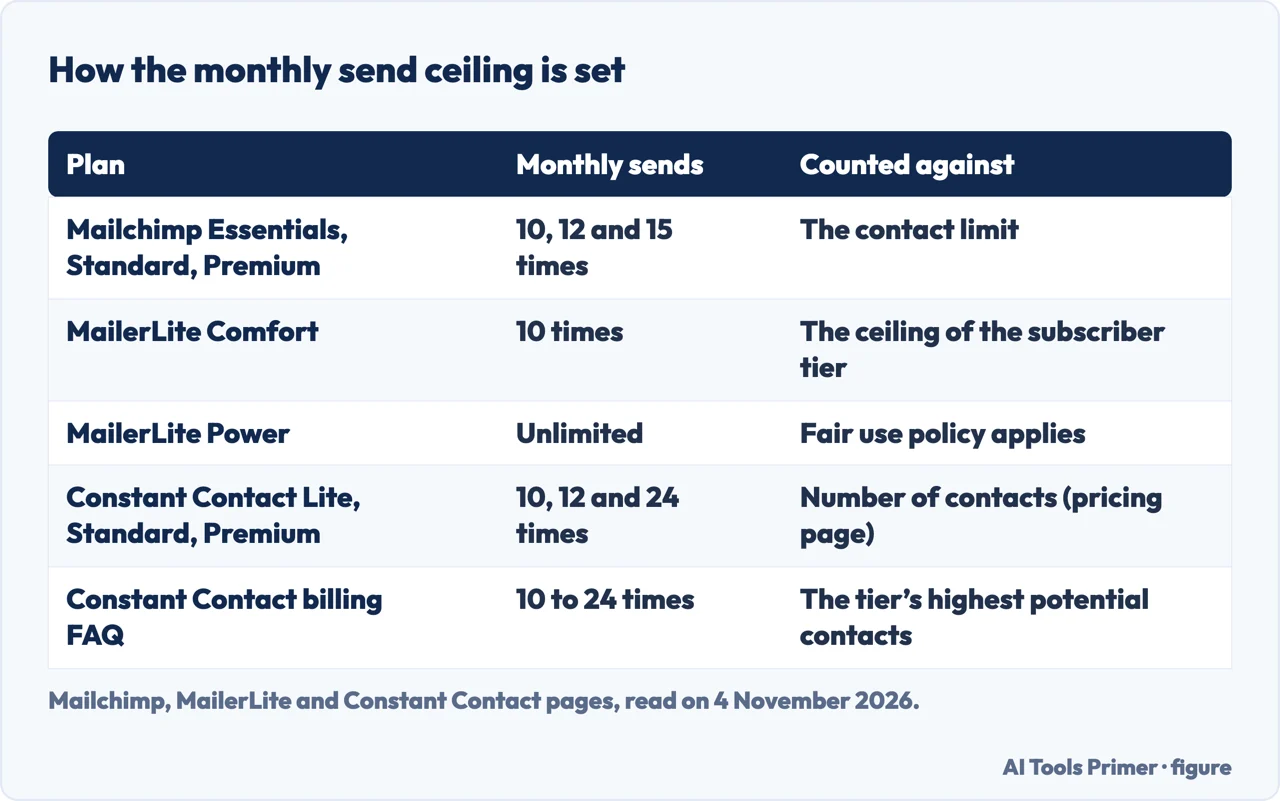
On paid plans, three of the four tie the monthly send ceiling to the size of the list. Mailchimp’s guide sets it at 10 times the contact limit on Essentials, 12 times on Standard and 15 times on Premium. The base price covers 500 contacts on Essentials and Standard and a base twenty times larger on Premium, and the price rises with the contact total. Above 200,000 contacts Mailchimp says it will customize a plan.
MailerLite’s Comfort plan allows 10 times the ceiling of the subscriber tier each month, and the page gives the example of a 5,000-subscriber tier, whose ceiling is multiplied by ten. Power is listed as unlimited with a fair use policy attached, and Enterprise asks you to contact sales for a custom offer. Comfort and Power are sold monthly or annually in subscriber tiers.
Constant Contact states 10 times on Lite, 12 times on Standard and 24 times on Premium. Here two of its own pages differ. The pricing page words the allowance as a multiple of “your number of contacts”. The billing FAQ words it as a multiple of the tier’s highest potential contacts, and its example takes a 24 times plan in the 5k-10k tier and multiplies the top of the tier. The two wordings give different ceilings for a list that sits below the top of its tier, and the pages we read do not say which applies.
Brevo sells volume in emails. Its Starter heading reads “From 5,000 emails per month” and the Professional heading gives a monthly figure thirty times larger. The pages describe Starter as best for single users and say Professional includes 10 seats. The pricing text we read does not tie any of these figures to a number of contacts.
What happens at the limit, and what the bill does
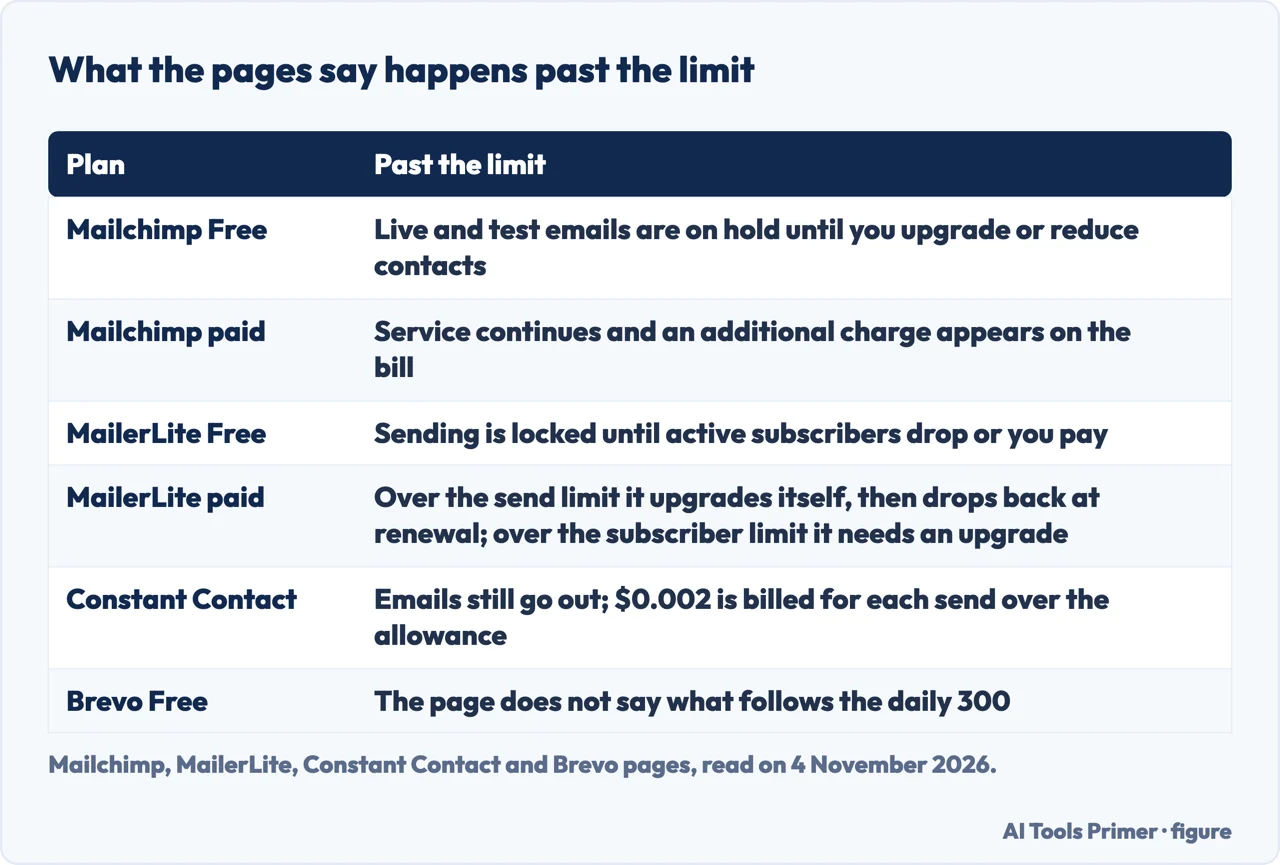
Mailchimp’s paid plans keep working. The guide says that if the contact total goes above the contact limit at any time in a monthly cycle, it will not interrupt the service and an additional charge shows up on the bill. If the increase is permanent, you update the pricing tier and the charges are removed; if it is temporary, you reduce the audience and keep the lower total for a full billing cycle to avoid future additional charges. The Free plan behaves differently, with the hold on sending described above.
MailerLite moves the plan. On monthly plans, billing rests on the number of active subscribers and the number of emails sent in the month, and exceeding either upgrades the plan. Its example takes a Comfort plan on the 5,000-subscriber tier that sends more than the allowance: it is upgraded to the 8,000 tier, then moved back at renewal, and a notification appears in the account. Going over a feature limit, such as active automations or forms, does not trigger an upgrade; on Comfort you cannot create, activate or edit those items until you cut back or upgrade. On annual plans a rise during the year is charged as a pro-rated amount, and the annual plan is a one-time payment for 12 months at a discount.
Constant Contact lets the emails go out. Its pricing FAQ says additional sends are billed at $0.002 for every send over the monthly allowance, which is $2 for every 1,000, and that you can raise the allowance by upgrading. On the contact side, its billing FAQ says the Billing team can lower a tier by hand once as a courtesy after you bring the list back down, but not if any emails were sent after the list rose into the higher tier.
The text we saved from Constant Contact’s pricing page includes dollar figures. On 4 November 2026 it gave starting prices of $12 a month for Lite, $35 for Standard and $80 for Premium, which depend on the number of contacts, and, for a 12-month prepayment saving up to 15 per cent, $10.20, $29.75 and $68 a month, all based on starting prices. Brevo’s page offers a Yearly option marked -10 per cent and says a monthly subscription period is 30 days, charged at the start of each period; its pay-as-you-go credits do not expire and come without phone support. MailerLite says annual plans get a 10 per cent discount automatically.
What we did not use
We opened no account and sent no email. We did not read ranked lists of tools from comparison sites or vendor blogs, nor any discussion thread, and we did not read Mailchimp’s product page. Constant Contact’s own ranked list is a vendor’s article in which the vendor appears, so we read its pricing page and billing FAQ instead.
Mailchimp’s pricing page came back in Italian and loaded its figures dynamically, so we saved only its help guide, which shows no date of last update. The text we saved for Mailchimp, Brevo and MailerLite holds no dollar prices, and this page gives none for them. Brevo’s text does not state a contact limit for its Free plan, and we have not used any figure from outside the pages we read. Deliverability, support quality and how the bill grows beyond the tiers are not covered by the pages we read, so they are not covered here either.
Where to start
Four ways in.
- “How do they count my list?”
- Four ways to count the same list — counting
- “What does the free plan allow?”
- What the free plans allow — free
- “How many emails can I send?”
- Sending volume as the list grows — volume
- “What if I go over?”
- What happens at the limit, and what the bill does — limit
Sending to people
The rules and the lists behind email marketing.
Plans and scheduling
When an email goes out.
Questions people also ask
What are the best tools for email marketing?
The pages we read are the vendors’ own and do not rank tools. This page sets out what Mailchimp, Brevo, MailerLite and Constant Contact publish on free plans, send ceilings and what happens at a limit, and it does not pick one.
What are email marketing tools?
On the vendors’ pages they are services that store contacts, build and send email, and charge by the size of the list or the number of sends, with templates, forms, automations, scheduling and A/B testing on some plans.
What are the 5 marketing tools?
The pages we read do not give a list of five. Mailchimp’s guide names email templates, landing pages, forms, automations and A/B testing among the features of its plans.
What are 10 best email sender software tools?
The pages we read do not rank ten. They describe four vendors’ plans, Mailchimp, Brevo, MailerLite and Constant Contact, and the limits each sets on contacts and sends.
Not covered here. We opened no account and sent no email. The statements come from Mailchimp’s guide to its pricing plans, Brevo’s pricing page, MailerLite’s plan and billing page and pricing page, and Constant Contact’s pricing page and billing FAQ, all read on 4 November 2026.
The search volume and difficulty behind this page come from a Semrush reading of 29 August 2026, older than the 60 days the site normally allows.
Sources
- Mailchimp — About Mailchimp Pricing Plans — mailchimp.com, read 4 November 2026.
- Brevo — Pricing Plans — www.brevo.com, read 4 November 2026.
- MailerLite — Subscription plan and billing — www.mailerlite.com, read 4 November 2026.
- MailerLite — Pricing — www.mailerlite.com, read 4 November 2026.
- Constant Contact — Pricing — www.constantcontact.com, read 4 November 2026.
- Constant Contact Community — Billing FAQ — community.constantcontact.com, read 4 November 2026.
Written by Alberto Gulotta
Founder and editor of AI Tools Primer, writing from Palermo, Italy. Thirty-five years of taking computers apart, starting with a Commodore 64 — the long version is on the about page.
Something wrong on this page? Write to aitoolsprimer@gmail.com and it gets fixed.
Written on 4 November 2026.
Independence and limits
No affiliate links and no paid placements anywhere on this site. Nobody pays to appear here, and no company has seen this page before you did.
This is general information, not professional advice. Where a page touches money, health, safety or the law, it names its source and the date it was read — and your situation may still differ. See the privacy page and the cookie policy.