
Business · guide
Online appointment booking: reminders, cancelling and customer data
By Alberto Gulotta · Updated · 15 min read
Online appointment booking means, on the pages we read, that the customer sees open slots, picks one and fills in a form. The pages differ on reminders, with Google capping them at 5 and Zoho counting five notifications plus three reminders, on who is told about a cancellation, and on what happens to customer data.
| Question | Answer | Where it comes from |
|---|---|---|
| What does the customer do? | Picks a date and time from a list of slots, fills in the booking form and books | Zoho Bookings |
| How many reminders? | Google says up to 5; Zoho says five email notifications and three time-based reminders | Google Calendar Help, Zoho Bookings |
| Who is told about a cancellation? | Microsoft says you and the staff member, when the customer cancels; Google says the person who booked, when you cancel | Microsoft Learn, Google Calendar Help |
| Does a cancellation policy block cancelling? | Calendly says it shows the policy but does not restrict cancels or reschedules | Calendly Help |
| Can a customer’s data be deleted? | Calendly describes deleting an invitee’s data by email address or by date range | Calendly Help |
How a booking goes, step by step
Zoho Bookings, on a page updated on 30 March 2026, describes the customer’s side in one sentence: clients land on the booking page, pick a date and time from the list of slots, fill the booking form and schedule the appointment. It says the system is used either from a widget on your website or through a booking link, and that its seven steps for building one run in this order.
- Availability. Slots shown to customers come from the availability you set; you create staff, set their working hours and assign them to services.
- Double bookings. Zoho calls avoiding conflicting reservations the crucial part, and says you can connect your personal calendars to do it.
- The booking page. Logo, contact details, socials and brand colors, which Zoho says several booking systems let you add.
- Payments. Charging for appointments when clients book.
- Collecting appointments. A booking page embedded in your site, or links to share. Zoho Bookings offers three kinds of link: one for a service, one for a staff member and one for a workspace.
- Keeping clients informed. Notification and reminder emails.
- Going further. Connecting the booking system to a CRM, an email marketing tool or customer support software.
Square’s FAQ gives the shorter version: clients see your availability and book online, and the appointment is confirmed at once and added to your calendar. Both are sellers describing their own product, so read them as what the product does, not as how every product does it.
Google Calendar Help shows what the setup looks like in one product. You need a personal Google Account or a Workspace account and a computer with a supported browser; Google says you cannot create an appointment schedule in the Calendar app for Android or for iPhone and iPad. On a computer you click Create, choose Appointment schedule, then set a title, the duration, your weekly availability and a scheduling window that limits how far ahead people can book and how much notice you need. Google says the default is a minimum lead time of 4 hours, so a booking page checked straight after setup may show nothing for the current day. Once appointments are booked you can add buffer time between them, cap the bookings per day and let guests invite others.
For the meeting itself, Google offers Google Meet, an in-person meeting, a phone call, or none, to be specified later; for a conferencing service of your own, Google says to pick the last and edit the event after someone books. The description you write shows on the booking page, in confirmation emails and in event descriptions. Google also says some features need an eligible Google Workspace or Google One subscription.
Zoho describes what the manual way costs: sending emails and reminders, making many calls, managing expectations, collecting payments and handling cancellations. That is a seller’s account of the alternative to its product, and the pages we read give no measurement of the time saved.
Connected calendars and double bookings
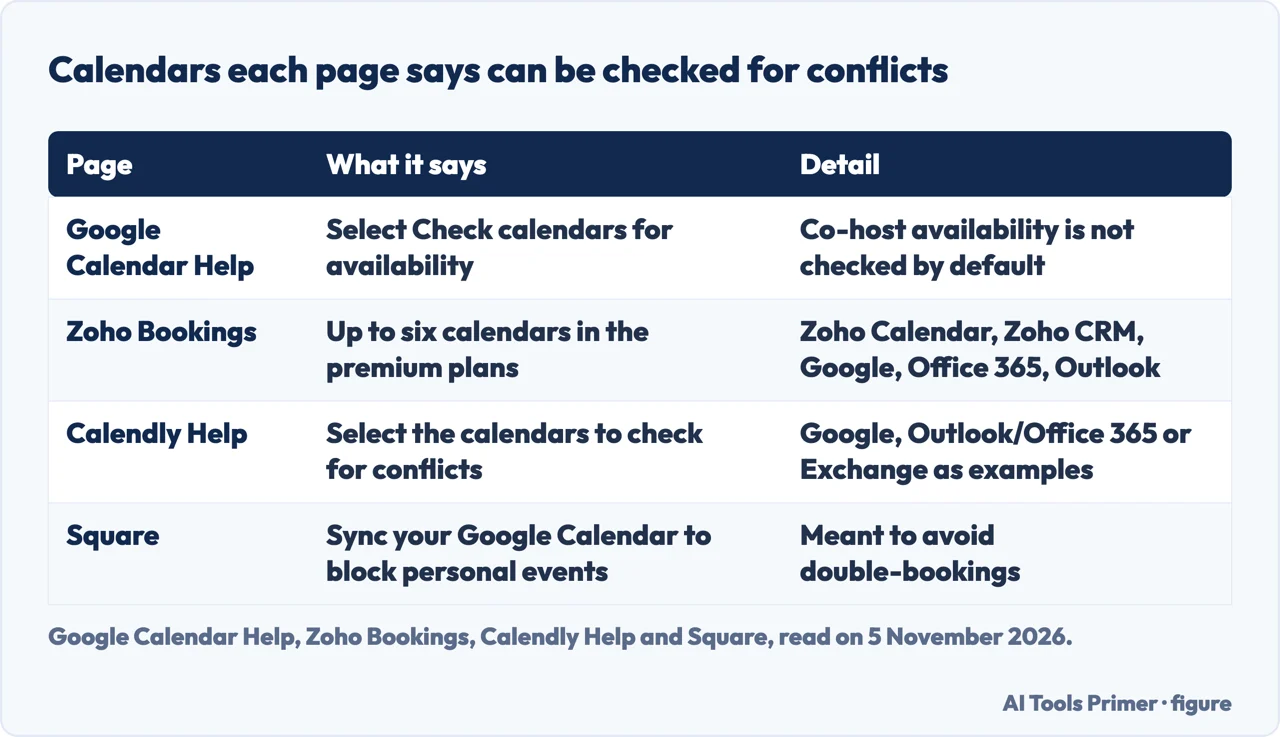
Google, Zoho, Calendly and Square each tie double bookings to the calendars the tool is connected to. In Google Calendar the setting is called Check calendars for availability. Google says appointments cannot be added to resource calendars, such as rooms. It also says appointment schedules do not check a co-host’s availability by default, and suggests including the co-hosts’ calendars in the checks to prevent double bookings. A co-host cannot add groups or users from outside the domain.
Zoho says up to six calendars can be connected in its premium plans, and names Zoho Calendar, Zoho CRM’s calendar, Google Calendar, Office 365 and Outlook Calendar. Calendly’s help pages say to connect a calendar account and give Google, Outlook/Office 365 and Exchange as examples of the type, then to select the calendars Calendly should check for conflicts and choose where new bookings go. Its home page promises that you connect your calendars, set your hours and control when you are available. Square says syncing a Google Calendar blocks off personal events automatically to avoid double bookings.
The difference is in what each page counts. Google counts a setting and a default that leaves co-hosts out, Zoho counts calendars and ties the number to a plan, Calendly counts nothing and lists calendar types, and Square names one calendar. A tool that checks your calendar for conflicts tells you little until you know which calendars it checks and whose.
Confirmations and reminders
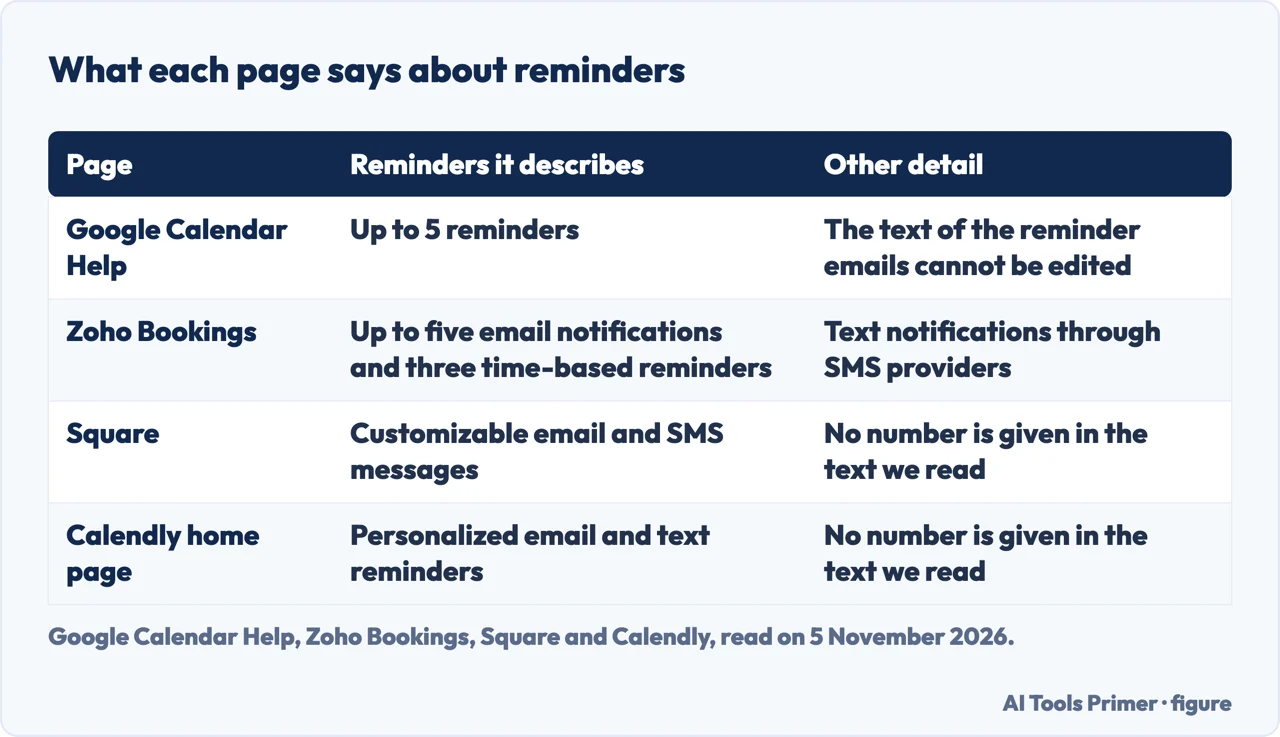
Google puts confirmations and reminders in a section of the booking page settings called Booking confirmations and reminders. It says you can send up to 5 reminders, that Add reminder is how you send more than one, and that you cannot edit the text of the reminder emails. Zoho counts differently: up to five different email notifications and three time-based reminders, with text notifications possible through SMS providers you connect, and a sender email address of your own to, in Zoho’s words, ensure credibility.
Square and Calendly give no number in the text we read. Square says it sends customizable email and SMS messages for confirmations, reminders and easy rescheduling, and that its waitlist fills cancellation openings. Calendly’s home page says it reduces no-shows with personalized email and text reminders, and lets invitees reschedule when needed without the back-and-forth. Google’s page, in what we read, speaks of email; the text messages appear on the Zoho, Square and Calendly pages.
Zoho, Square and Calendly all say reminders help reduce no-shows. Those are the sellers’ statements about their own products. The pages we read do not say which reminder setting cuts missed appointments most, and they give no figure for how much any setting cuts them.
Cancelling and rescheduling
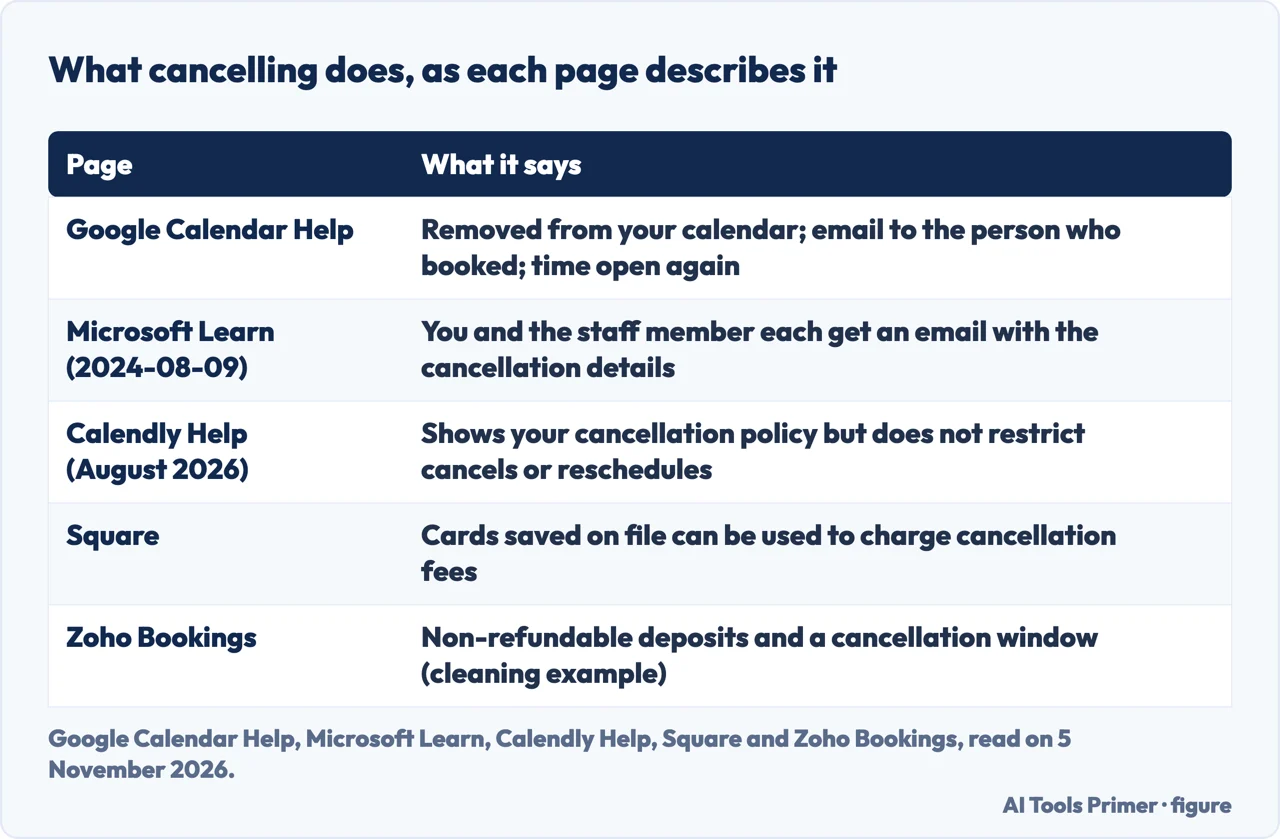
Google. When you cancel a booked appointment, Google says it is removed from your calendar, a cancellation email goes to the person who booked it and the time shows as available on your booking page again. To cancel, you open the booked appointment, click Cancel appointment and, on the booking page that opens, click Cancel your appointment. For an appointment on a third-party calendar, Google says to use the link in the confirmation email or decline the invitation. One detail concerns privacy as much as scheduling: Google says that if you or the person who booked forwards the confirmation email, the recipient can cancel the booked appointment. Deleting a whole schedule is separate: the links you shared stop working, while appointments already booked stay on both calendars.
Microsoft. Microsoft Learn, updated on 9 August 2024, describes a Manage booking button on the customer confirmation email and the booking details page. Customers can reschedule, cancel or contact you. A reschedule is chosen from free slots that match the service duration and requirements, and when a customer reschedules or cancels, Microsoft says you and the staff member each get an email with the details. Switching the setting off does not close every door: Microsoft says a customer booking through the Self-Service page keeps the button and its options even then, while one booking through the Calendar tab of the web app loses them. Its suggestion is to add text to confirmation and reminder emails about other ways to make a change, such as calling the office or emailing the help desk.
Calendly. The cancel and reschedule links are a checkbox in the Cancellation policy section of an event type’s notification settings, and the help page lists them under all plans. The policy text is a separate page, listed under paid plans. Calendly says plainly that it will display your cancellation policy but does not restrict cancellations or reschedules based on it.
Square and Zoho. Square describes saving clients’ cards on file to hold appointments, manage prepayments or charge cancellation fees, and customizable no-show policies, fees and prepayments. Its plan list shows a line called Cancellation policy and no-show fees under a tier above Square Free. Zoho describes optional payments, partial deposits and full payments, and for cleaning services non-refundable deposits with a cancellation window. Google says that after you connect a Stripe account to Calendar, you can request payment for appointments.
What happens to your customers’ data
A booking form is a data-collection form. Google’s has three required fields, first name, last name and email address, and you add more with Add an item. To avoid spam bookings, Google says to tick Require email verification, which sends a code to people not signed in to a Google Account. Zoho says the booking form can collect medical history and other important information from patients, and adds that several online booking systems support HIPAA compliance. The text does not say which systems, or whether Zoho Bookings is one of them. Zoho also says booking systems keep data synchronized across platforms and that this maintains customer privacy, which is a seller’s claim and not a test result.
Square says its client directory stores contact details, booking history, notes and payment information in one place, and that a client list can be imported from a CSV file. Appointment history from another provider is moved by contacting Square’s sales team.
Calendly’s help pages, updated in August 2026, say most about what you do when a customer asks for their data. They say the people whose data you collect, such as invitees and contacts, are generally considered your data subjects. For access, you can filter meetings for a specific person and export the details. For correction, you edit the contact. For erasure, you delete the contact, or use the data deletion tool in Settings, Security, Data. That tool works by email address, with up to 100 addresses separated by commas, or across a date range, and only owners and admins can use it. The result described is that the name is deleted, the email and its domain are anonymized and the answers to invitee questions are deleted. A date range removes event data only, not contacts. For a request to restrict or object, Calendly says it can attempt to assist if you contact its support team.
This page is not legal advice, and which rules apply depends on who your customers are and where you are. Sending marketing email to the people who booked is a different matter from running the booking, and our page on consent and the rules for business email takes it up. Our page on free CRM plans covers where the contact records go next.
What the pages do not say, and what we did not use
Some answers a business would want are missing from the pages we read.
- Which reminder setting cuts missed appointments most. The statements that reminders reduce no-shows are the sellers’, with no figure behind them.
- How long a booking tool keeps customer data. Calendly says how to delete it, not how long it is kept otherwise.
- What the law requires in each country. Zoho names HIPAA without saying who it applies to.
- Whether Microsoft’s reminders come with every plan. The Microsoft Learn page does not mention it.
- Prices. We give none, because the pages were read for how booking works and not for what it costs.
The pages also differ in kind. Google Calendar Help and Microsoft Learn are instructions for one product each; the Calendly pages are help articles from a seller; Zoho and Square are product and marketing pages. We did not find a comparison of these tools side by side.
Read together, the differences turn into questions for any tool: how many reminders it sends and whether their text can be edited; which calendars it checks, and whether co-hosts are included; who is told when a customer cancels, and whether a policy is enforced or only shown; and how a customer’s data is exported or deleted on request.
We tested no booking tool and created no account. We did not open the booking pages of other vendors, a government appointment page, or the commercial Microsoft 365 booking page. Google’s Workspace scheduling page was read, but it is a sales page that reached us in Italian, and we did not use it for any statement here.
Where to start
Four ways in.
- “How does a booking work?”
- How a booking goes, step by step — steps
- “Will it send reminders?”
- Confirmations and reminders — reminders
- “What if a customer cancels?”
- Cancelling and rescheduling — cancel
- “What about their data?”
- What happens to your customers’ data — data
Contacts and mailing
Who is on the list, and what you may send.
Planning around the booking
The calendar invitation that follows a booking.
Questions people also ask
How does online appointment booking work?
Zoho describes the customer landing on a booking page, picking a date and time from the list of slots, filling in the booking form and scheduling the appointment. Square says the appointment is confirmed at once and added to your calendar.
Can customers cancel or reschedule on their own?
Google says that if the confirmation email is forwarded, the recipient can cancel the booked appointment. Microsoft describes a Manage booking button that lets customers reschedule, cancel or contact you. Calendly says a checkbox adds cancel and reschedule links to its emails.
How many reminders can an appointment tool send?
Google says up to 5 reminders, with text that cannot be edited. Zoho says five email notifications and three time-based reminders. The text we read from Square and from Calendly gives no number.
What happens to a customer’s data when they book?
Google’s form requires a first name, last name and email address. Calendly describes deleting an invitee’s data by email address or by date range. The pages we read do not mention how long customer data is kept.
Not covered here. We tested no booking tool and created no account. The statements come from Google Calendar Help, Microsoft Learn, Calendly Help, Zoho Bookings and Square, all read on 5 November 2026. The Calendly, Zoho and Square pages are sellers describing their own products, and we used them only for that.
The search volume and difficulty behind this page come from an Ubersuggest reading of 5 November 2026, whose difficulty score is Ubersuggest’s own and not Semrush’s. The earlier reading, of 29 August 2026, is older than the 60 days the site normally allows.
Sources
- Google Calendar Help — Create an appointment schedule — support.google.com, read 5 November 2026.
- Google Calendar Help — Cancel appointments on your calendar — support.google.com, read 5 November 2026.
- Microsoft Learn — How to let customers manage their booking (updated 9 August 2024) — learn.microsoft.com, read 5 November 2026.
- Calendly Help — How to include cancel and reschedule links for invitees — calendly.com, read 5 November 2026.
- Calendly Help — How to add a cancellation policy — calendly.com, read 5 November 2026.
- Calendly Help — How does Calendly help customers with data subject rights? — calendly.com, read 5 November 2026.
- Calendly Help — How to delete personal data in Calendly — help.calendly.com, read 5 November 2026.
- Calendly — home page — calendly.com, read 5 November 2026.
- Zoho Bookings — What is an online booking system and how does it work? (updated 30 March 2026) — www.zoho.com, read 5 November 2026.
- Square — Free Online Booking and Scheduling Software — squareup.com, read 5 November 2026.
Written by Alberto Gulotta
Founder and editor of AI Tools Primer, writing from Palermo, Italy. Thirty-five years of taking computers apart, starting with a Commodore 64 — the long version is on the about page.
Something wrong on this page? Write to aitoolsprimer@gmail.com and it gets fixed.
Written on 5 November 2026.
Independence and limits
No affiliate links and no paid placements anywhere on this site. Nobody pays to appear here, and no company has seen this page before you did.
This is general information, not professional advice. Where a page touches money, health, safety or the law, it names its source and the date it was read — and your situation may still differ. See the privacy page and the cookie policy.