
Docs · guide
What is a PDF reader? Built-in ones, Adobe’s and the editing limit
By Alberto Gulotta · Updated · 10 min read
What is a PDF reader? Software that opens, views and prints PDF files, with tools to highlight and comment. Microsoft says a browser’s built-in reader needs no extra viewer application; Adobe says Acrobat Reader is free; both say reading is not editing. This page sets out those answers, the requirements and where the pages differ.
| Question | Answer | Where it comes from |
|---|---|---|
| What is a PDF reader? | Software used to view, browse and print PDF files, with tools to highlight and comment | novaPDF |
| Do I need to install one? | Microsoft says a PDF in OneDrive opens in the browser’s built-in reader, with no additional viewer application needed | Microsoft Support |
| Is Adobe’s free? | Yes: Acrobat Reader is free desktop software | Adobe |
| Can a reader change the text? | Not in the browser reader or in Acrobat Reader; both say you need to convert or buy an editor | Microsoft Support, Adobe |
| Who defines the format? | ISO 32000; PDF 2.0 is ISO 32000-2, free from the PDF Association | PDF Association |
What a PDF reader is, and what a PDF is
novaPDF, a vendor of a program that creates PDFs, in a page last updated on 21 February 2023, defines a PDF reader as software used to view, browse and print PDF files, which lets users open and read them on computers or mobile devices and also provides tools for highlighting, annotating and commenting. It adds that PDF is a file type developed by Adobe starting in 1993, that it can be shown without depending on a certain application, operating system or hardware, and that since 2008 it has been an ISO standard. The PDF Association agrees on the standard: PDF 2.0 is ISO 32000-2, first published in July 2017, and the 2020 edition replaces the 2017 one. The association says ISO 32000-2:2020 is available at no cost from it, thanks to sponsorship from Adobe, Apryse and Foxit.
Speechify, which sells a reading app, in a page of 4 August 2023, states the same job in plain words: a reader presents a PDF’s text, images and links in readable form. WinZip, which sells a PDF viewer, says a viewer only opens or lets you annotate existing content and has no option for converting documents to PDF. That is the short answer to what is a PDF reader: a program that opens PDFs, and the pages below say which ones you may already have and what they will not do.
Readers that may already be on your computer
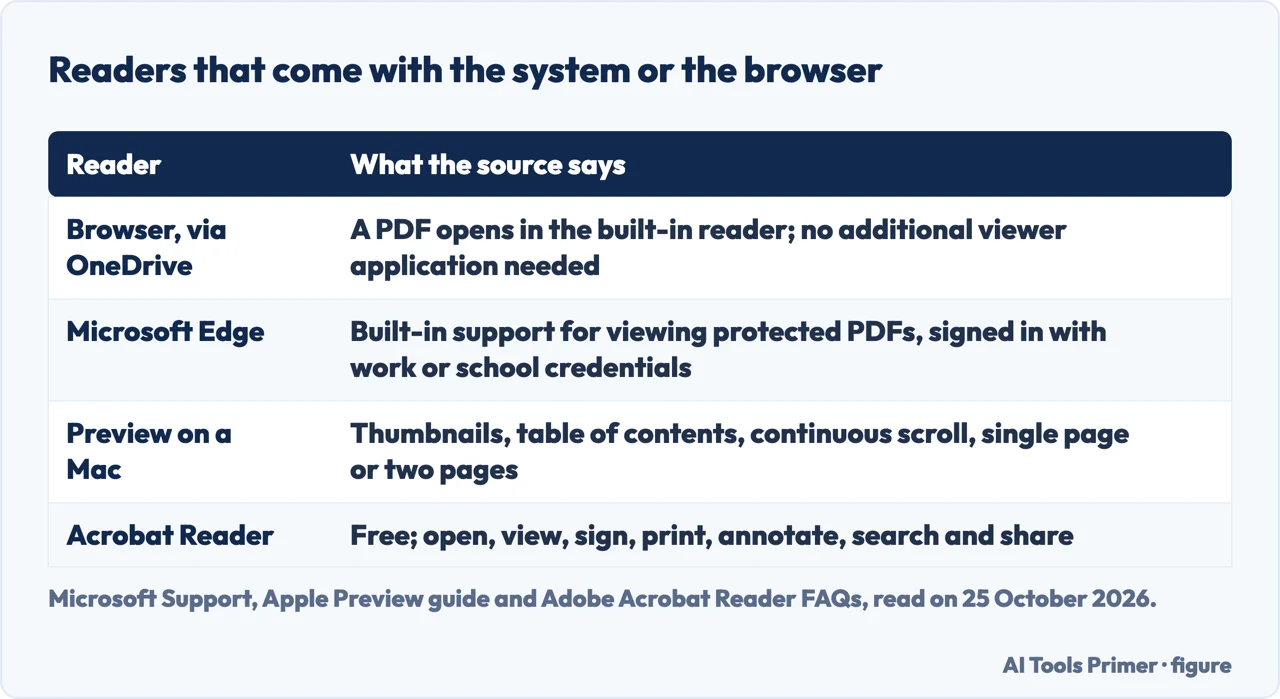
Microsoft’s support page on viewing, printing and editing PDFs in a PDF reader says that when you select a PDF in your OneDrive or team site library, it might open automatically in your browser’s built-in PDF reader, and that you can use it to view the PDF without an additional viewer application on your computer. You can view and print it but not edit its contents. From a modern browser such as Microsoft Edge or Chrome you open the PDF in a new tab and use the browser’s Print command; in Edge that is under More. If your browser has no built-in PDF viewer, Microsoft says you will see a message when you click Print, and you select Download and open the PDF in a desktop application or viewer. Separately, Microsoft says Edge has built-in support for viewing protected PDFs, with work or school sign-in, on Windows 11 and previous versions through Windows 8, and on macOS 10.12 and above.
Apple’s guide describes Preview, the viewer on a Mac. When you open a PDF with multiple pages you can view thumbnails of all the pages in the sidebar, show a table of contents if the document has one, and choose Continuous Scroll, Single Page or Two Pages from the View menu. Speechify says Windows, macOS, iOS, Android and Linux all have built-in tools to view PDFs, but that these tools are often limited, and names Edge, Apple Preview and Google Drive’s viewer as examples. Neither novaPDF nor WinZip says that the system or browser already has a reader.
Adobe Acrobat Reader: free, and what it lists
Adobe’s FAQ, last updated on 21 June 2026, says Acrobat Reader is free desktop software, a stand-alone application you can use to open, view, sign, print, annotate, search and share PDF files, and that you do not need Acrobat Pro or Acrobat Standard to use it; those are paid products in the same family. Its desktop software runs on Windows and Mac. The Reader product page says you can view, share, sign, leave comments and collaborate on PDFs for free on Windows, Mac, iOS and Android, and that a free mobile app is available. Adobe’s FAQ also calls Reader the only PDF viewer that can open and interact with all types of PDF content, including forms and multimedia, which is Adobe’s claim about its own product.
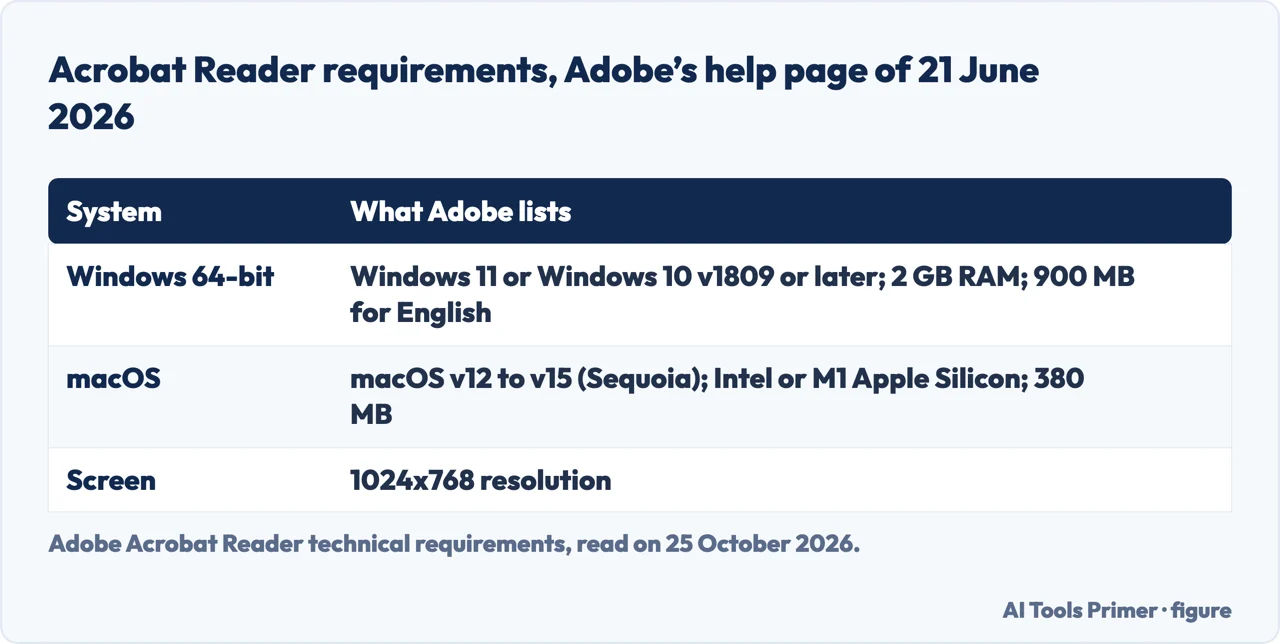
Adobe’s technical requirements page of the same date lists, for the 64-bit version on Windows, Windows 11, Windows 10 v1809 or later and some Windows Server versions, 2 GB of RAM and 900 MB of disk space for English; for macOS, an Intel or M1 Apple Silicon processor, macOS v12 to v15 (Sequoia), 2 GB of RAM and 380 MB. It also lists a 32-bit Windows version needing 4.5 GB, which looks like a different figure from the 64-bit one, and we did not install either.
Reading is not editing
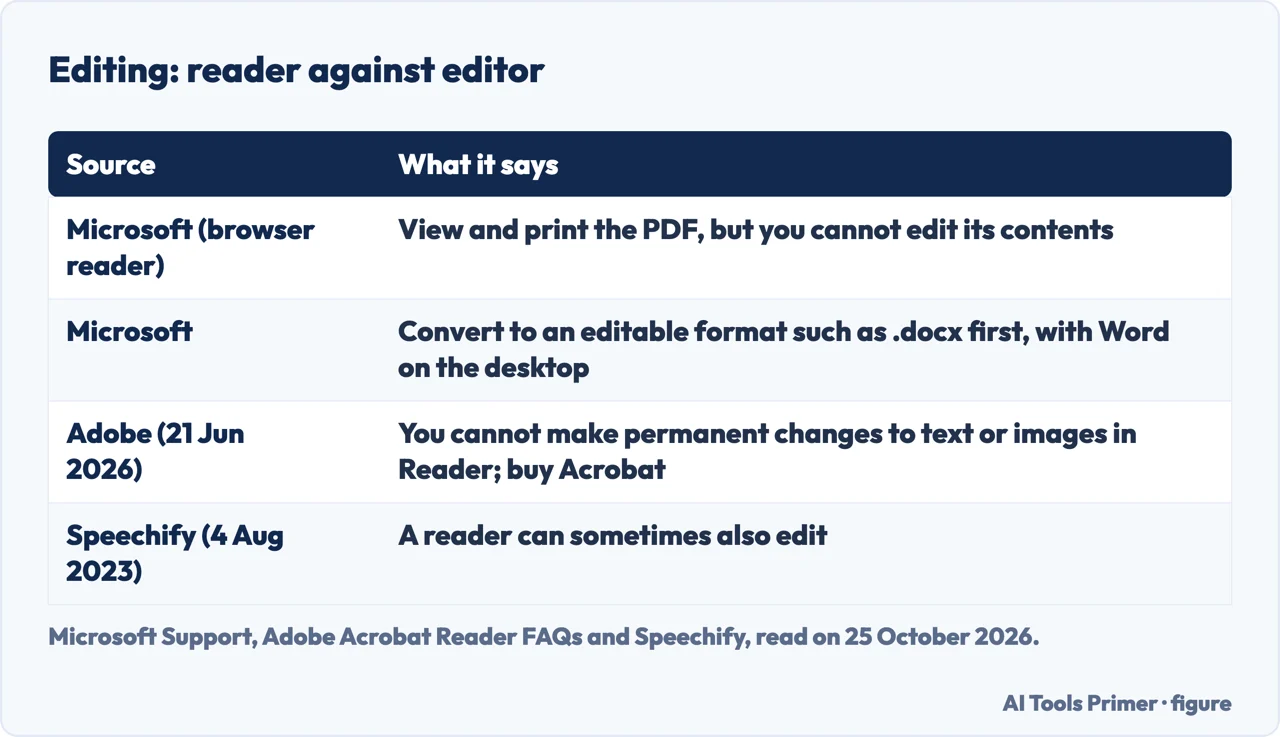
Microsoft says that before you can change the contents of a PDF you need to convert it to an editable format such as .docx, that you cannot do this with the browser’s PDF reader, and that you can use the desktop version of Word to convert the file. Adobe says you cannot make permanent changes to text or images in a PDF using Acrobat Reader, that you need to purchase Adobe Acrobat to edit, and that creating PDFs in Reader needs a subscription to Adobe Acrobat PDF Pack. Speechify takes a looser line: it says a reader can view, interact with and sometimes edit PDFs, and that some readers, which it calls editors or PDF tools, also edit, convert to other formats or create new PDFs. The vendors and the makers use the word differently, which is why the question of whether you need a reader is often a question about what you want to do with the file.
For changing a PDF see editing a PDF, for turning one into a Word file PDF to Word, and before you upload one to a converter site, what free converter sites do with your file.
Where the pages differ
The pages written by sellers of PDF software mostly define the reader and then list readers to download; novaPDF names Adobe Acrobat Reader, Foxit Reader, Sumatra PDF and Nitro PDF Reader, and says most are free and available for multiple systems. Microsoft and Apple describe what you already have. Adobe says its viewer is the only one that can open all types of PDF content, and Speechify says built-in viewers are often limited, while Microsoft and Apple describe viewing, printing and navigating without calling them limited. We did not test whether a built-in viewer opens forms or multimedia. The PDF Association is the neutral source on the format itself: the standard is open, though ISO holds the copyright to the specification.
Where to start
Four ways in.
- “What is it?”
- The definition — what
- “Do I have one?”
- Built-in readers — builtin
- “Is it free?”
- Adobe Reader — adobe
- “Can I edit?”
- Reading and editing — edit
PDFs: open, change, convert
Editing a PDF, converting it and opening it elsewhere.
Questions people also ask
Is it necessary to have a PDF reader?
You need something that opens PDFs. Microsoft says a browser’s built-in reader opens a PDF from OneDrive with no additional viewer application, and Apple describes Preview on a Mac.
Is a PDF reader for free?
Adobe says Acrobat Reader is free. Editing is not part of it: Adobe says you need to buy Acrobat for that.
What is a PDF reader on my phone?
Adobe says a free Acrobat Reader mobile app exists for iOS and Android.
How do I know if I have a PDF reader?
Open a PDF. Microsoft says that from Edge or Chrome a PDF opens in a new tab in the built-in reader; if the browser has none, Print shows a message and you download the file and use a desktop viewer.
Not covered here. We did not install or compare PDF readers. The statements come from Microsoft Support (viewing, printing and editing PDFs in a PDF reader; viewing protected PDFs in Edge), Apple’s Preview guide, Adobe’s Acrobat Reader FAQs and technical requirements (both updated 21 June 2026) and product page, the PDF Association, and vendor pages by novaPDF (21 February 2023), Speechify (4 August 2023) and WinZip, used for what they claim. Microsoft, Apple and WinZip pages carry no date that we could read.
Pages by Tungsten, a university IT service, PDF Candy and an app store listing were not used. Mobile readers other than Adobe’s are not covered.
The search volume and difficulty behind this page were read in Semrush on 29 August 2026.
Sources
- Microsoft Support — View, print, and edit PDFs in a PDF reader — support.microsoft.com, read 25 October 2026.
- Microsoft Support — View protected PDFs using Microsoft Edge on Windows or Mac — support.microsoft.com, read 25 October 2026.
- Apple Support — View PDFs and images in Preview on Mac — support.apple.com, read 25 October 2026.
- Adobe — Adobe Acrobat Reader FAQs (last updated 21 June 2026) — helpx.adobe.com, read 25 October 2026.
- Adobe — Adobe Acrobat Reader technical requirements (last updated 21 June 2026) — helpx.adobe.com, read 25 October 2026.
- Adobe — Adobe Acrobat Reader — www.adobe.com, read 25 October 2026.
- PDF Association — ISO 32000-2 — pdfa.org, read 25 October 2026.
- novaPDF — What is a PDF reader and what is a PDF file? (21 February 2023) — www.novapdf.com, read 25 October 2026.
- Speechify — What is a PDF reader (4 August 2023) — speechify.com, read 25 October 2026.
- WinZip — PDF Viewer: What It Is and How to Find One — www.winzip.com, read 25 October 2026.
Written by Alberto Gulotta
Founder and editor of AI Tools Primer, writing from Palermo, Italy. Thirty-five years of taking computers apart, starting with a Commodore 64 — the long version is on the about page.
Something wrong on this page? Write to aitoolsprimer@gmail.com and it gets fixed.
Written on 25 October 2026.
Independence and limits
No affiliate links and no paid placements anywhere on this site. Nobody pays to appear here, and no company has seen this page before you did.
This is general information, not professional advice. Where a page touches money, health, safety or the law, it names its source and the date it was read — and your situation may still differ. See the privacy page and the cookie policy.