
Footprint · guide
Google's Results about you tool, source by source
By Alberto Gulotta · Updated · 18 min read
Results about you is Google's tool for finding out whether your home address, phone number or email address shows up in search results. Google says an approved request removes the result, most of the time for any query, but the info stays on the source page. The pages we read differ on who is excluded.
| Question | Answer | Where it comes from |
|---|---|---|
| What does it look for? | Whether your home address, phone number or email address shows up in search results | Google Search Help |
| Where do I open it? | In the Google app, from the menu under your profile picture; on the web, with Get started or Settings | Google Search Help |
| What will Google not remove? | Pages owned by educational or government institutions and newspapers; its step-by-step section also names business websites | Google Search Help |
| What does an approval do? | Most of the time the URL stops appearing for any query; otherwise only for queries with your name | Google Search Help |
| Is the page itself deleted? | No: the info still exists on the source page, whether the request is approved or denied | Google Search Help, BBC Future |
What it scans for and how it is switched on
Google’s help page says that with Results about you you can find out if your personal info, like your home address, phone number or email address, shows up in search results. BBC Future calls it a free service run by Google, and says that you need a Google account to use the automated service, although there is also a manual process, usable without an account, for sensitive information you find in search results yourself. Google adds a warning that some of these features are rolling out for users over the age of 18 in certain markets, and for a result that shows personal info about someone under 18 it points to the detailed removal request form.
Google gives two doors in. In the Google app you log in, click your profile picture or initial to open the menu and select Results about you. From mobile web or desktop you go to the Results about you page and select Get started or Settings. Help Net Security described the app route in August 2023 in nearly the same words: click your Google account photo, then select Results about you.
Next you enter your name and the personal info you want Google to look for, and Google says it uses that to check search results that show the info. Its tip is that you can also enter a nickname, a maiden name, several personal phone numbers, several home addresses and several email addresses. You can then choose email notifications, and notifications also arrive through the Google app. With notifications on, Google says the first one tells you whether any results matched your info, and a new one follows when new matching results are found. The first notification is due within a few hours, it says.
The data you type in is the part some readers will weigh first. Google’s FAQ says it stores it under its standards for sensitive personal info, which include advanced encryption and access controls. It says it does not share the info or use it to personalise your experience across other Google products, and that it is used and stored for monitoring, for processing removal requests, for improving the process and for letting you see the status of your requests over time. To stop monitoring, Google says to select Remove all personal info under Settings. BBC Future adds that a Google spokesperson says the data is not used for any other purposes, and quotes Thorin Klosowski of the Electronic Frontier Foundation, who says Google probably has things like your address and phone number already.
EFF’s guide to managing a digital footprint puts a step before the tool. It suggests searching your own name in a private browsing window or a separate browser, so that being logged into a Google account does not skew the results, and only then going to the Results about you page to enter your information and get notifications when new information about you appears.
Asking for a removal, step by step
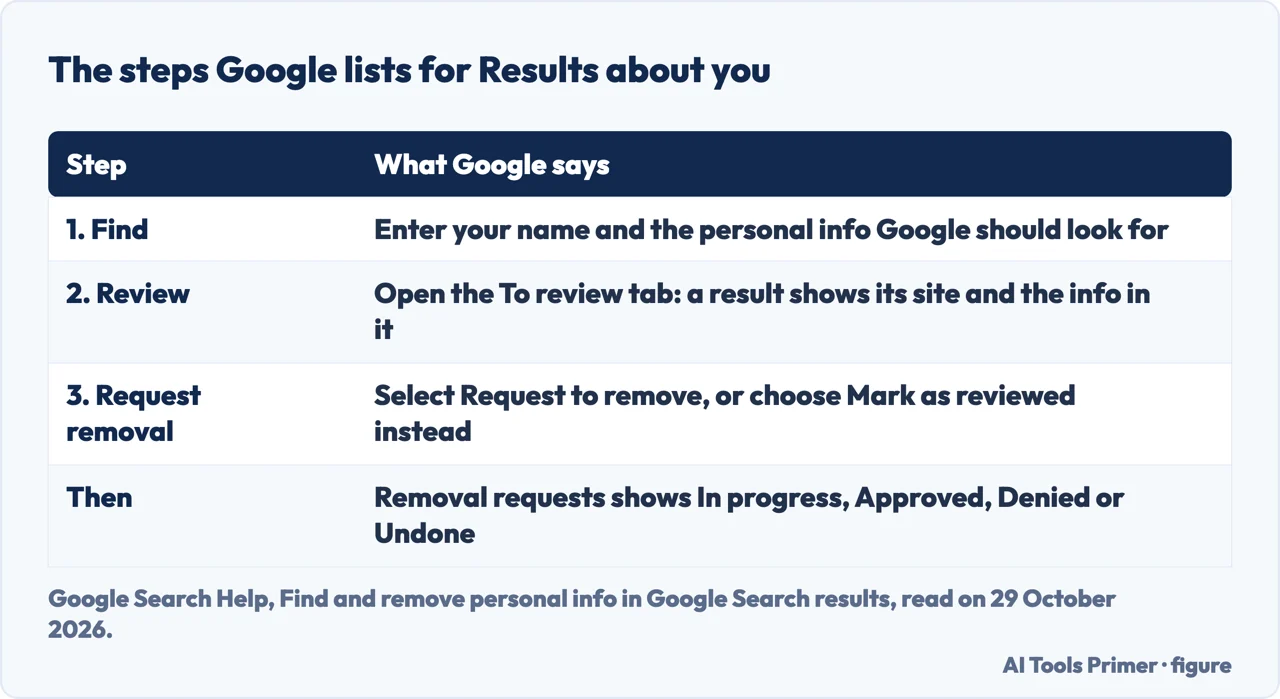
Google describes three steps: find, review, request. Reviewing happens on the To review tab of the Results about you page. When you select a result you can learn more about it, such as the website it is from and the personal info it contains. If you see a result you would rather keep private, you select it and expand Request to remove. If you do not want to start a request, Google says you can choose Mark as reviewed instead. Google’s page also says that for a result from a website it considers valuable to the public, you will not find a Remove result option.
The same help page covers a second route that does not start from the tool. You log in with your Google Account, then search for your name. To find results that show contact info, Google suggests searching your name with your home city, or your name with your home address. Click More to reach the About this result panel, then select Remove result, then It shows my personal info and I don’t want it there, then Contact Info, go through the reporting flow and submit. BBC Future describes it as the three dots next to a link in search results and the Remove result button. Google’s February 2025 post says the updated menu helps you understand what content is eligible for removal and lets you submit in fewer clicks.
Google’s tip for the form is to enter your name and the contact info exactly as they appear on the result: a nickname if the result shows one, an old home address if that is what it shows. If a result shows more than one type of contact info, you only need to include one in the form, and you do not need to submit several requests for the same URL.
What happens next is a short list. Within the next few hours Google says you will receive an email confirming the request was submitted, and you can check the status on the Results about you page under Removal requests: In progress, Approved, Denied or Undone. Selecting a request shows the link to the page you flagged, the day and time you submitted it, the request ID and the contact info you flagged. Google’s tip is that there may be a delay between approval and the result disappearing from search, and that you can check whether your info is already gone within a few hours after approval. The pages we read do not say how many days pass between a request and a decision.
What Google will not remove
After you submit a request, Google says it reviews it against policy requirements, and lists three. The contact info on the result has to be your personal info, and for professional info posted with the intent to harm you the page points to the detailed removal request form. You must not control the info yourself, which means info you can remove from the internet yourself, such as on a social media page or a personal blog you own. And Google says it will not remove info that is valuable to the public, giving as examples pages owned by educational or government institutions and newspapers.
The sources differ a little on who is on that list. Google’s step-by-step section names government or educational websites, online newspapers and business websites, while its FAQ names educational or government institutions and newspapers, without business websites. BBC Future writes that content on government and news sites is exempt. Help Net Security, in 2023, quoted Danielle Romain, Google’s VP of Trust, saying Google would evaluate all content on a page so as not to limit the availability of other information that is broadly useful, for instance in news articles, and would also evaluate whether the content appears as part of the public record on the sites of government sources.
If a request is denied, Google says you get an email, and the reason it was not approved is shown on the Results about you page. A paywall does not stop a request: Google says that if the result came from one of its notifications you can click the notification, and that if you found the result yourself in search you use the detailed removal request form. The same form is the route for a request on behalf of someone else, and Google warns that a request made through Results about you for someone else from your own Google Account may be denied. BBC Future says Google will also remove results containing information about family members in some cases.
What an approved request does, and what stays
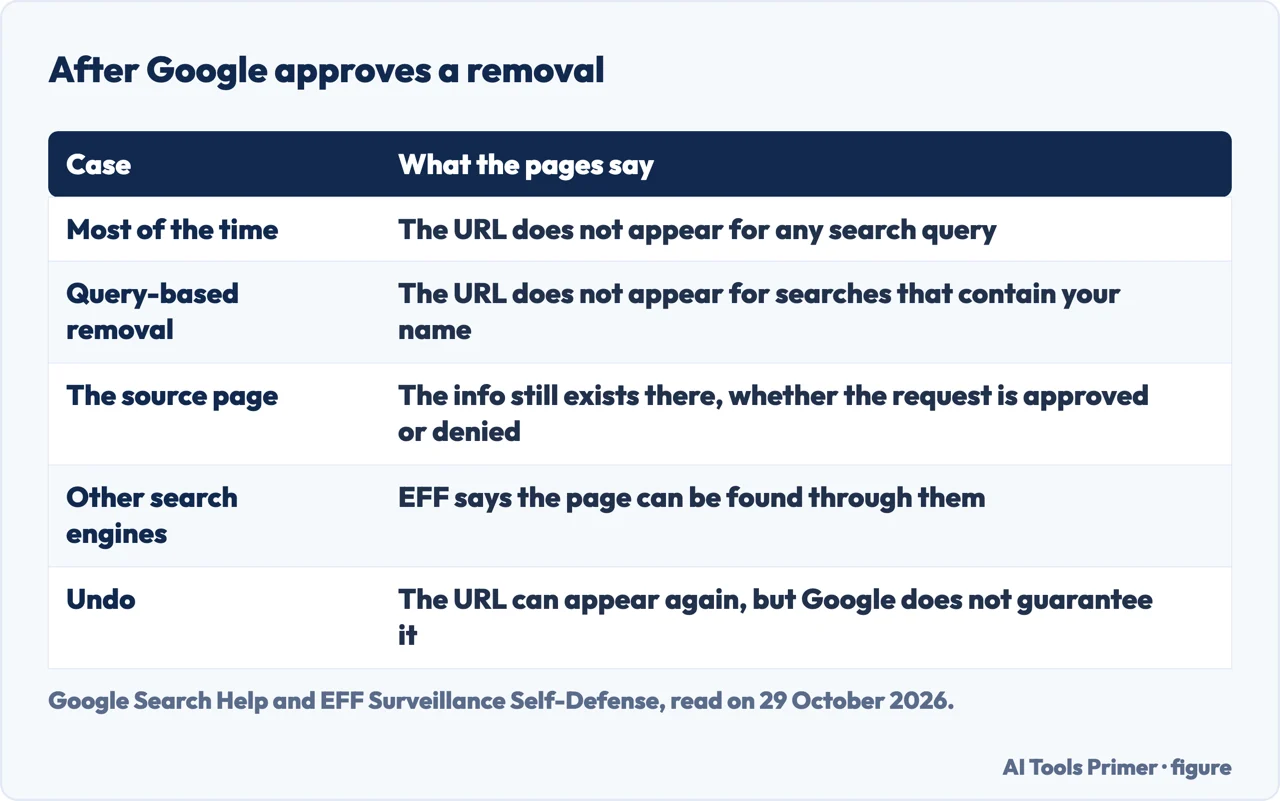
Google’s FAQ gives two outcomes for an approved URL. One is that it will not appear for any search query, and Google writes, “This is what happens most of the time.” The other is that it will not appear for search queries that contain your name. Google calls this query-based removal and says it happens when the info that violates the policy is accompanied by content considered valuable to the public, or by info that belongs to other individuals or businesses. Its general removal page draws the same line as full and partial removal, and adds that in a partial removal the page might still show up for other searches.
The limit that the Google, Help Net Security, EFF and BBC Future pages all repeat is that the page is still there. Google says that removing a result does not mean the info is gone from the internet: whether a request is approved or denied, the info still exists on the source web page, and to remove it from the source you contact the website’s owner. Google’s general page adds that people might still find the content through links, social media or other search engines. Help Net Security quotes Danielle Romain saying that removing content from Google Search does not remove it from the web or from other search engines. EFF’s guide says an approval does not mean the website hosting the data deletes anything, and that the data can be found through other search engines, though it calls the process useful because Google remains the most popular search engine. BBC Future puts it as: the tool removes the links from Google Search and leaves the information on other webpages.
Two smaller controls sit around this. If you change your mind, you select Undo on the Results about you page, which makes it possible for the URL to appear in search results again. Google says that does not guarantee it will reappear, because if someone else requested removal of the same URL and Google approved it, Google cannot show that URL again even if you undo your own request. And for the opposite problem, a result that shows old information after the website was updated, Google’s general page and its February 2025 post describe a refresh request from the three dots menu, after which Google’s systems recrawl the page and get the latest information.
What else you can ask for, and where
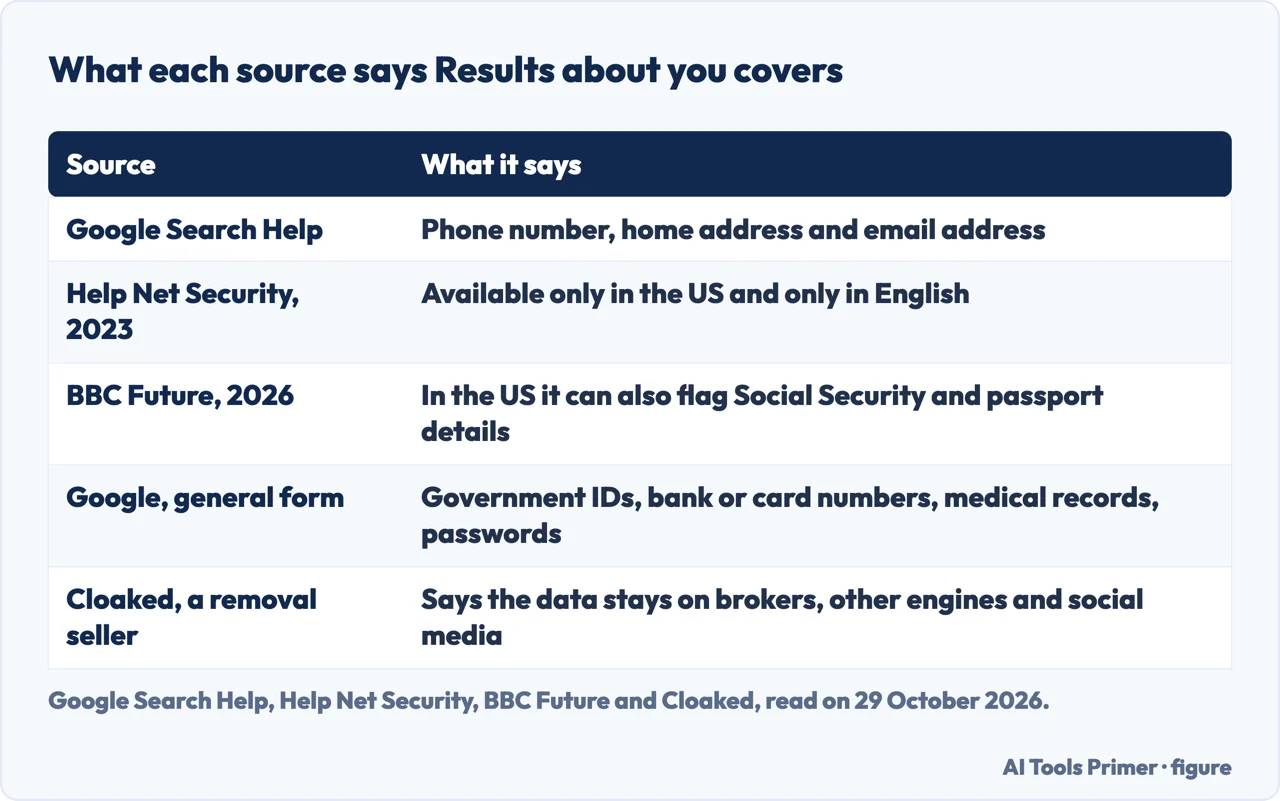
Results about you is the route Google points to for contact details. Its general page on removing private info lists a wider set that you can ask Google to remove with a request form: your address, phone number or email; confidential government IDs, such as Social Security or tax ID numbers and resident ID card numbers; a bank account or credit card number; pictures of your signature or ID; private records, such as medical records; and confidential usernames and passwords. A tip on that page tells you to use Results about you for contact details, since it also lets you set up notifications for new results. BBC Future says that in the US the tool can also flag Social Security numbers and passport or driver’s licence details, which is where the two sources differ on the tool itself: Google’s help page for it names phone number, home address and email address.
The same general page covers doxxing content, which it defines as sharing your private information to harm you. Google says it can remove a URL with your personal info along with explicit or implicit threats against you, or calls for others to harm or harass you, or with a significant amount of aggregated personal info without a legitimate purpose. That is a different job from the one this tool does, and our page on what to do about doxxing goes through it. For content that is not covered by Google’s policies, the general page says specific local laws may apply and points to the Legal Help Center; our page on the right to be forgotten covers where that exists as a legal right.
Where the tool is available is the point on which the sources are oldest. Help Net Security wrote in August 2023 that it was available only in the US and only in English, with plans to expand. Google’s help page today speaks of features rolling out for users over 18 in certain markets. The pages we read do not list the countries. On what has changed, Google’s blog post of 26 February 2025 describes a redesigned tool with a new hub, proactive monitoring that alerts you when new results are found, and removal requests directly from Search in fewer clicks. A removal seller, Cloaked, dates its upgrade to March 2025; we follow Google’s own dated post. BBC Future reports, citing Google, that more than 10 million people have used the tool since it launched in 2022.
Where the tool stops
BBC Future is direct about the limit. It says criminals buy and sell sensitive data from hacks and data breaches, that Google cannot help there, and that the tool will not give total privacy but creates roadblocks. It quotes Klosowski of EFF saying that if very dedicated people want to find you, they will, and that the tool peels off the first layer of information that is easy to find. To go further, BBC Future lists contacting data brokers directly and asking them to delete your information, paid services that do that work for you, and, for California residents, the free state-run Delete Request and Opt-out Platform, called Drop, which asks thousands of data brokers to delete your data at once. EFF’s guide adds what the broker route costs in effort: opt-outs are often complicated multi-step processes, most sites want an email confirmation, and you may need to repeat them over the years because the information is often repopulated. It says paid services such as EasyOptOuts and Optery claim to help, but brokers keep scraping public records, so such services can need ongoing subscriptions and cannot promise coverage of every source.
The page from Cloaked, a seller of removal services, makes the same point and gives numbers. It says it tested Google’s tool on three addresses and that Google delisted 3 of 8 results for the first, 2 of 12 for the second and 1 of 6 for the third. The page does not describe the method or give a date for the test, and Cloaked sells data removal, so we read the figures as a claim, not a measurement. It also lists where it says the data stays visible: direct visits to data broker sites, Bing, DuckDuckGo and Yahoo, social media, public records databases and property sites. On the source page and other search engines, that list matches what Google and EFF say.
A separate job sits next to this one. Results about you works on what search shows about you, and our page on deleting your search history covers the history of your own searches in My Activity. Google says it checks for your name and info regularly; BBC Future says the tool does not erase information on other webpages, and that to remove data entirely you can contact data brokers directly and ask them to delete it.
What we did not use
We did not set up the tool or send a request, and we tested nothing. The tool’s own page on myactivity.google.com needs a sign-in, and what we could open of it was only a short shell, so we used Google’s help pages instead. We did not open the guide from redact.dev or the post from Narrative Digital, both from removal sellers. The four questions below come from what the pages we read cover. The pages we read do not say how many days a decision takes, do not list the countries where the tool works today, and do not say what share of requests Google approves.
Where to start
Four ways in.
- “How do I turn it on?”
- What it scans for and how it is switched on — scans
- “How do I ask for a removal?”
- Asking for a removal, step by step — request
- “Which pages will Google refuse?”
- What Google will not remove — refuse
- “Is the page itself gone afterwards?”
- What an approved request does, and what stays — approved
Other routes off Google and the web
What to do when the problem is bigger than one tool.
Questions people also ask
How do I find my results about you?
Google says to open Results about you from the menu under your profile picture in the Google app, or go to the page from mobile web or desktop and select Get started or Settings. Then enter your name and the personal info to look for, and use the To review tab.
Does Google’s tool remove the page itself or only the search result?
Only the search result. Google says the info still exists on the source web page whether a request is approved or denied, and that you contact the website’s owner to remove it there. BBC Future says the tool removes the links from Google Search.
Which pages will Google not remove?
Google says it will not remove results for pages owned by educational or government institutions and newspapers, and its step-by-step section also names business websites. It also will not remove info you control yourself, such as a social media page or a blog you own.
Is the tool free and does it need a Google account?
BBC Future calls it a free service and says you need a Google account for the automated service. It adds that a manual process, for information you find in search results yourself, can be used without an account.
Not covered here. We set up nothing and sent no request. The statements come from two Google Search Help pages, a Google blog post, Help Net Security, BBC Future, EFF and a page by a removal seller, Cloaked, all read on 29 October 2026.
The search volume and difficulty behind this page come from a Semrush reading of 29 August 2026, older than the 60 days the site normally allows.
Sources
- Google Search Help — Find and remove personal info in Google Search results — support.google.com, read 29 October 2026.
- Google Search Help — Remove my private info from Google Search — support.google.com, read 29 October 2026.
- Google, The Keyword — Remove personal information and outdated content from Search results (26 February 2025) — blog.google, read 29 October 2026.
- Help Net Security — Google makes removal of personal user info from Search easier (4 August 2023) — www.helpnetsecurity.com, read 29 October 2026.
- BBC Future — People are selling your home address online (4 March 2026) — www.bbc.com, read 29 October 2026.
- EFF Surveillance Self-Defense — How to manage your digital footprint — ssd.eff.org, read 29 October 2026.
- Cloaked — Google’s Results About You vs Professional Data Removal (24 September 2025) — www.cloaked.com, read 29 October 2026.
Written by Alberto Gulotta
Founder and editor of AI Tools Primer, writing from Palermo, Italy. Thirty-five years of taking computers apart, starting with a Commodore 64 — the long version is on the about page.
Something wrong on this page? Write to aitoolsprimer@gmail.com and it gets fixed.
Written on 29 October 2026.
Independence and limits
No affiliate links and no paid placements anywhere on this site. Nobody pays to appear here, and no company has seen this page before you did.
This is general information, not professional advice. Where a page touches money, health, safety or the law, it names its source and the date it was read — and your situation may still differ. See the privacy page and the cookie policy.