Asking how to delete a gmail account gets a smaller answer than the phrase suggests: it removes one service, and the Google Account it belonged to carries on. Google says so in a single line.
What removing Gmail does not touch
Google lists it explicitly, which makes this the rare case where the scope of an irreversible action is published.
“You can still access your Google Account and other services that aren’t affected, like:”
“Your activity across Google services.”
“Purchases from Google Play.”
And on the other page, plainly: “You can remove your Gmail account from your Google Account.
Deleting it won’t delete your entire Google Account.”
That distinction is the first thing to settle, because the two operations are often described as one. Removing Gmail leaves the account standing; deleting the Google Account is a different command with a different consequence, and Google notes it on the same page: “When you delete your Google Account, the data associated with your Gmail account will be deleted.” One of those takes your mailbox. The other takes everything.
The verdict, and the sentence it rests on
“This sends an email to the alternate email address. Until you verify your address,
your Gmail address and emails aren’t removed from your Google Account.”
Pressing Delete does not delete anything. The switch is the link in the other inbox, and
Google says so on both of its pages about this — the second one puts it as “Until you verify the
new email address, your Gmail address won’t be deleted.” So the operation has a step that
happens somewhere else, on a different account, and a person who closes the tab after clicking
Delete has changed nothing at all. Read on Google’s pages, 23 August 2026.
The steps themselves are short, and they have an oddity worth knowing before you go looking for the menu. Google documents this operation twice, with two different routes, and the wording of the menus does not match.
What one Google page says
support.google.com/accounts/answer/61177
Google Account → Data & privacy.
Scroll to the “Tools” section.
Click Remove data from services you no longer use.
Next to “Gmail”, click Delete.
Enter an alternate email address, click Next.
What the other one says
support.google.com/accounts/answer/32046
Google Account → Data & privacy.
Scroll to “Data from apps and services you use”.
Select Delete a Google Service.
Next to “Gmail”, select Delete.
Enter an existing email address, select Send verification email.
Both end in the same place and both work; they were read on the same day. But if you are following one page and looking at the screen for the words from the other, you will not find them. The reliable landmark is the same in both: Data & privacy, then a section with Gmail in a list and a Delete beside it. Whether that section is called “Tools” or “Data from apps and services you use” depends on which of Google’s pages you happened to open.
One requirement is common to both and is worth having ready. You need a second email address before you start — Google’s wording is “a different email address associated with your Google Account” on one page and “an alternate email address” on the other. It becomes the address you sign in with, and it is also where the verification message goes.
“Your Gmail address can’t be used by anyone in the future.”
Eight words, and they settle a worry that sends a lot of people looking. A removed Gmail
address does not go back into circulation. Nobody will be reading mail meant for you, and
nobody will be writing from your old address. It is worth stating because the neighbouring
platforms behave differently — an Instagram username, for instance, returns to the pool and can
be taken by someone else. Google’s answer here is the opposite, and it is unconditional.
“the SMTP server
returns a 550 reply, typically with a string such as “no such user - ”
and the mailbox name”
That is not Google’s wording; it is the specification that every mail server on the
internet implements. It answers the question Google’s pages leave open: what happens to
the people who go on writing to you there. They are not left wondering. Their mail comes
straight back, with a permanent failure and a line naming the address — not a message that
sits unread in a mailbox nobody opens.
The practical consequence is about timing rather than about mail. Everyone who writes to that
address finds out on their first attempt, and finds out from a machine. Anyone who should hear
it from you instead has to hear it before you press the button, not after.
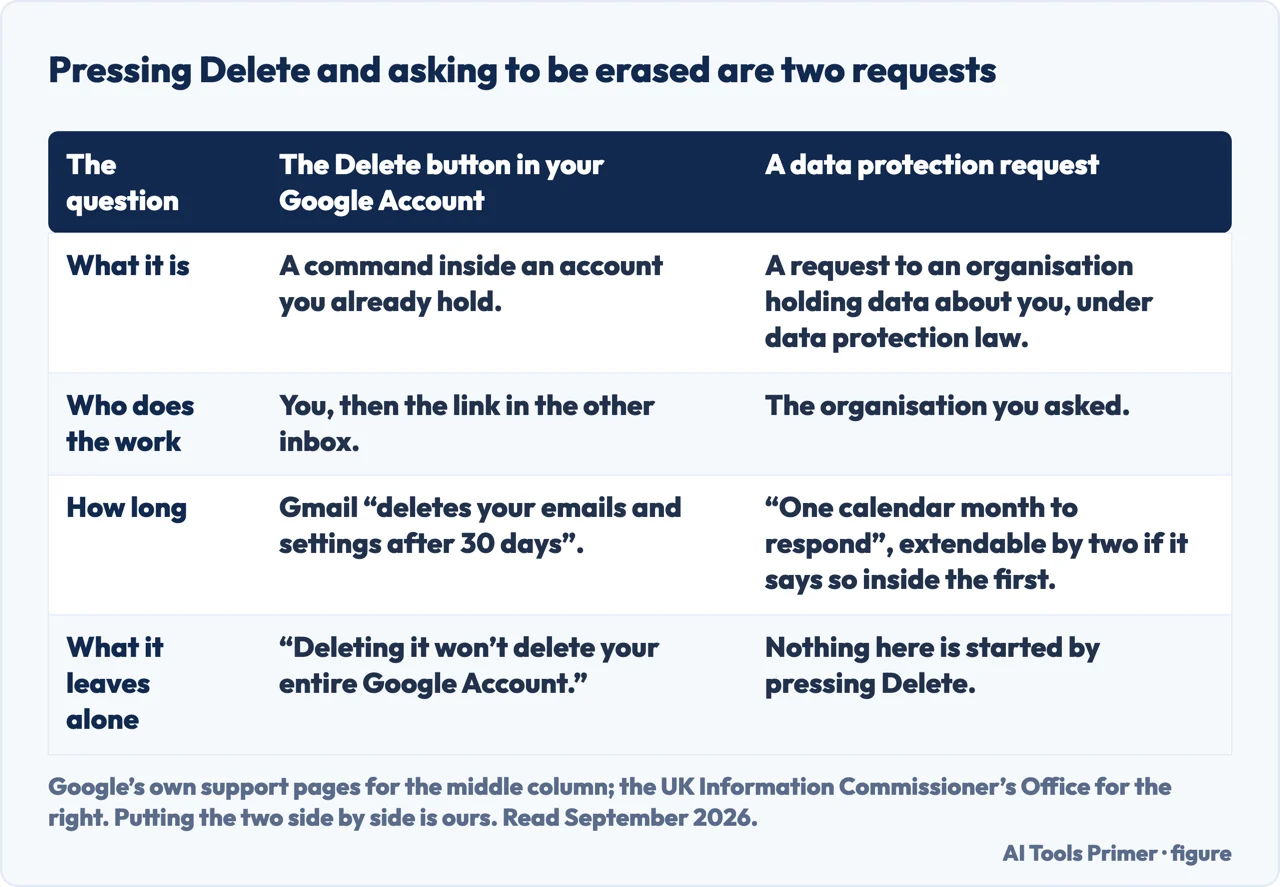
And one distinction worth keeping separate, because the same word covers two different things. Deleting the account is a product action: it removes the mailbox and the address. Asking a company to erase what it holds about you is a legal one, with its own deadline — the UK regulator describes it as asking “an organisation that holds data about you to delete that data”, and says the organisation then “has one calendar month to respond to your request”, extendable by two months if it tells you inside the first one and says why. The two are not the same button, and pressing the first does not start the second.
Two requests that get confused for one. Google’s pages on the left, the UK regulator on the right; putting them side by side is ours. Figure drawn by AI Tools Primer.
Two different clocks, and only one of them is generous.
On the address: “Even if you remove your Gmail address, you can get it back.” On the mail
inside it: “Gmail deletes your emails and settings after 30 days”, and Google adds the
qualification in the same breath — “if it’s been a while since you removed your Gmail address, you
might not be able to get your emails back.” Verdict: the address is recoverable and the
mail is not, past a point Google does not fix precisely. If anything in that mailbox matters,
it has to leave before the removal, not after.
What this page will not tell you is how long “a while” is. Google uses that word rather than a number when describing the point past which the emails may be gone, and the only precise figure it publishes is the thirty days after which the emails and settings are deleted. Turning a vague word into a firm deadline would be inventing the most consequential number on the page.
It also will not recommend a service that promises to delete accounts for you. Everything here is two menus deep inside an account you already have, and the second address it asks for is one you already own.
The guides below take it three ways: what leaves with the mailbox, how to get the address back, and the same question asked of the other accounts people close at the same time.
Where to start
Three ways in. If you have already pressed Delete, take the first — you may not be finished.
The Google Account, the activity across Google services, and Google Play purchases. Google publishes the list, which is rare for an irreversible action.
Not covered here. It will not tell you how long “a while” is. Google uses that word rather than a number for the point past which the emails may be gone, and inventing one would be inventing the most consequential figure on the page.
It will not recommend a service that deletes accounts for you. This is two menus deep inside an account you already have.
And it will not treat removing Gmail and deleting a Google Account as the same thing. They are two commands with two consequences, and Google separates them. What holds instead is simple: what survives removing Gmail is Google’s own list, and this page resists making the boundary sound cleaner than Google draws it.
Sources
Google, Remove Gmail from your Google Account — Google Account Help (that after removing Gmail the emails and settings are deleted after 30 days, that the address can no longer send or receive and may be recoverable if you change your mind, that the Gmail address cannot be used by anyone in the future, and that the Google Account and unaffected services remain accessible including activity across Google services and purchases from Google Play; the steps under the heading “Delete your Gmail service” through Data & privacy, the Tools section and “Remove data from services you no longer use”, clicking Delete next to Gmail and entering an alternate email address; the statement that this sends an email to the alternate address and that until it is verified the Gmail address and emails are not removed; and the note that even after removal the Gmail address can be recovered, though if it has been a while the emails might not be) — support.google.com, read 23 August 2026.
Google, Delete your Gmail account — Google Account Help (that a Gmail account can be removed from a Google Account and that deleting it will not delete the entire Google Account; the note that when the Google Account itself is deleted the data associated with the Gmail account is deleted too; the requirement for a different email address associated with the Google Account; and the steps through Data & privacy, the section “Data from apps and services you use” and “Delete a Google Service”, selecting Delete next to Gmail, entering an existing email address and selecting Send verification email, with the statement that until the new address is verified the Gmail address will not be deleted) — support.google.com, read 23 August 2026.
IETF, RFC 5321 — Simple Mail Transfer Protocol, the specification every mail server implements (that if the recipient is known not to be a deliverable address the SMTP server returns a 550 reply, typically with a string such as “no such user” and the mailbox name) — www.rfc-editor.org, read 26 August 2026.
Information Commissioner’s Office, Your right to get your data deleted (that the right to erasure is asking an organisation that holds data about you to delete that data, and that the organisation has one calendar month to respond, extendable by up to two further months if it says so within the first month and gives its reasons) — ico.org.uk, read 26 August 2026.
AG
Written by Alberto Gulotta
Founder and editor of AI Tools Primer, writing from Palermo, Italy. Thirty-five years of
taking computers apart, starting with a Commodore 64 — the long version is on the
about page.
Written on 23 August 2026 · last checked 23 September 2026.
§
Independence and limits
No affiliate links and no paid placements anywhere on this site. Nobody pays to appear here,
and no company has seen this page before you did.
This is general information, not professional advice. Where a page touches money, health,
safety or the law, it names its source and the date it was read — and your situation may
still differ. See the privacy page and the
cookie policy.