Unpublish
out of sight, still yours“When you unpublish a Page, it will no longer be visible publicly.” Nothing is deleted, nothing is queued, and it is undone by republishing.

Software · guide
By Alberto Gulotta · Updated · 11 min read
Before working out how to delete a facebook page it is worth knowing that Facebook documents three different commands here, and that one of them can happen without anybody pressing anything.
Unpublish
out of sight, still yours“When you unpublish a Page, it will no longer be visible publicly.” Nothing is deleted, nothing is queued, and it is undone by republishing.
Remove from portfolio
out of your business suiteTakes the Page out of a business portfolio. The Page itself carries on — and this is the step that lets somebody else take it over.
Delete
a clock startsDeactivated at once, gone after fourteen days. The only one of the three that ends with nothing left.
Those three get used interchangeably in conversation and they are not interchangeable at all. Unpublish hides. Removing from a portfolio hands over. Delete ends. Most of the regret in this subject comes from reaching for the third when the first two would have done the job.
What happens after you press Delete
Two stages, and only the first is immediate.
Fourteen is the number to hold on to, because thirty is the figure attached to personal accounts on the neighbouring platforms — Instagram’s deletion window is thirty days — and it does not apply here. And the second line matters as much as the first: the window is only usable from a personal profile, since a deactivated Page cannot be used to reactivate itself.
“Note: If your Page does not have at least one person with Facebook access with full control, it will be automatically deactivated and scheduled for deletion.”
Facebook’s own note, read 23 August 2026. A Page can be deleted without anyone deleting it. If the last person holding full control leaves the company, deletes their personal Facebook profile, or simply loses access to it, the Page does not carry on unattended — it is deactivated and queued for removal. Verdict: a Page with exactly one full-control admin is a Page with a single point of failure, and the remedy is a second one, added before it matters rather than after.
That note is the reason this page exists in the form it does. Everything else here is a decision somebody makes; that one is a consequence of an absence. A Page whose only full-control admin is a person who might leave, change jobs, or close their own account is already on a countdown nobody has started deliberately.
“You can’t transfer ownership of a Facebook Page to another business portfolio but, if you remove the Page from your business portfolio, another organization can add it to theirs.”
Verdict: if the Page is meant to go to somebody else, deleting it is the wrong move and there is no undoing it after fourteen days. Meta’s documented route is removal from the portfolio, which leaves the Page standing and free to be claimed. The word “transfer” does not exist as a command here, which is why people go looking for it, fail to find it, and reach for Delete instead.
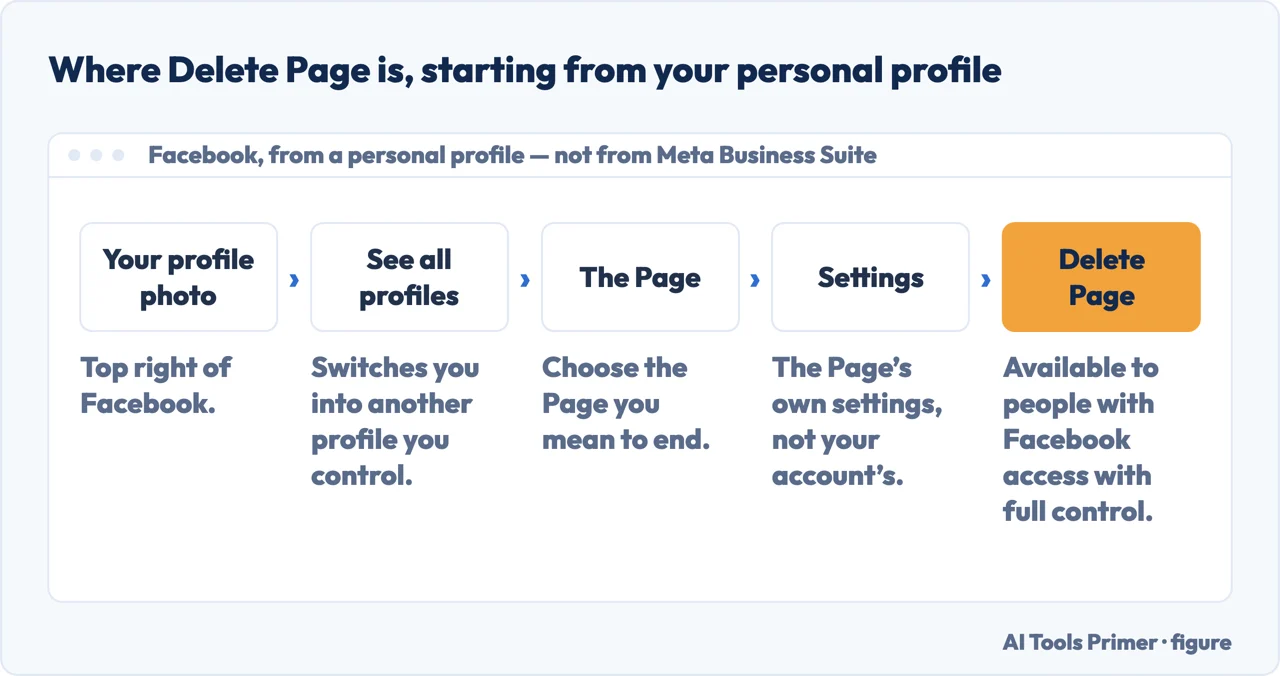
Where the command is not. Meta Business Suite manages a Page; it does not delete one. Its own help article is titled “Remove a Page From Your Business Portfolio” and describes exactly that — taking the Page out of the portfolio, not out of existence. Anyone hunting for a delete button inside Business Suite is hunting for something that is not there. The deletion lives in the Page’s own settings, reached by switching into the Page profile from your personal one.
The steps themselves, once you are in the right place, are short. From a personal profile: click your profile photo at the top right, See all profiles, select the Page, then its settings. The command is Delete Page, and it is available to people with Facebook access with full control.
Two places a deleted Page can still be
Neither runs on Facebook’s fourteen-day clock, and only one of the two is yours to chase.
Two things follow from that pair, and neither of them is a procedure. The first is that “deleted” describes the live copy: the regulator’s wording sets out what an organisation must do while a backup waits its turn to be overwritten, and it is not a right you exercise by pressing Delete on a Page. The second is that the durable fix for the search result is the one already made. Google’s list of permanent measures opens with removing the content, and the reason it gives is not about Google at all: “This is the most secure way to prevent your information from appearing in other search engines that might not respect the noindex tag. It also ensures that other people can’t access your page.” A takedown request expires after six months; a deleted Page does not come back.
What this page will not do is tell you how to recover a Page after the fourteen days. Facebook describes the window and what happens inside it, and says nothing about anything after — which is itself the answer, and a better one than a hopeful procedure.
It also will not tell you that unpublishing protects a Page from the automatic deletion above. The note about full-control access is written without reference to whether the Page is published, and reading a protection into it would be inventing one.
And it will not recommend a service that manages Pages on your behalf. Every command here is in an account you already hold, and the one thing worth doing today — adding a second full-control admin — costs nothing.
Three ways in. If you only want it off the internet, take the first.
Unpublish hides, removing from a portfolio hands over, Delete ends. They are used as synonyms and they are not.
Fourteen days rather than thirty, and only reachable from a personal profile. A deactivated Page cannot bring itself back.
There is no transfer command. Meta documents removal from the portfolio, which leaves the Page for somebody else to claim.
Not covered here. It will not tell you how to recover a Page after the fourteen days. Facebook describes the window and says nothing about what comes after, which is itself the answer.
It will not claim that unpublishing protects a Page from the automatic deletion. The note about full-control access says nothing about whether the Page is published, and reading a protection into it would be inventing one.
And it will not recommend a service to manage Pages for you. The one thing worth doing today — adding a second full-control admin — costs nothing and is two menus deep. What holds instead is simple: Meta’s own pages say what deletion does, and what a backup copy still holds comes from the regulator rather than from Meta.
Written by Alberto Gulotta
Founder and editor of AI Tools Primer, writing from Palermo, Italy. Thirty-five years of taking computers apart, starting with a Commodore 64 — the long version is on the about page.
Something wrong on this page? Write to aitoolsprimer@gmail.com and it gets fixed.
Written on 23 August 2026 · last checked 24 September 2026.
Independence and limits
No affiliate links and no paid placements anywhere on this site. Nobody pays to appear here, and no company has seen this page before you did.
This is general information, not professional advice. Where a page touches money, health, safety or the law, it names its source and the date it was read — and your situation may still differ. See the privacy page and the cookie policy.