Disappearing photos and videos
sent in a chat · notified“You can’t view disappearing photos or videos after you’ve sent them in Instagram chats, but you can see if they were seen or if we detect someone took a screenshot.”

Software · guide
By Alberto Gulotta · Updated · 11 min read
Does instagram notify when you screenshot is a question with a published answer, and the published answer is narrower than either of the two rumours about it. Two cases are documented. Everything else is not.
Disappearing photos and videos
sent in a chat · notified“You can’t view disappearing photos or videos after you’ve sent them in Instagram chats, but you can see if they were seen or if we detect someone took a screenshot.”
Disappearing messages
the timed chat · notifiedInstagram lists the screenshot among the things somebody can do — “take a screenshot or screen recording of your disappearing message before it’s no longer visible” — and adds, of that: “You’ll receive a notification if we detect this happens.”
Those are the two places Instagram commits to anything. Both are inside a chat, and both involve content that was already set to disappear. The feature exists because the sender chose a format that expires; the notification is part of that bargain rather than a general property of the app.
What the sender actually sees. Not an alert, not a push notification — a mark in the thread. Instagram’s instructions: tap Messages at the bottom, tap the conversation where you sent the disappearing photo or video, and “you’ll see the status of the content below it. If we detect someone has taken a screenshot of your photo or video, you’ll see a dotted circle next to it.” So the answer to “will they know” is: they will, if they go back and look at the thread.
“…if we detect someone took a screenshot.”
Three words worth noticing, because they appear in both places and they are not decoration. Instagram does not say if someone takes a screenshot. It says if we detect one — a claim about its own detection rather than about what happened on the other person’s phone. It is a smaller promise than the one people repeat, and it is the one actually written down.
Which brings us to the paragraph that answers the question better than any of this, and which almost nothing written about the subject quotes. It is Instagram’s own, and it is filed under Safety rather than under features.
“Only use disappearing messages with people you trust. For example, it’s possible for someone to:”
- Take a screenshot or screen recording of your disappearing message before it’s no longer visible. You’ll receive a notification if we detect this happens.
- Take a photo of a disappearing message with a camera or other device before it disappears.
That second bullet is the honest answer to the question, and it comes from Instagram rather than from anybody speculating. A second phone pointed at the screen produces nothing at all — no notification, no dotted circle, no record. Instagram does not present the notification as a protection; it presents it inside a paragraph that begins by telling you to rely on trust instead.
Instagram never says how the detection works, and the two companies whose systems it runs on do. Both answers narrow the promise rather than widening it.
On an iPhone, the app is told afterwards. Apple documents the signal an app can listen for as “a notification that posts when a person takes a screenshot on the device”, and adds one sentence that settles what it can do: “This notification posts after the screenshot is taken.” Nothing is intercepted. By the time anything can happen, the picture exists.
On Android, it fires for one gesture only. Google’s documentation for the detection interface, which it describes as being for exactly this purpose — “warning another user that someone took a screenshot of a messaging conversation” — states the boundary plainly: “the system API only detects a screenshot if the user performs a specific combination of hardware button presses”. It also notes that the callback “doesn’t provide an image of the actual screenshot”.
And a way to make screenshots impossible does exist. Google: “If you don’t want the contents of an app’s activity to appear in screenshots, or on non-secure displays, set the FLAG_SECURE display flag.” An app that sets it keeps its contents out of screenshots altogether. Instagram’s own safety text says the opposite of that for disappearing messages: that it is “possible for someone to” take one. Detecting and telling you is a different choice from preventing, and it is the one that was made.
Read together, those two bullets describe a system that reports one method and cannot see the other. That is not a flaw being confessed — it is a limit being stated, and stating it is the more useful thing to do. A notification that can be avoided with a second phone is a signal about carelessness, not a lock.
It also explains why the advice attached to it is social rather than technical. “Only use disappearing messages with people you trust.” Instagram is not offering a way to control what happens to an image after somebody else has seen it, because there is not one.
The conditions attached to disappearing messages
All published by Instagram, and several of them decide whether the feature is there at all.
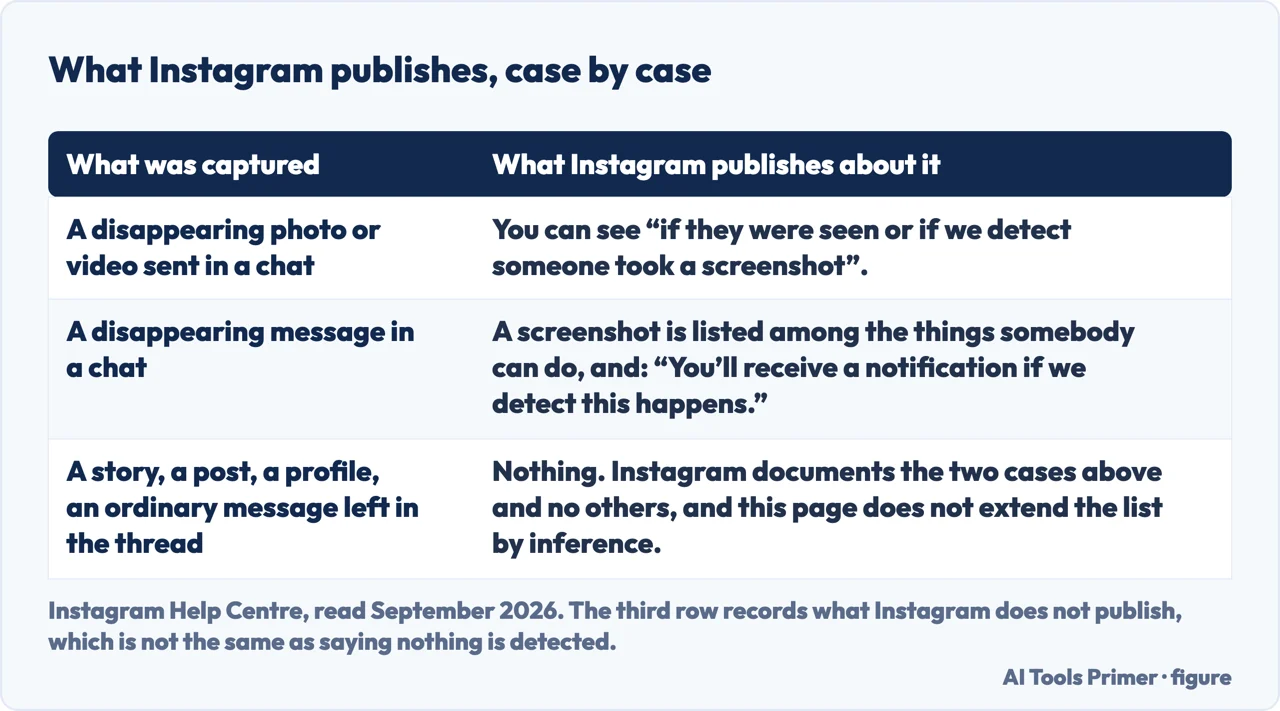
What this page will not tell you is whether a screenshot of anything else is reported — a story, a post, a profile, an ordinary message left in the thread. Instagram documents the two cases above and this page will not extend the list by inference, because the entire subject is made of confident claims nobody sourced.
It also will not tell you how the detection works, or how reliable it is. “If we detect” is all Instagram says about that, and everything beyond it would be invention.
And it will not suggest ways to take a screenshot without being noticed. Instagram names one in its own Safety section; repeating it as a tip rather than as a limit would be a different kind of page.
Three ways in. If you are the one worried about being seen, take the third.
Two documented cases, both inside a chat, both involving content already set to expire. The sender sees a dotted circle in the thread rather than an alert.
Only certain locations, only one-to-one chats, not group chats, not Messenger or Facebook accounts, and not certain professional accounts.
Instagram puts the notification in a Safety section that begins by telling you to trust the person instead. The advice is social because the control is not technical.
Not covered here. It will not tell you whether screenshots of stories, posts or ordinary messages are reported. Instagram documents two cases and this page stops where the documentation does.
It will not explain how the detection works or how well. “If we detect” is the whole of what Instagram says, and the rest would be made up.
And it will not offer a way to screenshot without being noticed. Instagram names one in its own Safety section as a reason not to trust the notification — which is a different thing from a tip, and it stays that way here. What holds instead is simple: when a screenshot is reported and when it is not comes from Instagram’s own Help Center, with its conditions kept attached to the answer.
Written by Alberto Gulotta
Founder and editor of AI Tools Primer, writing from Palermo, Italy. Thirty-five years of taking computers apart, starting with a Commodore 64 — the long version is on the about page.
Something wrong on this page? Write to aitoolsprimer@gmail.com and it gets fixed.
Written on 22 August 2026 · last checked 23 September 2026.
Independence and limits
No affiliate links and no paid placements anywhere on this site. Nobody pays to appear here, and no company has seen this page before you did.
This is general information, not professional advice. Where a page touches money, health, safety or the law, it names its source and the date it was read — and your situation may still differ. See the privacy page and the cookie policy.