On an iPhone
- Profile, then Menu at the top right.
- Accounts Center, then Profiles and personal details.
- Manage next to the account type you want to delete.
- Deactivation or deletion, then the profile.
- Delete account, then Continue.

Software · guide
By Alberto Gulotta · Updated · 13 min read
Working out how to delete instagram account leads to Instagram’s own help page, which lists the steps in full. Two things are worth knowing before you follow them: the username can come back, and the export has to come first.
“After your profile is deleted, you can sign up again with the same username or add that username to another profile as long as it hasn’t been taken by a new person on Instagram.”
Instagram’s own page, read on 23 August and 28 September 2026. The username is not burned, on the condition written into that same sentence: nobody else has taken it in the meantime. A second condition is documented further down the same page: “If your profile is removed for violating Community Standards, you may not be able to sign up again with the same username.”
One more thing depends on your phone. On an iPhone the app will do it; on Android it will not. Instagram’s Android instructions say: “If you use the Instagram app on Android, you’ll need to go to Instagram.com on a computer or mobile browser in order to delete your profile.”
Before the steps, though, there is something with a clock on it.
Four numbers, and why they have to be read together
They sit on two different Instagram pages, and that is where the trap is.
Verdict: request and download the export before you start the deletion, not alongside it. The reason is arithmetic, and it rests on one sentence from the deletion page: “After your profile has been deleted, you will not have access to Instagram’s Export your information tool.” If the link can take thirty days to arrive and the account is deleted after thirty, the link can arrive with fewer than four days left to use it.
Instagram suggests it too: “Before deleting your profile, you may want to log in and export a copy of your information (like your photos and posts)”. The reason to do it first rather than during is the one above.
All four of those numbers belong to Instagram, and they describe what Instagram does. If you are in the UK there is a fifth. It belongs to the law rather than to the app, and it answers a different question: not how long the company takes, but how long it is allowed to take before it has to say something to you.
The fifth clock, which is not Instagram’s
The four numbers above describe what Instagram does. In the UK a separate deadline binds the company: one calendar month to respond, which, if it asks for proof of identity, “begins from when they receive this additional information”. The ICO also warns that “this guidance is under review and may be subject to change.”
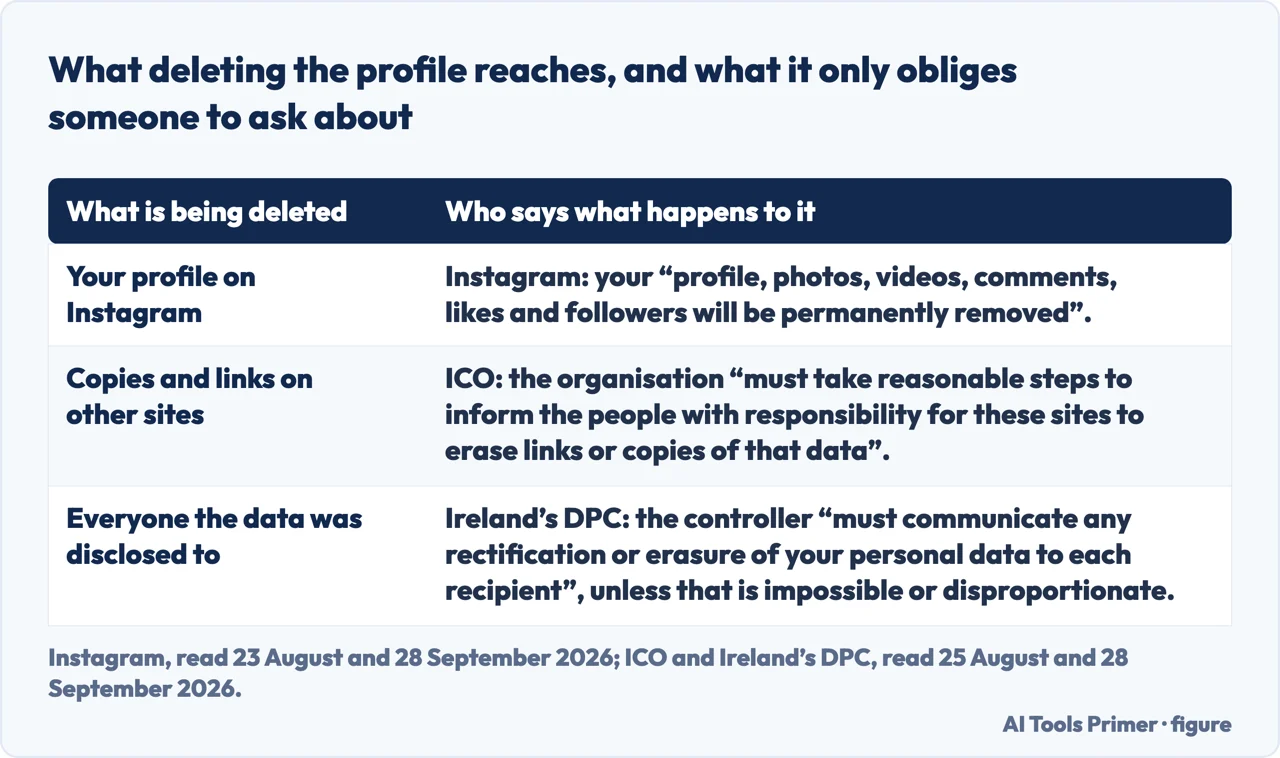
One line in the same guidance changes what deletion can even mean for an account that was public. The ICO: “If your data has been made public online – such as on social networks, forums or websites – then the organisation must take reasonable steps to inform the people with responsibility for these sites to erase links or copies of that data.” The Irish regulator adds a related duty, owed to everyone the data was disclosed to: “The data controller must communicate any rectification or erasure of your personal data to each recipient to whom the personal data have been disclosed, unless this is impossible or involves disproportionate effort.” Neither sentence appears on the Instagram pages, and both describe work that happens after the profile has already gone from your phone — the machinery of a right-to-be-forgotten request rather than of a delete button.
On an iPhone
On a computer
On Android, Instagram says to use Instagram.com in a computer or mobile browser.
Instagram also gives a shortcut: “You can delete your profile by going directly to Accounts ownership and control settings in Accounts Center.” And it warns at the top of the article that you may see Meta Account settings instead of Accounts Center: “We’re gradually updating people to Meta Accounts. You may see either Accounts Center or Meta Account settings as the place to manage your account settings.”
“If you temporarily deactivate your profile, your photos, comments and likes will be hidden until you reactivate it by logging back in.” — and: “Keep in mind that you can only deactivate your profile once a week.”
Verdict: if the reason is a break rather than an ending, deactivation is the right choice and deletion is not — one is undone by logging in, the other starts a clock. But the weekly limit has to be known first: deactivating is not a switch you can flick at will. Deactivate on Monday, log back in on Wednesday, and the once-a-week limit decides when you can deactivate again. Instagram, read 23 August 2026.
It is worth being blunt about what goes, because the page is: “When you delete your profile, your profile, photos, videos, comments, likes and followers will be permanently removed.” The list includes your followers.
Two limits Instagram states. The first: “For security reasons, we can’t delete a profile for you. You’ll need to be able to log into your profile to request deletion.” If you can’t remember your password or username, Instagram points to its tips for logging in. The second: “The number of days that you can cancel an account deletion varies by region.” The thirty days are when the deletion becomes permanent; the days in which you can still cancel it are the part Instagram says varies by region.
What this page will not do is tell you there is a way to delete a profile you cannot log into. Instagram says the opposite: “You’ll need to be able to log into your profile to request deletion.”
It also will not tell you what happens to a linked Threads profile when you delete Instagram. Instagram’s page on deleting a profile, read again on 28 September 2026, names Threads only in the list of related articles at the foot of it, and nothing above that answers the question. Saying so is better than inventing an answer.
The guides below go three ways: the pause instead of the ending, what is left behind afterwards, and the same questions asked of other accounts.
Three ways in. If you only want a break, take the second — it is not the same thing.
The steps on each device and a shortcut, four numbers spread across two pages, and one limit Instagram states plainly: you must be able to log in.
Deactivating hides and is undone by logging in. But it can be done once a week, and that limit is worth knowing before you use it.
Thirty days to receive the link, four to download it, thirty before the account goes. The numbers live on different pages.
Not covered here. It will not tell you there is a way to delete a profile you cannot log into. Instagram states the opposite.
It will not say what happens to a linked Threads profile. Instagram’s own page on deleting a profile, read again on 28 September 2026, does not answer it.
And it will not describe the screens after Continue. Instagram’s steps stop at “Tap Delete account, then tap Continue.”, and what comes after is not on its page, read again on 28 September 2026. What holds instead is simple: the waiting periods are Instagram’s own and the rights around them are the data protection authorities’, kept apart so you can tell policy from law.
Written by Alberto Gulotta
Founder and editor of AI Tools Primer, writing from Palermo, Italy. Thirty-five years of taking computers apart, starting with a Commodore 64 — the long version is on the about page.
Something wrong on this page? Write to aitoolsprimer@gmail.com and it gets fixed.
Written on 23 August 2026 · last checked 30 September 2026.
Independence and limits
No affiliate links and no paid placements anywhere on this site. Nobody pays to appear here, and no company has seen this page before you did.
This is general information, not professional advice. Where a page touches money, health, safety or the law, it names its source and the date it was read — and your situation may still differ. See the privacy page and the cookie policy.