Deactivate
hidden, and reversible- “Your photos, comments and likes will be hidden until you reactivate it by logging back in.”
- Instagram’s deactivation page gives no end date.
- Undone by logging back in.
- But: once a week only.

Software · guide
By Alberto Gulotta · Updated · 11 min read
Working out how to deactivate instagram leads to Instagram’s own help page, which is the right place to be. The steps are listed there in full, and the limit worth knowing before you follow them is written above them: you can only deactivate once a week.
Temporarily deactivate your Instagram profile
   …
   Tap Deactivation or deletion.
   Tap Deactivate account, then tap Continue.
   Re-enter your password and tap Continue.
   …
   Tap Deactivate account.
Those are its own words as read on 28 September 2026, when the heading over the steps matched them. It did not on 23 August 2026: that day the steps sat under headings reading “To permanently delete your profile if you see Manage accounts at the bottom of Accounts Center” and “…if you see Accounts at the bottom of Accounts Center”, and one of the steps read “Choose the you want to deactivate”. By 28 September the headings and the steps had been rewritten on the computer, iPhone and Android tabs. If you saved or printed the page before then, follow the newer steps.
With that out of the way, the mechanism itself is simple and reversible, and the useful part is how it differs from the other option people are weighing it against.
Deactivate
hidden, and reversibleDelete
a clock startsVerdict: if there is any chance you will come back, deactivate rather than delete. The evidence is the two columns above, both from Instagram. Deactivation has no stated deadline — Instagram’s page describes it as lasting until you log back in, and sets no maximum. Deletion becomes permanent 30 days after the request, and the number of days you can still cancel it, Instagram says, varies by region. One of those is a pause; the other is a decision with a timer on it.
“If you don’t want to deactivate your profile but want to change who can see it, you can set your posts to private or block people.”
Worth reading before anything else, because it answers a different question. If the aim is to disappear from particular people rather than from Instagram, deactivation is the wrong tool. It hides you from everyone, it can only be done once a week, and it undoes itself the moment you log in out of habit. Private posts and blocking do the specific job, cost nothing, and leave the account working.
The limit that decides whether this is usable at all. “Keep in mind that you can only deactivate your profile once a week.” Put that next to how reactivation works — “until you reactivate it by logging back in” — and the practical consequence appears: logging back in is the only step the page names for coming back. Log in out of habit two days later and you are back, with the once-a-week limit deciding when you can deactivate again. If the point of deactivating is to stay away, the app has to come off the phone too; otherwise the mechanism is one absent-minded login from being spent.
What six weeks away actually did, measured. A working paper published through the National Bureau of Economic Research reports “two large randomized experiments before the 2020 U.S. election”. People who deactivated Instagram for the six weeks before the election reported “a 0.041 standard deviation improvement relative to controls” on an index of happiness, depression and anxiety. “Exploratory analysis suggests”, the authors write, that “the Instagram effect is driven by women under 25.” That is a real effect and a small one — worth having in view before deciding what a week away is supposed to fix.
And who was close to it. The paper’s page on nber.org lists disclosures from its authors, and they are worth reading: among them are past employment at Meta, Meta stock, and “Direct research funding from Meta”. The platform was close to the work, and the page lets you see how.
One more thing the word does not cover. Deactivating hides a profile; it does not erase it. The UK regulator describes the right to erasure as asking “an organisation that holds data about you to delete that data” — and a deactivated profile is still held. If what you want is the data gone rather than the profile hidden, that is the neighbouring question — the right to be forgotten — and it has its own deadlines and its own conditions.
The steps themselves differ only in where they start. On a phone: Profile, then Menu at the top right, then Accounts Center. On a computer: More in the bottom left, then Settings, then Accounts Center. From there both go the same way — Profiles and personal details, the profile you want to deactivate, Deactivation or deletion, Deactivate account and Continue, your password again, a reason, and Deactivate account once more.
You may see Meta Account settings instead of Accounts Center. The neighbouring page, on deleting, says so: “We’re gradually updating people to Meta Accounts. You may see either Accounts Center or Meta Account settings as the place to manage your account settings.” The deactivation page itself lists only the Accounts Center route.
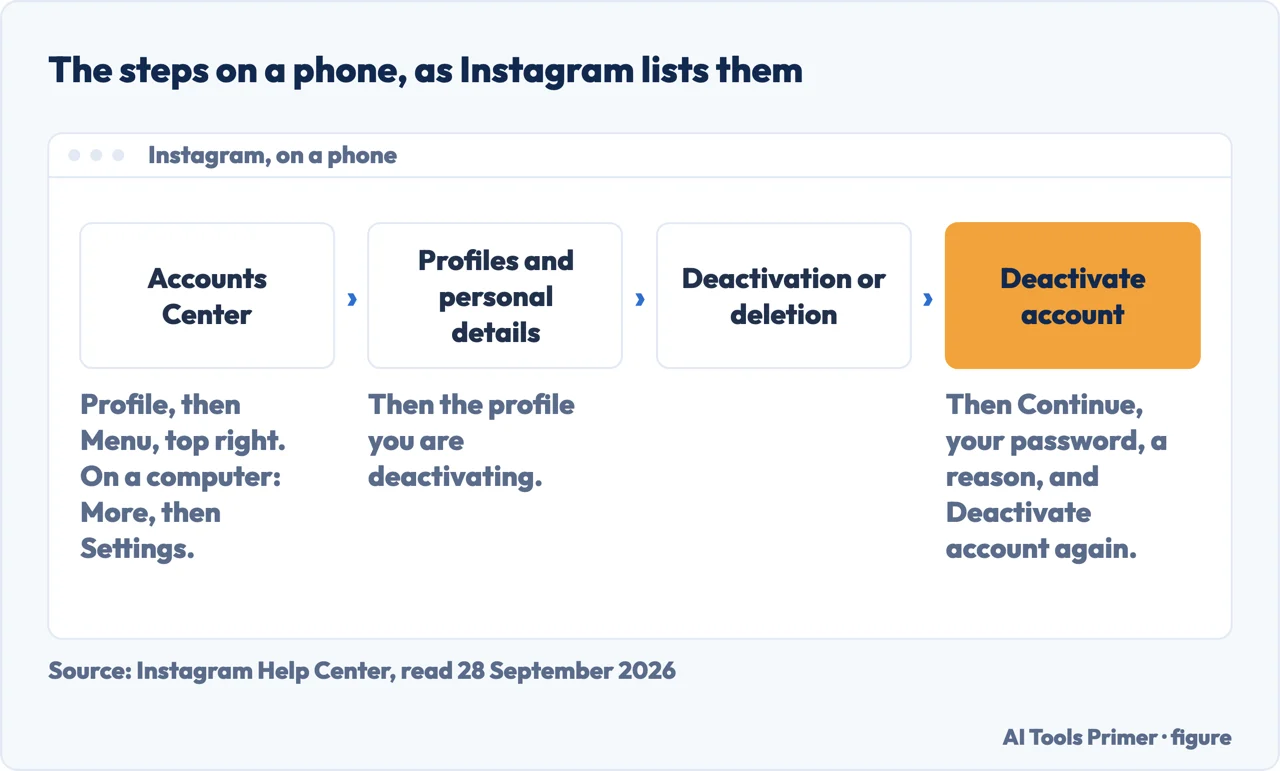
“You’ll need to be able to log in to temporarily deactivate your Instagram profile.” If you can’t remember your password or username, the page points to its tips for logging in. And on where it can be done: “You can only deactivate your Instagram profile from a computer, a mobile browser, or the Instagram app.” If you have read that deactivation works only in a browser, that is not what Instagram’s page says now: the app is on the list.
What this page will not tell you is how long you may stay deactivated. Instagram’s deactivation page gives no maximum, and an invented number would be worse than none.
It also will not quote the question buttons at the top of Instagram’s page — “What happens if I deactivate?” and the rest. Opening one produces an answer from Meta’s AI assistant rather than published documentation, and this site quotes what a company has written, not what its assistant generates on request.
And it will not tell you that deactivating removes your data. It hides a profile. The difference is the whole of the guide next door.
Three ways in. If you want to disappear from specific people, take the third.
Two starting points, one route through Accounts Center — and more on Instagram and the phone it runs on.
Deactivation has no stated deadline and is undone by logging in. Deletion becomes permanent after 30 days, and the days to cancel it vary by region.
Instagram names two settings that hide you from particular people without touching the account. The guides below cover privacy and security in other places.
Not covered here. It will not tell you how long you can stay deactivated. Instagram’s deactivation page gives no maximum.
It will not quote the question buttons at the top of Instagram’s page. Opening one produces an answer from Meta’s AI assistant, not published documentation, and this site quotes what a company has written.
And it will not say deactivating removes your data. It hides a profile, and the difference is the whole of the guide next door. What holds instead is simple: Instagram’s own wording was read on the dates this page names, and the study about six weeks off is cited as a study, not as advice.
Written by Alberto Gulotta
Founder and editor of AI Tools Primer, writing from Palermo, Italy. Thirty-five years of taking computers apart, starting with a Commodore 64 — the long version is on the about page.
Something wrong on this page? Write to aitoolsprimer@gmail.com and it gets fixed.
Written on 23 August 2026 · last checked 30 September 2026.
Independence and limits
No affiliate links and no paid placements anywhere on this site. Nobody pays to appear here, and no company has seen this page before you did.
This is general information, not professional advice. Where a page touches money, health, safety or the law, it names its source and the date it was read — and your situation may still differ. See the privacy page and the cookie policy.