The answer to how to recover deleted emails is different depending on which service you use, and the difference is larger than the wording suggests: one of the two most common ones gives you a second chance after you empty the bin, and the other does not. Every result on the first page of Google covers one service or is a forum thread; none of them puts the two side by side.
one layer
Gmail
Google is precise and short. “Up to 30 days after deletion: You can find the message in
Trash. You can recover the message from your trash and move it back to your inbox.”
And then: “After 30 days: The message is permanently deleted. You can’t recover the
message.”
There is no second folder. Emptying the trash, or letting thirty days pass, is the end of it.
two layers
Outlook
First: the Deleted Items folder — and check Junk Email too, which Microsoft lists alongside it. Select the message, then Move, or right-click and
Restore.
Then, if it is not there: Deleted Items › Recover items deleted from this folder,
tick the message, Restore. You can also tick the box beside Recoverable Items to take
everything at once.
“In some cases, you can even recover items after the Deleted Items folder is
emptied.”
Microsoft, read again 16 September 2026, and it is the sentence that makes this page worth writing.
Outlook has a second bin behind the bin, and almost nobody knows it is there. The route:
“Select the Deleted Items folder.” Then, “at the top of the message list, next to
Recover items deleted from this folder, select the Recover button.” That opens the Recoverable Items folder — the place messages go when they are
deleted from the place deleted messages go.
Two clocks, set by someone else, and a landing place that is not where it came from
The second bin has its own countdown, and Microsoft is careful to say who sets it: “your
administrator may have specified how long items in the Recoverable Items folder are available
for recovery. For example, there may be a policy that deletes anything that’s been in your
Deleted Items folder for 30 days, and another policy that lets you recover items in the
Recoverable Items folder for up to another 14 days.” On a work account the deadline is
not a property of Outlook; it is a setting in someone else’s console, and the numbers above are
an example rather than a promise.
Microsoft also leaves a door open past both: “after the recovery period expires, your
administrator may still be able to recover an item. If you can’t find the item in the
Recoverable Items folder, ask your administrator whether it can be recovered.” That is worth
asking before concluding the message is gone.
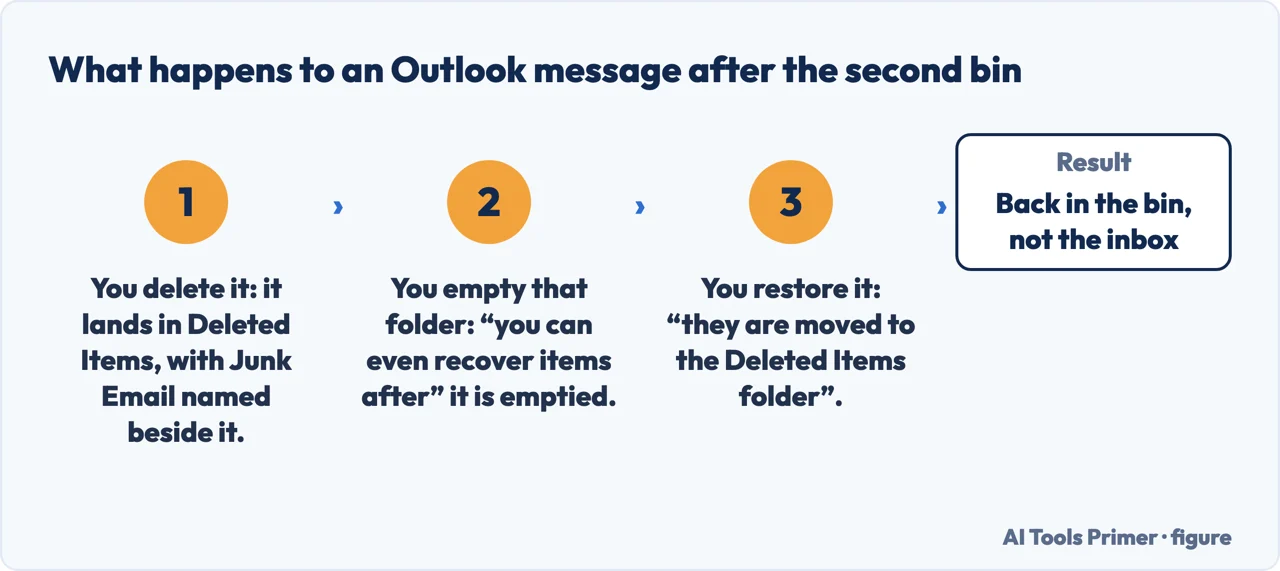
And one detail that decides where you go looking afterwards: “when you recover items from the
Recoverable Items folder, they are moved to the Deleted Items folder.” Recovery does not
put a message back where it was — it moves it one step up the chain, and the second step is
yours. The same page adds the limit for folders: “you can’t recover a folder that’s been
permanently deleted”, though the messages that were inside it can still be recovered
individually.
The second bin, and where recovery puts the message: back in Deleted Items, not in the inbox. Figure drawn by AI Tools Primer.
So “I already emptied the trash” means different things in the two. In Gmail it is the end of the conversation. In Outlook it is the point at which you go one level deeper — and nothing on the screen suggests there is a level to go to.
The one that catches writers
Google marks this Important, in a single line: “When you delete a draft, you can’t recover
it from Trash.” A half-written message you abandoned is not in the bin, because it never went
there. If you are composing something long and it matters, the safe habit is to send it to yourself
rather than leave it as a draft — a sent message is a message, and a draft is a thing that can
vanish without leaving a copy anywhere.
Before either route, check the obvious two places. A message that seems deleted is often archived rather than deleted — in Gmail, All Mail holds everything that is not in the bin, and a search there finds messages that are not in any folder you were looking at. And in Outlook, Microsoft lists Junk Email beside Deleted Items for a reason: a message the filter moved is not a message you deleted, and it is sitting somewhere perfectly ordinary.
If the account belongs to an employer or a school, there is often one more layer above all of this: an administrator can sometimes restore messages that the account holder cannot, within a window the organisation sets. That is a question for whoever runs the mail system rather than something you can do from the app, and it is worth asking before concluding that something is gone.
And the habit that makes all of it moot. Archive rather than delete. Storage is no longer the constraint it was, an archived message is out of the inbox and still findable by search, and the thirty-day clock never starts. Deleting an email you might want is a decision with a deadline attached; archiving it is not a decision at all.
The Gmail retention rule and the note about drafts are quoted from Google’s own Gmail documentation, and the Outlook routes including the Recoverable Items folder from Microsoft’s own, both read on 22 August 2026 and listed below. The comparison between the two, and the advice to archive rather than delete, are ours.
Not covered here. It will not give one answer for every mailbox. Gmail and Outlook behave differently after the bin is emptied, and the difference is the point of the page.
It will not let you assume a deleted draft is in the trash. Google says it is not, and that surprises people who have just lost a long message.
And it will not recommend email recovery software. Both services document what they keep and for how long, and the honest answer is on their own pages. What holds instead is simple: the Gmail retention rule and the note about drafts are quoted from Google’s and Microsoft’s own documentation, with the date each was read.
Email that is not arriving
Four places the message can be, none of which is the one you are looking in.
Google — Gmail Help, Delete messages in Gmail, including the thirty-day trash window, what happens after it, and the note that a deleted draft cannot be recovered from Trash — support.google.com, read 22 August 2026.
Microsoft Support — Recover and restore deleted items in Outlook, including the Deleted Items and Junk Email folders, the statement that items can sometimes be recovered after the folder is emptied, and the Recover items deleted from this folder route into Recoverable Items — support.microsoft.com, read 16 September 2026.
AG
Written by Alberto Gulotta
Founder and editor of AI Tools Primer, writing from Palermo, Italy. Thirty-five years of
taking computers apart, starting with a Commodore 64 — the long version is on the
about page.
Written on 22 August 2026 · last checked 23 September 2026.
§
Independence and limits
No affiliate links and no paid placements anywhere on this site. Nobody pays to appear here,
and no company has seen this page before you did.
This is general information, not professional advice. Where a page touches money, health,
safety or the law, it names its source and the date it was read — and your situation may
still differ. See the privacy page and the
cookie policy.