Google: a deletion deadline
30 days“Emails in your trash or spam are permanently deleted after 30 days or when you manually empty your trash or spam.”
After it, the message is gone.

Software · guide
By Alberto Gulotta · Updated · 13 min read
Why am I not receiving emails is usually read as mail that never arrived. In the manufacturers’ own documentation it is more often mail that arrived and was then refused, moved or deleted — and each of those has a published rule behind it.
Start with the one that stops delivery outright, because it is the least obvious.
Google: “When your account reaches its storage limit, you won’t be able to upload or create files in Drive, send or receive emails in Gmail, or back up photos or videos to Google Photos.”
Apple: “And you won’t be able to send or receive emails with your iCloud email address.”
The trap is in the word account. The quota that fills up is not the mailbox — at Google it is shared with Drive and Photos, at Apple with device backups, and Apple states the starting figure plainly: “When you set up iCloud, you automatically get 5 GB of storage for free.” A phone quietly backing itself up can stop your email arriving, and nothing in the mail app will say so.
Google is the only one of the three that publishes what happens to the message: “Messages sent to you go back to the sender.” So the mail is not queued waiting for room — it is refused, and the person who wrote to you is told. Google also publishes the delay after you clear space: “Important: Allow time (up to 48–72 hours) for your storage to update after deleting multiple files at once.”
Microsoft publishes a similar sentence for a different scope — the inbox rather than a shared account quota: “If your Inbox is full, you won’t be able to send or receive new messages.”
Notice what that means practically. The place to look is not the mail app: it is the account storage page, and on both Google and Apple the thing that filled it up may have nothing to do with email at all. And because Google refuses the message rather than holding it, the sender has already been told — which is why asking them to resend is not the first move, but clearing space is.
Then the second cause, and the reason these two together are worse than either alone.
Three sentences, all from Google, all on its own pages:
- How to free space fastest: “Empty trash and spam folders: This is the quickest way to recover space.”
- Where a missing message may have been sent: “If you set up filters, find any filters that automatically archive or move incoming emails to your trash.”
- What emptying does: “Emails in your trash or spam are permanently deleted after 30 days or when you manually empty your trash or spam.”
Put together they describe a trap that nobody warns about. If your account is full and your mail is also being filtered, the fastest published remedy for the first problem permanently erases the proof of the second. Microsoft states the same finality in its own words: “Junk email is retained for 30 days before it is automatically deleted and is not recoverable.”
The order that avoids it costs one extra minute. Search those folders before you empty them. Google’s own instruction for a missing message is to “search for your email across Gmail”, which is a different act from opening the inbox and looking.
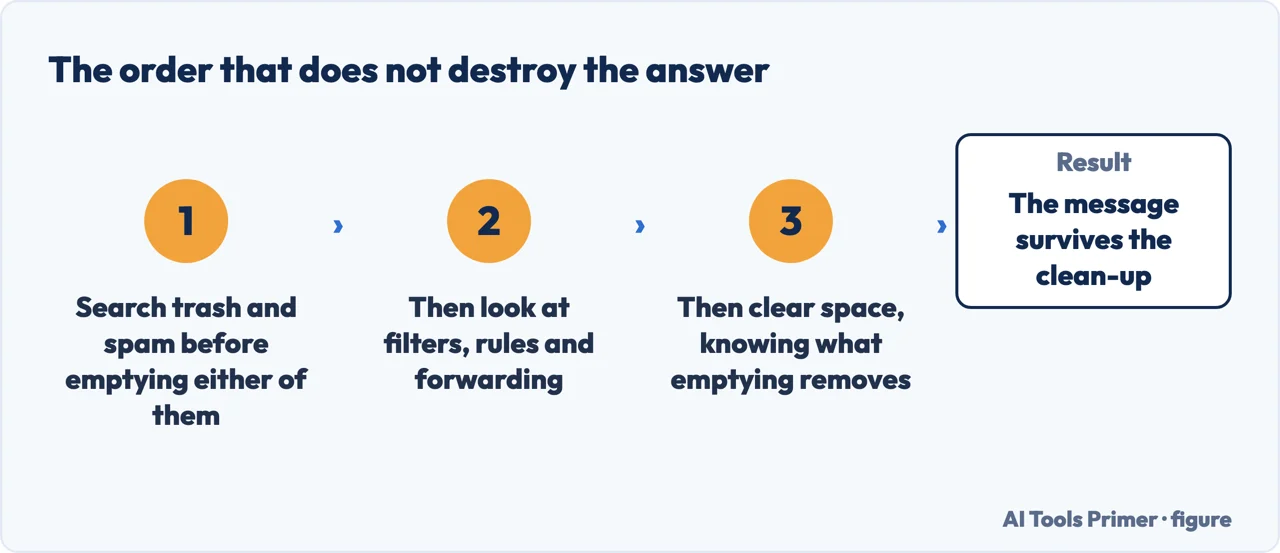
That is the sharpest thing on this page and it is entirely made of the vendors’ own sentences. Nobody is being careless: each instruction is correct for the problem it was written about. They only become dangerous when a reader has both problems at once, which is exactly the reader searching this question.
The number in those sentences is worth its own look, because it appears three times and does not always mean the same thing.
Google: a deletion deadline
30 days“Emails in your trash or spam are permanently deleted after 30 days or when you manually empty your trash or spam.”
After it, the message is gone.
Microsoft: a deletion deadline
30 days“Junk email is retained for 30 days before it is automatically deleted and is not recoverable.”
Same number, same meaning, different company.
Google again: a window
30 daysOn POP: “Recent mode shows your last 30 days of emails from Gmail.”
Here nothing is deleted at all. The mail is intact on the server and simply never reaches the program — the same figure describing a different failure.
Two of the three are the same kind of clock: a deadline after which the message is destroyed. The third is a different animal — a window of visibility, where nothing is deleted and the mail simply never reaches the program you are reading it in. Anyone using POP on a second device is reading through that window, and older mail being invisible there is not mail that is missing.
The last family of causes is the one people suspect first and check last: something is moving the mail on arrival.
Microsoft, on what happens when more than one rule matches an arriving message: “By default, the Stop processing more rules option is turned on. With this option on, when a message arrives in your inbox that meets the criteria for more than one rule, only the first rule will be applied.”
That default matters when you are hunting a rule that moved something: a later rule you remember writing may never have run at all. Microsoft publishes a second limit on the same inbox rules page that is easy to trip over: “Currently, new Outlook does not support rules for managing third-party accounts like Gmail, Yahoo, and iCloud.” If your Gmail is read inside Outlook, the rules you are looking for are not there.
On Thunderbird the equivalent contract is written differently: “Filters are executed in the order they appear in the list of filters, except when that order is not possible, in which case you will see the message Note: Filter actions will be run in a different order”. And their reach is narrower than the interface suggests: “Automatically applied filters are applied only to the inbox”. Two mail programs, two published contracts, and neither matches what a person guesses from the interface.
A note on where this question gets answered, read on 23 August 2026 with results visible. The first page is a community thread on a vendor’s own forum, two company blogs, a video block, a Reddit thread, a question-and-answer site — and one piece of first-party documentation, which is Apple’s iPhone article, that is, the answer to a different and narrower question. None of the manufacturer pages quoted above appears on it.
What this page will not do is tell you which of the causes is yours. Every one above is a check you can run in minutes, and the order they are written in is the order that avoids destroying the evidence.
It will not tell you to empty your spam folder to free up space before you have searched it. Two manufacturers publish that what leaves those folders is not recoverable.
And it will not cover the sender’s side. A message that never reached your provider at all is a different investigation, and none of the pages read here documents it.
Three ways in. If you are about to empty a spam folder, read the second one first.
Google and Apple both publish that a storage limit stops incoming mail, and the quota is shared with files, photos and device backups rather than belonging to the mailbox.
Emptying trash and spam is published as the quickest way to recover space, and as the act that permanently deletes what a missing message search would have found.
Only the first matching rule runs by default in Outlook, filters apply only to the inbox in Thunderbird, and forwarding to an unfamiliar address is a security signal.
Not covered here. It will not tell you to empty spam to free space before searching it. Two manufacturers publish that what leaves those folders is not recoverable.
It will not recommend a mail client or a cleanup service. Every check above is free and inside the account you already have.
It will not diagnose the sender’s side. A message that never reached your provider is a different investigation, and none of the pages read here documents it.
And it carries no affiliate links, including for storage plans, which is exactly what the first cause on this page would sell. What holds instead is simple: every limit, clock and default above is quoted from the company that published it, and where two of those instructions work against each other this page says so rather than choosing one; the Google and Apple pages are listed below.
Four guides: email that is not arriving, an iPhone not getting email, recovering deleted email and updating an email password on an iPhone.
Written by Alberto Gulotta
Founder and editor of AI Tools Primer, writing from Palermo, Italy. Thirty-five years of taking computers apart, starting with a Commodore 64 — the long version is on the about page.
Something wrong on this page? Write to aitoolsprimer@gmail.com and it gets fixed.
Written on 23 August 2026 · last checked 5 September 2026.
Independence and limits
No affiliate links and no paid placements anywhere on this site. Nobody pays to appear here, and no company has seen this page before you did.
This is general information, not professional advice. Where a page touches money, health, safety or the law, it names its source and the date it was read — and your situation may still differ. See the privacy page and the cookie policy.