The short answer to what is bcc in email is on every page that asks the question: blind carbon copy, a way of sending somebody a copy without the other recipients seeing that you did. That much is right. What almost nobody adds is that the field has costs, and Microsoft documents three of them in its own guidance.
The three boxes, and who sees what
To
The people the message is for. Everybody sees them.
Cc
Carbon copy. Also visible to everybody: Microsoft describes Bcc as the field whose
addresses other recipients don’t see, which is what separates it from these two.
Bcc
Blind carbon copy. Microsoft: “a copy of the message is sent to that person.
Other people who receive the message don’t see whose address is on the Bcc line.”
With the definition out of the way, the fact worth the whole page.
“Using Bcc is a favorite technique of spammers. Therefore, many junk email filters flag
messages that use the Bcc box as junk.”
That is Microsoft, in its own best-practice guidance, and it is the single most useful fact about
this field. Putting somebody in Bcc makes it more likely they never see the message at all.
Not because of anything you wrote — because of the field you used.
The mitigation Microsoft gives is social rather than technical: “make sure that the recipient is
expecting your message. That person may need to take steps to establish you as a safe
sender.” In other words, if a message matters and you are sending it blind, tell the person it
is coming.
It is worth sitting with the shape of that, because it inverts the usual assumption. Bcc feels like the careful option — the discreet, considerate choice. In deliverability terms it is the suspicious one, because it is what bulk senders do, and filters are built to notice what bulk senders do. The discretion is real and so is the cost.
You cannot check afterwards from the outside
“If you’re the recipient of a message, you can’t see whether the sender added Bcc
recipients. Only the sender of a message can see the names of Bcc recipients by opening a
message in the Sent Items folder.” If you need to know who really received something you
sent, that is where the answer is — and nowhere else.
It breaks other people’s filing
Microsoft on putting a distribution list in Bcc: “People who use rules to sort their email into
folders will be inconvenienced… their rules depend on the name of the distribution list being
in the To box or Cc box, your message will not be sorted according to their rules.” The
message arrives and lands in the wrong place, or nowhere they look.
It counts against the same limit
“Many email service providers set limits for the number of names that can be included in the To,
Cc, and Bcc boxes in a message… remember that the names in the Bcc box will count toward your total limit.” Moving
fifty addresses from To to Bcc protects their privacy and buys you no headroom at all.
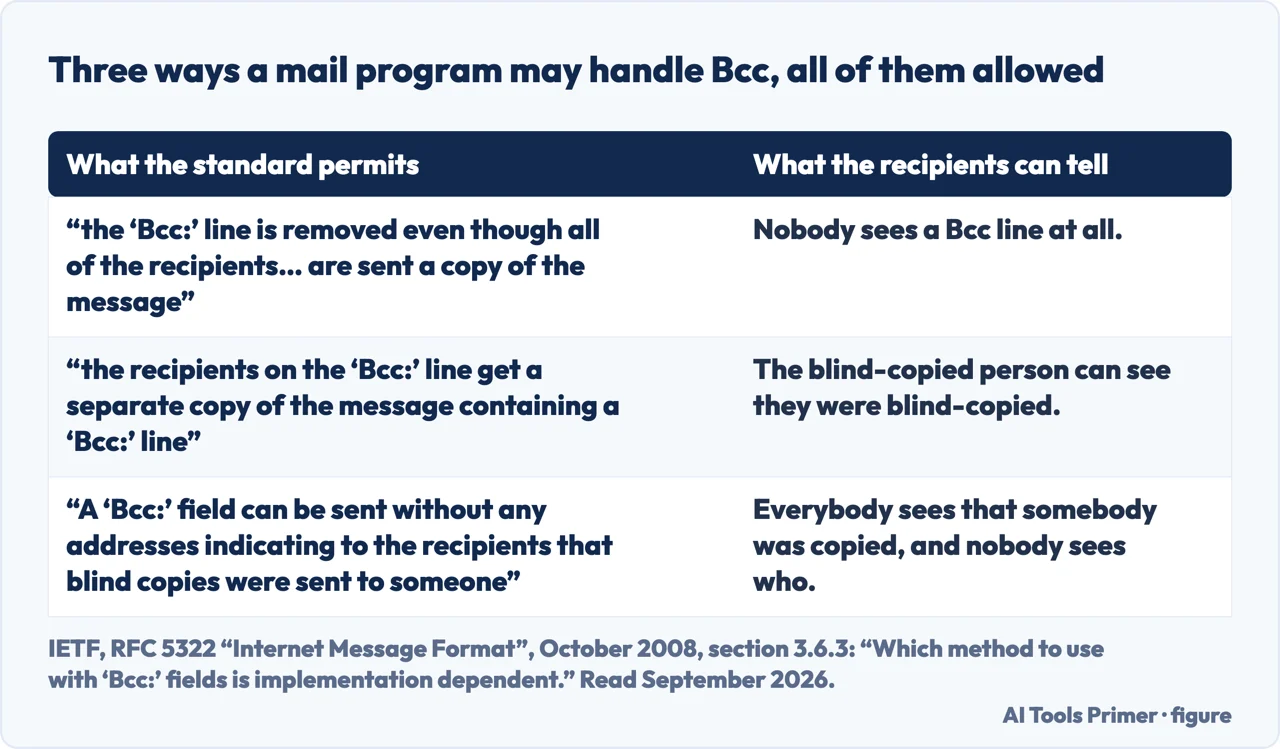
Quotations from RFC 5322, which calls the choice implementation dependent. Figure drawn by AI Tools Primer.
The first of those three is the one to remember on the day it matters. There is no way to look at a received message and tell whether other people were blind-copied on it — not in the headers a normal client shows, not anywhere. The only record is in the sender’s Sent Items, which means the sender is the only person who can ever answer the question.
That also answers the pairing people search for — what is cc and bcc in email — in one line: Cc is visible and Bcc is not, and Microsoft draws the line in exactly that place. The question is almost never really about Cc.
And it cuts the other way too, which matters when Bcc is used to include somebody quietly. If that person replies, their reply reveals that they had the message. Bcc hides an address from the other recipients; it does not stop the blind-copied person acting on what they read.
The mechanics, since the field is hidden by default in Outlook and that is its own small mystery. In new Outlook: Options › Show fields › Show Bcc. In classic Outlook: Options › Bcc if the message opened in its own window, or the Bcc button on the ribbon if you are composing in the Reading Pane. Microsoft adds a detail that saves squinting: the button is a toggle, and “a dark background means the button is turned on, and a light background means it’s turned off”.
Once on, it stays on: “After you turn on the Bcc box, it appears every time you create a message until it’s turned off.” That is convenient and it is also how an address ends up in Bcc by accident three emails later.
The legitimate use Microsoft names is the one worth protecting: keeping a recipient list private. Sending an announcement to two hundred people with every address in To hands each of them the other hundred and ninety-nine — and there is no way to take that back. That is a real harm, Bcc is the documented answer to it, and the junk-filter cost above is the price of the answer rather than a reason to avoid it.
The guides below take it four ways: the three fields, sending to a list properly, what happens afterwards, and the rest of what a message carries.
Not covered here. It will not tell you Bcc is the safe option. Microsoft says junk filters flag messages that use it, which makes it the discreet option and the risky one at the same time.
It will not pretend a recipient can check. Only the sender can see a Bcc list, and only in Sent Items.
And it will not advise against it for a mailing list. Publishing two hundred addresses to each other is a real harm, and this is the documented way to avoid it. What holds instead is simple: the behaviour of the Bcc field and the junk-filter warning are Microsoft’s own wording, quoted on the date this page names.
Sources
Microsoft Support — Show, hide, and view the Bcc (blind carbon copy) field in Outlook for Windows (what Bcc does and who can see it, the routes in new and classic Outlook, the toggle shading, that the field stays on once enabled, that only the sender can see Bcc recipients and only in Sent Items, and the best-practice notes on junk filters, distribution lists and recipient limits) — support.microsoft.com, read 22 August 2026.
IETF — RFC 5322, Internet Message Format, October 2008, section 3.6.3, for the definition of the Bcc field and the three permitted ways of handling it, which the standard says is implementation dependent — www.rfc-editor.org, read 5 September 2026.
AG
Written by Alberto Gulotta
Founder and editor of AI Tools Primer, writing from Palermo, Italy. Thirty-five years of
taking computers apart, starting with a Commodore 64 — the long version is on the
about page.
Written on 22 August 2026 · last checked 23 September 2026.
§
Independence and limits
No affiliate links and no paid placements anywhere on this site. Nobody pays to appear here,
and no company has seen this page before you did.
This is general information, not professional advice. Where a page touches money, health,
safety or the law, it names its source and the date it was read — and your situation may
still differ. See the privacy page and the
cookie policy.